DeepSeek V4: A Trillion-Parameter Multimodal AI Built on Huawei Chips, Not NVIDIA — What Developers Need to Know
March 17, 2026
NVIDIA DLSS 5 at GTC 2026: Neural Rendering Generates Photoreal Lighting — The ‘GPT Moment for Graphics’
March 17, 2026
Finally. After years of incremental improvements, WordPress 7.0 is about to redefine what a CMS can do. The RC1 drops on March 19, 2026, with the official release slated for April 9 — and this isn’t just another version bump. Real-time collaboration in the block editor, device-specific block visibility without a single line of CSS, a built-in AI infrastructure layer, and over 101 fixes since Beta 3. Let’s break down everything that matters.
Real-Time Collaboration — WordPress 7.0 Brings Google Docs-Style Co-Editing
The headline feature of WordPress 7.0 is real-time collaboration. Multiple users can now work on the same content simultaneously inside the block editor. You’ll see other editors’ cursors in real time, make edits without conflicts, and experience the kind of co-authoring workflow that was previously exclusive to platforms like Google Docs and Notion.
Here’s the clever engineering decision: WordPress chose HTTP polling for synchronization instead of WebSockets. Why does that matter? Because it means real-time collaboration works on standard shared hosting — no special server configuration, no WebSocket support required. Whether you’re running a $5/month shared host or a dedicated enterprise server, the feature just works out of the box. This was a deliberate architectural choice by the WordPress core team to ensure the widest possible compatibility across the enormous range of hosting environments that WordPress runs on globally — an estimated 43% of all websites.
For agencies managing multiple client sites, this changes the entire editorial workflow. No longer do you need to coordinate editing sessions through external tools or worry about conflicting revisions. Multiple team members — content writers, SEO specialists, designers — can all work on the same page simultaneously, seeing each other’s changes as they happen. The conflict resolution that used to eat up hours of back-and-forth communication is now handled automatically by the system.
WordPress 7.0 also introduces contextual commenting — inline feedback directly on specific blocks or text selections within the editor. Writers, editors, and reviewers can now communicate within the content itself, dramatically accelerating review cycles for distributed teams. Think of it as the WordPress equivalent of Google Docs comments, but natively integrated with the block editor’s block-level architecture. No more juggling between Slack threads and WordPress drafts, no more screenshot annotations, no more “see my notes in the shared document” emails.
Content-Only Patterns Are Now Default — A Fundamental Shift in Editing
WordPress 7.0 makes Content-Only mode the default for patterns. Previously, when you inserted a pattern, every block within it was fully editable — which meant clients could (and often did) accidentally break carefully designed layouts. Now, patterns lock down the structure while exposing only the content areas for editing.
For agencies and freelancers managing client sites, this is a game-changer. You can build sophisticated layouts knowing that clients will only be able to swap text and images — not delete columns, resize containers, or wreck your grid system. Block icons and grouped attributes are tucked into flyout menus, keeping the editor interface clean and focused. This is particularly valuable for enterprise WordPress deployments where content governance is a priority — marketing teams can update campaign pages without any risk of breaking the design system that took months to implement.
Need the old behavior? A simple PHP filter brings it back:
add_filter('block_editor_settings_all', function($settings) {
    $settings['contentOnly'] = false;
    return $settings;
});
Device-Specific Blocks — Responsive Design Without Writing CSS
This one’s going to make a lot of developers very happy. WordPress 7.0 introduces device-specific block visibility controls, allowing you to show or hide any block based on the device type — mobile, tablet, or desktop — directly from the editor UI.
Want to display a compact CTA button on mobile but a detailed comparison table on desktop? Done. No media queries, no custom CSS classes, no JavaScript visibility toggles. Just select the block, choose which devices should see it, and publish. This feature was first introduced in Beta 5 and has been stabilized for the RC1 release.
The implications for content strategy are significant. You can now create truly device-optimized experiences without maintaining separate templates or relying on third-party plugins. A single post can deliver different content hierarchies to different screen sizes, all managed from one editor view. Consider a product landing page: on desktop, you might show a full feature comparison table, a hero video, and detailed technical specifications side by side. On mobile, that same page automatically presents a streamlined version with a condensed feature list and a prominent call-to-action button. Previously, achieving this level of device-specific customization required custom PHP templates, CSS media queries, or JavaScript-based visibility plugins — all of which added complexity and maintenance overhead that most site owners could not justify.
Command Palette and DataViews — Admin Productivity Unleashed
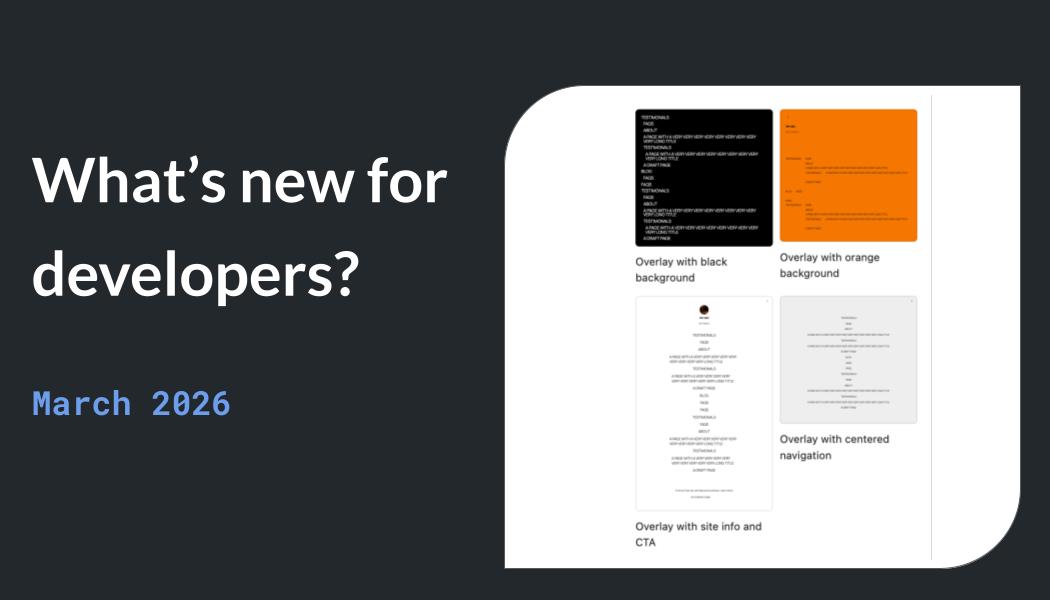
The Command Palette (accessed via the Omnibar) is one of those features that once you use, you can’t go back. Press ⌘K on Mac or Ctrl+K on Windows/Linux, and you get instant access to every admin tool from anywhere in the WordPress dashboard. Search posts, jump to settings, manage plugins, switch between pages — all from a single keyboard shortcut. If you’re familiar with the command palette in VS Code or Raycast on Mac, you already know how transformative this kind of interface can be for daily productivity.
DataViews received a significant overhaul as well. The content management screens now feature advanced filtering, sorting options, and customizable display layouts. If you manage a site with hundreds or thousands of posts, you’ll immediately notice the difference. It’s a modern data management interface that finally matches the sophistication of the block editor itself. You can create custom views, save filter presets, and switch between grid and list layouts depending on the task at hand — a far cry from the basic wp-admin list tables that have been largely unchanged for over a decade.
AI Infrastructure — WP AI Client and the Abilities API
WordPress 7.0 lays the foundation for native AI integration with two key additions. The WP AI Client standardizes communication between WordPress and large language models. Whether you’re connecting to Gemini, Claude, or OpenAI, there’s now a unified interface — no more building custom API wrappers for each provider.
The Abilities API takes this further by providing a standardized way to register and manage AI capabilities. Plugin developers can now implement AI-powered features through a consistent framework, and WP-CLI v3.0’s new wp ability command makes it manageable from the command line. This isn’t AI for the sake of AI — it’s infrastructure that enables the entire WordPress ecosystem to build on a common foundation. Imagine a content editor that can generate alt text for uploaded images, suggest internal linking opportunities, translate posts into multiple languages, or summarize long-form content — all powered by whichever LLM provider the site owner prefers, without every plugin needing to implement its own AI integration from scratch. That is the future the WP AI Client and Abilities API are building toward.
Developer Features — PHP-Only Block Registration, Selectors API, and More
For developers, WordPress 7.0 delivers practical improvements that directly impact daily workflow. Here’s what’s new for developers:
- PHP-only block registration: Register custom blocks entirely in PHP — no JavaScript build step required. Server-side rendered blocks just got significantly easier to develop, reducing the barrier to entry for PHP developers who may not be comfortable with React and the modern JavaScript toolchain.
- Block Selectors API: Define CSS targets directly in
block.json, giving you granular control over block styling without workaround selectors. This eliminates the need for fragile CSS hacks that break with theme updates. - Server-side SVG Icon Registration API: A new REST endpoint at
/wp/v2/iconslets you register and manage SVG icons programmatically, replacing the scattered approaches plugins previously used for icon management. - WP-CLI v3.0: New
wp blockandwp abilitycommands bring block and AI management to the command line, making deployment automation and CI/CD pipelines more powerful. - wp-env Playground: Now includes phpMyAdmin support, making database management in local development environments much more convenient for debugging and testing.
- Interactivity API enhancements: A new
watch()function and automaticstate.urlpopulation streamline reactive front-end development without requiring a full JavaScript framework. - PHP 7.4+ required: WordPress 7.0 officially drops support for PHP 7.2 and 7.3. If you haven’t upgraded yet, now is the time — these older versions have been end-of-life for years and represent a security risk.
Performance — Client-Side Media Processing
WordPress 7.0 introduces client-side media processing, where images are resized and optimized in the browser before being uploaded to the server. This reduces server load and speeds up publishing, particularly for media-heavy sites that regularly upload batches of images. In practical terms, when you upload a 4MB photo from your camera, the browser handles the heavy lifting of resizing it to the appropriate dimensions and compressing it before sending the much smaller file to the server. For sites on shared hosting with limited PHP memory or execution time limits, this can mean the difference between a successful upload and a frustrating timeout error.
Additional front-end improvements include new breadcrumb navigation blocks and video background support, expanding the design toolkit available directly in the editor without requiring custom code or third-party page builders.
Timeline and How to Prepare
Here’s the roadmap:
- RC1 release: March 19, 2026
- Final release: April 9, 2026
- 101+ bug fixes since Beta 3
With roughly three weeks until launch, here is your preparation checklist. First, verify that your hosting environment runs PHP 7.4 or above — if you are still on PHP 7.2 or 7.3, contact your hosting provider immediately, as these versions will no longer be supported. Second, set up a staging environment and install the RC1 to test all active plugins and themes for compatibility. Pay special attention to any plugins that modify the block editor experience, as the content-only patterns default and new collaboration features may affect their behavior. Third, start planning how your team will use real-time collaboration — define editing roles, establish commenting conventions, and train content editors on the new contextual feedback workflow. Finally, explore the device-specific block visibility controls in staging and identify opportunities to optimize existing content for different screen sizes.
WordPress 7.0 represents a genuine evolution for the platform. Real-time collaboration changes the fundamental workflow for teams. Device-specific blocks democratize responsive design. The AI infrastructure sets the stage for the next generation of plugins and integrations. Whether you’re a site owner, developer, or agency, the best move right now is to spin up a staging environment, install the RC1, and start testing. The organizations and developers who invest time in understanding these new capabilities before the official launch will have a significant head start when it comes to leveraging them effectively in production. April 9 will be here before you know it — and the sites that are prepared will be the ones that benefit most from everything WordPress 7.0 has to offer.
Planning a WordPress 7.0 migration or need help with site automation and technical architecture? Let’s talk.
Get weekly AI, music, and tech trends delivered to your inbox.