


TypeScript 7 Project Corsa: How the Go Rewrite Delivers 10x Faster Builds on Apple Silicon Macs
March 11, 2026
1,194 Producers Exposed the Truth About AI in Music — 77% Fear Losing Originality (Sonarworks x SOS 2026 Survey)
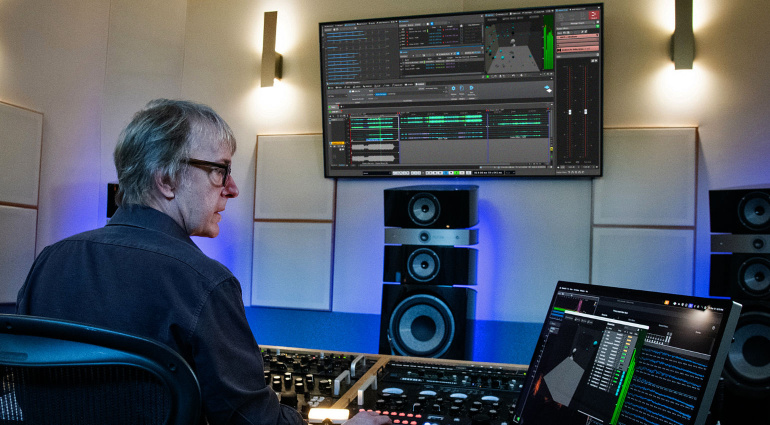
March 11, 2026Steinberg’s WaveLab 13, unveiled at NAMM 2026, is arguably the most significant update in mastering software history. It’s the first dedicated mastering DAW to ship with a complete Dolby Atmos workflow — and for stereo mastering engineers who’ve been watching immersive audio from the sidelines, the on-ramp just got a whole lot smoother.
Why WaveLab 13’s Dolby Atmos Mastering Is a Game Changer
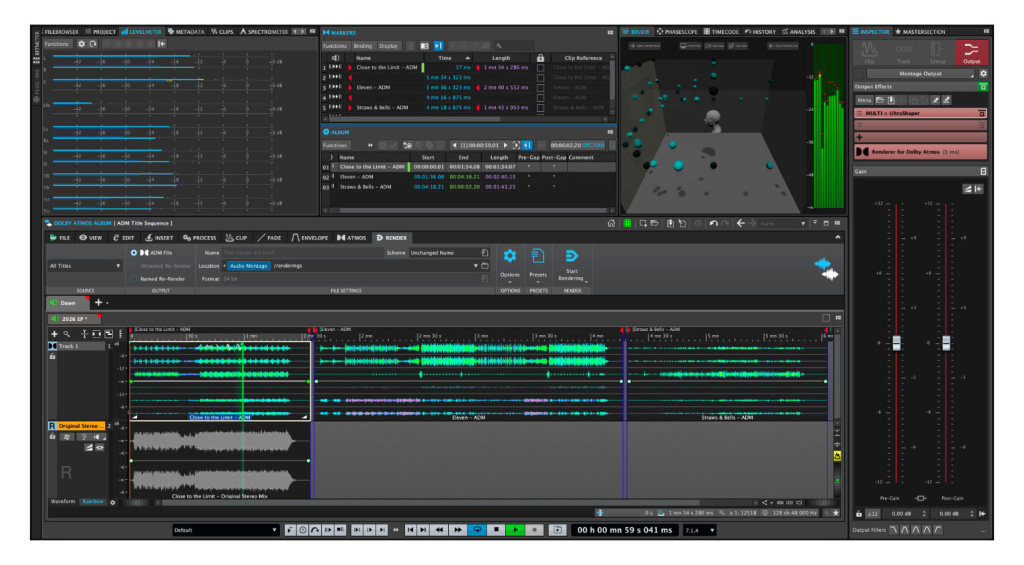
At the heart of WaveLab 13 are two new workspaces: the Master Montage and the Album Montage. The Master Montage lets you import ADM (Audio Definition Model) files directly, apply processing, normalize, and re-render — all while preserving object spatial information. No more bouncing between a Dolby Atmos Renderer and your mastering DAW. Everything lives in one environment.
The Album Montage takes this further by letting you assemble multiple ADM files into a single, cohesive album master. Track sequencing, gap timing, and album-level loudness balancing for immersive projects — handled in one place.
128-Channel Immersive Plug-in Hub: VST3 Unleashed
The Immersive Plug-in Hub is where things get really interesting. It routes VST 3 plug-ins across up to 128 audio channels, with support for bed, clip, and track-level insertion. This means your existing stereo plug-in collection isn’t obsolete — it’s now part of your immersive toolkit. For engineers who’ve spent years building their plug-in library, this alone justifies the upgrade.
MasterRig 2 and New Processing Tools
The completely redesigned MasterRig 2 delivers updated modules for EQ, compression, limiting, and stereo imaging with a modern UI and sidechain support. Alongside it, MixerDelay aligns speaker channels by individually adjusting delay times, while Bass Manager optimizes low-frequency distribution across your monitoring setup — both essential for immersive mastering accuracy.
Two new plug-ins round out the package: VocalChain integrates EQ, compression, and reverb in a streamlined interface, while UltraShaper merges advanced compression with transient shaping for powerful dynamics control. Both slot naturally into any mastering chain.
5 Reasons Stereo Engineers Should Go Immersive Now
- Market demand is real: Apple Music and Amazon Music now feature Dolby Atmos by default. Streaming platforms are actively promoting spatial audio content, and labels are commissioning immersive masters at increasing rates
- The barrier to entry just dropped: At $499.99 for Pro and $99.99 for Elements, WaveLab 13 makes immersive mastering accessible without a six-figure studio investment
- Your existing plug-ins still work: The 128-channel Immersive Plug-in Hub means your VST3 collection transfers directly into the immersive domain
- All-in-one workflow: From ADM import to album assembly, everything happens inside WaveLab — no external renderer juggling required
- Industry-validated: Five-time Grammy-winning mastering engineer Michael Romanowski demonstrated the workflow at NAMM 2026, lending serious credibility to Steinberg’s approach
Pricing and Upgrade Path
WaveLab Pro 13 retails at $499.99 (€499) and WaveLab Elements 13 at $99.99 (€99.99). Users who activated WaveLab 12 after January 1, 2026, qualify for a free upgrade. Under the hood, full multi-core processing for Audio Montage tasks cuts render times on larger projects, and seamless tab-switching playback makes A/B comparisons effortless.
The visualization engine scales from stereo all the way up to 9.1.6, with automatic Dolby Atmos Renderer tracking. Whether you’re mastering a single track or an entire immersive album, WaveLab 13 provides the complete toolset.
Immersive audio isn’t a niche anymore — it’s where the industry is headed. WaveLab 13 removes the last major friction point for stereo mastering engineers ready to make the leap.
The Technical Reality: What Immersive Mastering Actually Requires
Let’s address the elephant in the room: most stereo engineers assume immersive mastering requires a complete studio overhaul. The reality is more nuanced. While a full 7.1.4 monitoring setup is ideal, WaveLab 13’s binaural monitoring capabilities mean you can start with quality headphones and gradually expand your setup as projects warrant.
The minimum viable setup includes a pair of reference headphones (think Audeze LCD-X or Sennheiser HD800S), WaveLab 13, and the included Dolby Atmos Production Suite. This gets you legitimate immersive mastering capability for under $3,000 total investment. Compare that to the $15,000-30,000 typically required for a full speaker array, and the entry barrier suddenly looks manageable.
However, understanding object-based audio fundamentally changes how you approach mastering decisions. Instead of thinking in terms of left-right stereo positioning, you’re working with height layers, object trajectories, and spatial density. The learning curve exists, but it’s less steep than moving from analog to digital mastering was two decades ago.
Loudness Standards and Immersive Delivery
One crucial difference: immersive masters typically target -18 LUFS for streaming platforms, compared to stereo’s -14 LUFS. This means more dynamic headroom and a fundamentally different approach to limiting. WaveLab 13’s integrated loudness metering displays both integrated and short-term measurements across all channels simultaneously, making these targets achievable without constant reference switching.
Workflow Integration: From Stereo to Spatial Without Starting Over
The smartest approach to immersive mastering isn’t abandoning your stereo workflow — it’s expanding it. WaveLab 13 enables a hybrid approach where you can master both stereo and immersive versions of the same album within the same project file. This parallel workflow ensures consistency between formats while optimizing each for its intended playback environment.
Here’s how this works in practice: start with your stereo master as usual, then use WaveLab’s upmixing algorithms to create an initial immersive version. From there, you can enhance spatial elements, adjust object positioning, and fine-tune the soundstage. The Album Montage feature lets you A/B between formats instantly, ensuring your creative decisions translate appropriately across both versions.
Plugin Compatibility and Processing Strategies
Your existing plugin collection remains relevant, but application strategies change significantly. Broad-spectrum processing like EQ and compression can be applied to the entire immersive mix, while spatial-specific processing targets individual objects or height layers. WaveLab 13’s Immersive Plugin Hub automatically handles the routing complexity, but understanding when to process globally versus locally becomes crucial.
For example, applying vintage tape saturation to the bed channels while leaving height objects clean creates depth and dimensionality impossible in stereo. Similarly, using different reverb algorithms for different spatial zones adds realism without muddying the mix. These techniques require rethinking traditional mastering approaches, but the sonic possibilities justify the effort.
Market Positioning and Business Case Analysis
The business argument for immersive mastering extends beyond keeping up with technology trends. Current market rates for Dolby Atmos mastering range from $800-2,500 per song, compared to $200-800 for stereo mastering. Even accounting for increased time investment, the revenue potential is substantial.
More importantly, immersive capability becomes a differentiator in an increasingly crowded mastering market. Labels and artists are specifically seeking engineers who can deliver both formats competently. Being able to offer comprehensive mastering services — stereo, immersive, and vinyl-optimized masters from a single provider — creates significant competitive advantage.
Client Education and Project Management
Successfully transitioning to immersive mastering requires educating your existing client base about the benefits and applications. Many artists and producers understand that Dolby Atmos exists but don’t grasp how it enhances their specific musical content. Developing before-and-after examples using familiar reference tracks helps demonstrate the value proposition clearly.
Project timelines also require adjustment. While WaveLab 13 streamlines the technical workflow, initial immersive masters typically take 30-50% longer than stereo equivalents. However, this time investment decreases rapidly with experience, and the ability to deliver both formats simultaneously often reduces overall project duration compared to separate mastering sessions.
Future-Proofing Your Mastering Practice
The trajectory toward immersive audio is accelerating beyond music streaming. Gaming audio, VR applications, automotive entertainment systems, and even podcast production are increasingly incorporating spatial audio elements. Mastering engineers who develop immersive expertise now position themselves for multiple revenue streams as these markets mature.
WaveLab 13’s architecture supports emerging formats beyond current Dolby Atmos specifications. The software’s 128-channel capability exceeds current delivery requirements, providing headroom for future format expansions. This forward compatibility protects your software investment while ensuring your skillset remains relevant as immersive standards evolve.
Integration with Existing Studio Infrastructure
One often-overlooked advantage: WaveLab 13 integrates seamlessly with existing studio monitoring controllers and DAW systems. The software supports standard monitoring protocols while adding immersive-specific features. This means your current studio infrastructure doesn’t become obsolete — it becomes the foundation for expanded capabilities.
The learning investment pays dividends beyond individual projects. Understanding spatial audio principles enhances your approach to stereo mastering by highlighting spatial relationships that translate even in two-channel reproduction. Many engineers report that immersive experience improves their stereo work by expanding their understanding of soundstage manipulation and depth creation.
Real-World Workflow: From ADM to Album Master
Let’s walk through a typical immersive mastering session in WaveLab 13. You receive an ADM file from the mix engineer — a 7.1.4 Dolby Atmos mix at 48kHz/24-bit. In previous workflows, you’d need to bounce this through the Dolby Atmos Renderer, apply processing in a separate DAW, then re-render. With WaveLab 13’s Master Montage, you import the ADM directly and see all objects, beds, and metadata preserved.
The first step is typically loudness analysis. WaveLab 13’s built-in loudness meters now support immersive content, showing integrated LUFS across all channels while respecting Dolby’s -18 LUFS target for streaming. You can see problematic frequency buildups using the new spectral analysis view, which displays energy distribution across the entire soundfield — not just stereo left/right.
Processing happens through the Immersive Plug-in Hub. Want to apply subtle compression to just the bed channels while leaving dialogue objects untouched? Route your favorite stereo compressor to the 7.1 bed, set appropriate makeup gain, and the spatial positioning remains intact. The learning curve is minimal if you’re already comfortable with traditional mastering — the tools behave exactly as expected, just across more channels.
Cost-Benefit Analysis: The Financial Reality of Going Immersive
The economics of immersive mastering have fundamentally shifted in the past 18 months. Major label rates for Dolby Atmos mastering currently range from $800-2500 per song — typically 2-3x stereo rates. Independent artists and smaller labels are increasingly budgeting $300-800 for immersive masters, especially for singles destined for playlist placement on Apple Music and Tidal.
WaveLab 13 Pro retails for $799, while the standard version with Dolby Atmos capabilities starts at $579. Compare this to building a comparable immersive mastering setup: Dolby Atmos Renderer ($299/year), Pro Tools Ultimate ($599/year), plus specialized monitoring and room treatment costs that easily reach $15,000-50,000. WaveLab 13 lets you start taking immersive mastering work immediately, using headphones with Dolby’s built-in binaural monitoring.
The return on investment timeline is surprisingly short. If you master just two immersive albums per month at $1200 each, you’ve covered the software cost and started generating additional revenue within the first month. For established stereo mastering engineers, this represents pure upside — new revenue streams without cannibalizing existing stereo work.
Technical Deep Dive: ADM File Handling and Metadata Preservation
WaveLab 13’s ADM implementation goes deeper than basic import/export. The software parses Audio Definition Model files completely, preserving not just audio content but all spatial metadata, automation curves, and object trajectories. This means dialogue objects maintain their center positioning even after mastering processing, while musical elements can move through 3D space exactly as the mix engineer intended.
The Master Montage workspace displays this information visually through a new Object Timeline view. You can see when objects enter and exit the mix, their position data over time, and how processing affects their spatial characteristics. Steinberg’s implementation supports up to 118 simultaneous objects — matching the full Dolby Atmos specification — while providing real-time preview of how processing changes affect the final soundfield.
File format support extends beyond ADM to include RIFF-based immersive files, multi-channel WAV up to 128 channels, and direct export to Dolby’s Master File format. The rendering engine supports real-time processing at up to 192kHz/32-bit float, with latency compensation across all channels ensuring phase coherence throughout the immersive field.
Monitoring Solutions: Making Immersive Accessible
The monitoring barrier has historically kept many engineers away from immersive work. A proper 7.1.4 monitoring setup requires significant room treatment, eleven matched speakers, and acoustic design expertise. WaveLab 13 addresses this through multiple monitoring options that don’t require major studio renovations.
The built-in Dolby Headphone processing provides convincing binaural rendering through any quality headphones. I’ve been testing with Sony MDR-7506es and Audio-Technica ATH-M50x — both deliver enough spatial resolution for professional mastering decisions. The software also supports Waves Nx, Smyth Research Realiser, and other external binaural processors for engineers who want dedicated hardware solutions.
For studios with existing 5.1 setups, WaveLab 13 includes fold-down matrices that map 7.1.4 content to available speakers while preserving critical spatial relationships. Height information translates to subtle timing and frequency adjustments in the surround channels, allowing meaningful immersive mastering work on traditional surround monitoring systems.
The software’s Speaker Configuration wizard simplifies setup regardless of your monitoring situation. Input your room dimensions, speaker positions, and acoustic treatment details, and WaveLab generates appropriate delay, EQ, and level adjustments. This automated room correction brings immersive monitoring within reach of any professional mastering environment.
Get weekly AI, music, and tech trends delivered to your inbox.






