


Claude Code Multi-File Editing: How a 49% to 72.7% SWE-bench Jump Is Reshaping Developer Workflows
May 12, 2025
AMD Strix Halo Laptop Review: 128GB Unified Memory APU Takes on RTX 4070 and M4 Max
May 12, 2025
A free plugin just made half your paid reverb collection obsolete. Valhalla Supermassive 3.0 dropped with two new modes — Leo and Virgo — and honestly, the gap between “free” and “premium” reverb has never been thinner.
What Valhalla Supermassive 3.0 Brings to the Table
Sean Costello and the Valhalla DSP team have been quietly building one of the most powerful reverb engines in the plugin world — and giving it away for free. Version 3.0 pushes the total mode count to 20, each one a distinct reverb or delay algorithm built on feedback delay networks with delays up to 2 seconds.
The two new additions couldn’t be more different from each other, and that’s exactly what makes this update significant. Leo goes massive. Virgo goes minimal. Together, they fill the two biggest gaps Supermassive had.
Leo Mode: The Most Massive Reverb in Valhalla Supermassive 3.0
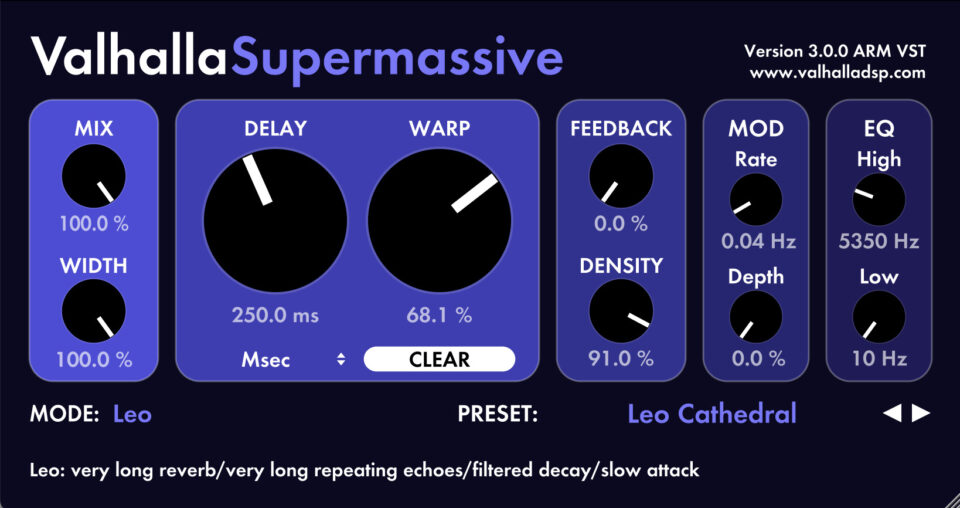
Leo is, in Sean Costello’s own words, “the most super massive-est of all the Supermassive modes.” That’s not marketing fluff — it’s a genuinely different approach to how feedback delay networks generate reverb tails.
Here’s what sets Leo apart from every other mode in the plugin:
- Very slow attack — the reverb builds gradually instead of hitting immediately, creating a natural bloom that sounds remarkably organic
- Dual decay control — both Density and Feedback parameters shape the tail length, giving you far more sculpting power than a single decay knob
- High echo density — the wash is thick and continuous, not grainy or steppy
- Interleaved EQ filters — high and low EQ are threaded throughout the entire reverb network, not just slapped on the output. This means the tonal character evolves naturally as the reverb decays
The interleaved EQ approach is the real technical innovation here. Most reverb plugins apply filtering at the end of the signal chain. Leo weaves it into the feedback loop itself, so a dark reverb actually gets darker as it decays, and a bright reverb maintains its presence through the entire tail. The result: cathedral spaces, massive synth pads, and ambient drones that sound genuinely three-dimensional.
Virgo Mode: When Less Is Everything
If Leo is the ocean, Virgo is a stone skipping across it. This is the smallest, sparsest mode in the entire Supermassive collection, and it fills a gap that producers have been working around for years.
Virgo starts as a clean stereo delay. As you push the Density control up, it gradually transitions into a grainy, textured reverb — but it never loses that sense of space between the reflections. This makes it perfect for:
- Pointillistic echoes — rhythmic, defined reflections that add depth without washing out the dry signal
- Spring-ish reverb character — that bouncy, metallic quality that analog spring units deliver
- Sparse atmospheric effects — ambient textures that breathe rather than smother
- Vocal processing — adding dimension to vocals without pushing them back in the mix
The transition from delay to reverb as Density increases is smooth and musical. There’s no abrupt switch — you can find sweet spots anywhere along the curve, which means Virgo effectively gives you an entire spectrum of spatial effects from a single mode.
20 Modes and Counting: The Full Valhalla Supermassive 3.0 Arsenal
With Leo and Virgo, Valhalla Supermassive 3.0 now packs 20 distinct reverb and delay algorithms. For context, version 1.0 launched with 8 modes. Here’s the complete roster: Gemini, Hydra, Centaurus, Sagittarius, Great Annihilator, Andromeda, Lyra, Capricorn, Large Magellanic Cloud, Triangulum, Cirrus Major, Cirrus Minor, Cassiopeia, Orion, Aquarius, Pisces, Scorpio, Libra, Leo, and Virgo.
Each mode uses a unique feedback delay network topology, as detailed on KVR Audio. That’s not just marketing — each one is a fundamentally different algorithm with different delay line configurations, feedback routing, and modulation characteristics. The plugin supports VST2.4, VST3, AAX, and AU formats on both Windows (64-bit) and Mac (Intel and Apple Silicon), with full M1/M2/M3 native support.
The Controls That Make It Work
Part of what makes Valhalla Supermassive so effective is its streamlined parameter set. Every mode shares the same control layout: Mix, Width, Delay (with tempo sync option), Warp, Feedback, Density, Mod Rate, Mod Depth, EQ High Cut, and EQ Low Cut. But here’s the key — these parameters behave differently in every mode. Density in Leo creates a thick wash; in Virgo, it transitions from delay to reverb. Warp generates harmonic echoes in some modes and cascading feedback in others.
The Warp control deserves special attention. In most reverb plugins, you get a simple pre-delay or diffusion knob. Warp reshapes the delay network itself — pushing it toward harmonic resonance at higher values, creating metallic, pitched reverb tails that are perfect for experimental sound design. Combined with the Mod Rate and Mod Depth controls, you can create everything from subtle chorus-like movement to dramatic pitch-shifting within the reverb tail.
The LATE 2023 preset folder that ships with the 3.0 update is worth exploring. These presets are specifically designed to showcase Leo and Virgo, and they serve as excellent starting points for sound design. Pay particular attention to the Leo presets that use moderate Warp values — they demonstrate how the interleaved EQ creates tonal evolution that you simply can’t replicate with post-processing.
Practical Use Cases for Valhalla Supermassive 3.0 in Production
Beyond the technical specifications, here’s how these modes translate to real production scenarios. Leo excels in ambient and cinematic music where you need reverb tails that sustain for 10-30 seconds without turning into noise. The dual control of Density and Feedback means you can dial in a tail that stays musical even at extreme lengths — something most algorithmic reverbs struggle with.
For electronic producers, Leo’s slow attack is particularly useful on synth pads and arpeggiated sequences. The reverb doesn’t smear the attack transients; instead, it builds behind the dry signal, creating depth without sacrificing clarity. Try it on a simple pad with the EQ High Cut around 4kHz — you’ll get that dark, evolving ambient texture that normally requires chains of multiple effects.
Virgo, on the other hand, shines in mix contexts where transparency matters. On acoustic guitar, it adds just enough room without the dreaded “bathroom reverb” quality. On snare drums, with Density at moderate levels, it creates a tight, controlled ambience that sits perfectly behind the transient. And for vocal production, Virgo at low Density values produces a slapback-meets-short-reverb effect that adds presence without distance.
My Take: What 28 Years in Audio Taught Me About Free Plugins
I’ve been working with reverb plugins since the days when a decent algorithmic reverb cost more than most people’s entire plugin budget. So when I say Valhalla Supermassive 3.0 competes with plugins that cost $200-400, I’m not being hyperbolic.
What Sean Costello has done with the feedback delay network approach is genuinely impressive from an engineering standpoint. Most reverb developers use convolution (sampling real spaces) or relatively simple algorithmic models. Supermassive’s approach — multiple unique FDN topologies, each with different delay line configurations — means every mode sounds fundamentally different, not just “the same reverb with different settings.”
In my studio work, I reach for Leo when I need that massive, evolving pad reverb that would normally require layering two or three different plugins. The interleaved EQ is a game-changer for dark ambient work — the reverb tail naturally darkens as it decays, exactly like a real acoustic space. Virgo has become my go-to for adding subtle dimension to vocals and acoustic instruments without the mud that most reverbs introduce.
The fact that this is free isn’t just impressive — it’s shifted the baseline for what producers should expect from any reverb plugin, paid or otherwise. If your $200 reverb can’t match what Supermassive does in Leo mode, that’s a problem for your $200 reverb. The competitive pressure this puts on companies like Exponential Audio, Fabfilter, and Eventide is real — when your free competition sounds this good, you need to offer something genuinely unique to justify a price tag.
What I particularly appreciate is Sean Costello’s approach to updates. Rather than adding incremental tweaks to existing modes, each major version introduces an entirely new algorithm with a distinct sonic character. It’s a philosophy that treats reverb design as an ongoing research project rather than a product lifecycle, and the results speak for themselves.
How to Get Valhalla Supermassive 3.0
Download is straightforward: head to the Valhalla DSP website, grab the installer for your platform, and run it. If you already have Supermassive installed, the update is free — just download and install over your existing version. All your presets and settings carry over.
Valhalla Supermassive 3.0 works on Windows 7/8/10/11 (64-bit only) and macOS 10.9 through the latest version. Whether you’re on an older Intel Mac or the newest Apple Silicon hardware, it runs natively with zero compatibility issues.
For producers who’ve been building reverb chains with multiple plugins to get from subtle delay-based spatial effects to massive ambient washes, Valhalla Supermassive 3.0 might just simplify your entire approach. Twenty modes, zero dollars, and two new algorithms that genuinely push the boundaries of what free software can do. That’s a hard combination to argue with.
Need professional mixing and mastering that makes the most of tools like Supermassive? Let’s talk about your next project.
Get weekly AI, music, and tech trends delivered to your inbox.






