LANDR Layers Review: Real Session Musicians Power This ‘Fair Trade AI’ Stem Generator — And It’s Only $8.25/Month
April 3, 2026
Microsoft MAI Models Drop 3 at Once — MAI-Transcribe-1 Destroys Whisper Across All 25 Languages
April 3, 2026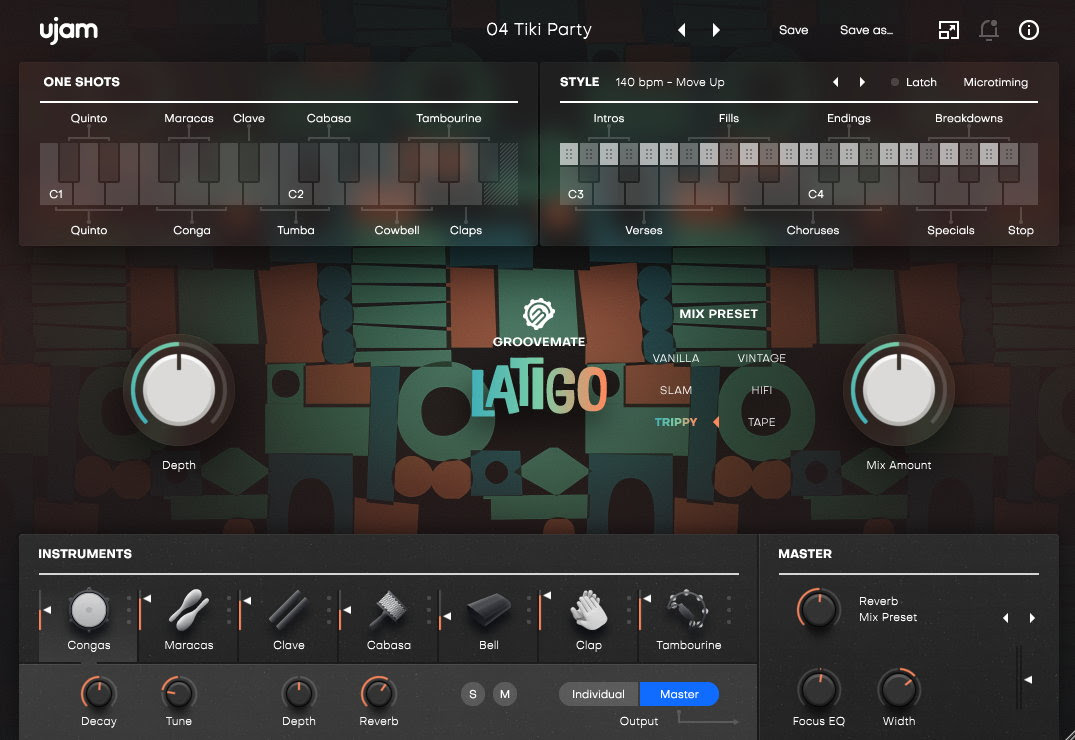
The hands that played congas on Jamiroquai’s live stages just landed inside your DAW. UJAM Groovemate Latigo review — Nate Williams personally performed all 460 Latin percussion phrases, and they’re yours for $39 until April 30. Here’s what that actually means for your productions.
Who Is Nate Williams — and Why Should You Care?
Nate Williams has toured and recorded with Jamiroquai and Steve Winwood, among others. As Mix Online reported, Williams describes his philosophy succinctly: “Percussion is the icing on the cake for every drum performance.” That mindset permeates every phrase in Groovemate Latigo. These aren’t quantized MIDI patterns — they’re real performances captured with all the micro-timing variations and dynamic nuances that only human hands can deliver.
UJAM itself carries serious pedigree. Co-founded by Hans Zimmer and Pharrell Williams, the company has built its reputation on making professional music tools accessible to producers at every level. The Groovemate series already covers drums and bass; Latigo extends the lineup into Latin percussion territory — a niche that has been underserved by phrase-based instruments.
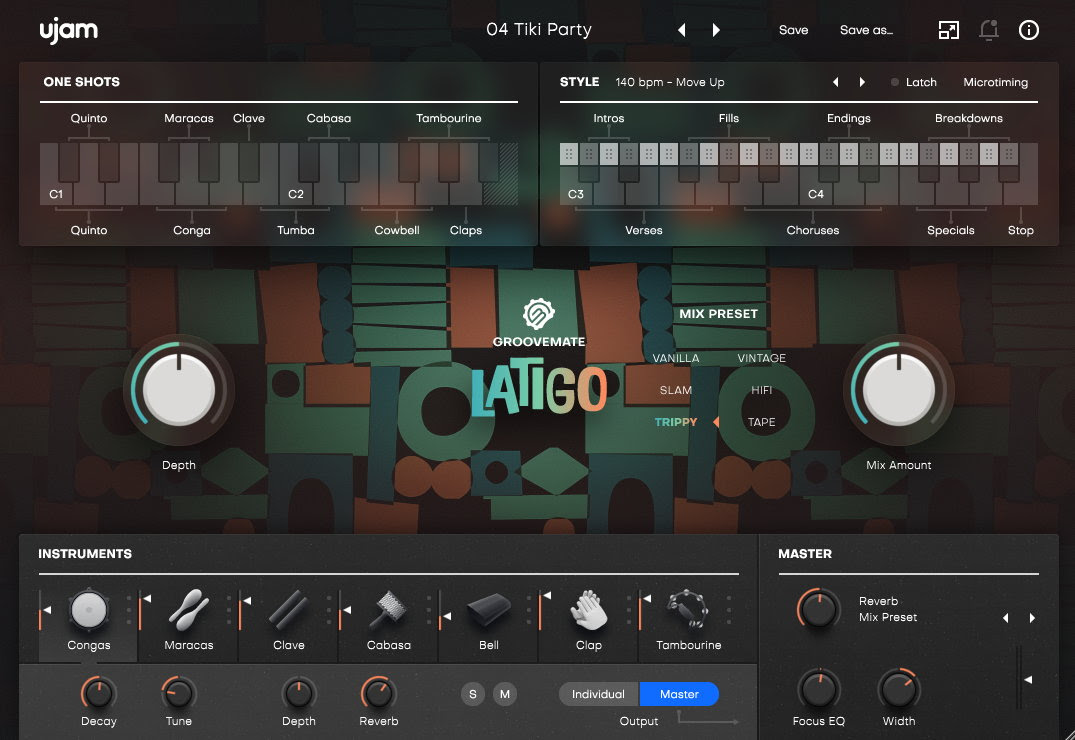
UJAM Groovemate Latigo Review: 460 Phrases, 7 Instruments, 6 Mix Presets
Let’s break down what you’re actually getting. This isn’t a collection of one-shot samples thrown into a sampler. Groovemate Latigo is a phrase-based engine, and that distinction matters fundamentally.
Instrument Lineup
The plugin includes nine instruments across seven groups: three congas (standard Conga, high-pitched Quinto, and low Tumba), Maracas, Cabasa, Tambourine, Claves, Cowbells, and Claps. Across these instruments, you get 460 phrases organized into 20 distinct styles covering everything from traditional son montuno and guaguancó patterns to modern Latin pop and reggaeton-influenced grooves.
The three-conga setup deserves special attention. In traditional Latin percussion, the interplay between Quinto (high), Conga (mid), and Tumba (low) creates the rhythmic foundation of virtually every salsa, rumba, and Afro-Cuban arrangement. Having all three voices available as separate phrase streams — but performed by the same musician in the same session — means you get the natural call-and-response dynamics that define authentic Latin percussion.
A critical production detail: all instruments were recorded in a single room. This means when you layer multiple instruments — say, congas with maracas and claves — there are no phase conflicts. The spatial relationships between instruments are already baked in, giving you the natural cohesion of a real percussion ensemble without the headache of aligning multiple sample libraries recorded in different acoustic environments. Anyone who has tried combining percussion samples from different libraries knows the frustration of fighting phase cancellation and mismatched room tones — Latigo eliminates this problem at the source.
Six Mix Presets That Actually Transform the Sound
- Vanilla — Clean, unprocessed source signal
- Slam — Heavy compression for aggressive, punchy percussion
- Trippy — Effects-laden experimental processing
- Vintage — Warm, analog-flavored saturation
- HiFi — Modern, polished high-fidelity treatment
- Tape — Tape saturation for lo-fi character
These aren’t subtle EQ tweaks. Switching from Vanilla to Tape fundamentally changes the character of a phrase. Modern pop track? HiFi. Lo-fi hip-hop beat? Tape. Latin jazz arrangement? Vintage. Genre-appropriate processing in a single click, without reaching for external plugins.
The Slam preset is particularly interesting for producers working in reggaeton or Latin trap. It applies aggressive compression that pushes the percussion forward in dense mixes where congas and shakers would otherwise get buried under 808s and synth layers. On the other end, the Trippy preset opens up creative possibilities for experimental producers who want to use Latin percussion as textural elements rather than rhythmic foundations — think ambient music or downtempo electronic with organic Latin undertones.
The Depth Control: Spatial Positioning With a Single Knob
Latigo’s most clever feature is its Depth macro control. This single knob positions percussion on a virtual front-to-back stage. Pull it forward for dry, intimate, in-your-face percussion. Push it back for room ambience and spatial depth. As Sound On Sound noted in their coverage, this feature addresses one of the most common mixing challenges with percussion.
Why does this matter? Positioning percussion in a mix typically requires a chain of reverb, EQ adjustments for distance simulation, and careful volume automation. The Depth control compresses this entire workflow into one intuitive parameter. For producers working on tight deadlines — which is most of us — this kind of workflow acceleration is where a plugin earns its keep.
It is worth noting that Depth is not simply a wet/dry reverb knob. It combines multiple parameters — early reflections, high-frequency rolloff, and level attenuation — to simulate genuine physical distance. The result is more convincing than manually dialing in reverb sends, because the processing is tailored specifically to the percussion content rather than applied generically.
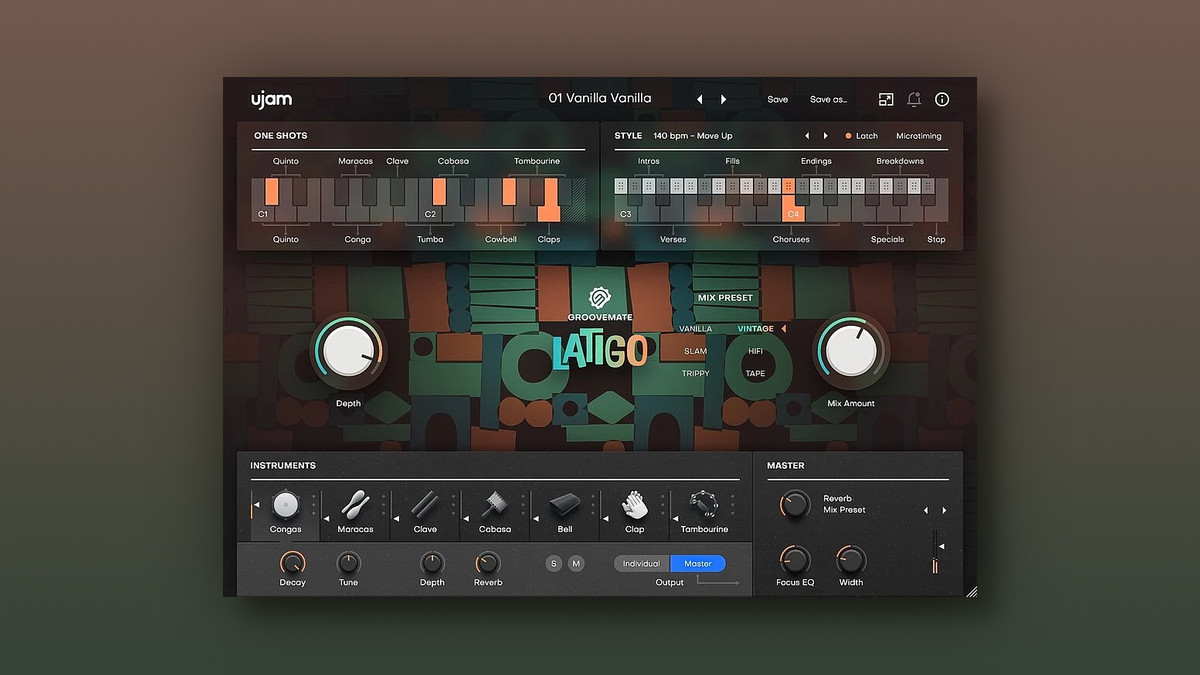
How Latigo Stacks Up: NI Cuba vs Toontrack Latin EZX vs UJAM
The Latin percussion virtual instrument market isn’t empty. Here’s where Groovemate Latigo fits in the landscape.
Native Instruments Cuba is a comprehensive Kontakt-based Latin percussion library. It offers both individual hits and patterns, giving you maximum editing flexibility. However, it requires the full Kontakt player, carries a larger storage footprint, and costs $99+.
Toontrack Latin Percussion EZX is an expansion pack for EZdrummer or Superior Drummer. It provides MIDI-based patterns with excellent editing granularity, but you need the host plugin ($69-89 for the expansion alone, plus the host).
XLN Audio XO excels at sample browsing and pattern creation but isn’t specifically focused on Latin percussion content.
Latigo’s differentiator is clear: the phrase-based approach. Rather than sequencing individual hits, you’re selecting complete performances by a world-class percussionist. This captures the micro-timing variations, ghost notes, and dynamic arcs that no amount of MIDI programming can replicate. And at $39 intro pricing, the barrier to entry is the lowest in this category by a significant margin.
There is also the question of system requirements. Latigo is remarkably lightweight — 1 GB of storage and 8 GB of RAM minimum. Compare that to comprehensive Kontakt libraries that can easily occupy 10-20 GB of disk space. For laptop producers or anyone working with limited storage, this efficiency matters. The plugin supports VST2, VST3, AU2, and AAX formats on macOS (Big Sur through Tahoe, both Intel and Apple Silicon) and Windows 10-11, covering virtually every modern production setup.
My Take on the UJAM Groovemate Latigo Review: 28 Years in Audio
After 28 years in music production, I’ve used more percussion libraries than I can count. Here’s the honest truth about most of them: they sound clean but lifeless. If you’ve ever tried to program a realistic Latin percussion groove with MIDI, you know the frustration — no matter how carefully you adjust velocity curves, you can’t recreate the subtle interplay between a conga player’s palm and fingertips, or the way a skilled percussionist naturally pushes and pulls against the beat.
Latigo’s phrase-based approach is the most pragmatic solution to this problem. Booking a percussionist of Nate Williams’ caliber for a studio session would cost hundreds of dollars per hour. Having 460 of his phrases available for $39, usable across unlimited projects, is — especially for indie producers — not a game-changer but simply the obvious choice.
That said, there’s a trade-off worth acknowledging. Phrase-based means limited editability. You can’t easily remove a specific ghost note on beat three or shift an accent to the upbeat. This is a tool for “selecting complete performances,” not “building from scratch.” In my workflow, I’d use Latigo for the foundational groove and supplement with individual one-shot samples for custom fills and breaks — a hybrid approach that gives you the best of both worlds.
The Depth control is genuinely useful in practice. Where to position percussion in a mix is always a judgment call, and having spatial placement available without loading a separate reverb plugin genuinely speeds up the workflow. It’s a small thing, but small things compound across a full production session.
One more thing worth mentioning: the 20 style categories are well-organized and musically logical. Instead of scrolling through hundreds of generic pattern names, you browse by groove style — which is how percussionists actually think about their playing. This design decision reflects the fact that a real musician was involved in the product design, not just the recording. When the person playing the phrases also helps organize them, you get categories that make musical sense rather than just alphabetical sense.
UJAM Groovemate Latigo Review Verdict: Who Should Buy It?
Must-buy if you: produce Latin pop, reggaeton, salsa, bossa nova, or any genre that benefits from organic percussion layers. Songwriters looking to add authentic Latin feel to pop or R&B tracks. Home studio producers who can’t afford session percussionists.
Skip if you: already own a comprehensive Kontakt-based percussion library and need individual hit-level editing control. EDM or electronic music producers who rarely use acoustic Latin percussion in their productions.
The intro price of $39 runs until April 30, 2026 — after that, it jumps to $79 MSRP. Existing UJAM users can crossgrade for $29. A fully functional 7-day trial is available on the official UJAM site, and I’d strongly recommend testing it in your own workflow before committing. VST2, VST3, AU2, and AAX formats are supported on both macOS (Intel + Apple Silicon) and Windows.
At the end of the day, the question isn’t whether Nate Williams can play — it’s whether your productions could use the groove that only decades of live performance can deliver. At $39, the answer writes itself.
Need professional mixing, mastering, or percussion recording sessions? Connect with a producer who’s been in the studio for 28 years.
Get weekly AI, music, and tech trends delivered to your inbox.