

GPT-5 vs Claude 3.5 Sonnet vs Gemini 2.5 Pro: The August 2025 Benchmark Showdown
August 6, 2025
Intel Lunar Lake NUC Mini PC Review: Compact Desktop for Home and Office
August 6, 2025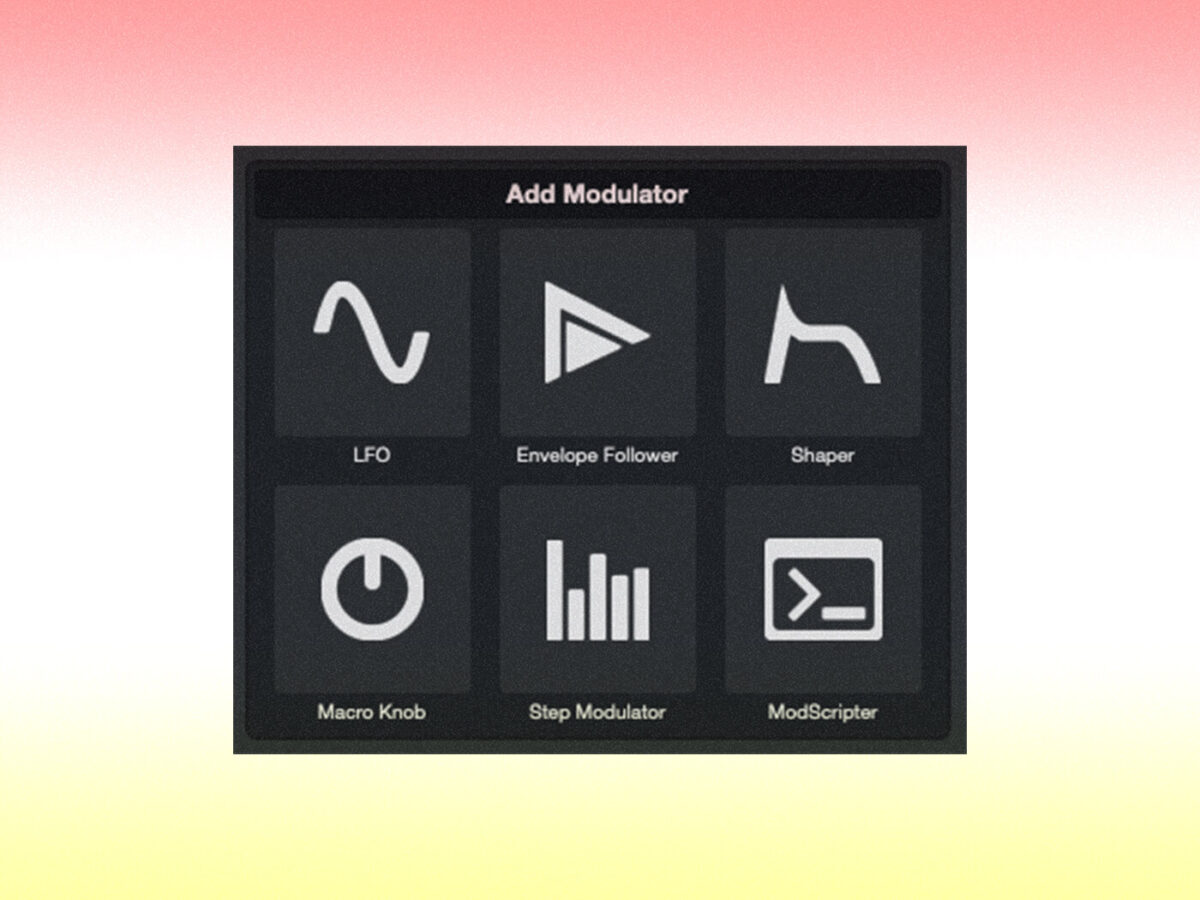
When was the last time Steinberg dropped an update this massive? Since inventing VST in 1997, few releases have genuinely shifted what a DAW can do — but Steinberg Cubase 14 is exactly that kind of moment. A fully integrated Pattern Editor, six new Modulators, and creative effects like Studio Delay and Underwater make this far more than a routine version bump. This is Steinberg reclaiming its place at the cutting edge of music production.
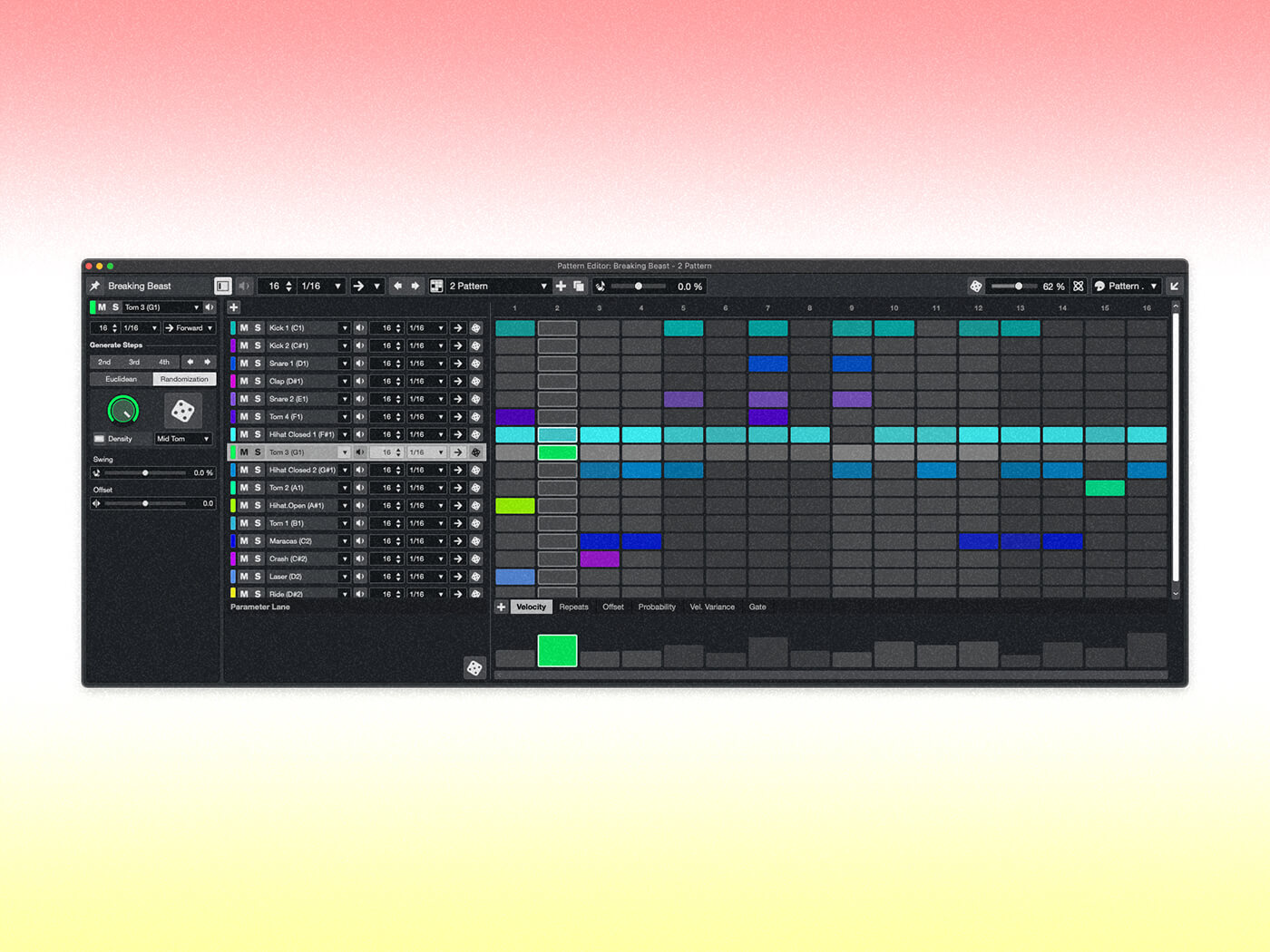
Steinberg Cubase 14 Pattern Editor and Drum Machine: Beat-Making Finally Built In
After 28+ years working in audio production, I’ve seen countless DAWs attempt built-in beat-making tools. Most fell short — either too limited to be useful or so disconnected from the main timeline that they felt like afterthoughts. The Pattern Editor in Cubase 14 is different. It’s a grid-style sequencer that lives natively inside your project, fully integrated with Cubase’s timeline, routing, and mixing engine.
The standout detail: 40 drum kits spanning hip-hop, trap, and electronic genres ship out of the box. These aren’t recycled samples from 2015; they reflect what producers actually need right now. The kits cover everything from crisp 808-style trap percussion to vintage drum machine emulations and modern electronic textures. Combined with the upgraded Groove Agent SE 6 featuring a scalable UI, a redesigned mixer, and enhanced effects processing, Cubase’s drum programming workflow is finally competitive with what FL Studio and Ableton have offered for years.
What makes this implementation particularly smart is the seamless transition between pattern-based and linear workflows. You can build your beat in the Pattern Editor, then drag it directly onto the timeline as a MIDI part. No exporting, no bouncing, no workarounds. This kind of fluid workflow is exactly what producers have been requesting from Steinberg for years, and they’ve delivered it with impressive polish.
But the Pattern Editor isn’t limited to drums. You can sketch melodic patterns, basslines, and arpeggios using the same grid interface, turning rough ideas into structured arrangements faster than ever. In professional production environments where studio time translates directly to budget, this kind of speed matters enormously. As MusicRadar reported, Steinberg designed this to make “composing, producing, and mixing more inspirational than ever” — and from what I’ve seen, they delivered on that promise.
Six Modulators That Transform Cubase Into a Sound Design Powerhouse
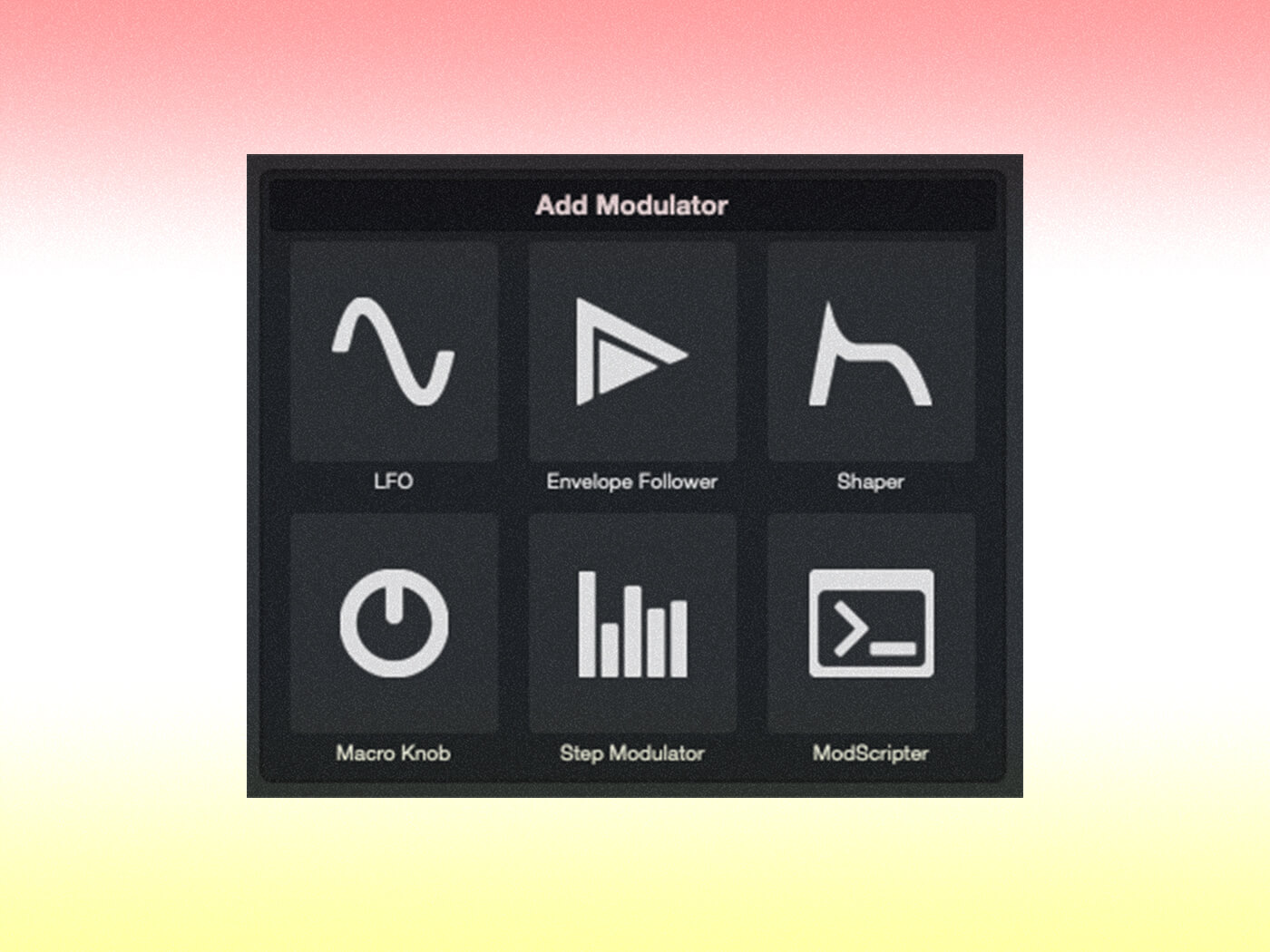
If the Pattern Editor is the headline feature, the six-modulator system is the one that will fundamentally change how people work in Steinberg Cubase 14. MusicTech called this “the most significant update since 1997’s VST launch” — and the modulator system is the primary reason why.
Here’s what each modulator brings to the table:
- LFO — Apply periodic modulation to any parameter: volume, panning, filter cutoff, plugin controls. From classic tremolo to complex sidechain-style pumping, the LFO handles it all with surgical precision.
- Envelope Follower — Tracks the dynamics of any audio signal and maps them to other parameters in real time. Want your reverb send to follow vocal dynamics automatically? Done in seconds.
- Shaper — Draw custom modulation curves freehand. When presets don’t cut it, the Shaper lets you design movement that’s entirely your own.
- Macro Knob — Control multiple parameters simultaneously with a single knob. Essential for live performance and complex mix automation where you need one gesture to trigger coordinated changes.
- Step Modulator — Step sequencer-style parameter modulation. Perfect for rhythmic filter sweeps, gated effects, and the kind of evolving textures that define modern electronic production.
- ModScripter — JavaScript-based scripting for fully custom modulation logic. If you can code it, you can modulate it. This opens up possibilities that no preset or GUI could ever cover.
The critical detail, as reviewers have noted, is that these modulators can connect to virtually any parameter in your mix or plugins. This elevates Cubase from a recording and editing tool to something closer to a modular synthesis environment — except it’s integrated into your full production workflow.
Think about what this means in practice. Instead of manually automating a filter sweep over eight bars, you assign an LFO. Instead of riding a reverb send during a vocal performance, you connect an Envelope Follower. Instead of drawing complex automation curves by hand, you use the Step Modulator for precise rhythmic control. Each modulator solves a specific creative problem, and together they form a system that makes Cubase uniquely powerful for sound design and experimental production.
Studio Delay and Underwater: New Effects Plugins Worth the Upgrade Alone
Two new effect plugins round out the creative additions in Cubase 14, and both are more versatile than they first appear.
Studio Delay is not your typical delay plugin. It combines delay with built-in modulation, distortion, reverb, and pitch shifting — all within a single interface. Previously, achieving this kind of processed delay required chaining three or four separate plugins. Studio Delay collapses that entire signal chain into one tool. For ambient, synthwave, and lo-fi production, this alone could replace third-party delay plugins you’ve been paying subscriptions for.
Having used dozens of delay plugins over nearly three decades, I can tell you that the trend toward “delay as creative instrument” — rather than just a timing effect — is exactly where modern production is heading. Think of how producers use delay in modern pop, hip-hop, and electronic music: it’s not just echo, it’s texture, movement, and atmosphere. Studio Delay is designed for exactly this kind of creative application, and Steinberg clearly understands where the industry is heading.
Underwater creates a low-pass filtering effect that simulates sound heard through walls or, as MusicRadar put it, the “party next door” effect. It sounds simple, but in practice, it’s incredibly useful for transitions, intro/outro design, and EDM buildup-to-drop moments. Instead of automating a low-pass filter manually every time, Underwater gives you a dedicated, polished tool for it.
Event Volume Curves, Dorico Score Editor, and Session Exchange: Workflow Upgrades That Matter
Beyond the flashy new features, Steinberg Cubase 14 delivers workflow improvements that professional users will appreciate daily.
Event Volume Curves let you draw volume automation directly on audio events — no need to open a separate automation lane. For dialogue editing, vocal riding, and podcast production, this is a massive time saver. Anyone who has edited a 30-minute podcast episode or a full album’s worth of vocal takes knows the pain of managing dozens of automation lanes. Event Volume Curves keep the volume control right where you need it: on the clip itself. It’s the kind of quality-of-life improvement that sounds minor on paper but transforms your daily workflow in practice.
Score Editor has been completely rebuilt using Dorico’s engine. Dorico is Steinberg’s professional notation software, and its technology now powers Cubase’s score capabilities. If you compose classical music, film scores, or any notation-heavy work inside Cubase, the quality jump is immediately noticeable. Engraving, spacing, and layout all benefit from Dorico’s decade of refinement.
Session Exchange addresses one of modern production’s biggest pain points: cross-DAW collaboration. When your collaborator uses Logic, Pro Tools, or another DAW, Session Exchange minimizes compatibility headaches when sharing projects. Instead of bouncing stems and writing detailed notes about your session structure, you can share project data in a format that other DAWs can interpret. In an era where remote collaboration is the norm rather than the exception, this feature’s practical value will only grow over time.
Pricing, Editions, and Who Should Upgrade
According to Steinberg’s official announcement, Cubase 14 ships in three editions:
- Cubase Pro 14 — €579: Full feature set including all six modulators, Pattern Editor, Studio Delay, Underwater, Dorico-powered Score Editor, and Session Exchange.
- Cubase Artist 14 — €329: Most core Pro features included. Suited for intermediate producers who don’t need the full professional toolkit.
- Cubase Elements 14 — €99.99: Entry-level edition focused on essential recording and editing.
Here’s my straightforward take: if you’re on Cubase 13 or earlier and you work in beat-making, sound design, or any genre that benefits from modulation and pattern-based workflows, upgrading to Pro 14 is a no-brainer. The Pattern Editor and modulator system alone justify the cost several times over. If your work is primarily recording and editing with minimal sound design, Cubase 13 may still serve you well — though Event Volume Curves and the Dorico Score Editor are tempting additions even for that workflow.
There’s a reason MusicTech called this the most significant Cubase update since VST launched in 1997. Steinberg Cubase 14 gives existing users a compelling upgrade path and gives producers on competing DAWs a serious reason to consider switching. The combination of the Pattern Editor and modulator system creates a creative toolkit that no other DAW currently matches in quite the same integrated way. Whether you’re a beat-maker looking for a tighter grid workflow, a sound designer craving modular-style parameter control, or a film composer needing professional notation, Cubase 14 has something genuinely new to offer.
Looking to optimize your DAW workflow or need professional mixing and mastering? Sean Kim brings 28+ years of audio expertise to every project.
Get weekly AI, music, and tech trends delivered to your inbox.






