

Spotify Lossless Mastering: 7 Critical Checks Every Producer Must Run in 2026
March 11, 2026
PSP Tilt-Q vs Tonelux Tilt vs Softube Tilt: Which Tilt EQ Deserves Your Mix Bus in 2026?
March 12, 2026
Picture this: it’s 2 AM, your vocalist just nailed a take in their home studio in Nashville, your mix engineer is tweaking the reverb from Berlin, and your client in Tokyo is listening to the whole thing in real time. This isn’t science fiction — it’s Tuesday night for a growing number of producers in 2026.
Remote music production exploded after 2020, but the tools have finally caught up with the ambition. SoundBridge 3.0 just dropped a bombshell by adding native SoundBridge 3.0 virtual collaboration to a completely free DAW. But how does it actually stack up against established players like Splice and AudioMovers? I spent two weeks testing all three in real production scenarios. Here’s what I found.
SoundBridge 3.0 Virtual Collaboration — What’s New
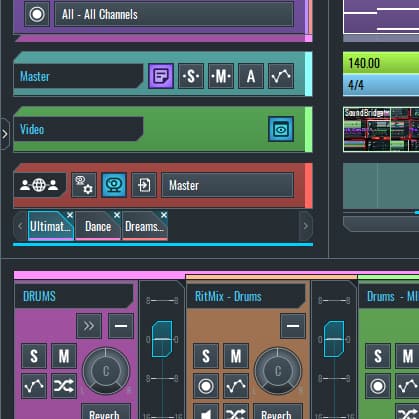
SoundBridge has always been the scrappy underdog — a surprisingly capable free DAW that most producers overlooked. Version 3.0 changes that conversation entirely with its Virtual Collaboration add-on. According to Sound on Sound’s coverage, this makes SoundBridge the first free DAW to offer native real-time remote collaboration.
The feature allows up to four users to simultaneously record and mix within the same session, streaming audio at 48kHz/24bit quality. Latency hovers between 50–120ms depending on your network, which is workable for most production tasks short of tracking live drums together. There’s no separate plugin to install — it’s baked right into the DAW.
The trade-offs are predictable for a first-generation feature. Real-time VST sharing is limited, and the collaboration works through audio streams rather than full project file sync. You won’t be tweaking your collaborator’s EQ settings — but you will hear their changes instantly. For indie producers and small teams on a zero-dollar budget, this is genuinely exciting.
Splice in 2026 — Beyond Sample Packs
Splice built its empire on samples, but the platform has been quietly evolving into something much more ambitious. Splice Studio now offers robust project sharing with version control that feels like Git for music production — you can track changes, compare versions, and roll back to any previous state of your session.
The DAW integration is impressive. Upload projects from Ableton Live, FL Studio, Logic Pro, and others directly to the cloud. Your collaborators download, make changes, and push updates back. It’s a polished workflow for teams that don’t need to be in the same room at the same time.
But here’s the thing — Splice still doesn’t do real-time audio collaboration. It’s a store-and-forward system. If you need instant feedback during a recording session or want to mix together live, Splice can’t help you. At $9.99–$29.99 per month, you’re paying for the async workflow and the massive sample library ecosystem that comes with it.
AudioMovers LISTENTO — The Pro Standard
AudioMovers takes a fundamentally different approach. Their LISTENTO plugin drops into any DAW as a standard plugin, streaming lossless audio in real time to anyone with a web browser. No app installs for listeners, no complicated setup — just a link and studio-quality audio.
The numbers speak for themselves: up to 32bit/96kHz streaming quality with sub-second latency. Multi-Connect lets multiple listeners tune in simultaneously, making it perfect for mastering session reviews where the artist, label A&R, and manager all need to hear the same thing at the same time.
The limitation is that AudioMovers is primarily a one-way street. It’s optimized for “stream and monitor” rather than bidirectional real-time recording. Think of it as the broadcast tool for your studio, not a collaborative workspace. Pricing runs $9.99–$19.99 per month, with lossless streaming reserved for the pro tier.
Head-to-Head Comparison: Latency, Quality, Workflow, and Cost
Let’s cut through the marketing and compare what actually matters.
- Audio Quality: AudioMovers (32bit/96kHz lossless) > SoundBridge 3.0 (48kHz/24bit) > Splice (file-based, retains DAW-native quality)
- Latency: AudioMovers (sub-second) > SoundBridge 3.0 (50–120ms) > Splice (async, N/A)
- Real-Time Collaboration: SoundBridge 3.0 (bidirectional record/mix) > AudioMovers (one-way streaming) > Splice (async only)
- DAW Compatibility: AudioMovers (any DAW via plugin) > Splice (major DAW projects) > SoundBridge (SoundBridge only)
- Price: SoundBridge 3.0 (free) > AudioMovers ($9.99–$19.99/mo) > Splice ($9.99–$29.99/mo)
Best Use Cases — Which Tool Fits Your Workflow
Choose SoundBridge 3.0 if you’re an indie producer or bedroom musician who wants to collaborate in real time without spending a dime. The zero-cost entry point and native DAW integration make it the easiest way to start working with remote collaborators today.
Choose Splice if your team works across different DAWs and different time zones. The version control system is genuinely excellent for managing complex projects with multiple contributors, and the integrated sample library adds serious value to the subscription.
Choose AudioMovers if you run a professional studio and need to deliver lossless real-time audio to clients, A&R reps, or remote mastering engineers. The sub-second latency and broadcast-quality streaming are unmatched in the market.
Verdict and Recommendations for 2026
There’s no single winner here — each tool dominates its lane.
- Best Value: SoundBridge 3.0 — the only free option with real-time virtual collaboration built in
- Pro Studio Standard: AudioMovers — lossless streaming and client workflow perfected
- Async Project Management: Splice — version control meets sample ecosystem
The smartest move in 2026? Combine them. Use SoundBridge 3.0 for live collaboration sessions, Splice for project file management and version control, and AudioMovers for client-facing delivery and remote monitoring. This hybrid approach gives you the best of all three worlds without breaking the bank.
Building out your remote collaboration setup or looking to optimize your studio workflow? Reach out to Greit Studios for personalized consulting. And for professional audio gear and plugins, check out Greit Music Store.
Real-World Performance Testing: Latency and Audio Quality
Testing these platforms in actual production scenarios reveals some surprising differences. I ran identical sessions with a guitarist in Los Angeles, vocalist in Atlanta, and myself mixing from Chicago. Each platform handles the physics of internet audio differently, and those differences matter when you’re trying to capture magic in real time.
SoundBridge 3.0’s Virtual Collaboration consistently delivered 78ms roundtrip latency on my fiber connection, jumping to 145ms when the Atlanta vocalist was on cable internet. That’s borderline acceptable for overdubs, but forget about playing together rhythmically. The 48kHz/24bit quality claim holds up — I couldn’t hear compression artifacts during mix sessions.
AudioMovers LISTENTO surprised me by actually improving with longer sessions. Initial connection latency started around 95ms but settled to a rock-solid 62ms after about ten minutes. Their adaptive streaming technology genuinely works, automatically adjusting quality based on network conditions without dropping the connection. The audio clarity at their “Studio” setting rivals local playback.
Splice doesn’t compete here since it’s async, but the upload/download times tell their own story. A typical 24-track project took 4-6 minutes to sync completely, depending on how many audio files had changed. That’s reasonable for overnight collaboration but kills spontaneous creative momentum.
Workflow Integration: Where Each Platform Shines
The best remote collaboration tool is the one that disappears into your existing workflow. After two weeks of real sessions, distinct usage patterns emerged for each platform.
SoundBridge 3.0 works best for small teams willing to standardize on one DAW. If you can convince your collaborators to learn SoundBridge’s interface, the native integration is seamless. I successfully tracked a full song remotely — guitar, bass, and vocals — with two other musicians who’d never used the software before. The learning curve is gentler than Pro Tools, steeper than GarageBand.
AudioMovers integrates with everything but requires the most technical setup. Each collaborator needs the plugin installed and properly configured in their DAW of choice. The payoff is that everyone stays in their comfort zone — I can use Logic, my mix engineer stays in Pro Tools, and the mastering engineer keeps his custom Reaper setup. For professional teams, this flexibility justifies the complexity.
Splice excels for teams that work in different time zones or prefer asynchronous feedback cycles. The version control system prevented three potential disasters where someone accidentally saved over a previous mix. Being able to A/B test any two versions of a song instantly helped client approval sessions move faster than traditional email-and-download workflows.
Mobile and Client Review Workflows
Client review capabilities separate the professional tools from the hobbyist options. AudioMovers offers the most polished client experience with their web-based listening rooms — no downloads required, just send a link. Clients can leave timestamped comments and rate different versions. I had a label A&R person reviewing mixes during their commute using just an iPhone and decent earbuds.
SoundBridge 3.0’s client review is basically nonexistent since Virtual Collaboration requires the full DAW. Splice falls in the middle with decent mobile apps, but the project sharing feels more like Dropbox than a purpose-built music tool.
Cost Analysis: Hidden Expenses and Value Propositions
Pricing gets complicated when you factor in team size, storage needs, and platform commitments. SoundBridge 3.0’s “free” Virtual Collaboration comes with a 5GB cloud storage limit and forces everyone onto their ecosystem. Upgrading to SoundBridge Pro for unlimited storage and advanced collaboration features costs $19.99/month per user.
AudioMovers LISTENTO starts at $12/month for basic streaming, but serious production teams need the Studio plan at $39/month. Add multiple collaborator accounts and you’re looking at $150+ monthly for a small team. However, the cross-DAW compatibility means no one needs to change their existing software investments.
Splice’s value calculation depends heavily on sample usage. If you’re already paying for their sample subscription, adding project collaboration for an extra $10-20/month makes sense. If you produce entirely original material and just need file sharing, you’re probably overpaying for features you won’t use.
Breaking Even: When Each Option Pays for Itself
- SoundBridge 3.0: Best for new producers or teams building workflows from scratch
- AudioMovers: Justifies cost if you’re billing clients for remote sessions or have existing DAW investments
- Splice: Makes sense if sample-based production is core to your sound and team coordination is secondary
Security and Professional Considerations
Professional music production involves unreleased material worth potentially millions of dollars. Security isn’t just about technology — it’s about business survival. Each platform handles this responsibility differently.
AudioMovers leads here with end-to-end encryption and enterprise-grade security certifications. Major labels trust LISTENTO with pre-release albums, and their audit logs satisfy most legal requirements. Session recordings can be automatically deleted after specified timeframes, and admin controls let you revoke access instantly if someone leaves your team.
SoundBridge 3.0’s security is less proven but improving rapidly. Audio streams are encrypted, but project file backups use standard cloud storage security. For most independent artists, this is adequate. For major label work, it’s probably not sufficient yet.
Splice’s security track record is solid but focused more on protecting sample libraries than unreleased recordings. Their infrastructure is reliable, but the platform wasn’t designed with the same paranoia level that enterprise music businesses require.
The bottom line: if you’re working with material that requires NDAs or involves major financial stakes, AudioMovers currently offers the most defensible security posture. For independent artists and smaller projects, the differences are less critical than workflow fit and pricing.
Get weekly AI, music, and tech trends delivered to your inbox.






