Roland Melody Flip — Everything You Need to Know About the AI Melody Generator Powered by Sony CSL
March 25, 2026
Adobe Firefly Custom Models Public Beta — Train AI on Your Art Style with Just 10 Images (2026)
March 25, 2026
Sixty-four plugins updated at once — and it didn’t cost a dime. On March 23, 2026, Plugin Alliance rolled out the most significant Plugin Alliance Brainworx update since 2018, bringing scalable interfaces, a unified toolbar, and modernized designs across its entire Brainworx-developed portfolio. If you own even a single Brainworx plugin, every improvement is already waiting in your Installation Manager.
What Changed in the Plugin Alliance Brainworx Update
The update addresses four major areas that affect every one of the 64 plugins: scalable UI across the entire lineup, a unified plugin toolbar with preset banks and undo functionality, performance optimizations at the codebase level, and an optional usage data tracking system. Beyond these universal changes, several plugins received individual attention — most notably the SPL module family, the bx_2098 EQ, and the Purple Audio MC 77.
Scalable UI — The Most Requested Feature, Finally Delivered
If you’ve ever squinted at a Brainworx plugin on a 4K display or struggled with an oversized interface on a laptop screen, you know the frustration. Plugin Alliance calls scalable UI their “most requested feature,” and it’s easy to see why. Every one of the 64 updated plugins now lets you resize the window to match your screen resolution and workflow setup.
This isn’t just a cosmetic convenience. For engineers running complex DAW sessions with dozens of plugin windows open, screen real estate management directly translates to productivity. The ability to freely resize and arrange plugin windows is particularly impactful for multi-monitor setups and laptop-based mobile production environments. Competitors like FabFilter and iZotope have offered resizable interfaces for years, so this update brings Brainworx plugins in line with modern expectations.
The practical impact extends beyond simple window resizing. With scalable UI, you can now keep a subtle EQ plugin small in the corner while enlarging your mastering chain’s multiband compressor to see every detail. In a mixing session with 40+ tracks, this kind of flexible window management prevents the constant minimize-maximize dance that breaks creative flow. For those using a single ultrawide monitor, the improvement is even more pronounced — you can tile multiple Brainworx plugins side by side at comfortable sizes without any overlap.
Unified Toolbar — Preset Banks A/B/C/D and Undo/Redo
All 64 plugins now share a standardized upper toolbar featuring four preset banks (A, B, C, D) alongside dedicated Undo and Redo buttons. The preset banks are a practical addition for mixing workflows — store four different EQ curves or compressor settings, then flip between them instantly for A/B/C/D comparison without reaching for your DAW’s automation.
The Undo/Redo functionality fills a gap that many DAWs don’t cover at the plugin level. Most DAW undo systems don’t track individual plugin parameter changes, which means accidentally sweeping an EQ band could require manual correction. Now, you can experiment freely and step backward within the plugin itself — a small but meaningful quality-of-life improvement for sound design and mixing experimentation.
The consistency of the toolbar across all 64 plugins also reduces the learning curve when switching between different Brainworx products. Whether you’re using the bx_console SSL 4000 E or the bx_digital V3, the preset management and undo controls work identically. This standardization might seem minor, but when you’re deep in a mixing session and switching between five or six different plugins, muscle memory matters. The toolbar design follows a clean, minimal aesthetic that doesn’t eat into the plugin’s main interface area.
SPL Module Family — 8 Plugins, One Unified Design
The most visually striking transformation belongs to the SPL module plugin family. All eight SPL modules — Mo-Verb Plus, De-Verb Plus, Attacker Plus, Transient Designer Plus, Twin Tube Processor, Dual-Band De-Esser, EQ Ranger Plus, and Free Ranger — have been redesigned with a consistent visual language.
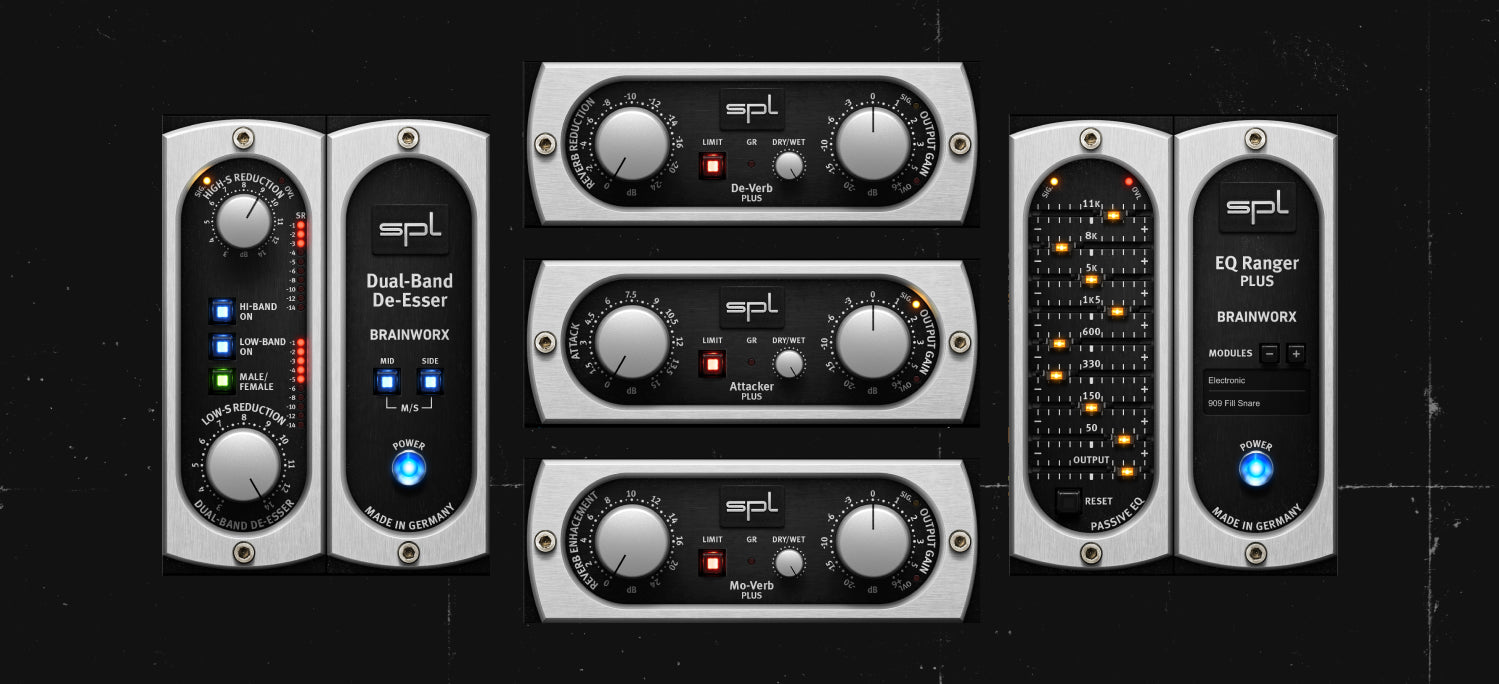
Previously, each SPL module had its own distinct interface style, which made the lineup feel disjointed despite sharing the same brand heritage. The redesign brings them into visual alignment — they now look like they belong in the same hardware rack. Functionality remains unchanged, but the consistent UI means engineers who chain multiple SPL modules together can navigate between them faster, reducing the cognitive load during mixing sessions.
For studios that have built their workflow around the SPL module ecosystem, this is a significant usability upgrade. The Transient Designer Plus and Attacker Plus, for example, are often used together on drum buses — having them share the same visual framework means faster parameter identification and fewer mistakes during time-critical sessions. The De-Verb Plus and Mo-Verb Plus pairing similarly benefits from the consistent layout when used as complementary tools in vocal processing chains.
bx_2098 EQ — Dual Layout and Improved Metering
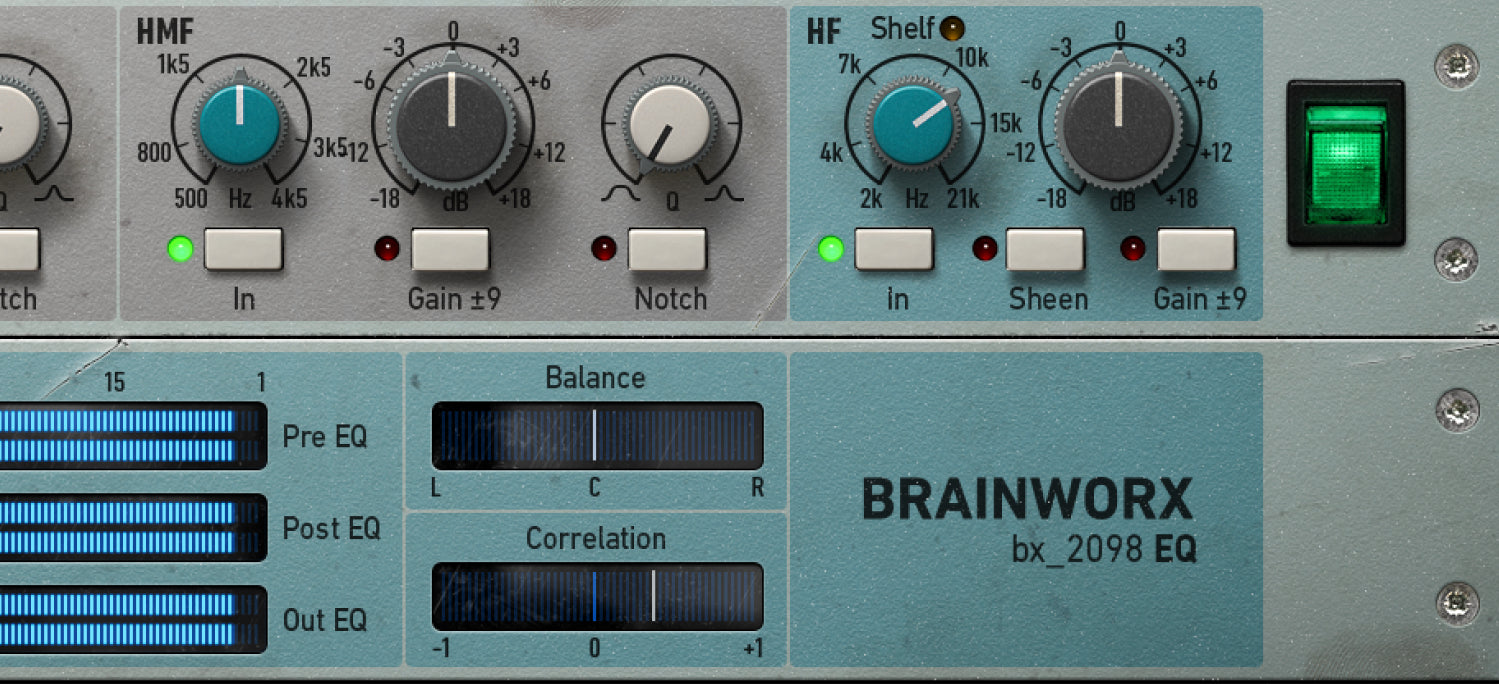
Among individual plugin updates, the bx_2098 EQ stands out. Already regarded as one of the most faithful emulations of the Neve 2098 console EQ, the bx_2098 EQ now offers two switchable UI layouts. Users can toggle between different visual presentations depending on their preference — whether they want a more compact view or a detailed layout with larger controls.
The metering display has also been updated for improved clarity. More precise visual feedback during subtle EQ adjustments means you can trust what you see on screen, which matters when you’re shaping frequencies in the critical midrange or applying gentle high-shelf boosts. The warm sonic character that made the original hardware legendary remains untouched — only the software experience has been elevated.
The dual layout option is particularly welcome for engineers who use the bx_2098 EQ both in tracking and mixing contexts. During tracking, a compact view keeps the interface unobtrusive while you focus on the performer. In mixing, the detailed view gives you full visual control over every band and parameter. Having both options in a single plugin eliminates the need to choose between convenience and precision — you can switch on the fly based on the task at hand.
Purple Audio MC 77, bx_limiter, and More Individual Updates
While all 64 plugins received the universal improvements, several also got targeted individual attention:
- Purple Audio MC 77 — A new three-step collapsible layout lets you minimize the interface when you don’t need full parameter access, saving precious screen space in busy sessions.
- bx_limiter — Interface standardization, bug fixes, and performance refinements bring this workhorse limiter up to the new portfolio standard.
- bx_oberhausen & Knif Audio Knifonium — NKS format support has been restored alongside performance improvements, which is great news for producers using Native Instruments controllers with these synthesizers.
Performance Optimizations and Usage Data Tracking
Under the hood, Plugin Alliance applied codebase-level performance refinements across the entire 64-plugin portfolio. While they haven’t released specific benchmarks, the improvements should be noticeable in large sessions running multiple Brainworx plugins simultaneously — think reduced CPU spikes during playback, faster plugin initialization times, and smoother parameter automation. For producers working with dense arrangements that stack multiple Brainworx EQs, compressors, and limiters across dozens of tracks, even marginal CPU efficiency gains compound into meaningful headroom.
The new optional usage data tracking system operates on an opt-in basis only. It collects anonymized data about how plugins are used, feeding that information back into development priorities. If you’d rather not participate, you can simply leave it off — no pressure, no hidden data collection.
Why This Update Matters
Let’s be honest — scalable UI and unified toolbars have been standard features from competitors like FabFilter and Valhalla DSP for years. In that sense, this update is Plugin Alliance catching up. But the significance lies in scale and generosity. Updating 64 plugins simultaneously and making every improvement free for existing customers is rare in the audio plugin industry, where even minor version bumps sometimes come with upgrade fees.
Plugin Alliance has stated that this is “not a one-time update” but rather the beginning of an ongoing improvement cycle throughout 2026. The standardized UI behavior, improved code foundations, and scalability infrastructure laid down now will serve as the groundwork for future developments. This kind of portfolio-wide modernization effort signals a company investing in long-term platform health rather than just chasing new product launches.
For users of Plugin Alliance’s subscription model, these improvements apply automatically to every plugin in the subscription catalog. And for those who purchased individual plugins, the updates arrive at no additional cost — a refreshing approach in an industry where paid upgrades are the norm. The message from Plugin Alliance is clear: they’re reinvesting in their existing product lineup rather than solely focusing on new releases.
All updates are available through the Plugin Alliance Installation Manager and are free for every registered license holder. If you own any Brainworx plugin, open your Installation Manager now and grab the latest versions — the improvements are substantial and the price is unbeatable.
Looking to optimize your plugin chain or mixing workflow? Connect with Sean Kim — 28+ years of audio engineering experience at your service.
Get weekly AI, music, and tech trends delivered to your inbox.