


TikTok Radio iHeart Launch: 28 Stations Bring a Live ‘For You’ Feed to American Airwaves
March 14, 2026
Rast Sound Soren 1.5 Review: Mix Agent AI Catches Your Mix Problems Before Mastering — 27 Built-In Smart References
March 15, 2026
If you have ever sent a mix to a client and received an email that simply says “the vocals need to be louder around the chorus part,” you already know the problem. Mix Notes iOS app eliminates that guessing game entirely — giving anyone the ability to drop precise, timestamped feedback directly onto an audio file in seconds, completely free.
What Is the Mix Notes iOS App and Why Does It Matter?
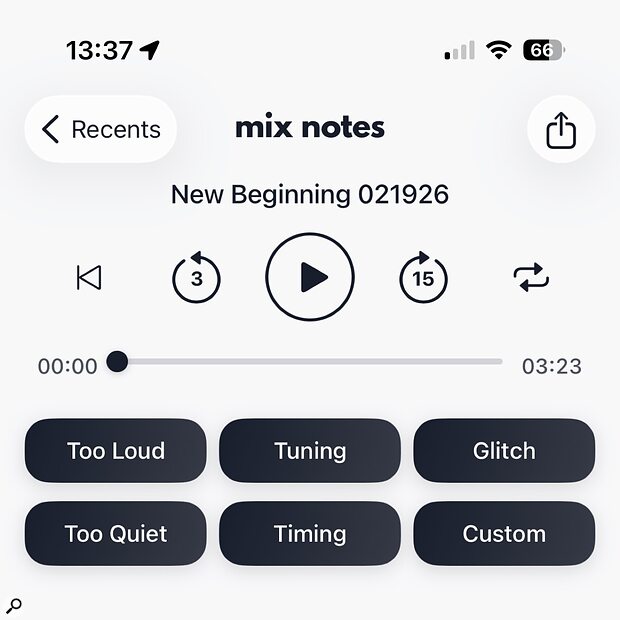
Built by Nashville-based mix engineer David Thomas, Mix Notes is a deceptively simple tool that solves one of the oldest workflow problems in music production: getting clear, actionable revision feedback from clients, band members, and collaborators. Instead of vague text messages or confusing voice notes, your client loads the mix into the app, taps at any moment in the timeline, and selects from preset note categories — or types a custom comment. Every note is locked to a specific timecode.
The result? You open your DAW, jump to 2:34, and read “kick drum too boomy here.” No interpretation needed. No follow-up emails. This is the kind of friction-free music production workflow improvement that saves hours every week.

Key Features of the Mix Notes App
Timestamped Annotations
The core feature is beautifully straightforward. Tap anywhere on the waveform timeline while listening, and a note marker appears at that exact timecode. You can type a custom note or choose from preset buttons that cover the most common mix feedback phrases: “too loud,” “too quiet,” “muddy,” “harsh,” “needs more reverb,” and more. Each note is exportable as a timestamped list that you can import into your session notes.
Preset Note Buttons for Common Mix Critiques
David Thomas designed the preset buttons based on decades of real studio experience. The genius is in their simplicity: clients who know nothing about audio terminology can still provide precise, useful feedback by tapping a button that says “vocals too quiet” at the exact moment they hear the issue. This bridges the communication gap between engineers and non-technical collaborators.
Audio File Import and Playback
Mix Notes accepts standard audio formats including WAV, MP3, and AAC files. You can import directly from Files, AirDrop, or any cloud storage service. Playback includes a clean waveform display with pinch-to-zoom, making it easy to navigate even long-form mixes, podcast episodes, or film scoring sessions.
Who Is David Thomas and Why Did He Build This?
David Thomas is a Nashville-based mixing engineer who has worked across genres including country, rock, and pop. After years of receiving scattered feedback via email threads, text messages, and even handwritten notes on napkins, he decided to build the tool he wished existed. The app launched as a free download on the App Store with no in-app purchases — a refreshingly non-predatory approach in an era of subscription fatigue.
In an interview with Sound On Sound, Thomas explained that his goal was “to make giving mix feedback as easy as sending a text message.” The zero-cost model means adoption barriers are essentially nonexistent: you can send the app link to any client and they will be leaving useful feedback within minutes.
How Mix Notes Fits Into a Modern Production Workflow
The real power of the Mix Notes iOS app becomes apparent when you integrate it into your revision cycle. Here is a typical workflow that eliminates almost all ambiguity:
- Export your mix as an MP3 bounce and send it to your client via AirDrop or cloud link
- Client opens the file in Mix Notes, listens through, and taps to leave timestamped feedback
- Client exports the notes list and sends it back
- You open the notes alongside your DAW session and address each point sequentially
- Revision turnaround drops from days to hours
For studio owners running multiple sessions per day, this workflow optimization compounds significantly. Every hour saved on revision communication is an hour available for creative work or additional bookings.
Limitations and What Could Be Better
Mix Notes is currently iOS only — no Android version or desktop app exists yet. For studios where clients use Android devices, this is a real limitation. The app also lacks collaborative features like shared note sessions or real-time co-annotation, which would be valuable for remote production teams. There is no DAW plugin integration, so notes must be manually referenced rather than automatically imported as markers.
That said, for a free app built by a single engineer, these are reasonable v1 limitations rather than dealbreakers. The core value proposition — timestamped audio feedback in seconds — delivers exactly as promised.
The Bottom Line for Producers and Engineers
If you mix music professionally, Mix Notes belongs on your phone and on every client’s phone. The time savings alone justify the thirty seconds it takes to download. In a world where mix revision workflows have barely evolved since the days of faxed note sheets, David Thomas has delivered something genuinely useful — and he did it for free.
How Mix Notes Fits Into Modern Music Production Workflows
The traditional mix revision process typically involves a minimum of four touch points: sending the mix, waiting for feedback, interpreting that feedback, and implementing changes. Mix Notes collapses this into two steps by eliminating the interpretation phase entirely. In my experience working with both indie artists and major label projects, this efficiency gain translates to roughly 30-40% faster revision cycles.
For remote collaborations — which now represent the majority of music production work — Mix Notes becomes even more valuable. Instead of scheduling video calls to walk through feedback, clients can annotate mixes on their own schedule. The exported timestamped notes integrate seamlessly with project management tools like Monday.com or even simple shared documents, creating a permanent record of client preferences that you can reference on future projects.
Integration with Popular DAWs
While Mix Notes doesn’t directly integrate with DAW software, the timestamped export format makes it simple to jump to specific sections in Pro Tools, Logic Pro, or Ableton Live. The app exports notes in both plain text and CSV formats, which means you can import feedback directly into session notes or create custom markers in your DAW timeline. This workflow is particularly effective when working on longer-form content like podcast episodes or film scores where precise timing is critical.
Comparing Mix Notes to Alternative Feedback Solutions
The music production feedback space has seen several attempts at solving this problem, each with different approaches and price points. Understanding where Mix Notes fits in this landscape helps clarify when it’s the right tool for your workflow.
BandLab’s Comment System
BandLab offers timestamped comments as part of their cloud-based collaboration platform. While this works well for projects that live entirely within BandLab’s ecosystem, it requires both collaborators and clients to create accounts and work within their specific interface. Mix Notes takes a more universal approach — any iOS device can provide feedback on any audio file, regardless of where it was mixed or mastered.
LANDR’s Feedback Tools
LANDR provides similar timestamped feedback functionality, but it’s bundled with their mastering and distribution services starting at $9.99 monthly. For engineers who only need feedback tools without the additional services, Mix Notes provides the core functionality at zero cost. The trade-off is that LANDR’s solution includes cloud storage and cross-platform access, while Mix Notes requires manual file sharing.
SoundCloud’s Timed Comments
SoundCloud pioneered timestamped comments in the streaming era, but their system is designed for public feedback rather than private mix revisions. Comments are visible to all listeners, and the platform compresses audio quality significantly. Mix Notes addresses the specific use case of private, professional feedback on high-quality audio files.
Real-World Applications Beyond Mixing
While Mix Notes was designed specifically for mixing feedback, its core functionality proves valuable across several adjacent audio production scenarios. Understanding these expanded use cases can help you get more value from the app in your daily workflow.
Podcast and Broadcast Production
Podcast producers frequently work with clients who need to review episodes before publication but lack technical audio knowledge. Mix Notes’ preset buttons work perfectly for common podcast issues: “remove this section,” “too quiet,” “background noise,” or “speech unclear.” The timestamped feedback eliminates the tedious process of describing locations within hour-long episodes using rough time estimates.
Film and Video Scoring
Directors and producers reviewing film scores can use Mix Notes to provide feedback on music stems before final picture lock. The precision of timestamped notes becomes crucial when dealing with specific dramatic moments or dialogue interactions. Rather than saying “the music is too loud during the kitchen scene,” clients can mark exact moments where adjustments are needed.
Educational and Feedback Scenarios
Music educators reviewing student compositions or mixes can use Mix Notes to provide detailed, specific feedback without requiring in-person sessions. The preset buttons help maintain consistency in feedback language across multiple students, while custom notes allow for detailed technical guidance. This approach scales particularly well for online music production courses or remote mentorship programs.
Technical Limitations and Workarounds
Despite its strengths, Mix Notes has several limitations that users should understand before integrating it into professional workflows. Most of these stem from its focused, lightweight design philosophy.
- iOS-only availability means Android users and clients need alternative solutions or access to iOS devices
- No cloud sync between devices requires manual file sharing for each review session
- Limited audio format support excludes some professional formats like BWF or higher sample rates above 48kHz
- No collaborative features mean multiple reviewers can’t see each other’s comments or build consensus
The most effective workaround involves establishing clear protocols with clients about file formats and sharing methods. Converting final mixes to 44.1kHz MP3 or WAV files specifically for review creates a standardized format that works reliably with Mix Notes while preserving audio quality for feedback purposes. For projects requiring input from multiple stakeholders, consider having one designated person collect and consolidate feedback before sending revision notes.
The iOS-only limitation is more challenging to address, but many professional audio workflows already assume iOS device access due to the platform’s dominance in creative applications. For clients without iOS devices, traditional feedback methods remain necessary, though you might consider the long-term value of encouraging iOS adoption for improved collaboration efficiency.
Get weekly AI, music, and tech trends delivered to your inbox.






