


Samsung Galaxy Z Fold7 Full Preview: 4.2mm Thin, 200MP Camera, and Galaxy AI — Everything Before Unpacked
July 4, 2025
iZotope RX 11 De-Hum Deep Dive: How Dynamic Adaptive Mode’s 1024 Notch Filters Changed My Post-Production Workflow
July 7, 2025
Every brilliant AI response you’ve ever generated has one fatal flaw: it disappears the moment you close the chat window. Microsoft Copilot Pages fixes this problem entirely, and the implications for team collaboration are bigger than most people realize. Announced as part of the Wave 2 update in September 2024 and rolled out globally by May 2025, Microsoft Copilot Pages introduces a persistent, multiplayer canvas where AI-generated content becomes a living document that entire teams can build upon together.
What Microsoft Copilot Pages Actually Is (And Why It Matters)
At its core, Microsoft Copilot Pages solves a deceptively simple problem. When you ask an AI assistant a question, you get an answer. But that answer lives inside a chat thread that’s difficult to share, impossible to collaboratively edit, and easy to lose. Copilot Pages transforms these ephemeral responses into durable, editable, shareable documents with a single click.
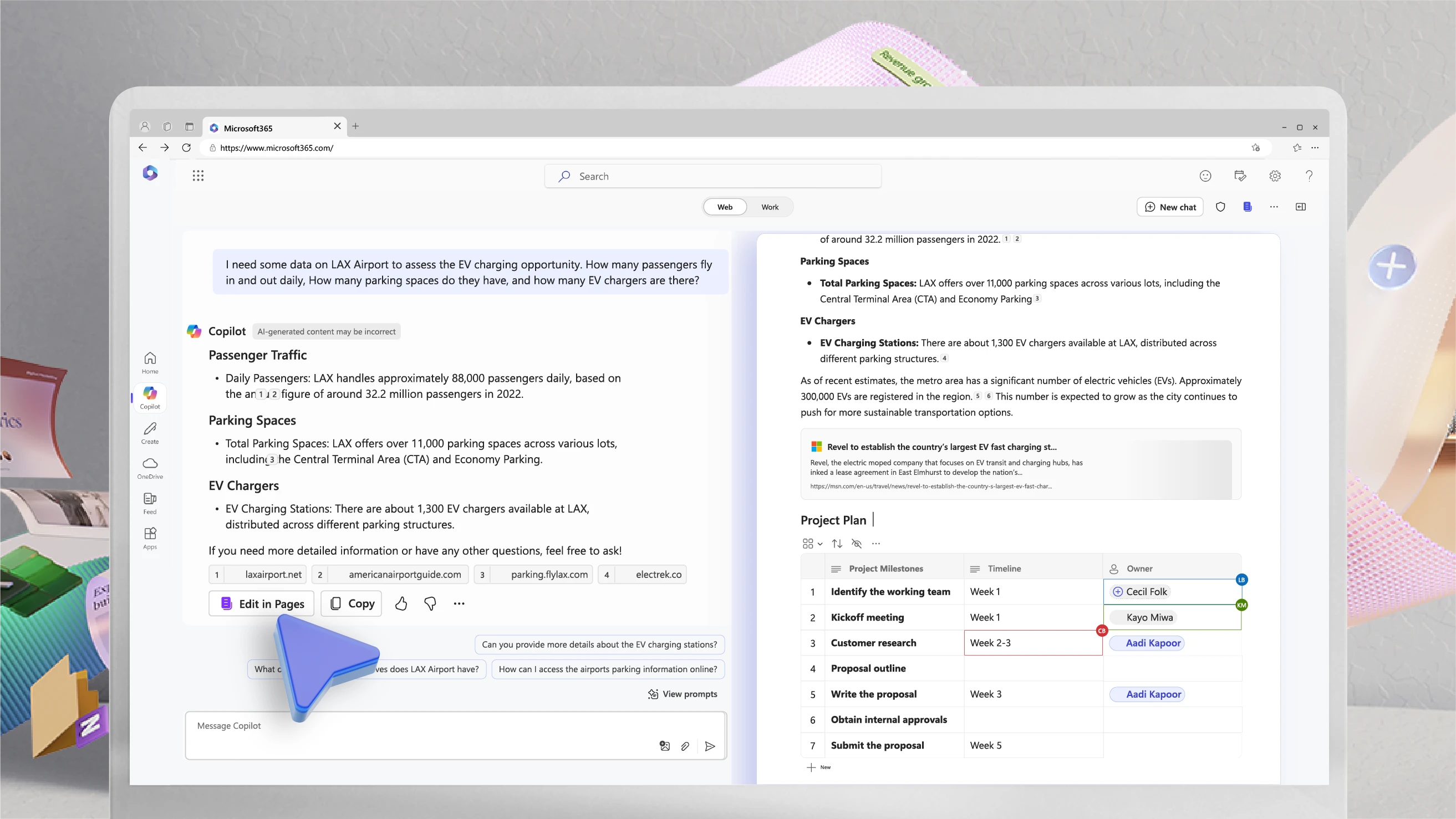
CEO Satya Nadella and VP Jared Spataro introduced Pages as the centerpiece of the Wave 2 announcement, positioning it not as a minor feature upgrade but as a fundamental shift in how people interact with AI at work. The concept is straightforward: you chat with Copilot, get a response worth keeping, click “Edit in Pages,” and suddenly that response becomes a formatted document complete with link previews, code blocks, and rich text that anyone on your team can access and modify.
What makes this genuinely different from simply copying AI output into Google Docs or Notion is the side-by-side architecture. When you open a Page, the Copilot Chat panel remains active alongside your document. You can continue asking the AI to refine, expand, or restructure content while simultaneously editing the document yourself. It’s the difference between having an assistant who hands you a finished memo and having one who sits beside you as you work through it together.
The Multiplayer Experience: AI Collaboration Beyond Solo Use
The term “multiplayer” isn’t marketing fluff here. According to the official Microsoft Tech Community announcement, Copilot Pages supports real-time co-authoring where multiple team members can simultaneously edit a document while each independently directing the AI. Think Google Docs-style collaboration, but with an AI participant that every collaborator can instruct.
The feature set reflects serious thought about enterprise collaboration needs. Dynamic tables with sorting and filtering let teams organize data without switching to Excel. @mentions pull specific colleagues into the conversation. A comment and suggestion system provides structured feedback mechanisms. Version history tracking ensures nothing is permanently lost. And granular access controls with configurable permissions mean you can share a Page with your entire department or restrict it to three people.
- Real-time co-authoring: Multiple users editing simultaneously with AI assistance available to each person
- Dynamic tables: Sortable, filterable data structures created and maintained within the document
- @mentions and comments: Tag teammates, leave feedback, create threaded discussions on specific sections
- Version history: Full change tracking with the ability to restore previous versions
- Granular permissions: Configure read/edit access per user, with time-limited sharing links for external collaboration
- Audit trails: Complete activity logs for compliance and security requirements
Sharing and Integration Across Microsoft 365
One of the smartest design decisions in Microsoft Copilot Pages is how deeply it integrates with the existing Microsoft 365 ecosystem. Pages can be shared directly through Teams channels or Outlook emails. The “copy-as-component” feature lets you embed a live Page snippet inside other Microsoft 365 applications, meaning changes to the source Page automatically propagate everywhere the component appears.
The integration with Microsoft Loop’s editing environment is particularly noteworthy. For organizations already using Loop for collaborative workspaces, Pages extends that paradigm by adding AI as an active participant rather than just a passive tool. This creates a natural workflow where brainstorming happens in Copilot Chat, structured content creation happens in Pages, and distribution happens through Teams and Outlook, all without leaving the Microsoft ecosystem.
Real-World Validation: How Microsoft Uses Its Own Tool
The strongest argument for any productivity tool is evidence that it actually works in practice. Microsoft published an Inside Track case study in May 2025 documenting how the company’s own employees use Copilot Pages for real-time multi-employee collaboration.
The case study reveals that Microsoft teams are using Pages extensively in project planning phases, where multiple stakeholders simultaneously contribute ideas, let the AI organize and structure them, and iterate on the results in real time. The report specifically addresses AI security practices, demonstrating that even with sensitive corporate data, the tool operates within Microsoft’s existing security framework. This kind of eat-your-own-cooking validation carries more weight than any third-party benchmark, especially for enterprise buyers evaluating whether the tool can handle their security requirements.

The Rollout Timeline: From Premium to Universal
Microsoft Copilot Pages followed a deliberate expansion strategy. The initial rollout in September 2024 targeted M365 Copilot licensed users, giving Microsoft a controlled environment to stabilize the feature with paying enterprise customers. The multiplayer collaboration features required M365 Copilot licenses during this phase.
Then came the pivotal expansion. According to Microsoft’s May 2025 release notes, Pages became available worldwide for all signed-in users on both desktop and mobile applications. This expansion to over 400 million free Copilot users with Entra accounts signals that Microsoft views collaborative AI workspaces not as a premium upsell but as foundational infrastructure for the future of work.
The timing is strategic. By making Pages widely available alongside the updated M365 Copilot app and Copilot Notebooks, Microsoft is building an integrated AI productivity suite where each component reinforces the others. Pages handles collaborative document creation, Notebooks handle personal research and ideation, and the Copilot app ties everything together with a unified AI interface.
How Copilot Pages Compares to the Competition
The AI-enhanced collaboration space is getting crowded. Notion AI offers database-connected documents with AI generation capabilities. Google is weaving Gemini throughout Workspace with AI features in Docs, Sheets, and Slides. Anthropic’s Claude has Artifacts for creating interactive content. How does Copilot Pages stack up?
The honest answer is that each tool excels in a different context. Copilot Pages’ decisive advantage is ecosystem integration. If your organization runs on Microsoft 365, adding Pages requires zero new tools, zero new logins, and zero change management. The AI collaboration happens inside the apps your team already uses every day. For enterprise environments where adding new SaaS tools requires months of security review and procurement, this is a massive practical advantage.
- Microsoft Copilot Pages: Best for organizations already in the M365 ecosystem. Strongest enterprise security, deepest integration with existing Microsoft tools
- Notion AI: Best for flexible, database-driven workspaces. Excellent for startups and small teams who want an all-in-one workspace
- Google Gemini + Docs: Best for Google Workspace organizations. Strong search integration and cross-platform availability
- Claude Artifacts: Best for code, visualization, and interactive content creation. More focused on individual creative work than team collaboration
Practical Use Cases Where Copilot Pages Shines
Understanding features is one thing. Seeing how they translate into actual workflow improvements is another. Here are the scenarios where Copilot Pages delivers the most value.
Project Kickoff and Planning
A project manager chats with Copilot about scope, timeline, risks, and resource requirements. The structured output goes into a Page. Team leads join the Page, each adding domain-specific details while the AI refines the overall structure. By the end of a single session, you have a comprehensive project plan that would traditionally take multiple meetings and several rounds of document revision.
Marketing Campaign Development
The marketing team brainstorms campaign concepts with AI, then moves the best ideas to Pages. Copywriters, designers, and strategists simultaneously work on messaging for different channels (email, social, blog) within a single canvas. The AI helps maintain tone consistency across all channels while suggesting variations optimized for each platform.
Technical Documentation and Incident Response
Engineering teams use Pages for technical specifications, API documentation, and incident reports. The AI drafts initial content based on specifications, and subject matter experts review and refine. Time-limited sharing links and audit trails make this suitable for security-sensitive documentation that needs to be shared with external partners temporarily.
Security and Governance: Enterprise-Ready by Design
For enterprise adoption, security isn’t a feature — it’s a prerequisite. Copilot Pages inherits the security infrastructure of the broader Microsoft 365 platform. Entra ID authentication, granular access controls, time-limited sharing, and comprehensive audit trails address the most common concerns that IT departments raise when evaluating AI collaboration tools.
The Microsoft Inside Track case study specifically validates these security practices in production. When Microsoft’s own teams, working with their own sensitive corporate data, confirm that the tool meets their security standards, it provides a level of assurance that’s hard to replicate with independent testing alone.
What This Means for the Future of Work
Microsoft Copilot Pages represents a broader industry shift that deserves attention. We’re moving from an era where AI tools are question-answer machines to one where they’re persistent collaborators embedded in our daily workflows. The distinction matters enormously. A chatbot you consult occasionally is useful. An AI teammate that maintains context across an entire project lifecycle is transformative.
The fact that Microsoft has made this available to 400+ million users for free tells us something about where the market is heading. Collaborative AI workspaces are becoming baseline infrastructure, not premium differentiators. Combined with the other Wave 2 features — Python in Excel, Copilot Agents, and the unified Copilot app — Microsoft 365 is evolving from an office suite into an AI-native work platform.
Whether Copilot Pages becomes the dominant standard for AI collaboration or simply one strong option among many, the trajectory is clear: the future of knowledge work involves AI as a persistent, integrated team member. Organizations that start building these workflows now will have a significant advantage as the tools continue to mature. For teams already embedded in the Microsoft ecosystem, Copilot Pages removes every excuse not to start experimenting with AI-powered collaboration today.
Looking to build AI-powered automation or integrate collaborative AI tools into your workflow? Let’s find the right solution for your team.
Get weekly AI, music, and tech trends delivered to your inbox.






