


Intel Lunar Lake Laptop Roundup: 5 Efficiency Champions That Finally Make x86 Competitive
May 28, 2025
MLCommons AILuminate AI Safety Benchmark: The First Industry Standard Grading AI Models Across 12 Hazard Categories
May 29, 2025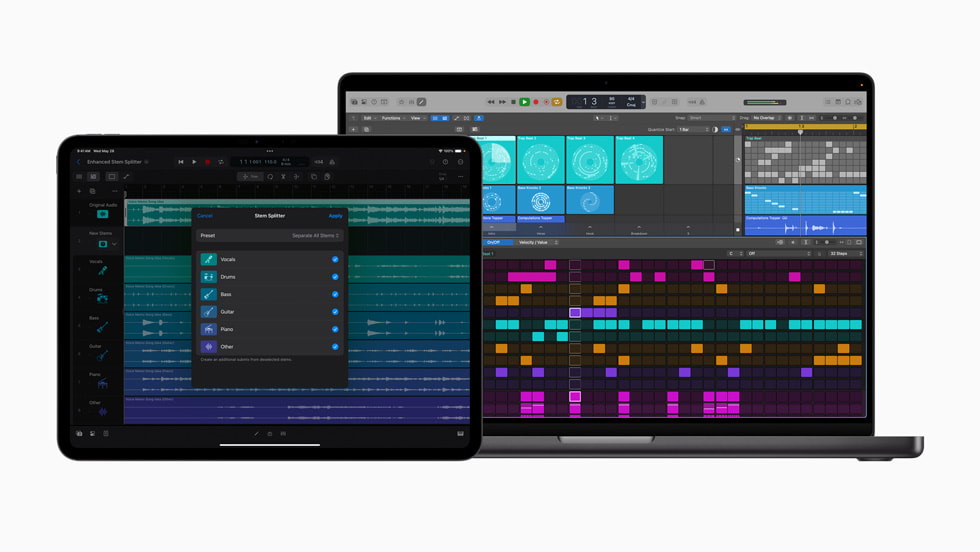
Finally — after years of incremental updates that left many producers wondering if Apple had quietly put Logic Pro on autopilot, the Logic Pro 11.2 update drops a feature that genuinely changes how I think about my recording sessions. Flashback Capture alone would have been enough to make this release noteworthy. But Apple went further — a dramatically improved Stem Splitter, three wildly different Sound Packs, and the first meaningful integration of Apple Intelligence into a professional DAW. Let me walk you through everything that matters.
Flashback Capture: Never Lose an Idea Again
Every producer has lived this nightmare: you’re noodling on your MIDI controller, stumble into an incredible progression, and realize you never hit record. That moment of creative gold — gone forever. The Logic Pro 11.2 update solves this with Flashback Capture, a feature that continuously buffers up to 3 minutes of MIDI and audio input in the background.
When inspiration strikes and you weren’t recording, just press Shift+R (or navigate to Edit > Flashback Capture), and Logic Pro retrieves your most recent performance. The captured region appears on your timeline exactly as if you’d been recording all along. According to Apple’s official announcement, the buffer captures everything routed through your audio and MIDI inputs, including software instrument performances.
What makes this implementation stand out is its seamlessness. There’s no configuration required — Flashback Capture runs automatically once you enable it. The 3-minute buffer is generous enough for most improvisation sessions, and the captured audio maintains full quality with no degradation. For session musicians and songwriters who work in a free-form exploratory style, this is genuinely transformative.
It’s worth noting that similar concepts exist in other DAWs — Ableton Live has had Capture MIDI for years, and Cubase offers retrospective recording. But Apple’s implementation handles both MIDI and audio simultaneously, which puts it a step ahead for tracking live instruments.
Stem Splitter: From 4 Stems to 6 — And It Actually Matters
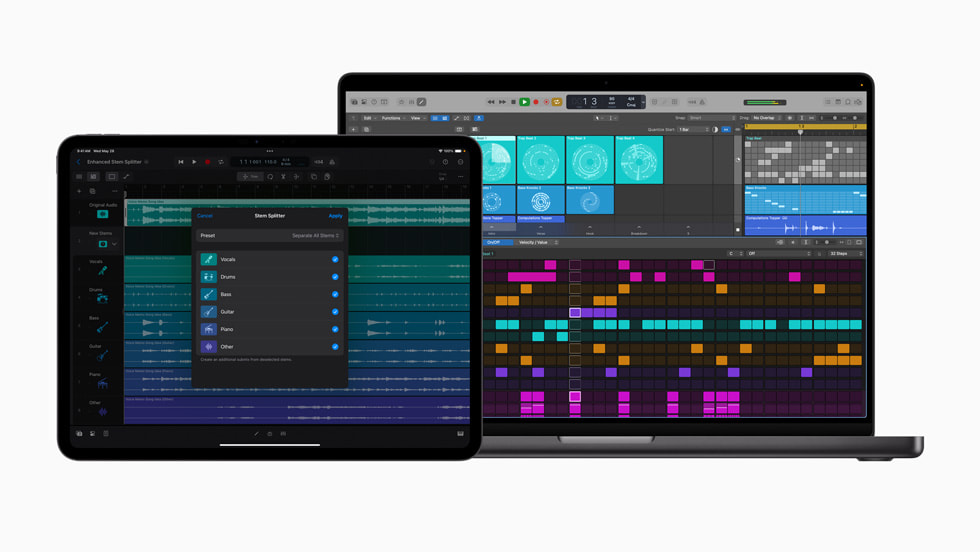
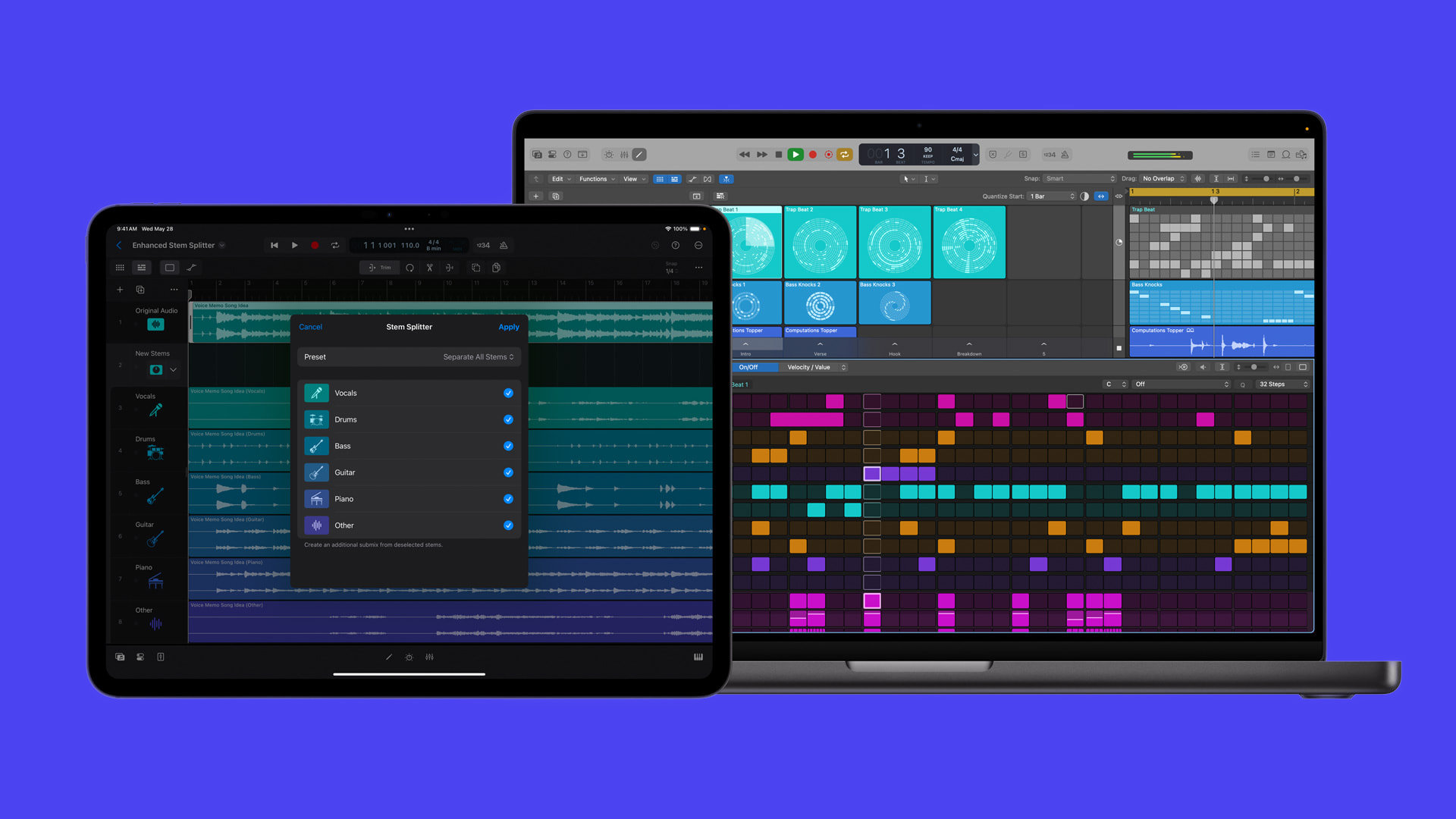
When Apple introduced Stem Splitter in Logic Pro, it could separate audio into four components: vocals, drums, bass, and other. Useful, but limited. The Logic Pro 11.2 update expands this to six stems — adding dedicated guitar and piano separation to the existing four.
This isn’t just a numerical improvement. Guitar and piano are among the hardest instruments to isolate because they occupy overlapping frequency ranges with vocals and other harmonic content. The fact that Apple’s machine learning model can now distinguish these instruments reliably enough to ship the feature speaks to significant advances in their audio separation algorithm.
Beyond the additional stems, Apple has introduced submix presets that let you quickly create common groupings — isolate just the rhythm section, pull out everything except vocals, or create an instrumental-only mix. These presets work as non-destructive processing, meaning you can always return to the original audio. For remix work, sample creation, and educational purposes (learning parts from recordings), the enhanced Stem Splitter is a serious productivity tool.
Three New Sound Packs: Something for Everyone
Apple has released three distinct Sound Packs with the Logic Pro 11.2 update, each targeting a very different audience. This is a smart strategy — rather than one generic expansion, producers get focused content for their specific genre.
Dancefloor Rush
Aimed squarely at electronic music producers, Dancefloor Rush delivers over 400 loops and samples rooted in drum and bass, breakbeat, and high-energy dance music. The pack includes full drum loops, one-shots, bass patches, and synth textures designed for tempo ranges typical of D&B (170-180 BPM). For producers working in electronic genres who’ve relied on third-party sample packs, having Apple-curated, royalty-free content directly inside Logic Pro is a welcome addition.
Magnetic Imperfections
Magnetic Imperfections takes a completely different approach, focusing on the warm, saturated character of analog tape recordings. This pack includes loops, textures, and instrument patches that emulate tape saturation, wow and flutter, and the harmonic coloring that made vintage recordings feel alive. In an era where pristine digital production dominates, having quick access to authentic analog character is valuable for lo-fi, indie, and experimental producers.
Tosin Abasi
Perhaps the most exciting Sound Pack for guitarists is the Tosin Abasi collection. Abasi — the virtuoso behind Animals as Leaders and one of the most technically innovative guitarists of the past two decades — has curated a pack focused on progressive metal and modern guitar tones. The collection features amp models, effect chains, and patches that capture his signature sound: clean-to-heavy dynamics, extended-range guitar textures, and rhythmically complex patterns. For guitarists working in progressive metal, djent, or modern fusion, this is essentially a masterclass in tone design packaged as a Logic Pro expansion.
Apple Intelligence Comes to Music Production
The Logic Pro 11.2 update marks the first time Apple Intelligence Writing Tools have been integrated into a professional music application. Specifically, the Writing Tools are available within Logic Pro’s Notepad feature, where producers can now use AI-powered text assistance for lyrics, chord progressions, session notes, and creative brainstorming.
The integration includes access to ChatGPT through Apple Intelligence, meaning you can ask for lyric suggestions, rhyme schemes, or even music theory explanations without leaving your session. While this won’t replace dedicated songwriting tools, having AI assistance built directly into the DAW reduces context-switching and keeps the creative flow intact.
This feels like a preview of where Apple is heading with AI in creative applications. The implementation is deliberately conservative — text-based tools in a notepad rather than AI-generated audio — which suggests Apple is taking a measured approach to AI in music production. As reported by Sound On Sound, the music production community has been cautiously watching how major DAWs integrate AI, and Apple’s text-first approach avoids the ethical concerns around AI-generated music while still providing genuine utility.
Workflow Improvements That Add Up
Beyond the headline features, the Logic Pro 11.2 update includes several workflow refinements that experienced users will appreciate:
- Search & Select: A new search function that lets you find and select specific regions, tracks, or elements across large projects. For anyone working with sessions containing hundreds of tracks, this is a significant time-saver.
- Long Faders: Extended fader resolution in the mixer provides finer gain control, particularly useful for precise volume automation and mixing at low levels.
- Saveable Undo History: Your undo history now persists when you save and close a project. Reopen a session days later and your complete edit history remains intact — a feature that has been requested by the Logic Pro community for years.
- Dolby Atmos Improvements: Enhanced spatial audio tools and workflow refinements for immersive audio production, continuing Apple’s push toward Atmos as a standard format for music.
Each of these improvements addresses real friction points in daily production work. Individually they’re incremental; collectively they represent a meaningful upgrade to the Logic Pro experience.
Pricing, Requirements, and Availability
The Logic Pro 11.2 update is free for existing Logic Pro users. New users can purchase Logic Pro for $199.99 — still one of the best values in professional music production software. The update requires macOS Sequoia 15.4 or later and an Apple Silicon Mac (M1 or newer). Intel-based Macs are no longer supported for new Logic Pro updates, which is consistent with Apple’s broader transition away from Intel hardware.
For iPad users, Logic Pro for iPad 2.2 brings many of the same features, including Flashback Capture and the new Sound Packs, continuing Apple’s commitment to feature parity between platforms.
My Take: A Producer’s Perspective
After 28 years in music production and audio engineering, I’ve developed a healthy skepticism toward “game-changing” updates. Most DAW updates are iterative — useful but rarely transformative. The Logic Pro 11.2 update is different, and it comes down to one word: Flashback Capture.
In my studio work, some of the best performances happen when musicians don’t know they’re being recorded. The pressure of the red light disappears, and pure musical instinct takes over. Flashback Capture essentially makes every moment in the studio a potential recording opportunity. I’ve already lost count of how many times this feature would have saved a perfect take that vanished because someone forgot to arm the track.
The expanded Stem Splitter is also genuinely useful in my workflow — not for replacing proper multi-track recordings, but for quick reference mixes, learning parts from commercial releases, and preparing stems for remix requests when the original multitracks aren’t available.
If you’re a Logic Pro user on Apple Silicon, there’s no reason not to update. If you’ve been considering switching DAWs, the Logic Pro 11.2 update makes an already compelling package even stronger. At $199.99 with no subscription, it remains the best value proposition in professional music production.
Thinking about upgrading your studio workflow or optimizing your production setup? Our team has helped studios worldwide integrate the latest tools into their creative process.
Get weekly AI, music, and tech trends delivered to your inbox.






