Nuendo 15 Launches March 25: Folder Group Tracks, Analyzer Track, and 5 Game-Changing Features for Post Engineers
March 24, 2026
OpenClaw NVIDIA Explained: Why Jensen Huang Called This Agentic OS ‘the Most Important Software Release Ever’ at GTC 2026
March 24, 2026
How much time have you wasted downloading reference tracks from Spotify, converting them, and importing them into your DAW just to check your tonal balance? iZotope Tonal Balance Control 3 eliminates that entire workflow with a standalone desktop app that captures frequency profiles directly from Spotify, YouTube, Apple Music, and Tidal in real time. No downloads. No conversions. No copyright headaches.
After 28 years in audio engineering, I have tested more metering tools than I can count. But iZotope Tonal Balance Control 3 represents one of those rare updates that fundamentally changes how you work rather than just adding incremental features. Released in March 2026 at $129 new ($99 upgrade), it bundles a standalone reference capture app, a built-in hybrid EQ, and entirely new meters for vocal balance, dynamics, and stereo width. The question is whether all of this justifies the price tag when free alternatives exist. Let us break it down.
” alt=”iZotope Tonal Balance Control 3 plugin interface”/>
The Standalone Capture App: iZotope Tonal Balance Control 3’s Biggest Addition
Previous versions of Tonal Balance Control worked exclusively as a DAW plugin. To set reference targets, you either used iZotope’s free Audiolens app separately or relied on built-in genre target curves. iZotope Tonal Balance Control 3 solves this with a dedicated standalone desktop application that runs outside your DAW.
The app captures the frequency profile of any audio playing on your computer in real time. Play a Bruno Mars track on Spotify, and its tonal balance is instantly converted into a reference target you can use in the DAW plugin. According to MusicRadar, this feature works by analyzing the audio stream without downloading the actual songs, which neatly sidesteps copyright concerns that have always made reference track workflows legally murky.
YouTube tutorials, Apple Music Dolby Atmos tracks, Tidal Hi-Fi streams — the source does not matter. This is what separates it from the old Audiolens workflow. While Audiolens was free, it required switching between a separate app and your DAW, and the handoff was never seamless. Tonal Balance Control 3 unifies the capture app and DAW plugin into a single ecosystem with one-click transfer of captured profiles.
There is also DAW Target Capture, which lets you create reference profiles from tracks within your current session. If you have a reference mix on an auxiliary track, you can capture its profile without leaving the plugin. This is particularly useful for engineers who keep a curated folder of approved masters — you no longer need to import them as audio files.
Built-In Hybrid EQ: Metering and Correction in One Window
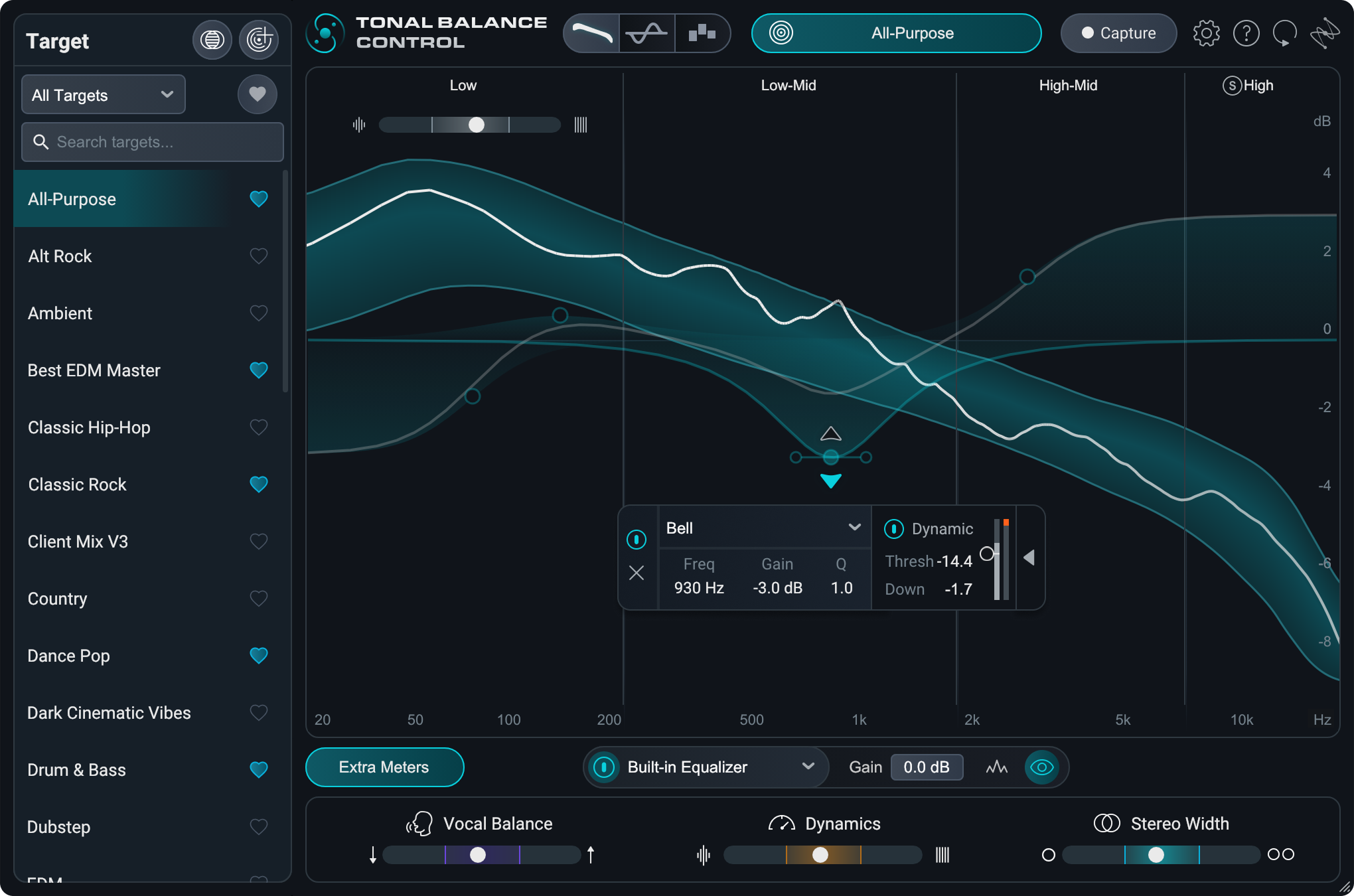
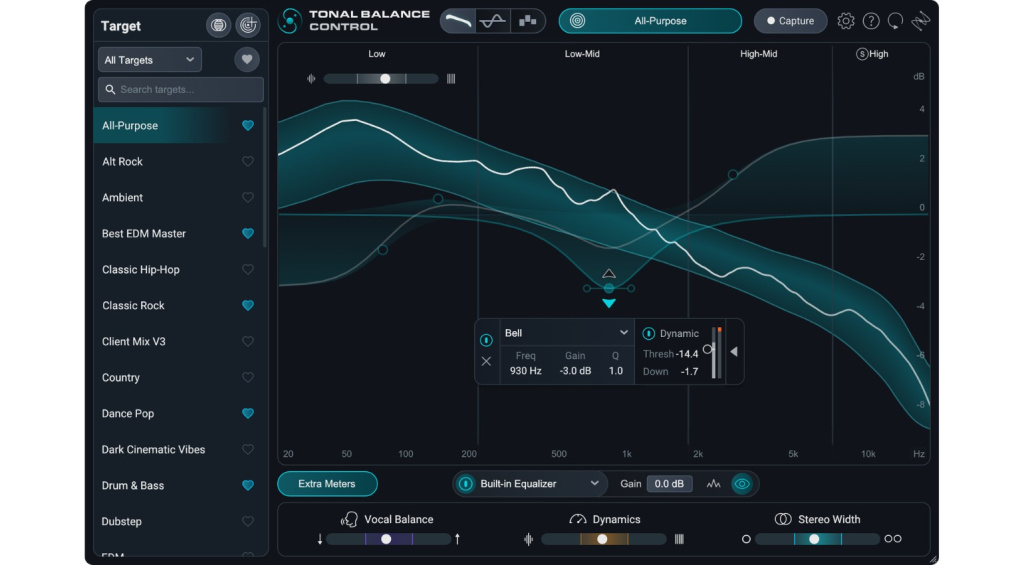
The most practical addition in iZotope Tonal Balance Control 3 is the built-in hybrid EQ. In previous versions, finding a tonal balance problem meant switching to Ozone or Neutron to fix it. Now you can drop EQ nodes directly onto the metering display and make corrections in real time while watching your mix align with the target curve.
The hybrid design supports both static and dynamic EQ nodes. Static nodes work like conventional parametric EQ — fixed boosts and cuts at specific frequencies. Dynamic nodes respond to signal level, engaging only when thresholds are crossed. For example, if you have intermittent mud buildup around 200Hz, a dynamic cut will only intervene when the problem actually occurs, leaving the rest of the frequency range untouched.
The real value here is workflow compression. You see the problem, fix it, and verify the fix — all without leaving one plugin window. iZotope’s official product page highlights this integrated workflow as the core selling point. And for Ozone and Neutron users, the deep integration remains intact: you can directly control parameters in those plugins from within Tonal Balance Control 3, reaching for more surgical tools only when the built-in EQ is not enough.
Leveled View and New Meters: Vocal Balance, Dynamics, and Stereo Width
Beyond frequency analysis, Tonal Balance Control 3 introduces three entirely new meters: Vocal Balance, Dynamics, and Stereo Width. These meters use stem separation technology to analyze each element independently within a full mix, which is a significant technical achievement.
The Vocal Balance meter compares vocal levels in your mix against a reference target. It shows whether your vocals are sitting too low in the mix or poking out too aggressively, giving you an objective benchmark instead of relying purely on ear fatigue-prone subjective judgment. For engineers who agonize over vocal levels — which is practically everyone — this is a confidence booster.
The Dynamics meter monitors overall dynamic range, and the new Low-End Crest Factor Meter specifically tracks dynamic range in bass frequencies. This is invaluable for catching over-compressed kick and bass elements or identifying unstable low-end peaks that could cause problems on consumer playback systems. Stereo Width analysis, meanwhile, helps ensure your mix translates well across different playback environments, from headphones to club systems.
The new Leveled View is an intuitive visualization mode designed for quick tonal comparison. While the retained Multiband View offers detailed frequency band analysis, Leveled View simplifies the comparison between your mix and the reference target into an immediately readable format. FutureMusic awarded the plugin their Power Award and praised Leveled View as one of the standout additions in their in-depth review.
” alt=”iZotope Tonal Balance Control 3 Leveled View and metering display”/>
Target Blender and Expanded Genre Library: Hybrid Referencing for Modern Production
Target Blender lets you combine two different reference targets to create a custom hybrid curve. Want the low-end energy of a hip-hop target with the bright top end of a pop target? Blend them. This is especially relevant in 2026, where genre boundaries are increasingly blurred. K-Pop, hyperpop, and cross-genre collaborations demand reference curves that do not fit neatly into single genre categories.
The genre target library has also been substantially expanded. Previous versions covered basics like pop, rock, EDM, and classical. iZotope Tonal Balance Control 3 adds dubstep, drum and bass, hyperpop, and other specialized genres. For producers working in bass music or experimental electronic styles, these purpose-built targets are far more useful than trying to approximate them with generic curves.
Combined with the standalone capture app and DAW Target Capture, you now have three distinct methods for creating reference targets: streaming capture, session track capture, and the built-in genre library. This flexibility means you can always find the right reference point regardless of your workflow or the genre you are working in.
Is $129 Worth It? Comparing iZotope Tonal Balance Control 3 to Free Alternatives
Let me be direct: iZotope’s free Audiolens app combined with the previous Tonal Balance Control 2 could handle basic referencing. So could free tools like SPAN, Voxengo Curve EQ, or MeldaProduction’s free metering plugins. Is $129 (or $99 for the upgrade) justified?
If you are already invested in the iZotope ecosystem — particularly Ozone and Neutron — the answer is a clear yes. The built-in EQ, integrated capture app, and deep plugin connectivity create a referencing hub that meaningfully reduces the meter-then-switch-then-fix-then-check cycle. The time savings compound across every session, and the new vocal, dynamics, and stereo meters add analysis capabilities that simply do not exist in free alternatives.
If you are using Tonal Balance Control purely as a standalone metering tool without Ozone or Neutron integration, the value proposition is more nuanced. The built-in EQ is useful but not a replacement for a full mastering EQ chain. Sound On Sound’s coverage noted that the product’s core value lies in its synergy with the broader iZotope ecosystem. For engineers who have already built effective metering chains from free or third-party tools, the capture feature alone may not justify the price.
There is another angle worth considering: the learning curve and accessibility factor. For less experienced engineers, Tonal Balance Control 3 serves as an educational tool as much as a metering one. Seeing exactly how a professionally mixed reference track differs from your work across frequency, dynamics, vocal balance, and stereo width provides concrete, actionable feedback that would otherwise require years of ear training to develop. The Leveled View mode makes these differences immediately visible even to someone who has never used a spectrum analyzer before. In a studio setting where assistant engineers are learning the craft, having this kind of visual feedback loop accelerates skill development significantly.
The competitive landscape also deserves attention. Products like iZotope Insight 2, Plugin Alliance bx_meter, and Mastering The Mix REFERENCE all occupy overlapping territory. However, none of them combine streaming capture, built-in corrective EQ, and stem-separated metering in a single plugin. Insight 2 offers deeper loudness and intelligibility analysis but lacks the referencing workflow. REFERENCE provides excellent A/B comparison tools but does not include corrective EQ. The closest competitor in terms of integrated workflow is arguably Sonible smart:EQ, but it approaches the problem from the EQ side rather than the metering and referencing side. iZotope Tonal Balance Control 3 occupies a unique position by making referencing the central workflow rather than an afterthought bolted onto an existing EQ or meter.
From my experience in production, iZotope Tonal Balance Control 3 is better understood as a referencing hub than a simple metering plugin. Streaming capture, custom target blending, vocal and dynamics analysis, in-plugin EQ correction, and Ozone/Neutron connectivity — everything related to referencing lives in one interface. That integration is the real value of the $129 price tag. For engineers serious about mix consistency and mastering quality, it is a smart investment that pays for itself in workflow efficiency within the first few sessions.
Need professional mixing, mastering, or help optimizing your tonal balance workflow? Let’s talk.
Get weekly AI, music, and tech trends delivered to your inbox.