


Microsoft Copilot Pages: The Multiplayer AI Workspace That Changes How Teams Collaborate
July 7, 2025
Nintendo Switch 2 Summer Update: 25+ Games Fixed, Mario Kart World v1.2.0, and Jamboree TV Launch
July 7, 2025
I spent three hours last Tuesday trying to salvage a field recording absolutely destroyed by 60Hz hum from a generator running two rooms away. Nothing in my usual toolkit was cutting it — until I fired up iZotope RX 11’s revamped De-Hum module in Dynamic Adaptive Mode and watched 1024 notch filters surgically carve out every harmonic in real time. The result? A clean, broadcast-ready track in under four minutes.
What’s New in iZotope RX 11 De-Hum: The Dynamic Adaptive Mode Revolution
If you’ve been using RX for any length of time, you know De-Hum has always been capable. But the leap from RX 10 to iZotope RX 11 De-Hum is genuinely significant. The headline feature is Dynamic Adaptive Mode — a processing approach that eliminates the need for pre-analysis entirely. Where previous versions required you to capture a “clean” section of hum for the algorithm to learn from, Dynamic Adaptive Mode starts removing interference the moment you hit process.
This matters more than it sounds. In post-production, you don’t always have a clean hum sample. Location audio from documentaries, live concert recordings, interviews in noisy environments — these files rarely give you the luxury of isolated hum. Dynamic Adaptive Mode handles exactly this scenario, deploying up to 1024 dynamically variable notch filters that track and adapt to shifting hum frequencies throughout your audio.

Three De-Hum Modes Compared: When to Use Each One
RX 11 De-Hum now offers three distinct processing modes, each optimized for different scenarios. Understanding when to reach for which mode is the difference between a quick fix and hours of manual cleanup.
Static Mode: The Precision Scalpel
Static Mode targets hum with a fundamental tone and 16 harmonic bands above it. This is your go-to when the hum is consistent — think studio recordings with a ground loop issue, or archived tape transfers with steady power supply noise. You set the fundamental frequency (50Hz for European power, 60Hz for North American), adjust the harmonic count, and let the algorithm do its work. It’s fast, lightweight, and predictable.
Dynamic Mode: The Learned Response
Dynamic Mode takes a more sophisticated approach. You analyze a section of your audio — ideally a passage with only the hum present — and the module learns the interference profile. It then applies up to 1024 notch filters that dynamically adjust as the audio plays back. If your hum is stable in both amplitude and frequency, Dynamic Mode typically delivers the cleanest results because it’s working from an accurate capture of the actual interference.
Dynamic Adaptive Mode: The Game-Changer
This is where RX 11 really separates itself. Dynamic Adaptive Mode skips the analysis step entirely and begins processing immediately. The algorithm continuously monitors the audio stream, identifying hum components in real time and deploying filters accordingly. It’s particularly powerful for audio where the hum characteristics change — recordings near HVAC systems with variable-speed motors, content captured near industrial equipment, or multi-camera shoots where each angle introduces different interference patterns.
The latency trade-off is worth noting: Dynamic Adaptive Mode has higher latency than Static or Dynamic modes. For real-time monitoring in the standalone app, this is manageable. For DAW plugin use, you’ll want to process offline or use the Spectral Editor ARA integration, which now includes De-Hum support as of the summer update.
Spectral Editor ARA Integration: iZotope RX 11 De-Hum Inside Your DAW
One of the most practical improvements in RX 11’s mid-2025 updates is bringing De-Hum tools into the Spectral Editor ARA workflow. Previously, tackling hum meant round-tripping audio to the standalone RX application. Now, you can select a problematic region directly in your DAW timeline, open the Spectral Editor, and apply De-Hum processing without ever leaving your session.
This integration supports Logic Pro, Pro Tools, and Studio One — covering the majority of professional post-production environments. A critical bug fix also addressed an issue where De-Hum settings were being rendered with incorrect parameters in the Spectral Editor ARA AU format, which previously made this workflow unreliable on macOS.
Practical Workflow: De-Humming a Location Recording Step by Step
Here’s the workflow I’ve settled on after using RX 11’s De-Hum extensively over the past few months. This approach works for everything from podcast cleanup to broadcast post-production.
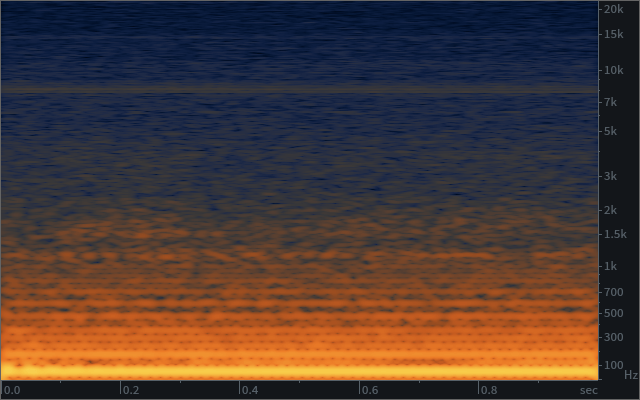
- Step 1: Visual inspection — Open the file in RX 11’s standalone editor. Switch to spectrogram view and look for the telltale horizontal lines that indicate hum harmonics. Note whether they’re stable or shifting.
- Step 2: Mode selection — Stable hum with clean reference section? Use Dynamic Mode for maximum precision. Shifting hum or no clean reference? Go straight to Dynamic Adaptive Mode.
- Step 3: Initial pass — Run De-Hum with moderate settings. In Dynamic Adaptive Mode, the default sensitivity usually gets 80-90% of the interference on the first pass.
- Step 4: Fine-tune — Listen critically to the processed audio. If residual hum remains, increase the filter count or sensitivity. If you hear artifacts (metallic tones or thinning), reduce aggressiveness.
- Step 5: Spectral repair — For any remaining problem spots, use the Spectral Repair tool to manually paint over residual interference in the spectrogram.
RX 11 De-Hum vs. Competitors: How Does It Stack Up?
The audio repair market has never been more competitive. CEDAR Audio‘s DNS series remains the gold standard in broadcast facilities, and Waves‘ NS1 is still a popular quick-fix option. But RX 11’s De-Hum module occupies a unique space — it’s the most flexible hum removal tool available at a prosumer price point.
The 1024 dynamically variable notch filters in Dynamic mode are unmatched in the plugin world. CEDAR’s hardware solutions offer comparable quality, but at 10-20x the cost. Waves NS1, while excellent for broadband noise, doesn’t offer the same surgical precision for harmonic interference that RX 11’s dedicated De-Hum module provides. And Accusonus ERA Bundle‘s de-hum is a one-knob solution that works well for simple cases but lacks the depth for complex, shifting interference patterns.
Real-World Performance: 28 Years of Hum Battles
After 28 years in audio production, I’ve fought every type of hum imaginable — from vintage console ground loops in Seoul’s recording studios to generator interference on outdoor film sets. The shift from RX 10 to RX 11’s De-Hum is the most meaningful improvement I’ve seen in this specific tool category in the last five years.
The Dynamic Adaptive Mode alone has saved me at least 2-3 hours per week on post-production projects. Previously, files with variable hum required multiple passes with different De-Hum settings, manual spectral cleanup, and sometimes creative workarounds involving EQ automation. Now, a single Adaptive pass handles what used to be a multi-step process.
For anyone working in post-production, podcast production, or archival restoration, the upgrade path is clear. If you’re on RX 10 or earlier, the De-Hum improvements alone justify the move to RX 11 Advanced. If you’re deciding between Standard and Advanced, note that Dynamic Adaptive Mode is available in both tiers — but Advanced gives you Dialogue Contour and the full Spectral Editor ARA integration that makes DAW-native de-humming possible.
Need professional audio repair, mixing, or mastering for your project? Sean Kim brings 28+ years of audio engineering expertise to every session.
Get weekly AI, music, and tech trends delivered to your inbox.






