


Google Search Live: Real-Time AI Answers Are About to Change How You Search Forever
September 8, 2025
Best iPhone 17 Pro Cases and Accessories: 12 Top Picks at Launch
September 8, 2025
iZotope Ozone 12 dropped on September 3, 2025, and after spending serious time with every new module, I can tell you this: the mastering landscape just shifted. This isn’t a minor point update with a fresh coat of paint. iZotope and Native Instruments delivered three entirely new processing modules, a rebuilt Master Assistant, and the kind of under-the-hood improvements that make you rethink your entire mastering chain.
I’ve been mastering records for over 28 years, and very few plugin updates have made me stop mid-session and reconsider my workflow. iZotope Ozone 12 is one of them. Let me walk you through exactly what’s new, what actually matters, and whether it’s worth your money.

What’s New in iZotope Ozone 12: The Big Picture
Ozone 12 introduces three brand-new modules — Stem EQ, Unlimiter, and Bass Control — alongside a completely redesigned Master Assistant 2.0 and the new IRC 5 Maximizer algorithm. The UI has been refreshed with cleaner visuals and improved workflow navigation, but the real story is in the processing power underneath.
Here’s the quick breakdown of what each edition gets you:
- Elements ($55) — Master Assistant only. Great entry point if you just want AI-assisted mastering.
- Standard ($219) — 14 editable mastering modules. Solid for most producers and mixers.
- Advanced ($499) — All 20 editable modules, 3 add-on plugins, plus Stem Focus with improved neural networks.
Master Assistant 2.0: Reference Matching With 8,000+ Bands
The original Master Assistant was already useful — load a track, get a starting point. But Master Assistant 2.0 in iZotope Ozone 12 takes a fundamentally different approach. You’re no longer just getting generic suggestions. You’re building a custom mastering flow from the ground up.
Here’s what you can now configure before the Assistant even touches your audio:
- Genre profiles — Choose from dozens of genre-specific targets (hip-hop, classical, EDM, pop, rock, and many more). Each profile adjusts the tonal balance, dynamics, and stereo width targets accordingly.
- Reference track matching — Upload a reference track and Ozone 12 analyzes it across 8,000+ separate frequency bands. It matches your master’s tone, dynamics, width, and loudness to that reference with surgical precision.
- LUFS targets — Set your desired loudness target (streaming-optimized or otherwise), and the Assistant builds its processing chain to hit that number without over-compressing.
- Module toggling — Choose which modules the Assistant can use. Want to skip the EQ and only adjust dynamics and limiting? Done.
- Processing strength — Dial the overall intensity from subtle to aggressive.
The 8,000+ band reference matching is the standout feature here. Previous versions used far fewer bands, which meant reference matching felt approximate. Now it’s genuinely precise — it captures the tonal fingerprint of your reference track and maps it onto your master in a way that sounds intentional, not algorithmic. You still get full manual control over every module after the Assistant runs, which is exactly how it should work.
iZotope Ozone 12 Stem EQ: The Real Star of This Update
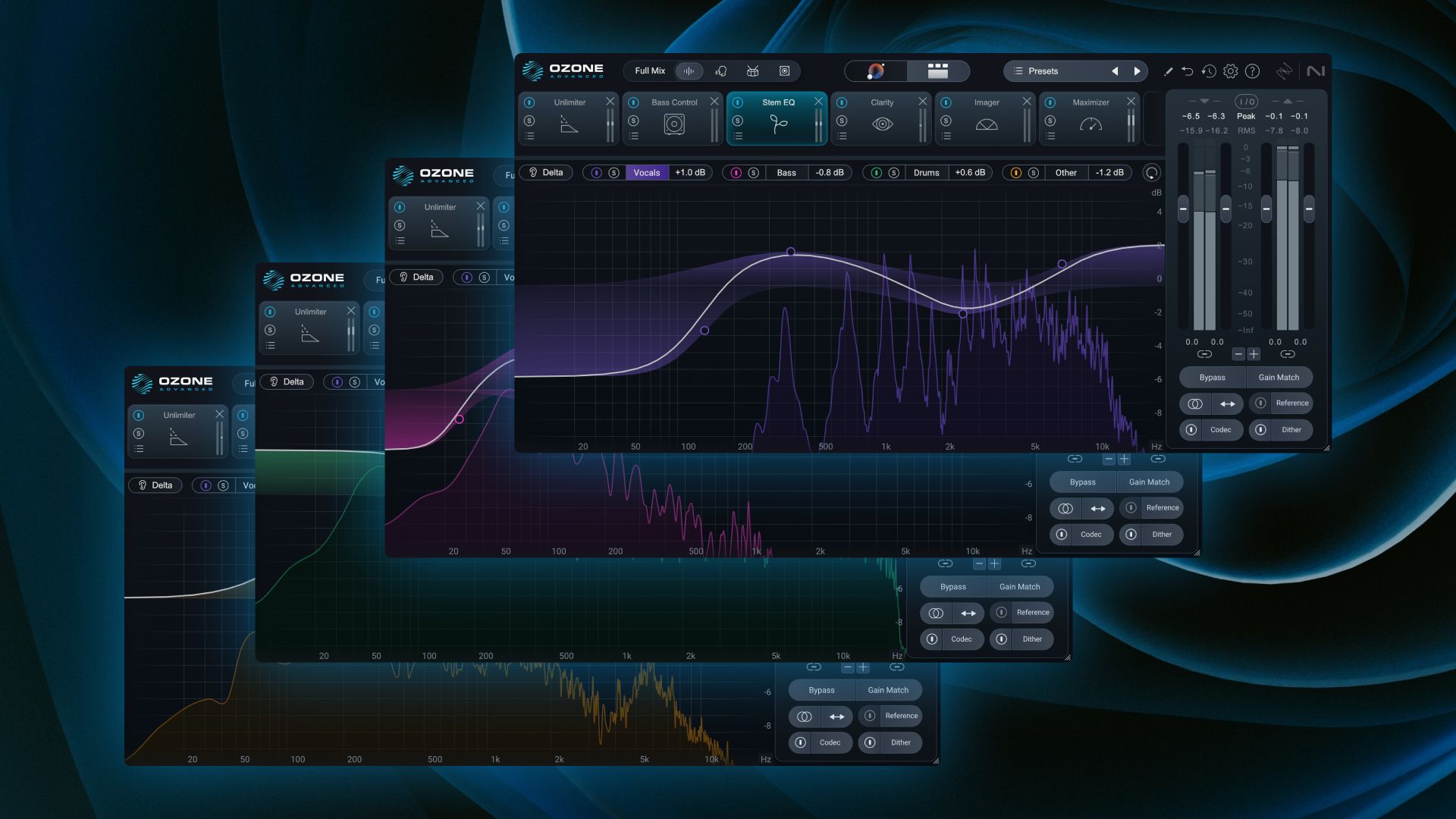
Multiple reviewers have called Stem EQ the highlight of Ozone 12, and after using it extensively, I agree completely. This module does something that was previously impossible in a mastering context: it lets you apply EQ to individual elements — vocals, drums, bass, and instruments — within a stereo mix, without needing multitrack stems.
Think about that for a moment. You’re working on a stereo master, and the vocals are slightly harsh around 3kHz. Traditionally, you’d cut 3kHz across the entire mix, affecting the guitars, cymbals, and everything else in that range. With Stem EQ, you isolate the vocal stem and cut only there. Everything else stays untouched.
Practical applications I’ve found most valuable:
- Taming harsh vocals without dulling the rest of the mix
- Adding low-end punch to drums without muddying the bass guitar
- Brightening acoustic instruments while keeping sibilance under control on vocals
- Reducing bass resonance in the bass stem without affecting kick drum impact
The neural network separation is remarkably clean. It’s not perfect — you’ll hear minor artifacts on extreme settings — but for mastering-level adjustments (a few dB here and there), it’s transparent. This is the module that justifies the upgrade for most working engineers.
Unlimiter: An Industry-First for Over-Compressed Audio
The Unlimiter is one of those tools you didn’t know you needed until you use it. It’s essentially an undo button for over-compressed or over-limited audio. Using machine learning, it analyzes compressed material and restores transient detail that was crushed during previous processing.
This is genuinely useful in several real-world scenarios:
- Remastering older tracks that were victims of the loudness war
- Working with pre-mastered stems from clients who over-processed before sending
- Restoring dynamics to reference tracks or samples you’re building on
- Fixing mixes where the mix bus limiter was pushed too hard
The ML-powered transient restoration works best on moderately over-compressed material. Don’t expect miracles on a track that’s been limited to -3 LUFS — the information loss at that point is too severe. But for the everyday scenario of a mix that’s been pushed 2-4 dB too hard into a limiter, the Unlimiter brings back punch and clarity convincingly.
Bass Control: ML-Powered Low-End Refinement
Bass Control addresses one of mastering’s most persistent challenges: getting the low end to translate across different playback systems. Using machine learning, this module analyzes your low-frequency content and reshapes it for consistency whether your listener is on studio monitors, earbuds, a car system, or a laptop speaker.
What makes Bass Control different from simply using a multiband compressor or low shelf EQ is that it understands the harmonic relationship between fundamental frequencies and their overtones. It can tighten a boomy kick drum without removing its weight, or add perceived bass presence on systems that physically can’t reproduce those frequencies by enhancing upper harmonics.
For genres where low-end precision matters — hip-hop, EDM, R&B, pop — this module alone could save hours of A/B testing across different monitoring setups.
IRC 5 Maximizer: Advanced Limiting Without Compromise
iZotope’s IRC (Intelligent Release Control) algorithms have been a core strength of Ozone for years. The new IRC 5 in Ozone 12 is their most advanced limiting algorithm yet, designed to achieve high LUFS targets while keeping the master sounding clean and open.
The key improvements in IRC 5:
- Reduced pumping artifacts at high gain reduction levels
- Better transient preservation — snare hits and vocal consonants retain their snap
- Improved stereo imaging under heavy limiting — the soundstage doesn’t collapse
- Lower distortion at extreme loudness targets
In practice, IRC 5 lets you push masters 1-2 dB louder than IRC 4 at the same perceived quality level. That might not sound like much, but in competitive mastering scenarios — particularly for streaming-optimized masters targeting -14 LUFS integrated — that extra headroom translates to punchier, more dynamic-sounding results.
iZotope Ozone 12 Pricing and Editions: Which One Should You Get?
Let’s break down the three editions and who each one is actually for:
Ozone 12 Elements — $55
You get Master Assistant and that’s essentially it. No manual module editing, no Stem EQ, no Unlimiter. This is purely for creators who want a one-click mastering solution without diving into the details. If you’re a bedroom producer uploading to DistroKid and you just want your tracks to sound louder and more polished, Elements does that job.
Ozone 12 Standard — $219
This is where it gets interesting. You get 14 editable mastering modules including the new Stem EQ, Unlimiter, and Bass Control. You also get full manual control over every parameter. For independent engineers and serious producers, Standard offers the best value. The only things you’re missing compared to Advanced are the extra add-on plugins and Stem Focus’s improved neural nets.
Ozone 12 Advanced — $499
The full suite: 20 editable modules, 3 add-on plugins, and Stem Focus with improved neural network models for cleaner stem separation. If mastering is your primary revenue stream or you’re running a commercial studio, Advanced pays for itself quickly. The improved Stem Focus alone makes a noticeable difference in Stem EQ’s separation quality.
Who Should Upgrade to iZotope Ozone 12?
Here’s my honest take after extensive testing:
Upgrade if: You master music professionally or semi-professionally. Stem EQ alone changes what’s possible in a stereo mastering session. If you’re coming from Ozone 10 or earlier, the jump is massive. Even from Ozone 11, the new modules and Master Assistant 2.0 improvements justify the cost.
Wait if: You’re on Ozone 11 Advanced and your current workflow is producing great results. The improvements are real but evolutionary, not revolutionary, if you’re already on the latest version.
Skip if: You only use Ozone for its EQ and compressor. There are cheaper alternatives for basic processing. Ozone 12’s value proposition is in its AI-assisted workflow and the new modules — if you’re not using those features, you’re overpaying.
Final Verdict
iZotope Ozone 12 is the most significant update to the platform in years. Master Assistant 2.0’s reference matching with 8,000+ bands is genuinely impressive, but it’s Stem EQ that steals the show — the ability to EQ individual elements within a stereo master is a game-changer for anyone doing mastering work. The Unlimiter, Bass Control, and IRC 5 round out a release that feels like a full generational leap.
At $219 for Standard or $499 for Advanced, it’s not cheap. But for the working mastering engineer, these tools will save hours per session and open up corrections that were previously impossible without going back to the mix. That’s worth the investment.
Ready to Elevate Your Sound?
At Greit Studios, we use tools like Ozone 12 to deliver broadcast-ready masters for artists, labels, and content creators worldwide. Whether you need mastering, mixing, or full production support — get a free studio consultation and let’s talk about your project.
Looking for production-ready music for your content? Browse our AI music library for royalty-free tracks crafted with professional mastering standards.
Get weekly AI, music, and tech trends delivered to your inbox.






