

Claude Opus 4.1: Anthropic’s Sharpest Coding Model Scores 74.5% on SWE-bench
August 8, 2025
iPhone 17 Rumors: Camera Bar Design, A19 Pro Chip, and 7 Major Changes Coming in September
August 8, 2025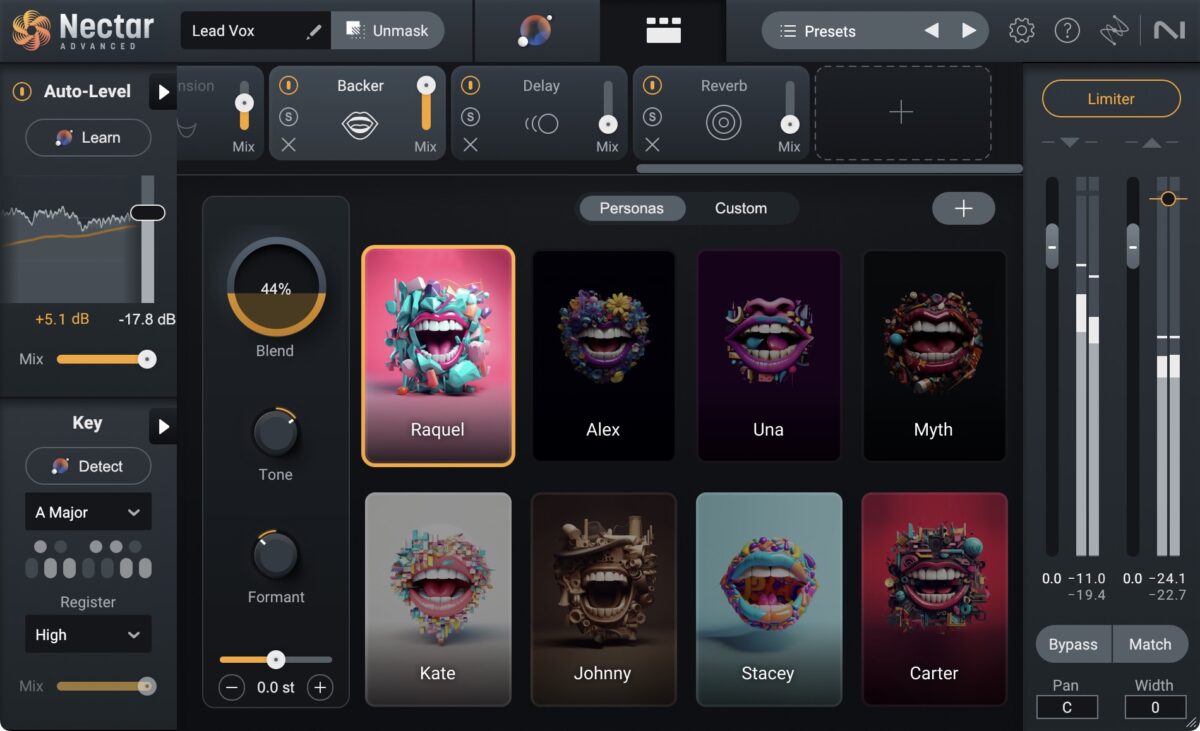
Finally — iZotope’s Nectar 4 just dropped the summer v4.1 update, and the AI Vocal Chain is no longer just a neat parlor trick. With new genre-specific presets, a refined Vocal Assistant, and the Auto-Level module that might actually replace your compressor on certain tracks, this iZotope Nectar 4 update feels like what version 4.0 should have been from day one.
What Changed in the iZotope Nectar 4 Update This Summer
The v4.1.0 update, released on June 25, 2025, brought more than bug fixes. iZotope expanded the preset library significantly — new vocal chain presets now cover pop, R&B, hip-hop, indie rock, podcast dialogue, and even Dolby Atmos spatial vocal workflows. But the real story is how the AI Vocal Assistant has been retrained to handle a wider range of vocal timbres, from breathy whisper vocals to aggressive screamed performances.

Sound On Sound’s review noted that Nectar 4 represents “a significant step forward,” particularly praising how quickly it produces mix-ready vocals. With the summer update, that process got even faster — the Vocal Assistant now analyzes input in roughly half the time of the initial release, and its EQ curve suggestions have noticeably improved for darker, low-mid-heavy vocal recordings.
Auto-Level Module: The Compressor Alternative That Actually Works
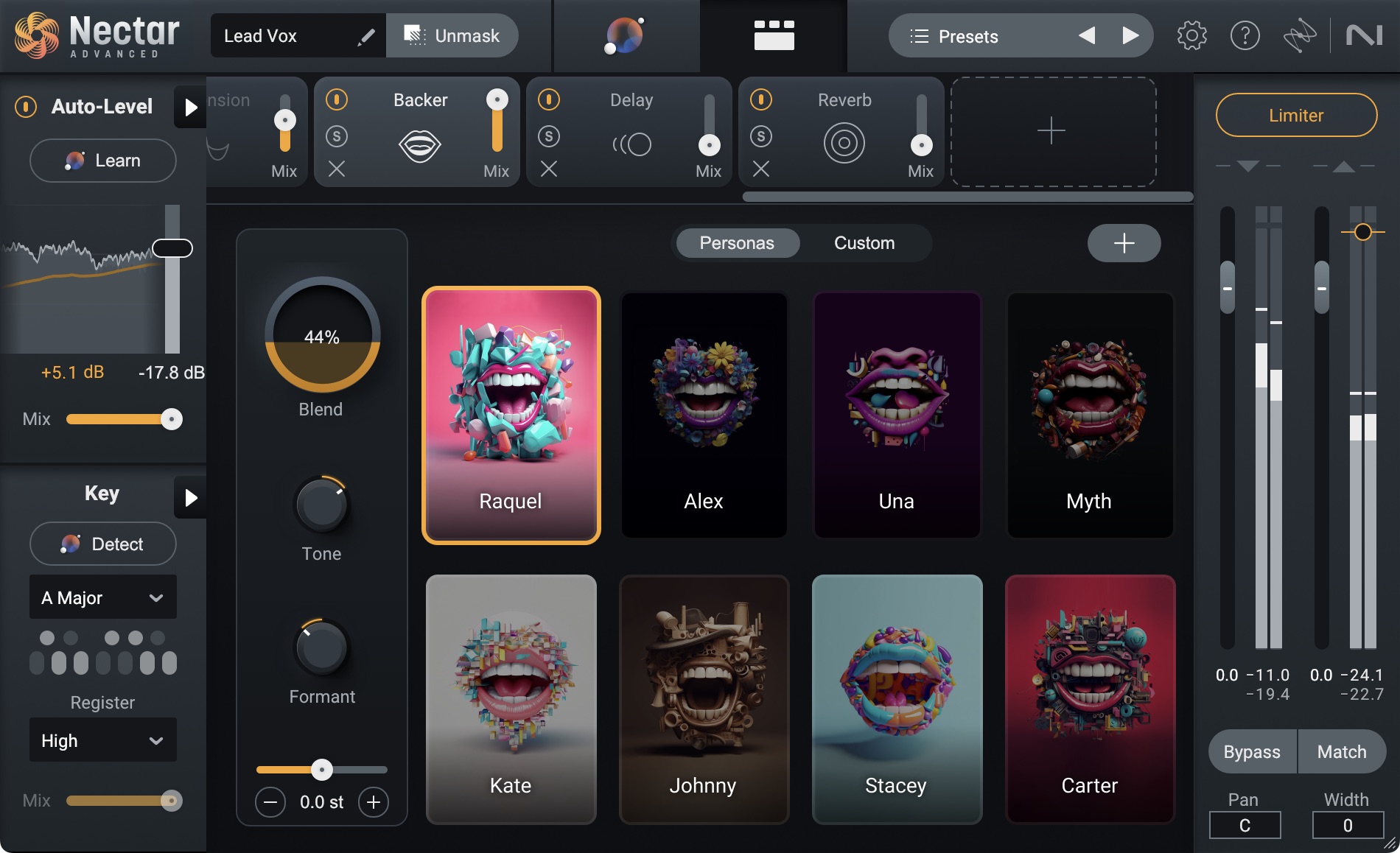
If there’s one module in the iZotope Nectar 4 update that deserves its own spotlight, it’s Auto-Level (ALM). Available exclusively in the Advanced edition, ALM sits at the top of your signal chain and manages vocal dynamics before any other processing touches the signal. Think of it as a recording engineer riding the fader in real time — it delivers consistent volume without the pumping, breathing, or transient smashing that traditional compressors introduce.
In practice, ALM is a game-changer for vocalists with wide dynamic range. Singers who whisper in verses and belt in choruses no longer need three layers of compression to sit properly in a mix. I’ve been testing it on everything from acoustic singer-songwriter sessions to aggressive rap vocals, and the results are remarkably transparent. The module also includes a noise-taming feature that gently reduces room noise during quieter passages — a subtle but valuable addition for home studio recordings.
Backer Module: AI Background Vocals That Actually Sound Convincing
The Backer module was already one of Nectar 4’s most talked-about features at launch, but the summer update brought refinements that make it genuinely usable in professional productions. Backer generates artificial background singers from your lead vocal, offering eight distinct voice personas that range from tight gospel harmonies to loose indie choir textures. You can also import your own acapella to create custom backing vocal styles.
What impressed me most is how the updated algorithm handles vowel formants. Previous versions sometimes produced that uncanny “vocoder” quality on certain syllables, especially on open vowels like “ah” and “oh.” The v4.1 update significantly reduced these artifacts. Sound On Sound described the harmony generation as “genuinely convincing” — and after spending several weeks with the updated version, I’d agree, with the caveat that it works best when blended at lower levels rather than featured prominently in a mix.
Voices Module: Harmony Generation Gets Smarter
The Voices module (formerly called Harmony in Nectar 3) has been enhanced with improved key detection and more natural-sounding interval generation. The summer update added new preset-based harmony progressions that automatically follow the chord changes in your track — a feature that brings Nectar closer to dedicated harmony plugins like Antares Harmony Engine.
For producers who work in MIDI-heavy environments, the Voices module now accepts external MIDI input for manual harmony control. This means you can play harmony parts on a keyboard in real time, using Nectar’s formant-preserving pitch shifting to keep the results sounding natural rather than chipmunk-pitched. Combined with the improved key detection, this makes Voices one of the most flexible harmony tools available in a channel strip plugin.
Audiolens: The Secret Weapon Most Users Overlook
Audiolens is a standalone desktop application bundled with Nectar 4 that deserves far more attention than it gets. It captures audio from any source on your system — Spotify, YouTube, a competitor’s mix — isolates the vocal using built-in stem separation, and creates a Reference preset that the Vocal Assistant can match tonally.
The practical implication is enormous. Instead of describing to the Vocal Assistant what you want (“warm but present, with controlled sibilance”), you can literally play a reference track and say “make it sound like this.” In the summer update, Audiolens’ stem separation accuracy improved noticeably for vocals buried in dense mixes — think heavily produced pop or EDM tracks where the vocal sits inside a wall of synths.
New Preset Categories and Genre Coverage
The expanded preset library is where casual users will feel the biggest impact. The summer update added preset packs organized by genre and use case:
- Pop Vocal Chains — Bright, present, radio-ready processing with de-essing and subtle saturation
- Hip-Hop/Rap Chains — Aggressive compression, telephone EQ effects, and ad-lib processing presets
- R&B/Soul Chains — Warm, smooth processing with gentle Auto-Level and lush reverb tails
- Indie/Folk Chains — Minimal processing, natural dynamics, room mic simulation
- Podcast/Dialogue Chains — Broadcast-standard leveling, noise reduction, and clarity-focused EQ
- Spatial Audio Chains — Dolby Atmos-ready vocal positioning with binaural width control
Each preset chain includes all 13 component plugins configured as a complete signal path. You can use them as-is or as starting points for customization — and with the Vocal Assistant’s improved analysis, tweaking a preset to match a specific vocal now takes seconds rather than minutes.
Pricing and Who Should Upgrade
Nectar 4 comes in three tiers: Elements (basic vocal processing), Standard (full module access), and Advanced ($299, includes all 13 component plugins and Auto-Level). The Advanced edition is also included in Music Production Suite 6 at $599. The v4.1 update is free for all existing Nectar 4 owners regardless of edition.
If you already own Nectar 4, updating is a no-brainer — the new presets and Vocal Assistant improvements alone justify the download. If you’re on Nectar 3, the upgrade path starts at $149, and the combination of Auto-Level, Backer, and the revamped Vocal Assistant makes a compelling case. For users currently relying on stock DAW vocal chains or cobbling together individual plugins, Nectar 4 Advanced at $299 consolidates your entire vocal workflow into a single insert — and does it better than most manual setups.
The summer update solidified Nectar 4’s position as the most complete vocal production suite available in plugin form. The AI Vocal Chain isn’t replacing skilled engineers anytime soon, but it’s eliminating the tedious setup work that used to eat the first 20 minutes of every vocal mixing session. More presets, smarter analysis, better-sounding modules — this is the kind of iterative improvement that turns a good plugin into an indispensable one.
Need professional vocal mixing, mastering, or help setting up your AI-powered vocal chain? Sean Kim at Greit Studios has 28+ years of audio engineering experience.
Get weekly AI, music, and tech trends delivered to your inbox.






