


Best Smart Home Devices of 2025: 8 Products That Actually Made Our Homes Smarter
December 8, 2025
Free Plugins 2025: Top 10 Must-Have Zero-Cost Tools That Rival Paid Software
December 9, 2025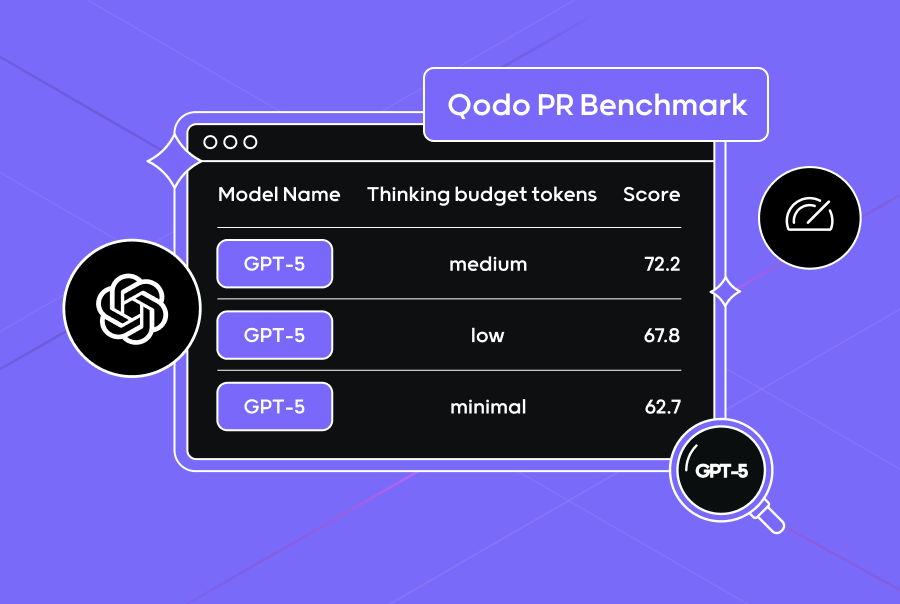
GPT-5 developer workflows looked destined for a revolution: SWE-bench 74.9%, Aider Polyglot 88%, hallucinations down 80%. Four months after launch, those numbers still impress on paper. But how have things actually changed in practice? After spending four months with this model in production environments, the story is far more nuanced than any benchmark can capture—and the gap between scores and reality might be the most important thing developers need to understand right now.
GPT-5 Developer Workflows: The Benchmark Leap That Started It All
When OpenAI released GPT-5 on August 7, 2025, the improvements over GPT-4 were undeniable. The SWE-bench score jumped from 52% to 74.9%—a massive leap in automated software engineering capability. The Aider Polyglot benchmark hit 88%, demonstrating strong multi-language competence. And hallucinations dropped by roughly 80%, addressing one of the most persistent complaints developers had with previous generations.
Three model variants shipped: gpt-5, gpt-5-mini, and gpt-5-nano, each with adjustable reasoning effort levels that let developers dial in the right balance between computational depth and response speed. This tiered approach was a deliberate strategy—giving teams the flexibility to match model capability to task complexity without overspending on inference costs for simple operations.
Enterprise adoption was swift and aggressive. According to CNBC’s reporting, developer activity on OpenAI’s platform doubled within weeks, while reasoning-heavy workloads surged an astonishing 8x. The major development platforms moved quickly to integrate: Cursor shipped GPT-5 support within days, JetBrains followed shortly after, and both Vercel and GitHub Copilot had deep integrations running within the first month. Microsoft 365 Copilot transitioned to GPT-5 as its backbone, extending the model’s reach across the entire Azure, GitHub, and Visual Studio ecosystem. For a brief moment, it felt like the developer tooling landscape had fundamentally shifted overnight.
Where GPT-5 Developer Workflows Actually Improved: Code Reviews, UI, and Pair Programming
After four months of real-world usage across thousands of development teams, the areas where GPT-5 genuinely transformed developer workflows have become clear. And the results are both encouraging and instructive.
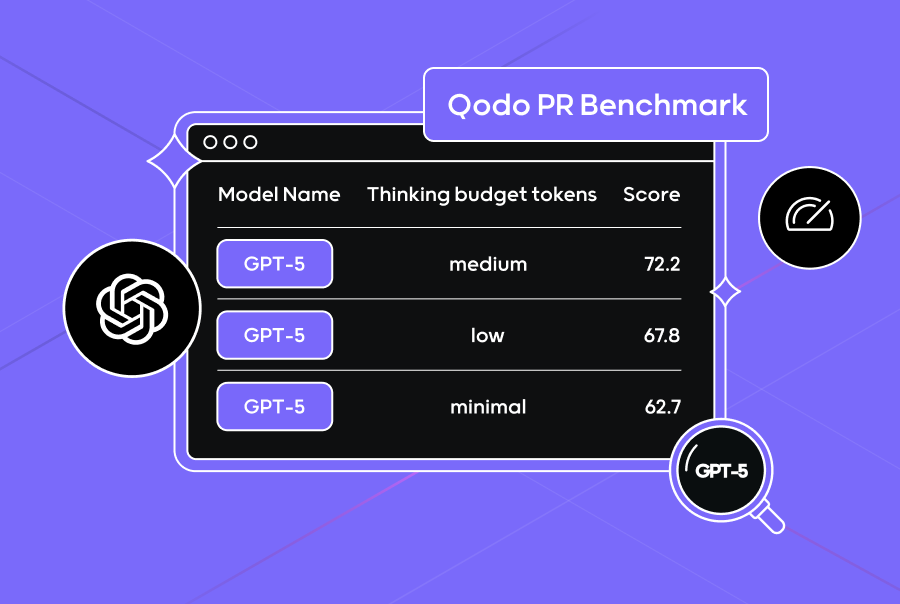
Code review stands out as the single most impactful application of GPT-5 in production developer workflows. In Qodo’s PR Benchmark testing, GPT-5 claimed the top spot among all models tested—and it wasn’t just about catching obvious bugs. The model identified security vulnerabilities that every other model missed entirely, including subtle injection vectors and authentication bypass patterns that typically require experienced security engineers to spot. For teams that have integrated GPT-5 into their pull request review pipeline, the improvement in catching logic errors and potential security issues before they reach production has been substantial and measurable.
Front-end UI generation is another area of meaningful improvement. React and Tailwind CSS component generation quality has noticeably increased compared to GPT-4, and multi-file scaffolding works more reliably than before. Developers report that prototyping landing pages, dashboards, and basic UI components is significantly faster—tasks that used to take hours of manual setup can now be roughed out in minutes. The model handles component composition, prop passing, responsive design patterns, and even basic state management logic with greater accuracy than its predecessor.
The AI pair programming experience has also evolved in meaningful ways. With GPT-5 powering GitHub Copilot, code autocompletion demonstrates noticeably better contextual understanding—it grasps the intent behind what you’re building, not just the syntax of the current line. JetBrains IDE users report more relevant suggestions that align with project-specific patterns and conventions. Developers working with unfamiliar languages, onboarding to new codebases, or exploring unfamiliar APIs have seen the biggest productivity gains. The reduced hallucination rate translates directly into fewer “looks right but is completely wrong” suggestions that used to plague GPT-4-powered tools.
For routine, well-defined tasks—writing unit tests, generating boilerplate code, converting between data formats, producing documentation from code comments—GPT-5 handles them with notably fewer errors than any previous model. The 80% reduction in hallucinations is most apparent in these straightforward scenarios, where developers spend dramatically less time verifying and correcting AI-generated output. Several teams have reported that their boilerplate generation workflows went from “generate then extensively verify” to “generate then spot-check,” saving meaningful amounts of developer time each week.
The Hidden Cost of GPT-5 Developer Workflows: A Code Quality Crisis
Here’s where the narrative gets complicated—and where the four-month perspective becomes essential. Benchmark scores tell one story; code quality metrics tell a very different one. According to The New Stack’s in-depth analysis, GPT-5 generates over 30% more code than Claude Sonnet 4 for equivalent tasks. In direct comparison testing, GPT-5 produced approximately 490,000 lines of code where Claude achieved the same outcomes with significantly fewer lines. More critically, GPT-5 averaged 3.9 issues per correct solution—nearly double Claude’s rate.
The code smell density paints an even more concerning picture: roughly 25 code smells per thousand lines of code (KLOC). This means that while GPT-5 might solve the immediate problem faster, it creates a maintenance burden that compounds over time. Dead code scattered throughout files. Overly complex methods that do too many things. Duplicated logic across components. Inconsistent naming conventions that make code harder to read. These are precisely the kinds of issues that slow teams down months later when they need to modify, debug, or extend the codebase. It’s a form of hidden technical debt that accumulates silently.
What makes this worse is a deeply counterintuitive finding: cranking up the reasoning effort setting actually degrades code quality rather than improving it. At higher reasoning levels, GPT-5’s output balloons to 727,000 lines with 5.5 issues per task—significantly worse than the default setting. The model effectively overthinks problems, generating elaborate, over-engineered solutions where simpler approaches would suffice. It adds unnecessary abstraction layers, creates helper functions that are only called once, and builds complex class hierarchies for problems that could be solved with a few straightforward functions. It’s the AI equivalent of an architect who designs a cathedral when you asked for a garden shed.

Large codebases and custom frameworks remain stubbornly problematic. Drop GPT-5 into an existing project with tens of thousands of lines and proprietary patterns, and it frequently generates code that doesn’t align with established conventions, architectural decisions, or coding standards. It might produce functionally correct code that violates every pattern the team has carefully established. The 16x Engineer coding evaluation highlighted this gap between benchmark performance and real-world developer experience as the defining theme of GPT-5’s first few months in the wild.
How Smart Teams Are Actually Using GPT-5: Patterns That Work
By December 2025, the developer community has moved past the initial hype cycle and settled into practical, battle-tested patterns for getting the most out of GPT-5 developer workflows. The teams seeing the best results have adopted specific strategies that acknowledge both the model’s genuine strengths and its very real limitations.
- Code review as the primary high-value use case: GPT-5 delivers the highest ROI when used to pre-screen pull requests for security vulnerabilities, logic errors, and potential bugs. Teams using it as a first-pass automated reviewer before human review consistently report catching issues that would have otherwise slipped through to production. The key insight is positioning GPT-5 as a complement to human review, not a replacement for it.
- Prototyping acceleration with mandatory refactoring: The most effective teams use GPT-5 for rapid scaffolding of new projects, UI components, and proof-of-concept implementations—but they treat every line of output as a rough draft that must be cleaned up before it enters the main codebase. Teams that skip the refactoring step are discovering the hard way that they’re accumulating significant technical debt at an accelerated rate.
- Strategic model variant selection by task complexity: Using gpt-5-nano for simple code generation, autocompletions, and boilerplate tasks. Deploying gpt-5-mini for moderate complexity work like writing test suites or refactoring individual functions. Reserving the full gpt-5 model only for architectural discussions, complex debugging sessions, and multi-file reasoning tasks. This tiered approach manages inference costs while matching capability to actual need.
- Keeping reasoning effort deliberately low for code generation: Counterintuitively, lower reasoning settings produce cleaner, more maintainable, and more concise code. Teams that have internalized this finding resist the natural urge to max out reasoning effort, understanding that higher settings generate bloated output with more issues per task. The sweet spot for most coding tasks is medium or low reasoning effort.
- Multi-model strategies for different workflow stages: An increasing number of engineering teams use GPT-5 specifically for code reviews (where it demonstrably excels) and Claude for code generation (where it produces cleaner, more maintainable output with fewer issues). This model-per-task approach recognizes a fundamental truth: no single model is best at everything, and the competitive advantage comes from knowing which model to deploy where.
The teams seeing the best results aren’t the ones using GPT-5 for everything—they’re the ones who’ve carefully mapped each model’s strengths to specific workflow stages and built processes around those strengths. A comprehensive survey of software developers confirms this trend: the most productive teams treat AI models as specialized tools in a larger toolkit rather than universal replacements for human engineering judgment.
The Four-Month Verdict on GPT-5 Developer Workflows
GPT-5 has meaningfully changed developer workflows—but not in the sweeping, transformative way that the launch-day hype suggested. The improvements in code review automation, rapid prototyping, and AI pair programming are real, measurable, and genuinely valuable. Developers who have integrated GPT-5 thoughtfully and strategically into their workflows are more productive than they were four months ago.
But the gap between a 74.9% SWE-bench score and actual production readiness is the most important lesson from these four months. GPT-5 generates more code, but not necessarily better code. It solves benchmarks impressively, but struggles with the messy reality of large existing codebases and custom architectural patterns. It reasons more deeply at higher settings, but that depth comes with a quality penalty that defeats the purpose for most practical coding tasks.
The developers getting the most value from GPT-5 developer workflows are the ones who approach it with clear-eyed pragmatism: use it where it genuinely excels (code reviews, prototyping, boilerplate generation), constrain it where it demonstrably struggles (large codebases, high reasoning settings, production-ready code generation), and always maintain the engineering judgment to critically evaluate what it produces. Four months in, the verdict is unambiguous—GPT-5 is a powerful tool in the developer’s arsenal, but knowing precisely when and how to deploy it matters far more than any benchmark score ever suggested.
Wondering how to integrate GPT-5 into your team’s development workflow? From AI tool adoption strategy to model selection and prompt engineering, I can help you build a plan that actually works in production.
Get weekly AI, music, and tech trends delivered to your inbox.






