


Black Friday 2025: Best Laptop Deals — MacBook Air M4 at $749, Dell XPS 13 at $649, and 8 More Picks Worth Buying
November 3, 2025
GPT-5.1-Codex-Max: 5 Breakthroughs Behind OpenAI’s 80% SWE-Bench AI Coding Model
November 5, 2025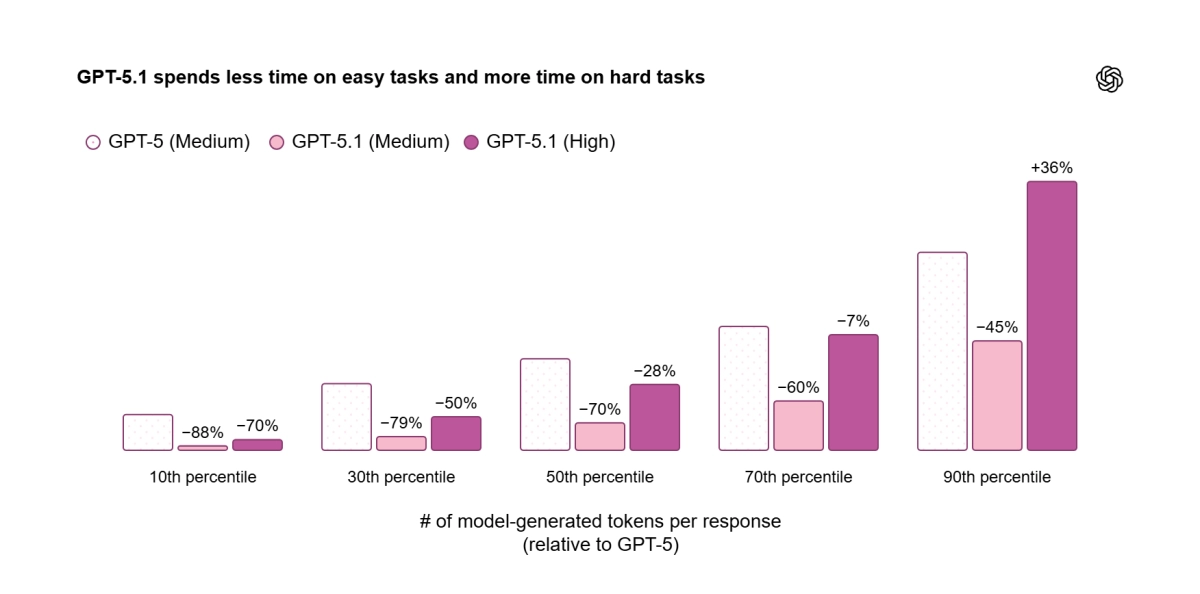
“35% fewer tool call failures.” That single number from OpenAI’s GPT-5.1 launch is fundamentally reshaping how developers architect AI agents. Released on November 13, GPT-5.1 isn’t just another model upgrade — with the new apply_patch tool, shell tool, and a completely redesigned instruction following system, this is closer to a new operating system for developers.
GPT-5.1 Developer Guide: Why This Matters Right Now
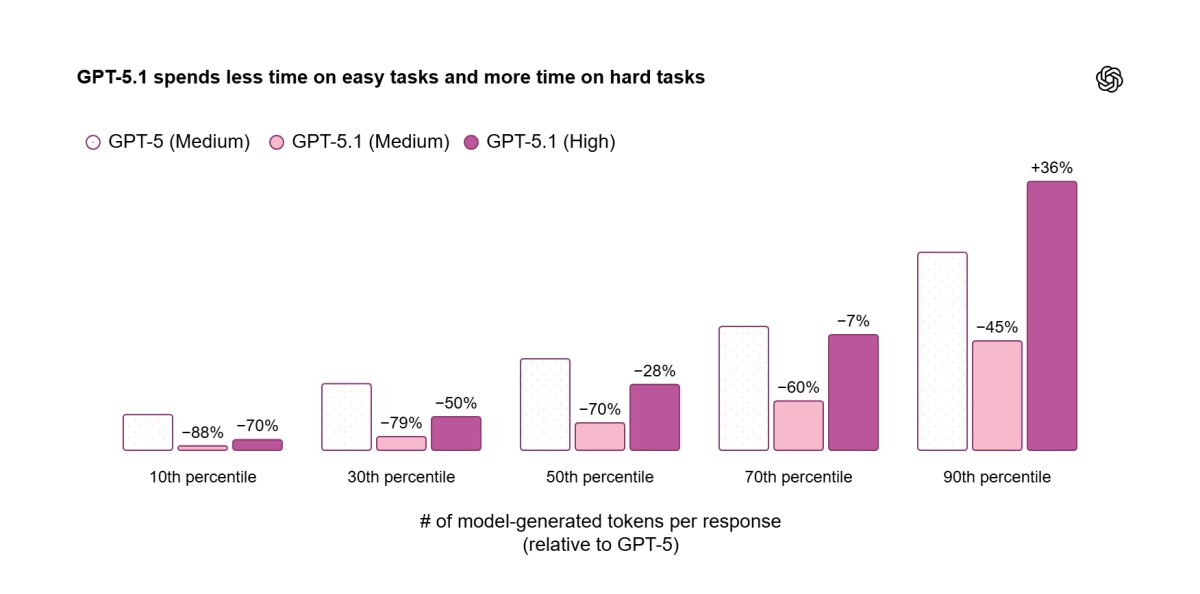
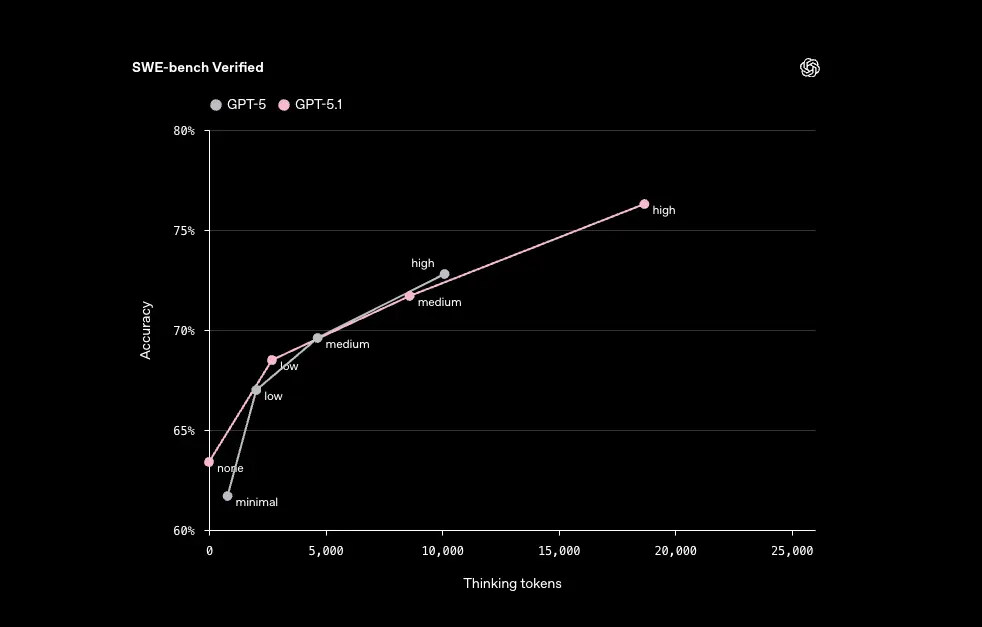
GPT-5.1 is the latest flagship in the GPT-5 model family, optimized for code generation, bug fixing, refactoring, instruction following, long context, and tool calling. The most significant difference from GPT-5 is the introduction of Adaptive Reasoning. On straightforward tasks, the model spends fewer tokens thinking — delivering snappier responses and lower bills. On complex tasks, it stays persistent, exploring options and verifying its work for maximum reliability.
The model comes in several variants: gpt-5.1, gpt-5.1-chat-latest, and the agentic coding specialists gpt-5.1-codex and gpt-5.1-codex-mini. All are available on every paid tier at GPT-5 pricing, which means you can start testing today without budget surprises.
The apply_patch Tool: How OpenAI Cut Code Editing Failures by 35%
The biggest pain point for LLM-based coding agents has always been code modification. JSON escaping errors, inaccurate line numbers, incomplete diff application — if you’ve built an AI coding assistant, you’ve hit these walls. OpenAI’s answer is apply_patch, a dedicated tool integrated directly into the Responses API.
response = client.responses.create(
    model="gpt-5.1",
    input=RESPONSE_INPUT,
    tools=[{"type": "apply_patch"}]
)
The tool works through three operations — create_file, update_file, and delete_file — generating structured unified diffs. No more writing custom tool descriptions. The API manages the tool type directly, and the result is OpenAI’s official claim of a 35% reduction in code editing failure rates.
In practice, this means the edit-run-verify loop that every coding agent relies on finally works reliably. As OpenAI’s GPT-5.1 Prompting Guide describes it: an “iterative, multi-step code editing workflow” that agents can actually complete without human intervention.
The Shell Tool: Giving AI Agents a Terminal
The second new tool is shell, which lets the model propose and execute shell commands on your local machine. It runs with a 120-second default timeout and 4096-character max output, under developer oversight.
tools = [{"type": "shell"}]Why this matters: it completes the plan-and-execute loop. The model can now edit code (apply_patch), run tests (shell), analyze results, and iterate — a fully autonomous development cycle. OpenAI describes this as “a foundational component for building truly autonomous agents that can interact with file systems and local environments.”
From my own experience building automation pipelines with Claude Code CLI, native tool integration like this has enormous potential to eliminate custom wrapper code. When the model can natively read, write, and execute rather than going through fragile intermediaries, the entire agent becomes more reliable.
Instruction Following: GPT-5.1 Listens Differently
The most striking improvement in GPT-5.1 is instruction following. The core message from OpenAI’s prompting guide: “GPT-5.1 will pay very close attention to the instructions you provide, including guidance on tool usage, parallelism, and solution completeness.”
Here’s what that looks like in practice:
- Enhanced Parallel Tool Calling: Add “Parallelize tool calls whenever possible. Batch reads and edits to speed up the process” to your system prompt, and GPT-5.1 actually does it. Parallel execution efficiency is significantly improved over GPT-5.
- None Reasoning Mode: Set
reasoning_effortto ‘none’ for zero reasoning tokens — GPT-4.1-level latency with GPT-5.1 intelligence. Particularly useful with hosted tools like web search and file search. - Autonomous Programmer Persona: The instruction “Treat yourself as an autonomous senior pair-programmer” makes the model complete implementations without premature termination, proactively gathering context instead of waiting for follow-up questions.
- Planning Tool (update_plan): For medium-to-large tasks, lightweight TODO tracking with 2-5 milestones. Updates every ~8 tool calls, maintaining exactly one in_progress item at a time.
Migrating from GPT-5: What You Need to Know
If you’re already on GPT-5, there are critical changes to understand when switching to GPT-5.1. According to OpenAI’s official migration guide:
- Emphasize Persistence and Completeness: GPT-5.1 can be overly concise. Explicitly specify output detail and formatting requirements in your prompts.
- Resolve Conflicting Instructions: Since GPT-5.1 excels at instruction following, contradictory directives in your system prompt produce unpredictable results. Audit your instructions for conflicts before migrating.
- Migrate apply_patch: If you built custom code editing tools, transition to the new named tool implementation for better reliability.
- Use Metaprompting: Feed GPT-5.1 your system prompt plus failure logs and ask it to “identify root-cause contradictions in instructions.” It generates specific patch_notes with surgical revisions — a two-step debugging cycle that replaces manual guesswork.
24-Hour Prompt Caching and Cost Optimization
A change developers can’t afford to ignore: 24-hour prompt cache retention. Activate it with prompt_cache_retention='24h', and identical system prompts stay cached for up to 24 hours, cutting both cost and latency simultaneously.
This is especially powerful for agentic workflows. Coding agents with long system prompts, customer service bots, data analysis pipelines — all direct beneficiaries. Combined with Adaptive Reasoning — saving reasoning tokens on easy tasks while caching slashes input costs — you get a dual optimization that compounds over thousands of API calls.
Practical GPT-5.1 Developer Guide: Prompting Patterns That Work
After testing GPT-5.1 extensively in agentic workflows, here are the prompting patterns that deliver the best results according to OpenAI’s own cookbook and real-world developer feedback:
Pattern 1: Explicit Parallelism Directive. Instead of hoping the model batches calls, tell it directly: “Parallelize tool calls whenever possible. Batch reads and edits to speed up the process.” Then provide 2-3 examples of permissible parallelism in your system prompt. GPT-5.1’s improved instruction following means it actually respects these directives consistently.
Pattern 2: Planning Before Execution. For complex multi-file changes, include this instruction: “Plan extensively before each function call. Reflect extensively on the outcomes of previous function calls before proceeding.” This forces the model to think through dependencies before making changes, dramatically reducing the need for rollbacks.
Pattern 3: The Metaprompting Debug Loop. When your agent produces unexpected behavior, don’t manually debug your system prompt. Instead, feed GPT-5.1 your system prompt plus the failure logs and ask: “Identify root-cause contradictions in these instructions.” The model generates specific patch_notes explaining what conflicted and how to fix it — surgical revisions rather than guesswork.
Pattern 4: Verbosity Control. GPT-5.1 responds well to explicit length constraints: “Respond in plain text using at most 2 concise sentences. Lead with what you did.” For user-facing updates in agentic loops, set frequency (“1-2 sentence updates every 6 tool calls”) and content type (“plans, discoveries, concrete outcomes”). This level of steerability was inconsistent in GPT-5 but works reliably in 5.1.
Pattern 5: Solution Persistence. Add “Do not stop at analysis or partial fixes; carry changes through implementation” to prevent the model from giving up after identifying an issue. Combined with the autonomous programmer persona, this creates an agent that behaves like a senior developer who finishes what they start.
The Bottom Line: What GPT-5.1 Means for Developers
GPT-5.1 marks an inflection point where LLMs evolve from “text generators” to “software engineering partners.” Reliable code editing via apply_patch, execution and verification via shell, cost-efficient reasoning via Adaptive Reasoning, and predictable behavior via enhanced instruction following — these four capabilities interlock to bring truly autonomous agents one step closer to reality.
What you can do right now: audit your existing GPT-5 prompts for conflicting instructions, test apply_patch and shell tools in the Responses API, and take advantage of Black Friday API credit deals that are starting to appear. The future of agentic development is here — and it’s 35% more reliable than last month.
Need help building AI automation systems or technical consulting? Sean Kim can help.
Get weekly AI, music, and tech trends delivered to your inbox.






