Apple M4 Ultra: 5 Reasons the Dual-Die Chip May Never Arrive
May 16, 2025
SSL Fusion Review: 6 Analog Color Tools That Transform Your Mix Bus and Mastering Chain
May 19, 2025
Forget autocomplete. GitHub just shipped something that makes every AI coding tool you have used look like a toy. GitHub Copilot Workspace does not just suggest lines of code—it reads your issue, drafts a specification, builds a multi-file implementation plan, writes the code, and runs the tests. All from a single natural language prompt. Over 55,000 developers have already used it in technical preview, merging more than 10,000 pull requests. Here is exactly why GitHub Copilot Workspace matters, what it gets right, what it still fumbles, and where this whole agentic coding movement is heading.
What GitHub Copilot Workspace Actually Is (And What It Is Not)
GitHub Copilot Workspace is a task-centric developer environment built by GitHub Next, the company’s research lab. Unlike traditional Copilot—which lives inside your editor and completes code line by line—Workspace operates at the project level. You start from a GitHub Issue or pull request, describe what you want in plain English, and the system orchestrates multiple AI agents to deliver working code changes across multiple files.
The architecture relies on three core agents powered by GPT-4o. The Plan Agent captures your intent and proposes a step-by-step action plan spanning whatever files need to change. The Brainstorm Agent helps you discuss ideas and eliminate ambiguity before any code is generated. The Repair Agent automatically fixes test failures after implementation. Developers retain full control at every stage—you can edit specifications, adjust plans, and modify generated code before anything gets committed.
The Four-Step GitHub Copilot Workspace Workflow
Understanding how Copilot Workspace structures its pipeline is key to understanding why it works differently from chatbot-style coding tools like ChatGPT or Claude for code generation.
Step 1: Issue to Specification
You open a GitHub Issue—say, “Add GCP machine type pricing to our Flask pricing dashboard.’’ Workspace reads the issue, analyzes your repository’s current state, and generates a formal specification. This spec describes what exists now and what the final state should look like. Crucially, you can edit this spec before moving forward. According to GitHub’s development team, this pivot from chat interfaces to structured, editable stages was a deliberate design choice after internal dogfooding revealed that developers needed more control than a back-and-forth conversation provided.
Step 2: Plan Generation
From the approved specification, the Plan Agent generates a multi-file implementation plan. Each step identifies which file changes, what changes, and why. This is where Workspace diverges sharply from tools that just dump code into a chat window. The plan is transparent and editable—if the AI suggests modifying three files but you know a fourth needs updating too, you add it.
Step 3: Code Generation and Execution
Once you approve the plan, Workspace generates the actual code changes. These appear as diffs you can review, edit, or reject file by file. The environment includes an integrated terminal where you can run the code, execute tests, and verify behavior before committing anything. If tests fail, the Repair Agent kicks in to propose fixes automatically.
Step 4: Integration and Review
When you are satisfied, Workspace creates a pull request directly from the environment. The entire workflow—from issue to merged PR—can happen without opening a traditional IDE. GitHub even supports this flow on mobile through the GitHub app, which is a surprisingly practical touch for triaging and approving changes on the go.
Real-World Performance: What 55,000 Developers Discovered
Numbers tell a clearer story than marketing copy. During the technical preview that ran until May 30, 2025, over 55,000 developers used GitHub Copilot Workspace. More than 10,000 pull requests were merged from Workspace-generated code. GitHub’s own data shows Copilot has already boosted developer productivity by up to 55% in general, and Workspace takes that further by handling the planning and coordination overhead that line-level completions cannot touch.
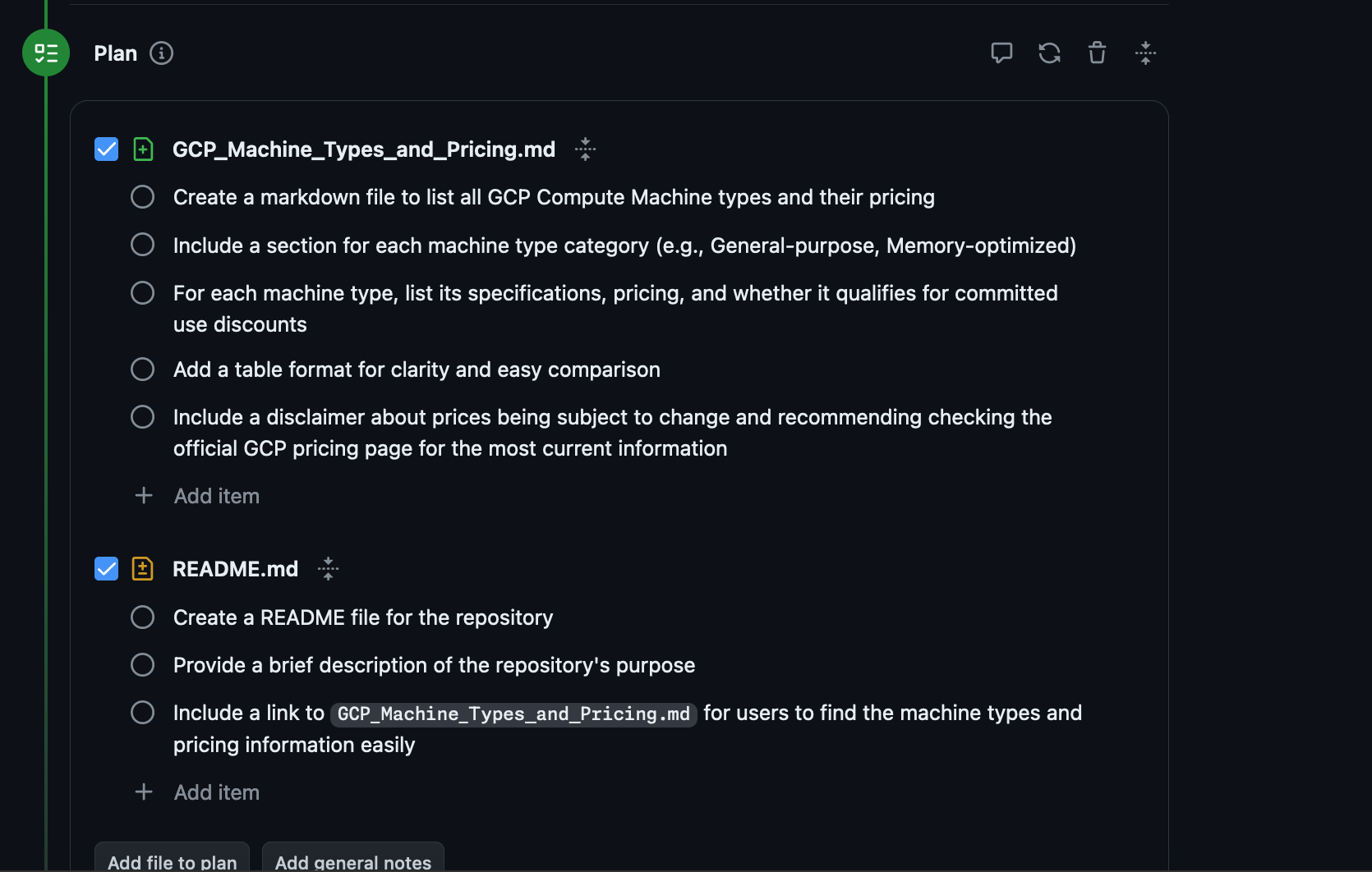
But the honest picture includes friction. One independent reviewer tested Workspace on a real project—adding GCP machine type pricing to an existing Flask application. The structured workflow from Issue to Spec to Plan to Implementation earned praise for clarity. However, the tool struggled with existing code conventions, template systems, and dependency management. When the codebase had strong opinions about architecture, Workspace sometimes generated code that worked in isolation but did not fit the project’s patterns.
This is not unique to Copilot Workspace. Every agentic coding tool—from Devin (valued at $2 billion) to Cursor’s agent mode—hits the same wall. AI can generate syntactically correct code, but matching a team’s conventions, understanding implicit architectural decisions, and handling edge cases in existing dependency graphs remains genuinely hard.
GitHub Copilot Workspace vs. the Agentic Coding Landscape
Copilot Workspace is not the only player in this space, and positioning it accurately matters. Here is how it compares to the major alternatives developers are evaluating right now:
Devin (Cognition Labs): Fully autonomous agent that attempts entire tasks end-to-end with less human oversight. Higher ambition, but also higher failure rate on complex real-world codebases. Workspace’s editable-at-every-step philosophy is more conservative but more reliable.
ChatGPT / Claude for coding: Conversational interfaces that generate code snippets on demand. Powerful for isolated tasks, but they lack the structured planning pipeline and repository awareness that Workspace provides. You are the orchestrator when using chat—Workspace tries to be the orchestrator for you.
Cursor Agent Mode: Editor-integrated agent that can make multi-file changes within a VS Code fork. Closer to Workspace’s philosophy but tied to a specific editor. Workspace’s browser-based, mobile-friendly approach offers different flexibility.
SWE-bench performance: Copilot Workspace scored approximately 55% on the SWE-bench coding benchmark, which evaluates AI systems on real GitHub issues from popular open-source projects. This is competitive but not dominant—some specialized agents score higher on this benchmark, though benchmark performance does not always translate to real-world utility.
What GitHub Is Really Building: The Billion-Developer Bet
GitHub’s CEO Thomas Dohmke has repeatedly stated the company’s goal: reaching one billion developers on the platform. The current count is over 100 million. The gap between 100 million and one billion cannot be closed by making existing developer tools incrementally better. It requires making software development accessible to people who do not currently write code professionally.
Copilot Workspace is a direct move toward that goal. By letting developers (and eventually non-developers) describe what they want in natural language and receive structured, reviewable implementation plans, GitHub is lowering the barrier from “you must understand the codebase” to “you must understand the problem.” This is a profound shift in who can participate in software creation.
The technical preview’s sunset on May 30, 2025 signals that GitHub is preparing to integrate Workspace capabilities more deeply into the core GitHub experience rather than keeping it as a standalone experimental tool. Watch for Workspace features appearing directly in Issues, PRs, and the GitHub web editor throughout 2025 and into 2026.
Sean’s Take: What This Means for Working Developers
I have been building automation pipelines and shipping production code alongside music production for the better part of three decades. The blog you are reading right now is generated by a multi-agent pipeline I built—researcher, writer, image generator, publisher, reviewer, reporter—all orchestrated by Claude. So when I say I have opinions about agentic coding tools, I mean I am living inside one daily.
Here is my honest assessment of Copilot Workspace: the structured specification-to-plan-to-code pipeline is the right abstraction. Every time I have tried to use a chatbot for multi-file code changes, the conversation devolves into “no, I meant the other file” and “you forgot the import statement” within three exchanges. Workspace’s explicit plan step eliminates most of that friction. You review the plan, catch the gaps, and then let the AI execute. That is how I work with my own automation agents—clear specs, reviewable plans, human approval gates.
But I also see the ceiling. The independent review that tested it on a Flask app mirrors exactly what I experience with agentic tools on my own projects: they excel at greenfield additions but struggle with established patterns. My blog pipeline has specific conventions for Gutenberg markup, Cloudinary image handling, and WordPress API interactions. An AI agent that does not deeply understand those conventions will generate code that technically works but creates maintenance debt. Copilot Workspace’s editable stages mitigate this—you catch the convention violations in the plan review—but it means “fully autonomous coding” is still a marketing aspiration, not a daily reality.
The developer who will benefit most from Workspace is not the senior engineer who can write the code faster by hand. It is the mid-level developer who understands the problem but spends hours figuring out which files to change and in what order. Workspace compresses that discovery phase dramatically. For teams, that is where the real productivity multiplier lives.
Where Agentic Coding Goes From Here
The trajectory is clear even if the timeline is not. Within the next 12 to 18 months, expect every major development platform to ship some version of the specification-to-plan-to-code pipeline. The differentiator will not be “does it generate code” but “how well does it understand my existing codebase’s conventions.” Teams that invest in clear documentation, consistent coding standards, and well-structured repositories will see dramatically better results from these tools than teams with messy, undocumented codebases.
GitHub’s advantage is distribution. With 100 million developers already on the platform and deep integration with Issues, PRs, and Actions, Copilot Workspace does not require developers to adopt a new tool—it meets them where they already work. That is a moat that standalone AI coding startups will find extremely difficult to cross.
The smartest move for any development team right now is to start treating AI coding agents as junior team members: useful for well-defined tasks with clear specifications, unreliable for ambiguous problems requiring deep institutional knowledge. Build your workflows around that reality, and tools like Copilot Workspace become genuine force multipliers rather than sources of frustration.
Building your own AI-powered automation pipeline or need help integrating agentic workflows into your dev process?
Get weekly AI, music, and tech trends delivered to your inbox.