


AI Agent Frameworks November 2025: AutoGPT Platform, LangGraph 1.0, and 4 More Open Source Updates Compared
November 18, 2025
Apple M5 Ultra Preview: 36 CPU Cores, 80+ GPU Cores, and Why Mac Pro’s Future Is Uncertain
November 18, 2025
I spent $0 on my first Dolby Atmos mix — and it got accepted by Apple Music. If you think immersive audio production requires a $50,000 studio overhaul, the tools available in late 2025 will change your mind completely.
Dolby Atmos mixing has gone from an exclusive post-production luxury to something any bedroom producer can explore with free software. Between Fiedler Audio’s Composer Essential, Logic Pro’s built-in renderer, and the free Dolby Atmos Music Panner plugin, the barrier to entry has never been lower. This guide breaks down exactly how to get started — no expensive hardware required.
Why Dolby Atmos Mixing Matters in 2025 (Especially This Black Friday)
Apple Music now has over 10,000 Dolby Atmos tracks. Tidal, Amazon Music, and even Spotify are pushing spatial audio hard. For producers and mix engineers, ignoring immersive audio means leaving both creative opportunities and revenue on the table.
Here’s the practical reality: distributors like DistroKid and TuneCore now accept Dolby Atmos masters. Labels increasingly request Atmos deliverables alongside stereo mixes. And with this year’s Black Friday deals, DAWs and plugins with native Atmos support are at their lowest prices ever — making November 2025 the ideal time to jump in.
Dolby Atmos Mixing Fundamentals: Beds vs. Objects
Before touching any DAW, you need to understand two core concepts that define every Dolby Atmos mix:
Beds (Channel-Based Audio)
Beds are fixed, channel-based containers — think of them as the foundation of your mix. They’re perfect for elements that should stay anchored: drum bus, bass, rhythm guitars, pads. A 7.1.4 bed gives you 12 channels of speaker-mapped audio that translates predictably across any playback system.
Objects (Position-Based Audio)
Objects are discrete audio elements you can place and move anywhere in 3D space. Lead vocals, featured instruments, sound effects, ad-libs — anything you want to give spatial movement becomes an object. The Dolby Atmos renderer tracks their X/Y/Z coordinates and maps them to whatever speaker configuration the listener has.
The golden rule: Use beds for stability, objects for flair. A common beginner mistake is making everything an object — this actually degrades the mix on simpler playback systems like stereo headphones.
5 Free (or Built-In) DAW Tools for Dolby Atmos Mixing
Here’s what you can use right now without spending a dime on additional Atmos-specific software:
1. Fiedler Audio Dolby Atmos Composer Essential (Free — Any DAW)
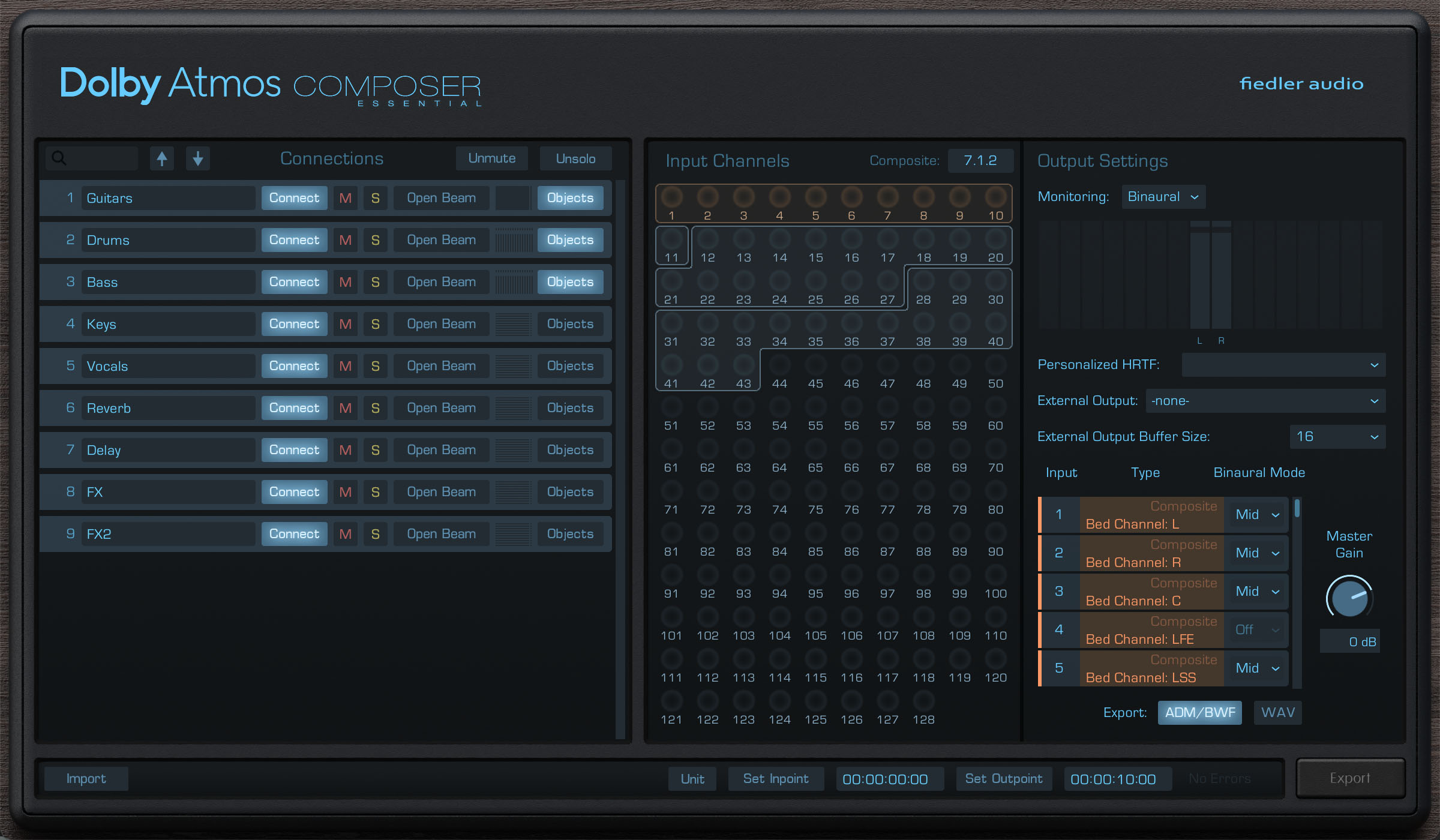
This is the game-changer for 2025. Fiedler Audio’s Composer Essential is a Dolby Labs-certified, completely free tool that works with any DAW on Mac and Windows. It includes the Dolby Atmos Beam Essential panning plugin and a built-in Atmos renderer. You can create legitimate Dolby Atmos mixes in Ableton Live, FL Studio, Reaper — DAWs that have zero native Atmos support.
The free version lacks level metering, trim controls, and LFE management that the paid Composer offers, but for learning and creating deliverable Atmos mixes, it’s more than sufficient.
2. Logic Pro (Built-In Renderer — macOS Only)
If you’re on a Mac, Logic Pro is arguably the easiest entry point. Apple integrated a full Dolby Atmos renderer directly into Logic, complete with surround and 3D object panners, the Spatial Audio Monitoring plugin, and direct AirPods head-tracking support. No additional purchases needed — the $199 Logic Pro license includes everything.
As Sound On Sound detailed in their mixing guide, Logic’s Atmos workflow is remarkably intuitive: create a Dolby Atmos project, assign tracks to beds or objects, and monitor through Apple’s binaural renderer for headphone mixing.
3. Dolby Atmos Music Panner (Free Plugin — VST3/AU/AAX)
Dolby’s own Music Panner is a free plugin available as VST3, AU, and AAX. It enables tempo-synced object panning routines for immersive mixes. Compatible with Pro Tools, Logic Pro, DaVinci Resolve, Ableton Live, and Nuendo. It’s a targeted tool — great for automation-heavy spatial effects but not a full mixing solution on its own.
4. Steinberg Nuendo (Native Renderer — Most Advanced)
Nuendo isn’t free, but it deserves mention as the most fully-featured Atmos DAW available. It includes a native Dolby Atmos renderer with 64-bed support (vs. Cubase’s single-bed limitation), ADM importing/exporting, and the deepest integration with external Dolby rendering hardware. For anyone serious about making Atmos their primary format, Nuendo is the professional benchmark.
With Black Friday 2025 deals, Nuendo upgrades from Cubase are historically discounted 30-40% — worth watching if you’re already in the Steinberg ecosystem.
5. DaVinci Resolve Studio (Native Atmos — Paid Version)
DaVinci Resolve Studio supports Dolby Atmos natively up to 22.2 configurations — but only the paid Studio version ($295 one-time). The free version of Resolve does not include immersive audio support. If you’re doing music for film, TV, or YouTube content, Resolve Studio’s combined video/audio Atmos workflow is unmatched.
Step-by-Step: Your First Dolby Atmos Mix (Free Setup)
Here’s a practical workflow using only free tools:
Step 1: Install Fiedler Audio Composer Essential
Download from fiedler-audio.com. Install both the Dolby Atmos Beam Essential plugin and the Composer Essential renderer. Works on any DAW — Ableton, FL Studio, Reaper, Studio One, you name it.
Step 2: Set Up Your Session
Create a new project with your stems imported. Gain stage everything so your mix sits around -18 LUFS integrated — this is the target loudness for Dolby Atmos deliverables across Apple Music, Tidal, and Amazon Music. True peak should not exceed -1 dBTP.
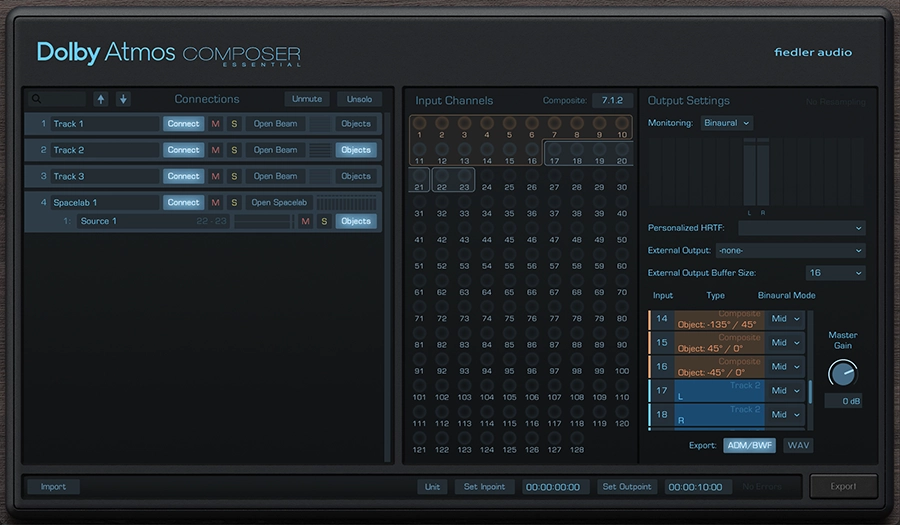
Step 3: Assign Beds and Objects
- Bed tracks: Drums (stereo or 7.1.4 bed), bass, rhythm instruments, pads, backing vocals
- Object tracks: Lead vocal, featured solo instruments, sound effects, ear-candy elements
- Start with fewer objects — 8 to 12 is a good range for music. The 128-object limit is for film, not songs.
Step 4: Monitor with Binaural Rendering
You don’t need a 7.1.4 speaker system. Use the binaural rendering built into Composer Essential (or Logic Pro’s Spatial Audio Monitoring plugin) with any good pair of headphones. Apple’s AirPods Pro and AirPods Max add head-tracking, which helps evaluate spatial movement. Sony’s WH-1000XM5 also works well for binaural monitoring at this price point.
Step 5: Mix in 3D — The 80/20 Approach
- Start in stereo: Get your balance, EQ, compression, and effects right in the stereo fold-down first
- Then go spatial: Pan objects to their 3D positions. Subtle movements beat wild automation every time.
- Check the fold-down constantly: Toggle between Atmos and stereo — most listeners will hear the stereo version, so it must sound great both ways
- Height channels matter: Place reverb tails, ambient pads, and overhead percussion in the height layer for a natural sense of space
Step 6: Export and Deliver
Export your mix as an ADM BWF file (Audio Definition Model Broadcast Wave Format) — this is the standard delivery format for Dolby Atmos music. Distributors like DistroKid, TuneCore, and CD Baby accept ADM BWF files for Apple Music, Amazon Music, and Tidal spatial audio distribution.
Black Friday 2025: Dolby Atmos Mixing Deals to Watch
If you’re reading this during Black Friday week, here are the Atmos-relevant deals historically worth watching:
- Steinberg Nuendo/Cubase: Typically 30-40% off upgrades during November sales
- Dolby Atmos Renderer ($299): Occasionally bundled with Pro Tools deals through Avid
- Fiedler Audio Composer (full version): Watch for introductory pricing on the paid version — the Essential remains free year-round
- Headphones: Sony WH-1000XM5, Apple AirPods Max, and Sennheiser HD 600 frequently hit lowest prices during Black Friday — essential for binaural monitoring
- Logic Pro ($199): Apple rarely discounts, but check Apple gift card deals that effectively reduce the price
Common Dolby Atmos Mixing Mistakes (And How to Avoid Them)
- Making everything an object: This tanks your stereo fold-down. Keep foundational elements in beds.
- Ignoring the LFE channel: The .1 in 7.1.4 exists for a reason. Don’t leave it empty, but don’t dump your entire bass there either — a filtered send from your sub-bass elements works best.
- Over-automating panning: Constant 360° spinning is a parlor trick, not mixing. Use spatial movement intentionally — vocal pull-forward for a chorus, percussion scatter for a breakdown.
- Skipping the stereo check: 95% of your audience hears stereo. If the fold-down sounds thin or lopsided, rework your object placement.
- Wrong loudness: -18 LUFS integrated, -1 dBTP true peak. Miss these targets and your master gets rejected by distributors.
The path to Dolby Atmos mixing in 2025 is genuinely accessible. Between Fiedler Audio’s free Composer Essential for any DAW and Logic Pro’s built-in renderer for Mac users, the only real investment is time spent learning the spatial mindset. Start with a simple session — three or four stems, a couple of objects, binaural headphones — and you’ll understand in minutes why immersive audio is where music production is headed.
Need professional Dolby Atmos mixing and mastering for your tracks? Sean Kim at Greit Studios brings 28+ years of audio engineering experience to immersive audio production.
Get weekly AI, music, and tech trends delivered to your inbox.






