


Samsung Odyssey OLED G8 32-Inch Review: Is This $999 4K 240Hz QD-OLED Monitor Worth It?
October 17, 2025
Ableton Live 12 Clip Launching: 5 Advanced Techniques That Transform Your Electronic Music Sets
October 20, 2025
Ever had that sinking feeling when your OpenAI API bill arrives? I hit $47 in a single day during prototyping — and that was the moment I knew I needed a proxy layer between my app and the model providers. Enter Cloudflare AI Gateway: one line of code changes your baseURL, and suddenly you have monitoring, caching, rate limiting, and fallback routing for every LLM API call. Here’s how to set it up and why it’s become essential infrastructure for any serious AI project.
What Is Cloudflare AI Gateway? Your Control Tower for LLM APIs
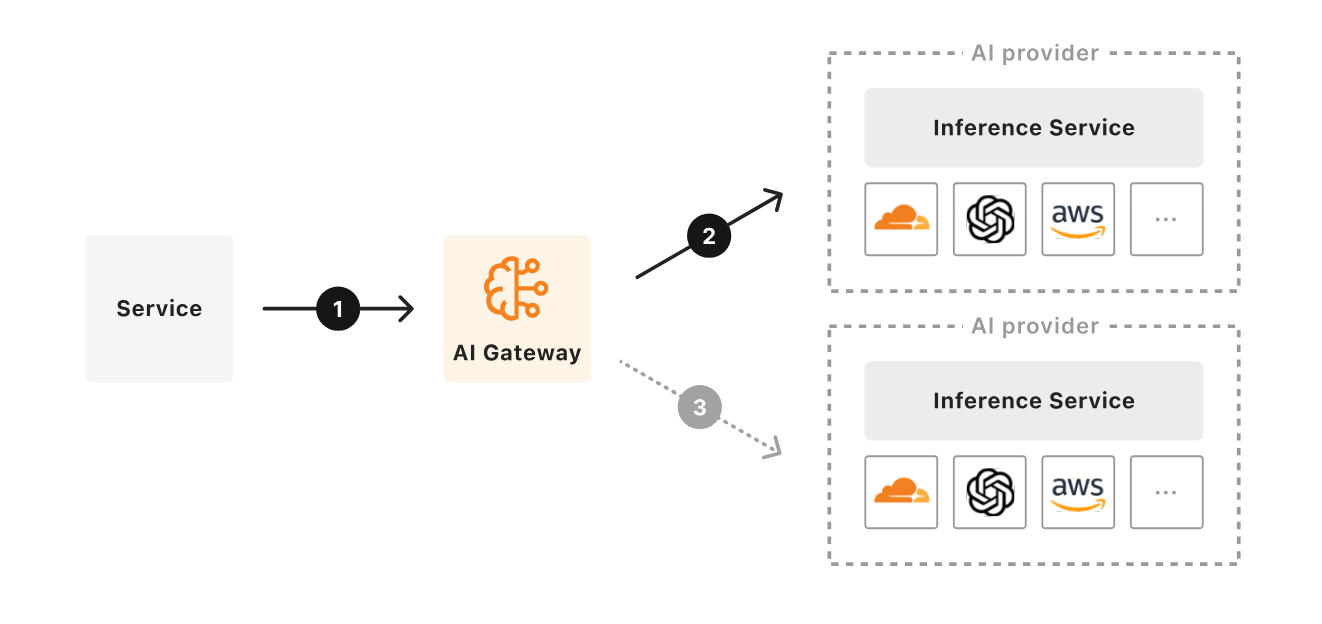
Cloudflare AI Gateway is a proxy layer that sits between your application and AI model providers like OpenAI, Anthropic, Groq, Hugging Face, and more. Launched in beta during September 2023 and reaching General Availability in May 2024, it has since proxied over 2 billion requests. The setup is dead simple — change your SDK’s baseURL to a Cloudflare endpoint, and every request flows through their global network. No other code changes required.
The best part? Core features — dashboard analytics, caching, rate limiting, and fallback routing — are free on all Cloudflare plans. You literally just need a Cloudflare account to get started.
5-Minute Setup Guide — From Zero to Monitored
Step 1: Create Your Gateway
In the Cloudflare dashboard, navigate to AI → AI Gateway and create a new gateway. The Gateway ID becomes part of your proxy URL, so I recommend matching it to your project name for easy management.
Step 2: Change One Line of Code
If you’re using the OpenAI SDK, just swap the baseURL:
// Before
const openai = new OpenAI({ apiKey: "sk-..." });

// After — routed through Cloudflare AI Gateway
const openai = new OpenAI({
  apiKey: "sk-...",
  baseURL: "https://gateway.ai.cloudflare.com/v1/{account_id}/{gateway_id}/openai"
});
Same pattern for Anthropic:
import Anthropic from '@anthropic-ai/sdk';

const client = new Anthropic({
  apiKey: "sk-ant-...",
  baseURL: "https://gateway.ai.cloudflare.com/v1/{account_id}/{gateway_id}/anthropic"
});
That’s it. Every request now flows through Cloudflare, and you can see it all in real-time on your dashboard. The setup takes under 5 minutes, and you don’t touch any of your existing application logic.
Caching: Cut Costs by Up to 90% on Repeated Requests
This is where Cloudflare AI Gateway really shines. When the same prompt hits the same model, the first response gets cached on Cloudflare’s global network. Subsequent identical requests are served from cache instantly — reducing latency by up to 90% according to Cloudflare’s own benchmarks.
Where does caching deliver the biggest impact?
- FAQ chatbots: Customer support bots with recurring questions can hit 80%+ cache rates
- Content classification: Pipelines that run the same categorization prompts repeatedly
- Code review: Analysis requests for common code patterns
- Translation: Repeated multi-language translation requests for identical phrases
You can configure cache TTL (Time To Live) from the dashboard and define custom cache keys for granular control. For example, you might cache classification requests for 24 hours but keep conversation responses for just 5 minutes. The savings compound quickly — if 50% of your requests are cacheable, you’ve just cut your API spend in half. In my own testing, a content pipeline that made ~500 API calls per day saw 62% cache hits after tuning, dropping daily costs from $40 to roughly $15.
Rate Limiting: Never Get Hit With a Surprise $10K Bill
The scariest scenario in LLM-powered services is an unexpected traffic spike. A single user running a bot, or a bug causing an infinite loop, can rack up thousands of dollars in hours. Cloudflare AI Gateway’s rate limiting stops this cold:
- Fixed Window: Maximum requests per time window (e.g., 100 requests per minute)
- Sliding Window: More granular traffic smoothing
- Per-user/per-IP limits: Prevent individual abuse without affecting other users
Setting a limit of 100 requests per minute and 10,000 per day gives you predictable cost boundaries. With GPT-4 turbo pricing, 10,000 daily requests stays in the $30–50 range — a number you can budget for with confidence.
Real-Time Analytics: Tokens, Costs, and Errors at a Glance
The Cloudflare AI Gateway dashboard aggregates metrics from all your AI providers in one place. Here’s what you can track:
- Request volume: Traffic patterns by time of day
- Token usage: Input and output tokens broken down separately
- Cost tracking: Per-provider, per-model cost analysis
- Error rates: 4xx and 5xx error pattern identification
- Latency: P50, P95, P99 response times
- Cache hit rates: How effectively your caching is working
The September 2024 Birthday Week update introduced Persistent Logs in open beta — up to 10 million logs per gateway. You can inspect individual request prompts, responses, costs, and durations. This is invaluable for debugging prompt regressions and tracking down costly outlier requests. There’s also a human evaluation feature where team members can rate responses with thumbs up/down for quality tracking. Combined with Logpush integration, you can export logs to Cloudflare R2, Amazon S3, or Google Cloud Storage for long-term compliance and advanced analysis.
Fallback and Retry: Build AI Services That Never Go Down
When OpenAI goes down, your service goes down — unless you’ve set up fallbacks. With Cloudflare AI Gateway’s Universal Endpoint, you define a chain of providers:
// Universal Endpoint — fallback chain
const response = await fetch(
  `https://gateway.ai.cloudflare.com/v1/{account_id}/{gateway_id}`,
  {
    method: "POST",
    headers: { "Content-Type": "application/json" },
    body: JSON.stringify([
      { provider: "openai", endpoint: "chat/completions", ... },
      { provider: "anthropic", endpoint: "messages", ... },
      { provider: "workers-ai", endpoint: "@cf/meta/llama-3.1-8b-instruct", ... }
    ])
  }
);
This routes through OpenAI first, falls back to Anthropic if that fails, then to Workers AI as a last resort. Combined with automatic retries for transient network errors, this setup delivers 99.9%+ availability for your AI-powered features. In production, this kind of resilience isn’t a luxury — it’s a requirement.
Real-World Impact: Before and After AI Gateway
Let’s look at what changes when you add Cloudflare AI Gateway to a daily content generation pipeline that uses LLMs:
- Before: Daily API costs $30–50, manual retries on errors, cost tracking only via monthly invoices
- After: Caching eliminates repeated requests → daily costs $5–15, automatic fallback recovery, real-time dashboard for instant cost/performance visibility
If you’re using multiple AI providers simultaneously (say GPT-4 turbo + Claude + Llama), you no longer need to check each provider’s dashboard separately. Cloudflare AI Gateway gives you unified monitoring across all of them — one dashboard to rule them all.
It’s Free — So Why Aren’t You Using It Yet?
Cloudflare AI Gateway’s core features — analytics dashboard, caching, rate limiting, and fallback routing — are free on every plan. The only paid features are expanded persistent log storage (free tier: 100K–200K logs; extra: $8 per 100K logs/month) and Logpush integration for compliance.
For any project using LLM APIs, Cloudflare AI Gateway should be table stakes. The setup takes 5 minutes. The code change is one line. That one line can save you hundreds of dollars per month and give you visibility you never had into how your AI features actually perform. If you’re not running your AI API calls through a proxy yet, start today. Check out the official documentation to get started, and read the GA announcement blog for the full feature breakdown.
Looking to build AI automation systems or optimize your LLM API pipeline? Let’s discuss the best approach for your specific use case.
Get weekly AI, music, and tech trends delivered to your inbox.






