


iPad Pro M5 Rumors: 5 Leaked Specs That Could Redefine Tablet Computing in 2025
May 8, 2025
Best NAS for Home 2025: Synology DS224+ vs QNAP TS-264 vs Asustor AS3302T — The Definitive Comparison
May 9, 2025
Your AI just remembered that you hate em dashes, prefer Python over JavaScript, and always want code examples with type hints — and you never explicitly told it any of that. Welcome to the new ChatGPT memory update.
On April 10, 2025, OpenAI rolled out a massive ChatGPT memory update that goes far beyond the “remember this” feature we had before. According to TechCrunch, ChatGPT can now automatically reference all your past conversations to build a comprehensive understanding of who you are — your communication style, preferences, recurring topics, and workflow patterns. It launched first for Plus and Pro subscribers, with a lighter version reaching free users by June 2025.
What the ChatGPT Memory Update Actually Changes
According to OpenAI’s official announcement, the update introduces a dual-layer memory system that fundamentally changes how ChatGPT interacts with you.
Saved Memories work the way you’d expect. You tell ChatGPT “Remember that I use FastAPI for all backend projects” and it stores that fact explicitly. You can view, edit, and delete individual saved memories in your Settings. Think of these as bookmarks — intentional, visible, and fully under your control.
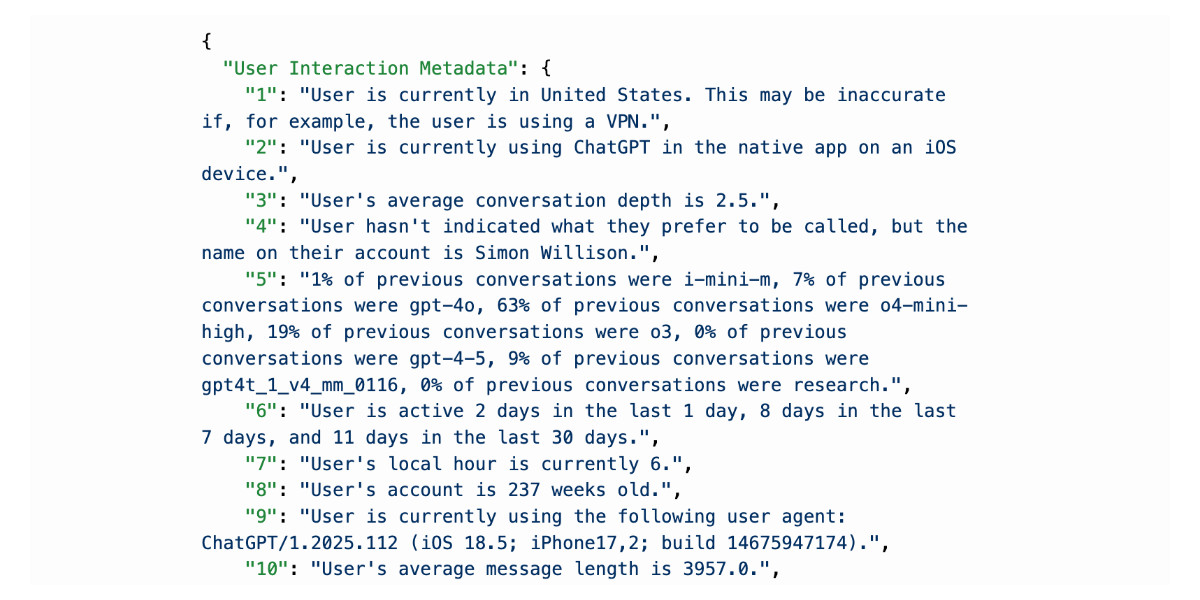
Chat History Reference is the game-changer — and the controversial part. ChatGPT now automatically mines insights from your entire conversation history. It learns your communication style, identifies recurring themes, picks up on preferences you never explicitly stated, and builds what amounts to a behavioral profile. These insights don’t show up as individual items in your Settings the way saved memories do. They’re woven into the background context that shapes every response you receive.
The practical impact is significant. Before this update, every ChatGPT conversation started from zero unless you manually told it what to remember. Now, ChatGPT carries forward context from text conversations, voice chats, and even image generation requests. It’s the difference between talking to a stranger every time and talking to an assistant who actually knows your work.
Search Engine Journal reported that the system learns across all interaction types — meaning your image generation preferences, voice conversation patterns, and text chat history all feed into the same unified memory. If you asked for a logo design in one chat and then start a new conversation about branding, ChatGPT already knows your visual preferences without being told.
How ChatGPT Memory Update Differs by Subscription Tier
Not all users get the same memory experience. OpenAI has tiered the feature based on subscription level, and the differences matter more than you might expect.
- Free tier: Short-term continuity only. ChatGPT references recent conversations but forgets older ones. Think of it as a few sessions of context — useful for ongoing work within a day or two, but not true persistent memory.
- Plus ($20/month): Long-term memory kicks in. ChatGPT can reference conversations from weeks or months ago, enabling genuine personalization over time. This is where the feature becomes truly valuable for professionals.
- Pro ($200/month): The most powerful memory tier. Full conversation history reference with the most sophisticated user profile construction. For power users running complex, multi-threaded workflows, this is where the investment pays off.
According to BleepingComputer, the free tier expansion began on June 3, 2025. If you’re on the free plan and wondering why ChatGPT seems slightly more aware of your preferences, this is why — though the experience is considerably more limited than what paying subscribers get.
The Privacy Debate: When Convenience Becomes a “Dossier”
Not everyone is thrilled about an AI that automatically builds a profile of everything you’ve ever discussed with it. Security researcher Simon Willison published a pointed critique titled “I really don’t like ChatGPT’s new memory dossier,” arguing that the automatic profile construction crosses a line from helpful personalization into surveillance territory.
His concern isn’t theoretical. The fact that the EU, UK, Iceland, Liechtenstein, Norway, and Switzerland were excluded from the initial rollout due to GDPR regulations tells you something about the privacy implications. OpenAI itself recognized that this feature needed careful handling in regions with strict data protection laws.
The good news is that OpenAI has built in meaningful controls:
- Temporary Chat mode: A conversation that neither uses nor updates memory — the equivalent of incognito browsing for your AI interactions.
- Individual memory deletion: You can review and remove specific saved memories from Settings.
- Full disable: You can turn off the memory feature entirely if you prefer a clean-slate experience.
- Sensitive data safeguards: Health information and other sensitive data won’t be memorized unless you explicitly ask ChatGPT to remember it.
ChatGPT vs Claude vs Gemini: The AI Memory Wars
How each major AI handles memory reveals its core philosophy — and understanding these differences is crucial for choosing the right tool for your workflow.
ChatGPT (OpenAI) takes the most aggressive approach. Automatic reference of all past conversations, automatic user profile construction, maximum convenience with a privacy trade-off. It’s the “let me handle everything” assistant.
Claude (Anthropic) takes the opposite stance. Every conversation starts from a blank slate. Memory only activates when you explicitly invoke it. Each project gets its own independent memory space, and when Claude does reference past conversations, it searches the original transcripts rather than relying on AI-generated summaries. It’s the “you’re in control” assistant.
Gemini (Google) is currently the most conservative. It forgets preferences when sessions end, compensating through Google Workspace integration. Your context comes from your existing Google ecosystem rather than from conversational memory. It’s the “ecosystem-first” assistant.
None of these approaches is objectively “best.” ChatGPT maximizes convenience, Claude maximizes user control, and Gemini maximizes ecosystem integration. The right choice depends on what you value most — and increasingly, the smartest approach is using multiple AI tools for different types of work.
It’s worth noting that each approach carries distinct risks. ChatGPT’s automatic profiling means accidental disclosure of sensitive information in one chat can follow you into every future conversation. Claude’s blank-slate approach means you lose continuity but gain predictability — you always know exactly what context the AI is working with. Gemini’s ecosystem play means your AI context is only as good as your Google Workspace usage, which works brilliantly for Gmail-heavy users but falls flat for those on other platforms.
4 Practical Strategies to Make the ChatGPT Memory Update Work for You
If you’re staying with ChatGPT’s memory enabled, here’s how to get maximum value while maintaining control.
1. Lock in your writing style preferences early. Tell ChatGPT explicitly: “I never use em dashes. I prefer short, direct sentences. Always use active voice.” One conversation sets the tone for every future interaction. For freelance writers, marketers, and content creators, this alone saves hours of repetitive prompting.
2. Define your technical environment once. “I work with Python 3.12, FastAPI, PostgreSQL, and deploy on AWS. All code examples should target this stack.” No more re-explaining your setup in every coding session. ChatGPT will automatically tailor code suggestions, troubleshooting advice, and architecture recommendations to your environment.
3. Use memory for recurring workflows. Weekly reports, periodic analyses, ongoing projects — let memory maintain the thread. “Continue the analysis from last week’s sales data” becomes a viable prompt when ChatGPT actually remembers last week’s conversation.
4. Deploy Temporary Chat mode strategically. Sensitive topics, one-off questions, borrowing someone else’s device — Temporary Chat should be your default for anything you wouldn’t want stored. Think of it as the same discipline you apply to incognito browsing: not for everything, but essential for certain situations.
My Take: A Producer’s Perspective on AI Memory
I use both Claude and ChatGPT daily — for blog pipeline automation, music production workflows, and tech consulting. The difference in their memory philosophies isn’t abstract to me; I live it every day.
Honestly, ChatGPT’s automatic memory is convenient. Not having to explain every session that I work in Pro Tools, mix in Dolby Atmos, and operate in both Korean and English saves real time. But after 28 years in the music and technology industry, I’ve learned one thing that applies perfectly here: convenience and control are always a trade-off.
I saw the same tension when studios transitioned from analog consoles to digital. Total Recall was a revelation — instant session recall instead of photographing fader positions. But it also meant your session data was locked into a specific system. If the manufacturer went under or changed formats, your recall data was worthless. AI memory carries the same risk: the more context you invest in one platform, the harder it becomes to leave.
My strategy is deliberate: ChatGPT’s automatic memory handles non-sensitive repetitive tasks, while Claude’s project-based memory handles deep, context-rich project work. I don’t put all my eggs in one AI basket. For anyone building serious workflows around AI tools, I’d recommend the same hybrid approach. Use each tool’s strengths rather than forcing one tool to do everything.
The ChatGPT memory update is a genuine milestone in AI personalization. But the real skill isn’t using the feature — it’s managing your data consciously. Use Temporary Chat for sensitive conversations. Audit your saved memories regularly. Never share information with an AI that you wouldn’t want stored indefinitely. Enjoy the convenience, but never surrender the control. That’s how you thrive in the AI era.
Need help building AI-powered workflows or automation systems? Let’s talk about how to integrate AI tools into your production pipeline.
Get weekly AI, music, and tech trends delivered to your inbox.






