


Moog Spring 2026 Analog Synth Hardware Lineup: $899 Messenger to $150K Emerson Modular
March 6, 2026
Bedroom Producer to Professional: The 7-Step Career Roadmap for 2026
March 9, 2026
I’ve been using ChatGPT daily for over two years now — and until recently, every single conversation started from scratch. No context, no memory of the 500+ chats that came before. That changed dramatically in early 2026, and honestly, it feels like upgrading from a goldfish to a colleague who actually remembers your name.
The Memory Revolution: From Amnesia to Total Recall
OpenAI’s ChatGPT long-term memory system has evolved through several major milestones. The initial memory feature launched in early 2024 was basic — you could manually tell ChatGPT to remember things, and it would store small notes. But the real transformation began in April 2025, when OpenAI introduced chat history reference, a system that automatically draws context from your entire conversation history.
As Sam Altman put it: “AI systems that get to know you over your life, and become extremely useful and personalized” — that’s exactly what ChatGPT is becoming in March 2026. With GPT-5.4 now powering the platform and a 1 million token context window available via API, the infrastructure for true personalization is finally here.

5 ChatGPT Long-Term Memory Features You Should Know About
1. Saved Memories — Your Explicit Instructions
The original memory feature still works: tell ChatGPT “Remember that I prefer TypeScript over JavaScript” or “I’m allergic to shellfish,” and it stores these as persistent notes. What’s improved is the capacity and intelligence behind it. ChatGPT Plus and Pro users now benefit from automatic memory management — the system prioritizes the most relevant saved memories and moves less important ones to the background, preventing the memory bank from hitting capacity.
2. Chat History Reference — The Game Changer
This is the feature that transformed ChatGPT from a stateless tool into something that genuinely feels personal. Chat history reference allows ChatGPT to automatically draw context from past conversations — your tone preferences, recurring projects, professional goals, and interests — without you explicitly saving anything. It adapts silently in the background.
The difference between saved memories and chat history is crucial: saved memories are explicit bookmarks you create, while chat history is an ambient awareness that builds over time. Think of it as the difference between writing a sticky note versus a colleague naturally learning your work style over months.
3. Memory with Search — Personalized Web Results
Introduced in April 2025, Memory with Search lets ChatGPT leverage your stored memories when conducting web searches. If you’ve told ChatGPT you follow a vegan diet, asking “find me a restaurant nearby” will automatically prioritize vegan-friendly options. If it knows you’re a music producer, searching for “best new plugins” will return results tailored to your DAW and genre preferences.
4. Project-Specific Memory Isolation
One of the most practical additions in 2026 is project-specific memory. ChatGPT’s Projects feature now supports isolated memory contexts — instructions and files you share within a project stay contained there. This means your work project memories don’t bleed into personal conversations, and vice versa. Plus users can attach up to 25 files per project, while Pro users get 40.
5. Tiered Memory Access — Free vs Plus vs Pro
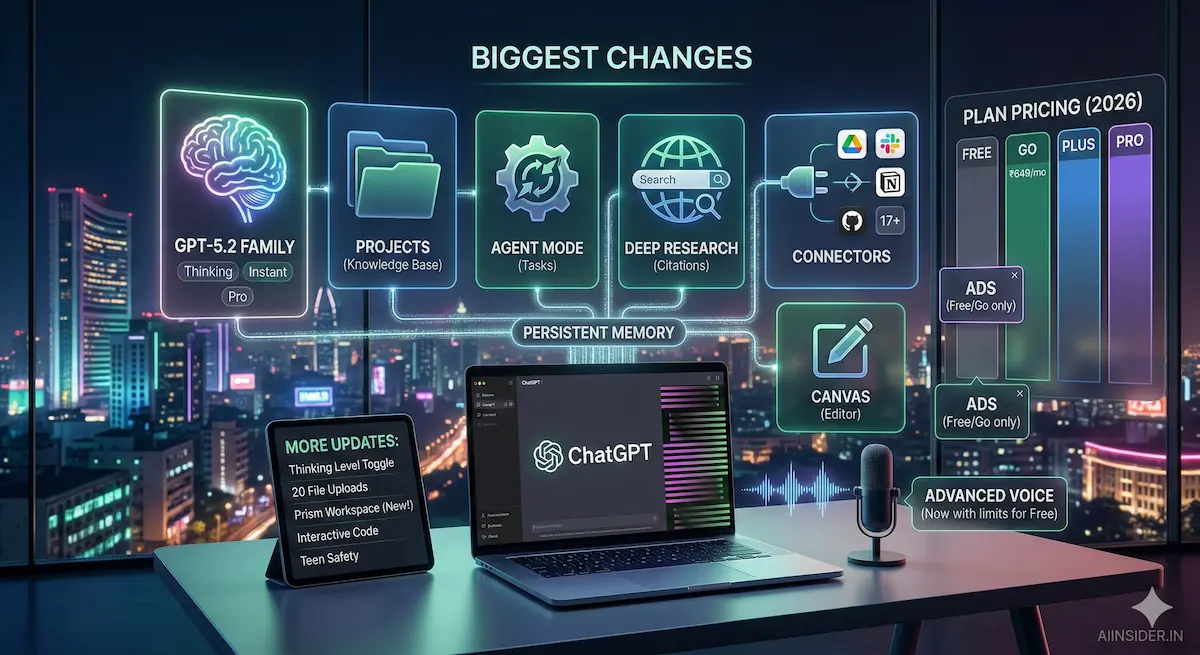
Not all memory is created equal. Here’s how the tiers break down in March 2026:
- Free users: Lightweight memory — short-term continuity across recent conversations only. GPT-5.2 Instant model.
- Plus ($20/month): Full chat history reference, saved memories with auto-management, project memory (25 files), GPT-5.4 access.
- Pro ($200/month): Maximum memory depth — comprehensive profile building across all past interactions, 40 files per project, GPT-5.4 Pro with extended thinking.
Privacy Controls: You’re Still in Charge
With great memory comes great responsibility — and OpenAI has built robust controls. Navigate to Settings → Personalization → Memory to toggle saved memories and chat history references independently. You can view, edit, and delete individual memories, or nuke everything with a single click. There’s also Temporary Chat mode for one-off conversations you don’t want remembered.
One important caveat: deleting a conversation doesn’t automatically erase saved memories from that chat. You need to manually remove them, and full deletion takes up to 30 days. Also worth noting — EU users (EEA, UK, Switzerland, Norway, Iceland, Liechtenstein) still can’t access the full memory features due to privacy regulations like GDPR.
The Bigger Picture: GPT-5.4 and the March 2026 Ecosystem
ChatGPT’s memory features don’t exist in isolation — they’re part of a massive platform evolution happening in March 2026. GPT-5.4 launched on March 5 with 33% fewer factual errors than GPT-5.2, native computer use capabilities, and upfront planning that shows its reasoning before execution. The old GPT-5.1 models were retired on March 11.
Add in the new Connectors (Google Drive, Gmail, Slack, Notion, GitHub integration), Agent Mode for multi-step task automation, and ChatGPT for Excel, and you’ve got an AI platform that doesn’t just remember you — it can actually act on your behalf across your entire digital workspace.
For professionals, the combination of persistent memory + connectors + agent mode is genuinely transformative. Imagine an AI that remembers your coding style, connects to your GitHub repos, and can autonomously execute multi-step workflows — that’s not a chatbot anymore, that’s a digital colleague.
Should You Care? My Honest Take
After using ChatGPT’s full memory stack for the past few months as a music producer and developer, I can say it’s the single most impactful quality-of-life improvement OpenAI has shipped. The friction of re-explaining your context every conversation was the biggest barrier to treating AI as a real productivity tool. That barrier is now gone for Plus and Pro users.
Free users still get a meaningful upgrade with lightweight memory, but if you’re a professional relying on ChatGPT daily, the Plus tier at $20/month is now a no-brainer. The memory features alone justify the cost — you’ll recoup that in time saved within the first week.
Looking to build AI-powered automation pipelines or integrate ChatGPT’s memory features into your creative workflow? Sean Kim has been building production AI systems since 2023.






