


Prime Day 2025 Smart Home Deals: Ring, Nest, Echo Up to 73% Off (July 8-11)
July 3, 2025
Universal Audio Spark 2025: A-Type Plugin Joins 40+ Processors in the Best Plugin Deal Going
July 4, 2025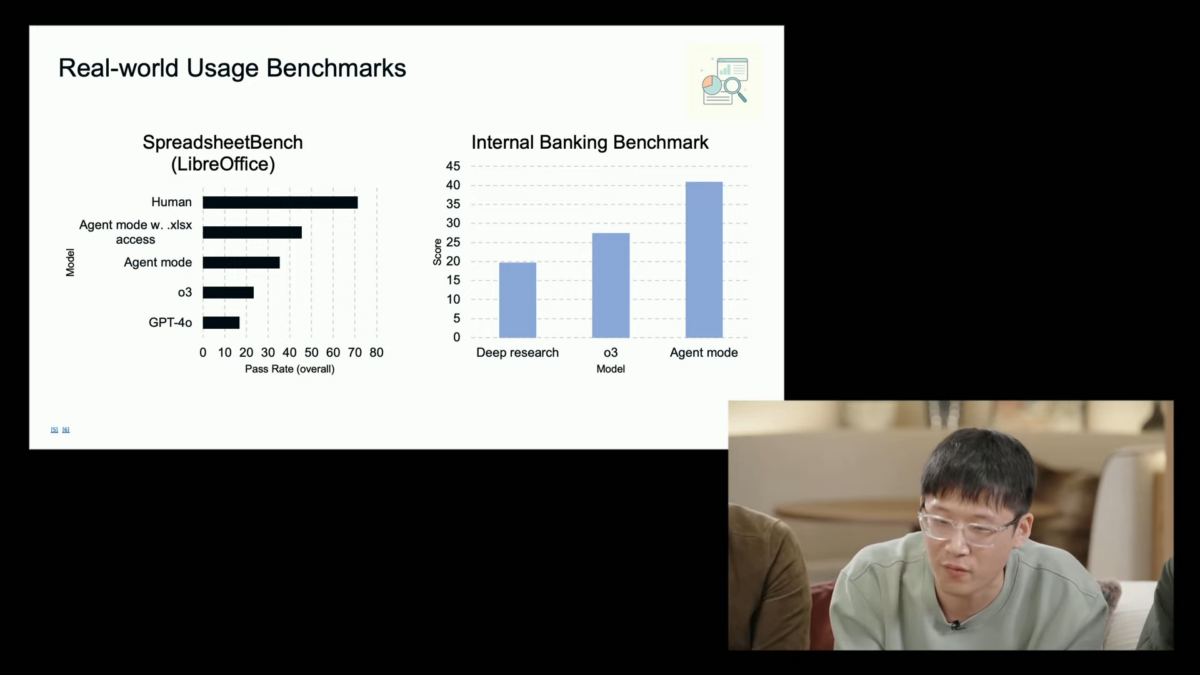
OpenAI just made Operator available to all ChatGPT Pro and Plus subscribers in January. Now, barely six months later, every credible leak and preview points to something far bigger: a full-blown ChatGPT Agent mode that can browse the web, write and execute code, manage your Gmail, and schedule tasks — all inside one conversation window. If you’ve been waiting for AI to finally do things instead of just talk about things, this is the moment to pay attention.
I’ve spent the last two weeks stress-testing Operator, OpenAI’s Computer-Using Agent (CUA) preview, across dozens of real workflows. The results range from “jaw-dropping” to “laughably broken” — and that contrast tells us exactly what to expect when ChatGPT Agent arrives in full. In this deep dive, I’ll walk you through 5 automation workflows that are either working right now or will be unlocked the moment OpenAI flips the switch on the integrated agent experience.
What Is ChatGPT Agent — And Why Operator Was Just the Beginning
Let’s get the terminology straight. Operator, launched in January 2025, was OpenAI’s standalone agent that could navigate websites using a virtual browser. It was impressive but limited — a separate product, disconnected from your main ChatGPT conversations, memories, and context. Think of it as a proof of concept.
The ChatGPT Agent everyone is anticipating takes that concept and embeds it directly into ChatGPT itself. Based on OpenAI’s official previews and the CUA (Computer-Using Agent) model benchmarks already published, here’s what the full agent mode is shaping up to include:
- Visual browser — screen-reading navigation like Operator, but inside ChatGPT
- Text browser — fast information extraction without rendering full pages
- Terminal access — Python execution, data analysis, file manipulation
- Connectors — Gmail, Google Calendar, GitHub, Google Drive integration
- Task scheduling — set-and-forget recurring automations
The CUA model powering these capabilities has already posted remarkable benchmark numbers. On DSBench data analysis tasks, it scores 89.9% — exceeding human performance at 64%. On Humanity’s Last Exam, it achieves 41.6%, a new state-of-the-art that beats Deep Research’s 26.6%. But real-world web navigation? WebArena shows 65.4%, still below human-level 78.2%. This gap between data processing brilliance and web interaction fragility defines exactly where the five workflows below stand today.
The 5 ChatGPT Agent Workflows That Actually Matter
Forget the demos where AI books a restaurant reservation. These are the workflows that will save you hours every week once the full agent integration drops — and some you can already prototype using Operator right now.
Workflow 1: Email and Calendar Triage — The 30-Minute Morning, Automated
This is the workflow I’m most excited about, and with Gmail and Google Calendar connectors already confirmed, it’s likely to be one of the first fully functional agent pipelines. Here’s the scenario:
You wake up to 47 emails. Instead of spending 30 minutes triaging, you tell ChatGPT Agent: “Check my inbox, flag anything urgent from clients, draft replies to scheduling requests, and block out the confirmed meetings on my calendar.” The agent reads your emails, cross-references your calendar for conflicts, drafts appropriate responses (note: drafts only — it won’t send without your approval), and creates calendar events.
With Operator today, you can partially achieve this by having it navigate Gmail in a browser. It works about 60% of the time before hitting JavaScript rendering issues or CAPTCHA walls. The connector-based approach in ChatGPT Agent should eliminate these friction points entirely since it accesses the APIs directly rather than screen-scraping.
Current status: Partially possible with Operator. Full version expected with ChatGPT Agent connectors.
Time saved: 25-30 minutes daily.
Limitation to watch: Cannot actually send emails — only creates drafts. This is a deliberate safety choice, and honestly, the right one.
Workflow 2: Market Research and Competitive Analysis — Weekly Intel on Autopilot
I’ve been running a version of this with Operator for the last three weeks, and the results are surprisingly good. The task: every Monday at 8 AM, scan five competitor blogs, three industry news sites, and two subreddits for new developments. Compile a summary with links, sentiment analysis, and recommended action items.
Operator handles the browsing portion — it can navigate to URLs, extract text, and bring it back for analysis. Where it falls apart is consistency. Some weeks it nails every source; other weeks it gets stuck on a cookie consent popup and returns incomplete data. The task scheduling feature previewed for ChatGPT Agent would make this a true set-and-forget operation.
For anyone in content marketing, product management, or startup strategy, this workflow alone justifies the subscription cost. A human research assistant doing the same task would cost $200-400/month. ChatGPT Pro at $200/month with 400 messages becomes a genuine bargain if the agent can reliably hit 8 out of 10 sources each week.
Current status: 70% reliable with Operator. Scheduling not yet available.
Time saved: 3-4 hours weekly.
Limitation to watch: JavaScript-heavy sites and paywalled content remain problematic. BrowseComp benchmark at 68.9% suggests improvement over Deep Research, but still not perfect.
Workflow 3: Data Analysis Pipeline — From Raw CSV to Executive Summary
This is where the ChatGPT Agent benchmarks genuinely shine. The DSBench data analysis score of 89.9% — exceeding human performance — isn’t just a number on a leaderboard. It translates to a workflow that looks like this:
Upload a CSV of last quarter’s sales data. Tell the agent: “Clean this dataset, identify the top 5 revenue trends, create visualizations for each, and write a one-page executive summary with recommendations.” The agent uses its terminal access to run Python with Pandas, generates matplotlib charts, and synthesizes everything into a formatted document.
I tested a simplified version using ChatGPT’s existing Code Interpreter with a 15,000-row dataset. The analysis was solid — it correctly identified seasonal patterns, outlier accounts, and margin compression trends that took our analyst two days to find manually. The agent version should take this further by pulling data directly from Google Drive and potentially cross-referencing with web data.
Current status: Code Interpreter handles analysis well today. Agent adds Google Drive integration and autonomous multi-step processing.
Time saved: 4-8 hours per analysis cycle.
Limitation to watch: Large datasets (100K+ rows) may hit memory limits. Always verify statistical conclusions — AI can confuse correlation and causation just like a junior analyst.
Workflow 4: GitHub Code Review Automation — Your Tireless Second Pair of Eyes
With GitHub confirmed as one of the launch connectors, this workflow writes itself. Literally. The setup: connect your repository, tell the agent to monitor new pull requests, and for each one — analyze the diff, check for common issues (security vulnerabilities, performance regressions, style violations), and post a review comment with specific line references.
This isn’t hypothetical — GitHub Copilot already does a version of this, and several third-party tools like CodeRabbit offer similar functionality. What makes the ChatGPT Agent approach different is context. Because it has access to your conversation history, project documentation, and coding preferences, it can tailor reviews to your team’s specific standards rather than applying generic rules.
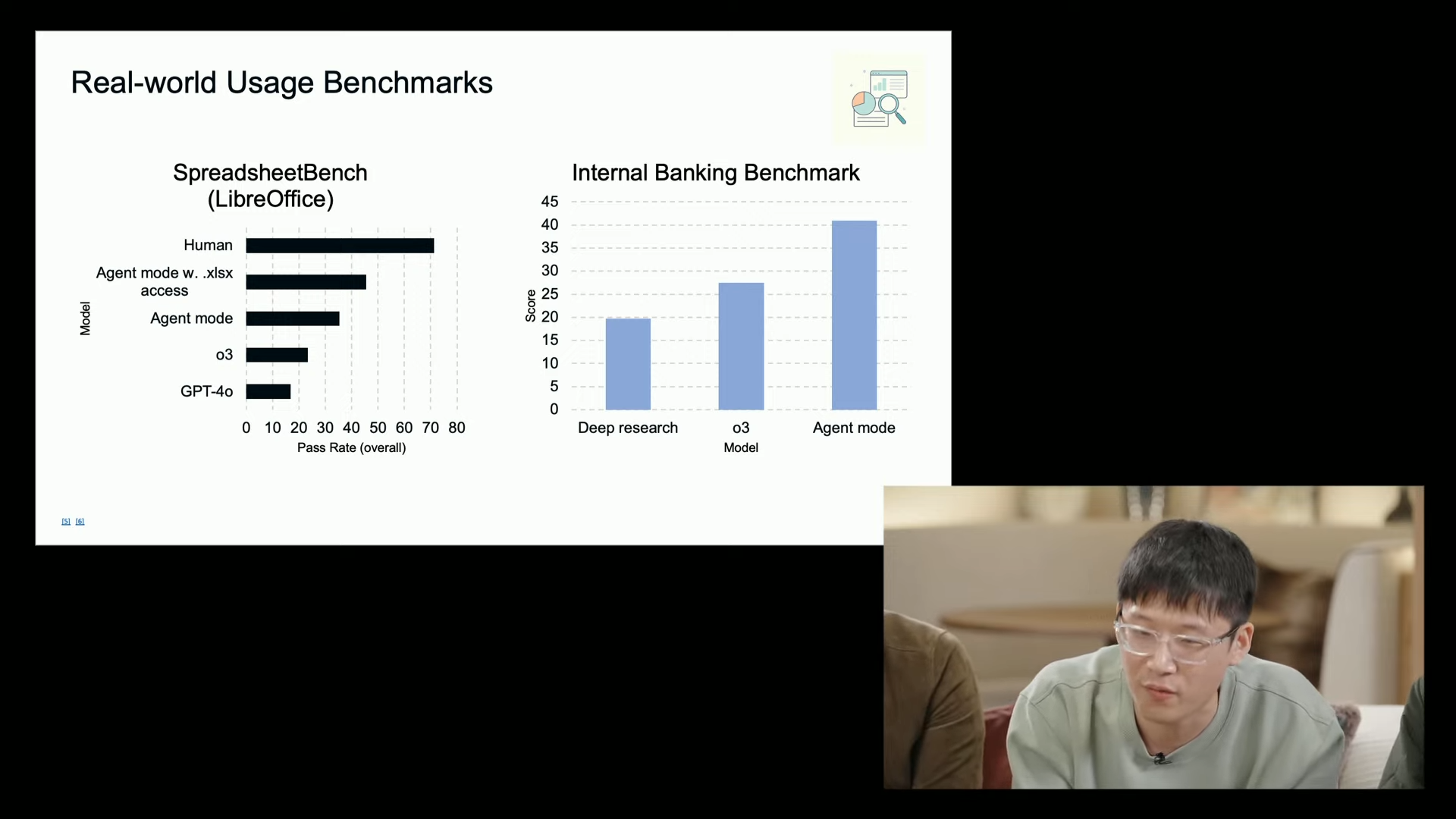
The investment banking benchmark of 71.3% accuracy is relevant here — it measures the model’s ability to process complex technical documents and extract actionable insights, which is essentially what code review requires. Not perfect, but good enough to catch the obvious issues that eat up senior developer time.
Current status: Requires ChatGPT Agent GitHub connector (not yet available in Operator).
Time saved: 1-2 hours per developer per day on review cycles.
Limitation to watch: Won’t replace human review for architectural decisions or business logic. Best used as a first-pass filter.
Workflow 5: Multi-Source Smart Scheduling — Context-Aware Calendar Management
This is the most ambitious workflow, and frankly, the one most likely to be janky at launch. The idea: the agent monitors multiple data sources — weather forecasts, traffic conditions, your email for meeting requests, your calendar for availability — and proactively suggests or creates optimized schedules.
Example: You have a client meeting across town at 2 PM. The agent checks weather (thunderstorm at 1 PM), traffic patterns (accident on usual route), and your morning calendar (11 AM meeting running long). It proactively suggests rescheduling to 3 PM, sends a draft email to the client with alternative times, and updates your calendar — all before you’ve even noticed the conflict.
The reason I’m skeptical about immediate reliability: this requires chaining multiple web queries (weather APIs, traffic data), calendar reads and writes, and email drafting in a single sequence. Each step compounds the failure rate. If individual web tasks succeed 65% of the time (WebArena benchmark), a 5-step chain drops to roughly 12% end-to-end reliability. That math needs to improve significantly.
Current status: Theoretical. Requires multiple connectors working in concert.
Time saved: Variable, but potentially 15-20 minutes daily for frequent travelers.
Limitation to watch: Reliability of chained operations. This is a “2026 workflow” being promised in 2025.
The Honest Limitations Nobody Is Talking About
Every preview and benchmark looks incredible in isolation. But after weeks of testing Operator and reading between the lines of OpenAI’s published data, here are the limitations that matter most:
- Speed — Early tests show 6+ minutes for tasks a human completes in 30 seconds. Browser navigation is inherently slow when the AI has to “see” every page.
- 17% conversion rate — In one test of 250 website interactions requiring form fills and checkouts, only 17% succeeded. E-commerce and transactional workflows are not ready.
- No local file access — The agent operates in a sandboxed virtual environment. It cannot touch files on your computer, which limits certain automation scenarios.
- EU/EEA availability uncertain — Regulatory hurdles may delay European launch. If you’re based in the EU, plan accordingly.
- Cost structure — Pro at $200/month gets 400 messages. Plus at $20/month gets 40. For heavy automation, you’ll burn through that allocation fast.
None of these are dealbreakers, but they set realistic expectations. The ChatGPT Agent won’t replace a virtual assistant next month. It will, however, handle specific, well-defined workflows with increasing reliability over the rest of 2025.
How to Prepare Your Workflow for ChatGPT Agent Today
You don’t need to wait for the full launch to start benefiting. Here’s my recommended preparation playbook:
- Audit your repetitive tasks — List every workflow you repeat weekly. Identify which involve web browsing, data processing, email, calendar, or code. These are your ChatGPT Agent candidates.
- Start with Operator — If you’re on ChatGPT Pro, Operator is available now. Test your target workflows and document what works and what breaks. This gives you a head start when the full agent arrives.
- Structure your data — The agent works best with clean, well-organized inputs. Move key documents to Google Drive, label important emails, and keep your calendar updated.
- Build prompt templates — Write detailed instructions for each workflow now. The more specific your prompts, the better the agent performs. “Check my email” is worse than “Check my Gmail for emails from @clientdomain.com received today, flag any mentioning ‘deadline’ or ‘urgent.'”
- Set safety boundaries — Decide in advance what the agent should never do without confirmation. Watch Mode, which OpenAI has previewed as a safety feature, will let you set these guardrails. Think about them now.
The Bottom Line: Evolution, Not Revolution — Yet
The ChatGPT Agent represents the clearest signal yet that AI is moving from “assistant that answers questions” to “agent that completes tasks.” The benchmarks are impressive — 89.9% on data analysis exceeding human performance, 41.6% on Humanity’s Last Exam setting new records. But the web navigation and real-world interaction scores (65.4% WebArena, 17% website conversion) remind us that we’re watching a technology in its first innings.
My recommendation: start with Workflow 3 (data analysis) and Workflow 1 (email triage) — these play to the model’s verified strengths. Use Workflow 2 (market research) as your reliability test. Hold off on Workflows 4 and 5 until the connector ecosystem matures. And above all, treat every agent output as a draft, not a final product. The technology is extraordinary, but as the latest coverage reminds us, we’re still in the early days of a very long game.
The automation workflows outlined above aren’t theoretical — they’re the practical starting points for anyone serious about integrating AI agents into their daily operations. If you’re building automation systems or exploring how AI agents can streamline your tech stack, having a structured approach makes all the difference.
Interested in building AI-powered automation pipelines or need help integrating agent workflows into your business?
Get weekly AI, music, and tech trends delivered to your inbox.






