
4K Gaming PC Build 2025: Complete Component Guide Under $1500 (April)
April 25, 2025
Klang.io Transcription Studio Review: The First AI Tool That Transcribes 8 Instruments Simultaneously in Under 30 Seconds
April 28, 2025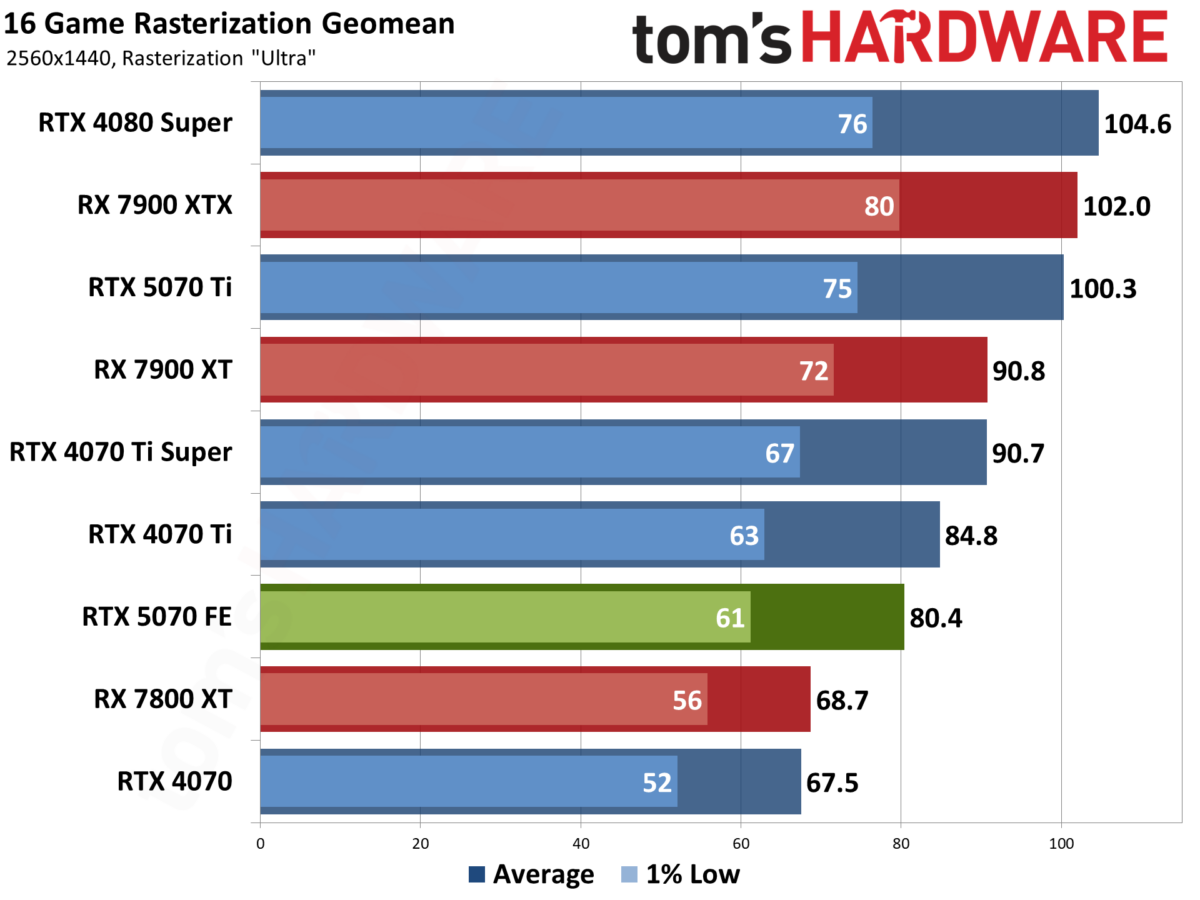
The RTX 5070 is finally here, and for the first time in years, a genuine 4K gaming PC build under $1500 is not just possible — it is genuinely compelling. After months of leaks, paper launches, and stock shortages, NVIDIA’s latest mid-range GPU landed in March 2025, and it changes the math on what a budget-conscious gamer can achieve at 3840×2160. I spent weeks digging through benchmarks, pricing data, and real-world availability to put together the definitive 4K gaming PC build 2025 component guide that actually makes sense right now.
CPU: AMD Ryzen 5 9600X — The 4K Gaming PC Build 2025 Sweet Spot
Here is the thing about 4K gaming that most build guides gloss over: at 3840×2160, the GPU does the heavy lifting, not the CPU. That makes the AMD Ryzen 5 9600X an almost unfairly good choice for this build. Six cores, twelve threads, Zen 5 architecture on TSMC 4nm, and a 65W TDP that keeps thermals and noise in check.
The 9600X originally launched at $279, but street prices have cratered to roughly $185 as of April 2025. That is a 16% IPC improvement over the previous Zen 4 generation at a price that would have bought you a Ryzen 5 5600X three years ago. Single-threaded performance is excellent — exactly what drives frame rates in the vast majority of games — and the AM5 platform gives you a clear upgrade path to future Ryzen processors without swapping your motherboard.
Compared to Intel’s Core i7-14700K, the 9600X trails by roughly 3-5% in raw gaming performance on Windows 24H2. But it peaks at 70C under load versus the Intel chip’s 100C, draws 65W versus 125W, and sits on a platform with a future — unlike LGA 1700, which is at end of life. For a 4K gaming build where the GPU is the bottleneck anyway, the 9600X is the smarter long-term investment.
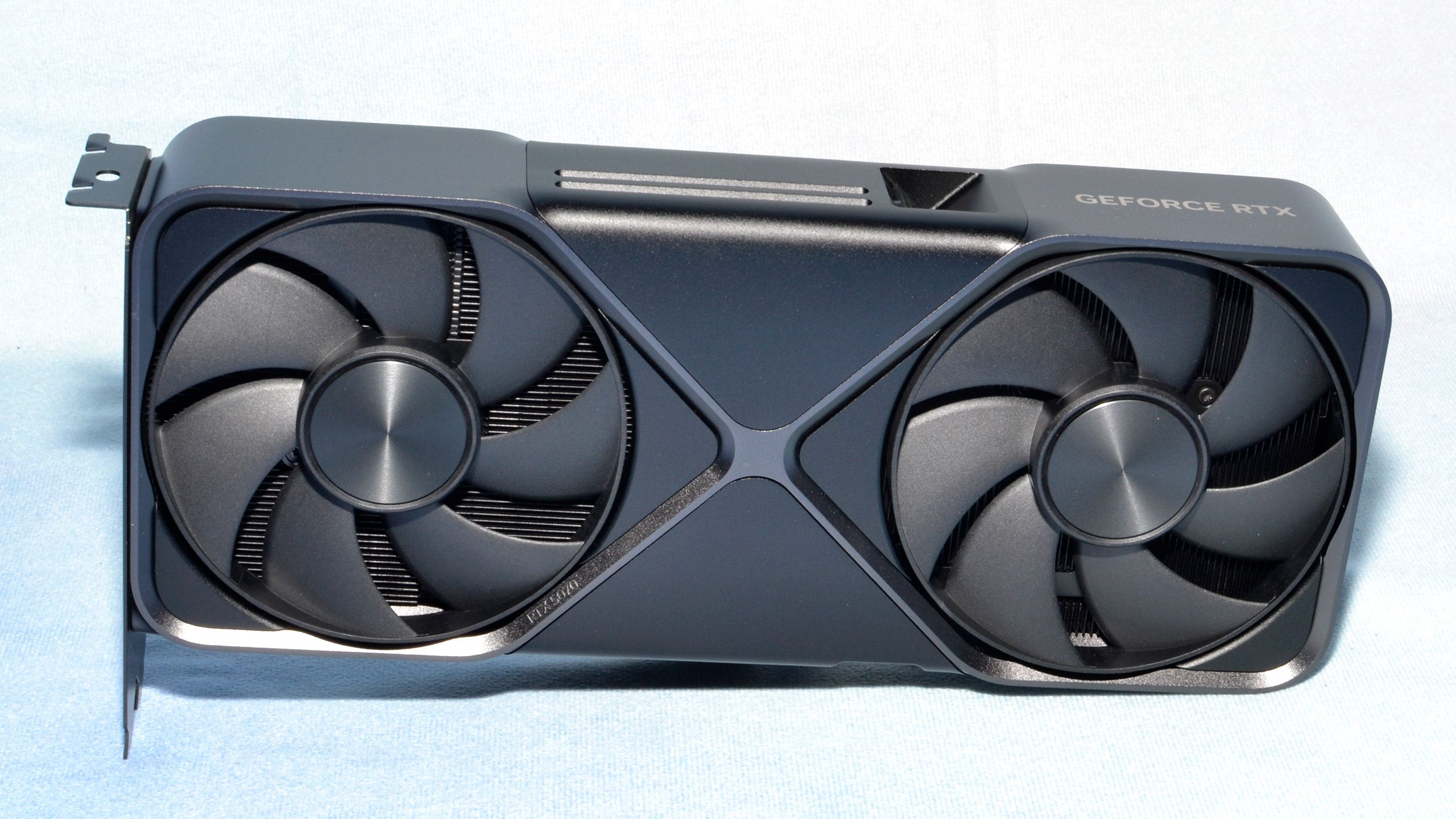
GPU: NVIDIA GeForce RTX 5070 — The Heart of This Build
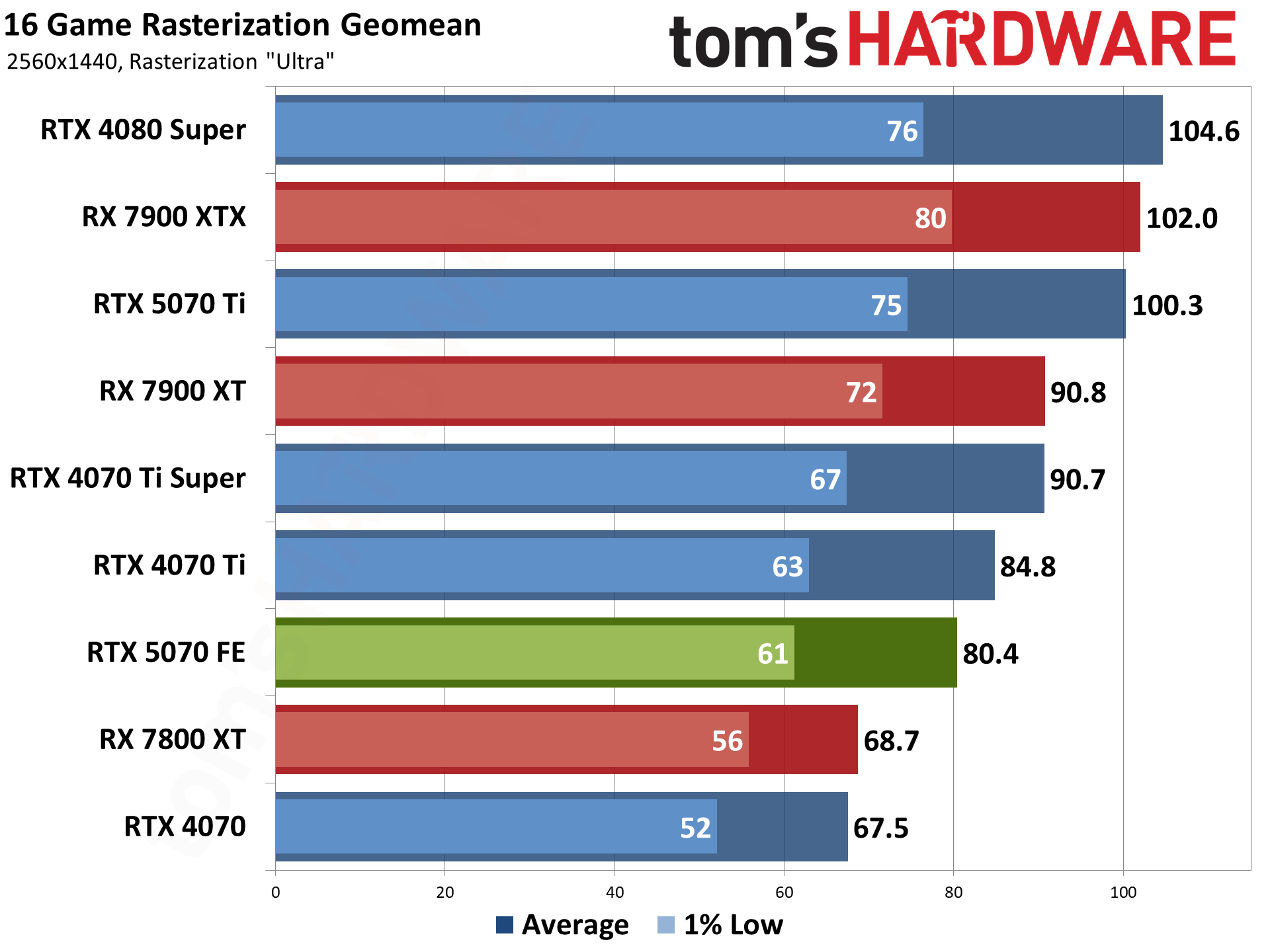
The NVIDIA GeForce RTX 5070 is the reason this build exists. At $549 MSRP, it packs 12GB of GDDR7 memory, 6144 CUDA cores, and full support for DLSS 4 with Multi-Frame Generation. According to Tom’s Hardware’s review, it is 19% faster than the RTX 4070 at 1440p and 22% faster at 4K.
Now, let me be honest about 4K performance. At native resolution without upscaling, the RTX 5070 averages around 53 FPS in demanding titles — playable, but not the buttery-smooth experience you might expect. The magic happens with DLSS 4. In Cyberpunk 2077 at 4K, Multi-Frame Generation pushes frame rates to approximately 122 FPS according to TechSpot’s testing. DLSS Quality mode makes 4K gaming genuinely smooth across the board.
The elephant in the room is availability. Stock shortages have been severe since the March 2025 launch, with real street prices running $100 or more over MSRP. If you cannot find an RTX 5070 near $549, the RTX 4070 Ti Super at $799 is a viable alternative — it offers 16GB of GDDR6X on a wider 256-bit bus, which gives it better VRAM headroom for 4K texture packs. The 12GB on the RTX 5070 may become a limitation as games demand more VRAM at ultra-high resolutions.
Motherboard: ASUS TUF Gaming B650-Plus WiFi
The ASUS TUF Gaming B650-Plus WiFi at around $200 is the Goldilocks choice for this build. AM5 socket, DDR5 support, PCIe 4.0, WiFi 6, and over two years of BIOS maturity mean you are getting a board that just works. The B650 chipset does not offer PCIe 5.0 for storage, but since we are using a Gen4 NVMe drive anyway, that is a non-issue.
What matters more is reliability and VRM quality for the 9600X. The TUF Gaming line has consistently delivered solid power delivery at this price point, and the board’s VRMs handle the 65W 9600X without breaking a sweat. You get two M.2 slots, USB 3.2 Gen 2, and a straightforward BIOS that supports AMD EXPO memory profiles out of the box.
RAM: G.Skill Trident Z5 Neo RGB DDR5-6000 CL30 32GB
DDR5-6000 at CL30 is the sweet spot for AMD Ryzen 9000 series processors — this is not opinion, it is where AMD’s Infinity Fabric clock (FCLK) runs in its optimal 1:1 ratio. The G.Skill Trident Z5 Neo RGB kit at around $100 for 32GB (2x16GB) is specifically optimized for AMD EXPO profiles, meaning you enable the XMP equivalent in BIOS and the memory runs at rated speeds automatically.
32GB is the standard for gaming in 2025. Modern titles like Hogwarts Legacy and Star Wars Outlaws regularly consume 16GB or more, and having 32GB ensures you can keep a browser, Discord, and streaming software running alongside your game without hitting a wall.
Storage: Samsung 990 Pro 1TB NVMe Gen4
The Samsung 990 Pro 1TB has dropped to around $99 — a historic low for what remains the fastest Gen4 NVMe drive on the market. With sequential read speeds of 7,450 MB/s, game load times are essentially instantaneous on titles that support DirectStorage. The WD Black SN850X at a similar price point is another excellent choice with 7,300 MB/s reads, but the Samsung edges it out on sustained write performance.
One terabyte is enough for your operating system and 8-10 modern AAA games. If you need more space, the $131 budget headroom in this build can cover a second 1TB drive or a 2TB QLC option for game storage.
PSU: Corsair RM750x ATX 3.1 — Do Not Cheap Out Here
The Corsair RM750x ATX 3.1 at $110 is the right call for this build. 750W provides comfortable headroom for the RTX 5070’s power requirements, 80 Plus Gold efficiency keeps your electricity bill reasonable, and the ATX 3.1 standard means you get a native 12VHPWR connector — no adapter cables that can melt or cause instability.
Fully modular cabling means you only install the cables you need, which dramatically improves airflow and cable management inside the case. The 10-year warranty is the cherry on top. If there is one component where cutting corners leads to catastrophic failure, it is the PSU. Do not do it.
Case and Cooling: Corsair Frame 4000D RS ARGB + Thermalright Peerless Assassin 120 SE
The Corsair Frame 4000D RS ARGB at roughly $90 was highlighted by GamersNexus as one of the best airflow cases in 2025. It ships with three 120mm ARGB fans, a full mesh front panel for unrestricted intake, and clean cable management options. The mid-tower ATX form factor fits our B650 motherboard and full-length RTX 5070 without any clearance issues.
For CPU cooling, the Thermalright Peerless Assassin 120 SE at just $35 is one of the best-kept secrets in PC building. This dual-tower cooler with six heatpipes keeps the Ryzen 5 9600X at around 65C under full load — well within safe operating temperatures. At this price, it outperforms many coolers costing two to three times as much. The 65W TDP of the 9600X means you genuinely do not need a 240mm AIO for this build.
Build Tips: Avoiding Common Mistakes
A few practical notes from putting this configuration together:
- Enable AMD EXPO in BIOS immediately after first boot. Your DDR5-6000 kit will run at 4800 MHz by default. Go into BIOS, find the EXPO/XMP profile, enable it, save, and reboot. Free performance you are leaving on the table otherwise.
- Use the native 12VHPWR cable from the PSU. Do not use a dual 8-pin to 12VHPWR adapter if your PSU came with the native cable. Adapters have been linked to melting connectors under load.
- Install your NVMe drive before the GPU. On most B650 boards, the primary M.2 slot sits directly below the CPU socket and above the first PCIe x16 slot. Installing the drive after the GPU means removing the GPU again.
- Front-mount your AIO radiator (if you upgrade later) as intake. For the air cooler in this build, make sure the fans push air toward the rear exhaust fan. Positive pressure keeps dust out.
- Update BIOS before installing the CPU if buying an older B650 board. Most boards sold in April 2025 ship with Ryzen 9000-compatible BIOS, but if you get old stock, you may need a BIOS flashback update.
Performance Expectations: What Can You Actually Play at 4K?
Let me set realistic expectations for this $1,369 build. At native 4K resolution without any upscaling, the RTX 5070 will average around 50-60 FPS in demanding AAA titles like Cyberpunk 2077, Alan Wake 2, and Black Myth: Wukong. That is playable, but it is not the 100+ FPS experience many gamers expect.
Where this build truly shines is with DLSS enabled. At 4K DLSS Quality, you are looking at 80-100+ FPS in most modern titles with image quality that is virtually indistinguishable from native rendering. DLSS 4 Multi-Frame Generation pushes those numbers even higher — Cyberpunk 2077 hitting 122 FPS at 4K is genuinely impressive for a sub-$1,500 machine.
For competitive titles like Valorant, Counter-Strike 2, and Fortnite, you will easily exceed 144 FPS at 4K with reduced settings — more than enough for a high-refresh 4K monitor. Esports titles are where this build feels almost overkill.
The complete parts list with estimated April 2025 pricing:
- AMD Ryzen 5 9600X — $185
- NVIDIA GeForce RTX 5070 Founders Edition — $549 (MSRP, street price may vary)
- ASUS TUF Gaming B650-Plus WiFi — $200
- G.Skill Trident Z5 Neo RGB DDR5-6000 CL30 32GB — $100
- Samsung 990 Pro 1TB NVMe — $99
- Corsair RM750x ATX 3.1 750W — $110
- Corsair Frame 4000D RS ARGB — $90
- Thermalright Peerless Assassin 120 SE — $35
- Total: $1,369 (with $131 headroom for extras)
My Take: What 28 Years in Tech Taught Me About Building PCs
I have been building PCs since the Pentium II era, and what strikes me most about the current landscape is how the definition of “budget” has shifted. A $1,369 machine that handles 4K gaming would have been science fiction five years ago. The RTX 5070 represents a genuine generational leap in what mid-range silicon can do — and DLSS 4’s Multi-Frame Generation is not a gimmick. It is a fundamental shift in how frames are rendered.
From my perspective as someone who runs demanding creative workloads alongside gaming, the AMD platform choice here is not just about gaming performance. The Ryzen 5 9600X on AM5 gives you a path to drop in a Ryzen 7 or Ryzen 9 later when your needs evolve — whether that is video editing, 3D rendering, or running local AI models. I have seen too many builders lock themselves into dead-end platforms to save $30 on a motherboard. The AM5 ecosystem still has at least one more generation of CPUs coming, and that longevity matters.
The one thing I would keep my eye on is the 12GB VRAM situation on the RTX 5070. For today’s games, it is sufficient. But as someone who has watched VRAM requirements steadily climb for nearly three decades, I would not be surprised if 12GB starts feeling tight for 4K ultra settings within 18-24 months. If you can stomach the price premium, the RTX 4070 Ti Super with 16GB might age more gracefully — though you trade away DLSS 4 MFG support and newer architecture features. It is a genuine trade-off with no clear winner.
This build hits the sweet spot of price, performance, and future-proofing that I would recommend to anyone ready to jump into 4K gaming without breaking the bank. The $131 in budget headroom is deliberate — use it for a second storage drive, better case fans, or put it toward a quality 4K monitor if you do not already own one.
Get weekly AI, music, and tech trends delivered to your inbox.