


Stability AI CEO Departure: How Emad Mostaque’s Exit Reshaped Open Source AI Image Generation
June 17, 2025
Mac Studio 2025 M4 Max M3 Ultra Review: Why Apple Skipped the M4 Ultra
June 17, 2025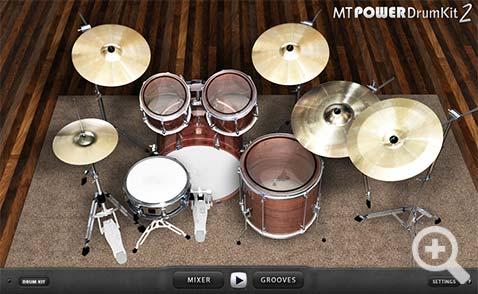
Stop paying $400 for drum plugins when six of the best free drum VST plugins in 2025 sound better than what most producers paid full price for five years ago. After testing every major free drum virtual instrument over the past month — from the newly updated Steven Slate SSD5.5 Free to the legendary Sennheiser DrumMic’a — I’m genuinely shocked at how far free options have come.
Whether you’re tracking a demo at 2 AM or building a production-ready kit for a client session, these six free drum VST plugins deliver results that belong on released records. Here’s exactly how each one stacks up in June 2025, with honest takes from 28 years behind the console.
Why Free Drum VST Plugins in 2025 Are Actually Usable
Let’s address the elephant in the room: free drum VST plugins used to be terrible. Thin samples, robotic velocity layers, and zero mix-readiness. That era is over. Companies like Steven Slate, IK Multimedia, and inMusic (BFD) now offer genuinely capable free tiers as onramps to their premium ecosystems. The samples are multi-velocity, the interfaces are modern, and the built-in processing handles 80% of what you’d do in your mix chain anyway.
The real question isn’t whether free drum VSTs can work — it’s which one matches your workflow, genre, and production style. That’s what this comparison is about.
1. MT Power Drum Kit 2 — The Workhorse That Refuses to Die
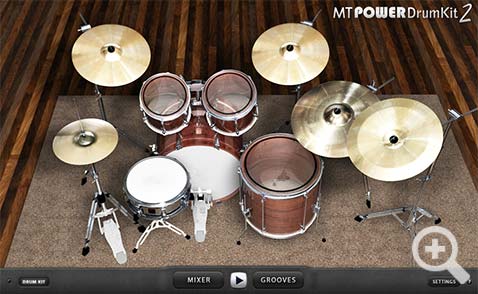
MT Power Drum Kit 2 by Manda Audio has been a staple of bedroom studios and professional demos alike for years, and in June 2025 it remains one of the most reliable free drum VST plugins available. The plugin is donationware — fully functional without paying, though a small donation removes the startup nag screen.
What makes MT Power Drum Kit 2 special is its mix-ready sound. The samples were specifically recorded and processed for pop, rock, and metal productions. You load it up, pick a groove from the built-in library, and the drums sit in a mix almost immediately. The built-in mixer gives you control over compression, EQ, and volume per drum piece — enough to shape the sound without opening a single third-party plugin.
Best for: Pop, rock, metal demos. Songwriters who need drums that just work. Producers who want drag-and-drop MIDI grooves without programming every hit.
Limitations: Only one kit sound (though it’s a good one). No room mic blending. The interface feels dated compared to newer options. If you need jazz brushes or electronic hybrid kits, look elsewhere.
Format: VST, AU, AAX — Windows and macOS
2. Steven Slate Drums SSD5.5 Free — Professional-Grade Without the Price Tag
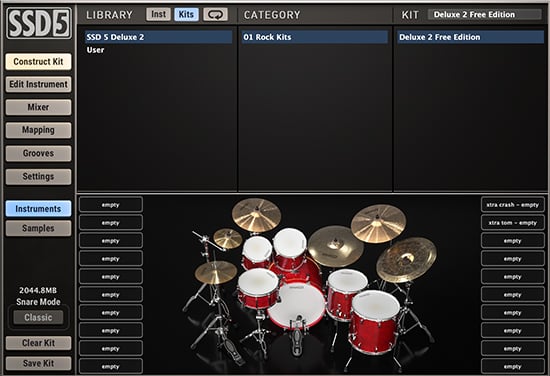
Steven Slate Drums SSD5.5 Free is, in my opinion, the single most impressive free drum VST plugin available in 2025. This isn’t a crippled demo — it’s a fully functioning version of the SSD5.5 engine with one Deluxe 2 kit, a classic mix-ready Slate snare, and three kit presets: Deluxe 2 Free, Hugo, and Dry n’ Tight.
The standout feature is Groove AI — an intelligent assistant that analyzes your song’s transients and recommends MIDI grooves that actually fit. The updated GUI provides total control over dynamics, panning, ADSR settings, and the ability to blend ambient room mics with close mics using custom routing. This is the kind of control you’d expect from a $200 plugin, not a free one.
From a mixing perspective, SSD5.5 Free sounds immediately polished. The Deluxe 2 kit has that modern, punchy character that works across rock, pop, and even country. The snare cuts through without being harsh, and the kick has enough low-end weight to anchor a full arrangement.
Best for: Rock, pop, country, singer-songwriter. Anyone who wants a professional-sounding drum kit with intelligent groove assistance.
Limitations: Only one full kit in the free version (the paid version has 100+ kits). Requires creating a Steven Slate Audio account and downloading through Slate Audio Center. About 2 GB download.
Format: VST, AU, AAX — Windows and macOS
3. Sennheiser DrumMic’a — 9 GB of Mic Modeled Perfection
Sennheiser’s DrumMic’a is the hidden gem that most producers don’t know about — and the ones who do guard it jealously. This free acoustic drum library packs over 9 GB of data with nearly 13,000 24-bit samples, up to 25 velocity layers per articulation, and the ability to switch between multiple Sennheiser and Neumann microphone models on every single piece of the kit.
Let that sink in: you can choose between an e 901, e 902, MD 421, or Neumann microphones on each drum. For a free library. The level of detail is absurd — this is the kind of mic modeling that premium libraries charge $300+ for.
The catch: DrumMic’a runs inside Native Instruments Kontakt (or the free Kontakt Player). It’s not a standalone VST plugin. If you don’t already use Kontakt in your workflow, this adds an extra layer of complexity. But if you do? This is arguably the best-sounding free drum instrument available anywhere.
Best for: Engineers who want mic-level control. Jazz, acoustic, and orchestral productions where natural drum tone matters. Kontakt users looking for a premium-quality free expansion.
Limitations: Requires Kontakt or Kontakt Player (free). Large 9 GB download. Interface is functional but not modern. May no longer be actively updated by Sennheiser, though existing downloads still work perfectly.
Format: Kontakt library (NKI) — Windows and macOS
4. BFD Player — 5 GB of Radio-Ready Acoustic Drums
BFD Player from inMusic is the free entry point to the BFD ecosystem, and it punches well above its weight class. You get 5 GB of high-quality acoustic drum sounds, 14 mixer presets, 340 drag-and-drop MIDI grooves, and a 3D kit view for intuitive drum customization. The velocity layers and channel count don’t skimp compared to the paid version — you just get fewer kits.
The built-in mixer is surprisingly deep for a free plugin. You can blend close mics, overheads, and room channels independently, apply per-channel processing, and export stems if needed. The 3D kit visualization makes it easy to swap individual drums and cymbals without diving into menus.
Best for: Producers who want maximum flexibility in a free package. Anyone who might upgrade to full BFD3 later and wants to learn the workflow now.
Limitations: The free sound library, while high quality, is more limited in variety compared to the full BFD3. Expansion packs are available for purchase. The plugin can be CPU-intensive with all mic channels active.
Format: VST, AU, AAX — Windows and macOS
5. IK Multimedia MODO Drum CS — Physical Modeling Magic
MODO Drum CS takes a fundamentally different approach than every other plugin on this list. Instead of playing back recorded samples, it uses physical modeling to synthesize drum sounds in real-time. You can change the drum head type, play style, stick type, room acoustics, and tuning — and the engine recalculates the sound from scratch. It’s like having infinite velocity layers because the sound is generated, not triggered.
The free Custom Shop edition includes one Studio kit, which has been an industry standard for years. The built-in mixer offers compression, distortion, and bit crushing per channel. While the free version limits you to one kit and room, the modeling approach means you can coax a surprising range of tones from that single kit by tweaking parameters.
Best for: Producers who want deep sound-design control over individual drum characteristics. Studio, pop, and rock productions. Anyone curious about physical modeling as an alternative to sampling.
Limitations: Only one kit in the free version. Higher CPU usage than sample-based plugins due to real-time modeling. The full MODO Drum 1.5 with 10+ kits is a paid upgrade.
Format: VST, AU, AAX — Windows and macOS
6. Sitala — The Lightweight Champion for Sample Lovers
If you already own drum sample collections in WAV format, Sitala by Decomposer might be the only free drum VST plugin you’ll ever need. It’s a 16-pad drum sampler with per-pad controls for trimming, tuning, envelope shaping, compression, and a smart Tone knob that adapts based on each sample’s pitch content.
Sitala excels at beat slicing and one-shot triggering. Drop your samples onto pads, tweak the built-in effects, and you’re producing. It won’t replace a full acoustic drum instrument like SSD5.5 or BFD Player, but for hip-hop, electronic, and lo-fi productions where you’re building kits from individual samples, it’s perfect. And at under 20 MB, it loads instantly on any system.
Best for: Hip-hop, electronic, lo-fi producers. Beatmakers who work with custom sample collections. Anyone who needs a lightweight, no-nonsense drum sampler.
Limitations: No built-in acoustic drum sounds — you bring your own samples. Not suitable if you need a complete acoustic drum kit out of the box. Limited MIDI groove library compared to the others.
Format: VST, AU, Standalone — Windows, macOS, Linux
Head-to-Head Comparison: Which Free Drum VST Plugins Should You Download?
Here’s how all six free drum VST plugins in 2025 compare across the metrics that actually matter:
- Best overall sound out of the box: Steven Slate SSD5.5 Free — the Deluxe 2 kit sounds release-ready immediately
- Best for mic-level control: Sennheiser DrumMic’a — nothing else offers mic model switching for free
- Best for quick songwriting: MT Power Drum Kit 2 — load, pick a groove, done
- Best sample library size: BFD Player (5 GB) and DrumMic’a (9 GB) dominate here
- Most unique technology: MODO Drum CS — physical modeling is a fundamentally different approach
- Most lightweight: Sitala — under 20 MB, loads on anything
- Best groove assistant: SSD5.5 Free — Groove AI is a genuine game-changer for non-drummers
My Recommendation by Genre
Rock/Metal: Start with SSD5.5 Free. The Deluxe 2 kit was designed for these genres. MT Power Drum Kit 2 is your backup — it’s been powering rock demos for a decade.
Jazz/Acoustic: DrumMic’a is the clear winner. The mic model switching and 25 velocity layers capture the nuance that jazz demands. BFD Player is the runner-up.
Pop/Singer-Songwriter: SSD5.5 Free with Groove AI. Let the assistant suggest patterns, tweak the dynamics, and you have radio-ready drums in minutes.
Hip-Hop/Electronic: Sitala, hands down. Load your own samples, slice, and build custom kits. MODO Drum CS is interesting for hybrid acoustic-electronic sounds.
Film/Orchestral: DrumMic’a for acoustic realism, supplemented by MODO Drum CS for sound-designed percussion.
Pro Tips: Getting the Most from Free Drum VST Plugins
After 28 years in music production and audio engineering, here are the techniques I use to make free drum plugins sound like premium ones:
- Layer two plugins together. Use SSD5.5 Free for the close-mic punch and blend in DrumMic’a room mics from Kontakt. Instant depth.
- Parallel compression is your best friend. Send the drum bus to a heavily compressed aux channel and blend it back in. This adds sustain and body without crushing the transients.
- Don’t overlook the built-in processing. MT Power Drum Kit 2 and SSD5.5 both have internal compression and EQ — use them before reaching for external plugins.
- Humanize your MIDI. Even with 25 velocity layers, perfectly quantized drums sound robotic. Add 5-10ms of random timing variation and randomize velocities by ±10-15%.
- Export and process externally when the mix demands it. Render the drums to audio, then treat them like a recorded kit — EQ, compression, saturation, reverb as needed.
The Bottom Line: You Don’t Need to Spend a Dollar on Drums in 2025
The gap between free and paid drum VST plugins has never been smaller. Steven Slate SSD5.5 Free alone would have been a $150 product five years ago. Combined with MT Power Drum Kit 2 for quick demos, DrumMic’a for detailed acoustic work, BFD Player for maximum flexibility, MODO Drum CS for physical modeling experimentation, and Sitala for sample-based beatmaking — you have a drum arsenal that covers every genre and production scenario.
Download all six. Spend a weekend learning each one’s strengths. Your productions will thank you — and your wallet will too.
Need help dialing in your drum sounds or building a production-ready mix? Sean Kim brings 28 years of studio experience to every session.
Get weekly AI, music, and tech trends delivered to your inbox.






