


AI Note Taking App Comparison: Notion AI vs Obsidian AI vs Mem vs Reflect — Which Second Brain Wins in 2025?
September 25, 2025
Garmin Venu 4 Launch: AMOLED Display, ECG, Flashlight, and 12-Day Battery for $549
September 25, 2025
After years of promising “cloud-first” workflows that felt more like cloud-only-when-convenient, Avid just shipped the update that might actually change how studios collaborate. Pro Tools 2025.6 doesn’t just add features — it fundamentally rewires how audio professionals find sounds, transcribe dialogue, and work together across continents.
Pro Tools 2025 Cloud Collaboration: What Actually Changed
Let’s address the elephant in the room: Avid Cloud Collaboration has existed since Pro Tools 12.5. So what’s different now? Starting with version 2024.10, cloud collaboration workflows moved out of the separate Avid Link application and directly into Pro Tools itself. With the 2025.6 release, this integration reaches maturity.
Up to 10 collaborators can now contribute tracks, share audio files, and exchange session updates within the same cloud-based project — all without leaving the Pro Tools interface. The 1GB of included cloud storage won’t impress anyone working on feature films, but expandable plans starting at $4.99/month make the barrier to entry practically nonexistent for indie producers and songwriters.
The real shift isn’t about storage. It’s about workflow friction. When cloud collaboration required launching a separate app, nobody used it. Now it’s embedded where you already work — and that changes adoption rates dramatically.
Splice Integration: 2,500 Free Samples and AI-Driven Sound Matching
The Splice partnership is arguably the headline feature of Pro Tools 2025.6. For the first time, you can browse millions of royalty-free loops, FX, and one-shots directly inside Pro Tools — no browser tab, no drag-from-desktop workflow.
But the standout capability is Search with Sound. Drop an audio or MIDI clip from your Pro Tools timeline into the Splice panel, and Splice’s AI engine recommends matching samples by rhythm, key, and tempo. I’ve tested similar features in other DAWs, and none of them match the contextual accuracy of having the DAW’s own timeline data inform the search.
Free accounts get 2,500 samples to start. Paid Splice subscriptions unlock the full library. For producers who already subscribe to Splice — and that’s a significant percentage of the music production community — this eliminates an entire step in the creative workflow.
Speech-to-Text AI: Local Processing, 20+ Languages
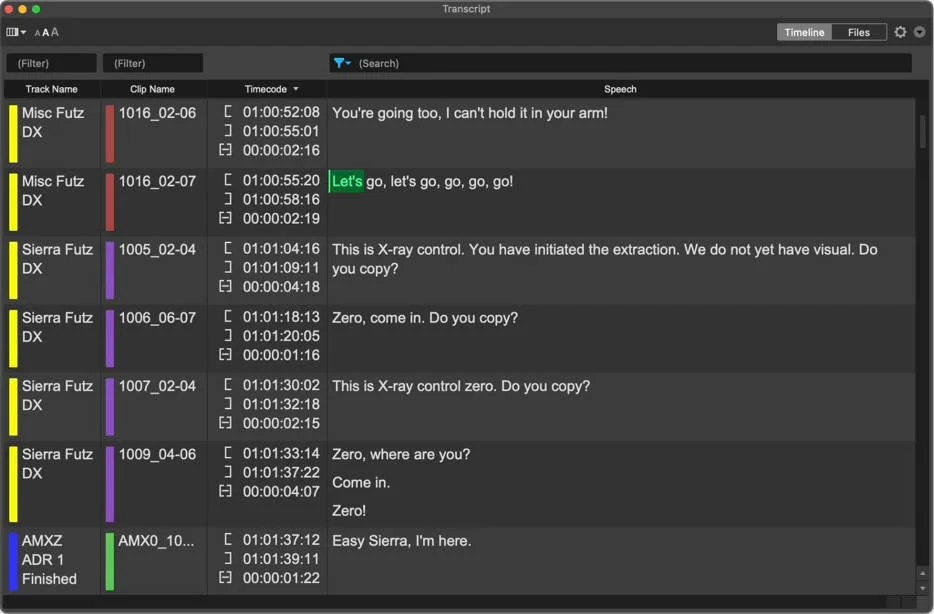
Pro Tools’ new AI-powered Speech-to-Text engine represents a significant leap for post-production workflows. Available exclusively to Studio and Ultimate users, the feature generates transcripts of dialogue and lyrics directly within the Pro Tools interface.
Three details make this implementation stand out from competing solutions:
- Fully local processing — transcription never leaves your machine. For studios working under NDA on unreleased films or music, this isn’t a nice-to-have; it’s a requirement.
- 20+ language support with per-clip language detection. Multilingual projects no longer require switching between different transcription tools.
- Clickable, searchable transcripts mapped directly to audio clips. Click a word, jump to that exact moment in your timeline. Search for a specific line of dialogue across hours of footage in seconds.
Transcriptions appear in dedicated lanes beneath audio tracks or in a floating window — your choice depending on screen real estate. For dialogue editors and podcast producers, this feature alone justifies the Studio tier subscription at $34.99/month.
ARA2 Vocal Tools: Synthesizer V and Waves Sync Vx
The expanded ARA2 ecosystem brings two powerful vocal tools into the Pro Tools environment:
Dreamtonics Synthesizer V integrates via ARA2 to generate realistic vocals from melodies and lyrics. With over 70 voice models and multilingual support, it’s positioned as a production tool for demos, reference tracks, and creative experimentation. The ARA2 integration means edits happen non-destructively within the Pro Tools timeline — no bouncing or rendering required.
Waves Sync Vx handles the practical side of vocal production: aligning up to 16 tracks using up to 4 reference vocals with non-destructive pitch and time correction. For anyone who’s spent hours manually aligning backing vocal stacks, this integration feels long overdue.
Post-Production Power: Cue Pro and Matchbox 2
While music producers get Splice and vocal tools, post-production professionals aren’t left behind. Non-Lethal Applications Cue Pro brings purpose-built ADR capabilities with real-time visual overlays onto video output, live cue editing, and multilingual support. If you’ve ever tried to manage ADR sessions with spreadsheets and markers, Cue Pro feels like jumping forward a decade.
The Cargo Cult Matchbox 2 tackles reconforming — the nightmare scenario where picture edits arrive after you’ve finished your sound design. Its Smart-Conform feature identifies insertions, deletions, and shifts, applying per-clip updates rather than forcing you to rebuild from scratch. For post-production facilities handling multiple picture lock versions, this is transformative.
MIDI Workflow Improvements and the Details That Matter
Beyond the headline features, Pro Tools 2025.6 addresses long-standing workflow requests:
- MIDI Operations tab consolidates quantize, transpose, and duration adjustments directly in the MIDI Editor — no more navigating through menus.
- Custom Note Labels let you rename piano roll notes to match specific instruments. Essential for working with drum machines and sample libraries where note assignments vary.
- MIDI Live Mode ensures recorded data aligns with playback output. A toggle that sounds simple but eliminates the latency confusion that’s frustrated performers since MIDI-over-USB became standard.
- Mute Safe locks mute states during mixing via right-click menu. Never accidentally un-mute a scratch vocal during a client playback again.
- Dolby Atmos ADM Thinning removes unused automation data to reduce file sizes — a practical necessity as Atmos sessions routinely generate enormous files.
- Apple Silicon support for Avid Video Engine brings native ARM processing, improving video playback performance on M-series Macs.
Pricing Reality: Who Gets What
Pro Tools 2025.6 is available across all tiers, but not all features come standard:
- Pro Tools Artist ($9.99/month) — Splice integration, MIDI improvements, dashboard redesign
- Pro Tools Studio ($34.99/month) — Everything above plus Speech-to-Text, ARA2 vocal tools
- Pro Tools Ultimate ($99/month) — Full feature set including advanced post-production tools
- Perpetual license holders with active support plans receive all updates
The tiered approach means Avid is using Speech-to-Text and ARA2 integrations as upsell drivers. It’s a reasonable strategy — these are genuinely professional features that justify the price difference.
The Bigger Picture: Avid’s Platform Strategy in 2025
Pro Tools 2025.6 was showcased at IBC2025 in Amsterdam (September 12-15), positioning it squarely in the broadcast and post-production conversation. Combined with the AES Convention season, Avid’s timing is deliberate — they’re signaling that Pro Tools isn’t just for music anymore.
The Splice integration targets music producers. Speech-to-Text targets post-production. Cloud collaboration targets distributed teams. Avid is building a platform that serves every professional audio workflow, and 2025.6 is the most convincing argument yet that the strategy is working.
For studios evaluating their DAW ecosystem heading into Q4 2025, Pro Tools 2025.6 makes the subscription more defensible than it’s been in years. The cloud collaboration improvements alone remove one of the most common objections from teams considering a switch. Add Splice, add AI transcription, and the value proposition starts to look genuinely compelling — even at the Ultimate tier.
Looking to optimize your Pro Tools workflow or need professional mixing and mastering for your next project?
Get weekly AI, music, and tech trends delivered to your inbox.






