


Meta Llama 3.1 405B: The Open-Source Model That Finally Rivals GPT-4o — And Why It Changes Everything
June 12, 2025
Dell UltraSharp U2725Q Review: The 4K USB-C Monitor That Replaced My Entire Dock
June 12, 2025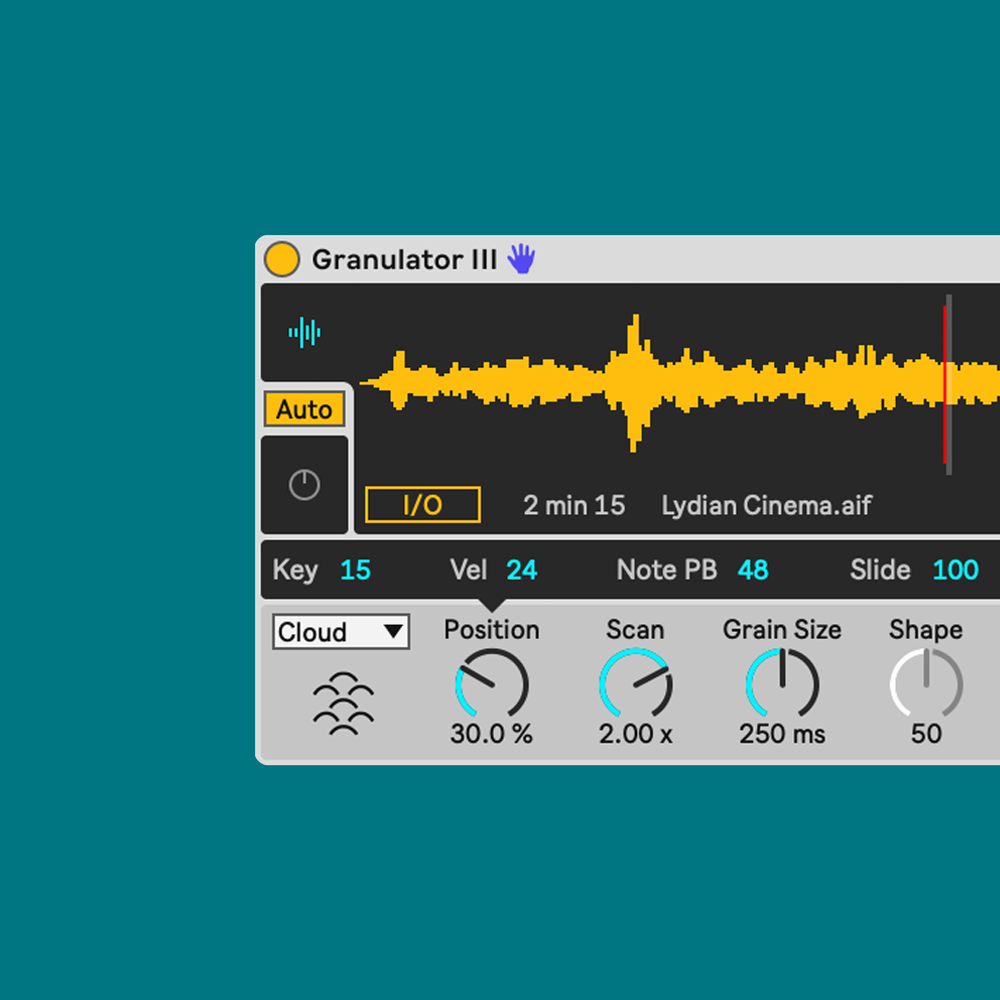
Granular synthesis ambient music changed everything I thought I knew about texture. After 28 years of working with synthesizers, samplers, and every signal chain imaginable, discovering how a single two-second field recording could become an infinite, breathing soundscape through grain manipulation was the closest thing to a genuine paradigm shift I have experienced in a studio. If you have been chasing those lush, evolving pads and ethereal drones that define modern ambient production, granular synthesis is not just one option among many — it is the engine that powers almost every immersive texture you hear today.
What Is Granular Synthesis and Why It Matters for Ambient Music
Granular synthesis works by slicing audio into tiny fragments called grains — typically between 1 and 100 milliseconds long — and then reassembling, overlapping, and transforming those grains in real time. Unlike subtractive or FM synthesis, which build sound from mathematical waveforms, granular synthesis starts with real audio and deconstructs it into something entirely new. This is why it pairs so naturally with ambient music: you are sculpting organic, evolving textures from source material that already carries acoustic complexity.
The core parameters you need to understand are grain size, grain density, position, pitch, and randomization (jitter). Grain size determines how much of the original audio each fragment captures. For smooth ambient pads, you generally want grain sizes between 50 and 100 milliseconds. Shorter grains — below 20ms — produce metallic, glitchy artifacts that work better for experimental textures. Grain density controls how many grains overlap at once. Higher density creates thick, continuous clouds of sound. Position determines where in the source file the engine reads grains from, and modulating position over time is one of the most powerful techniques for creating evolving soundscapes. As Native Instruments explains in their synthesis guide, understanding these fundamentals is the foundation for all granular sound design.
Essential Granular Synthesis Plugins for Ambient Production
The plugin landscape for granular synthesis has matured significantly. Here are the tools I rely on most in my ambient production workflow, each offering a different approach to grain manipulation.
Ableton Granulator III (Max for Live)
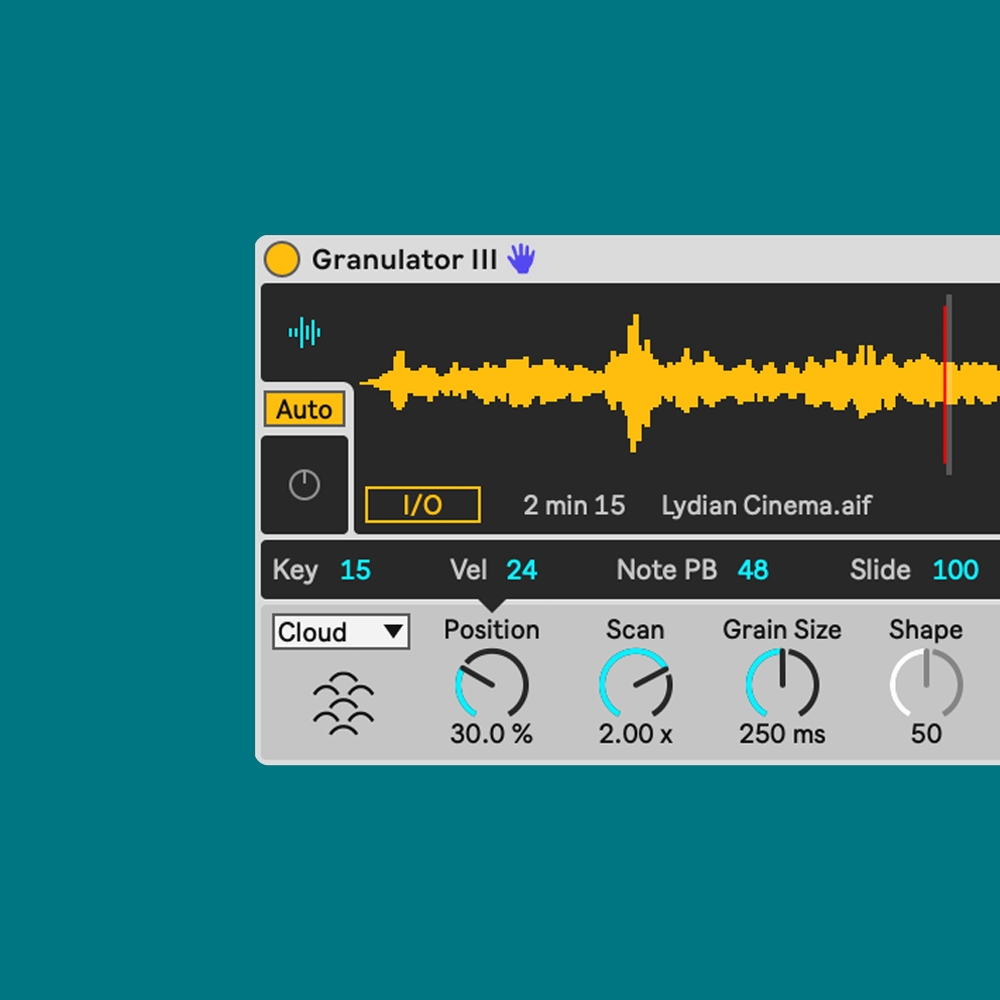
If you are working in Ableton Live 12, Granulator III is your first stop — and it is free with Live Suite. Developed by Robert Henke (Monolake), this Max for Live instrument offers three distinct modes: Classic, Loop, and Cloud. For ambient work, Cloud Mode is where the magic happens. It scatters grains randomly across the loaded sample, creating dense, slowly evolving textures that feel almost alive. As Sound On Sound detailed in their technical review, the addition of MPE support in Live 12 means you can now control grain parameters expressively per-note, adding another dimension of movement to your ambient patches.
Start with Cloud Mode, load a sustained chord or field recording, set grain size to around 80ms, density to 70%, and slowly sweep the position knob. Add the built-in reverb at around 40% wet. You will immediately hear the source material dissolve into an ethereal pad that retains the harmonic character of the original but exists in an entirely different sonic space.
Arturia Pigments 5
Pigments is a multi-engine synthesizer, and its granular engine is one of four sound sources you can layer. What makes it exceptional for ambient work is the modulation system — you get up to 24 modulation sources that you can map to any parameter with drag-and-drop simplicity. Load a vocal sample into the granular engine, map an LFO to grain position with a rate of 0.1 Hz, add a second LFO to grain size, and route the output through the built-in reverb and delay. Within minutes, you have a living, breathing texture that never repeats. The ability to layer the granular engine with Pigments’ analog modeling or wavetable engines means you can create extraordinarily complex ambient soundscapes within a single plugin instance.
Output Portal
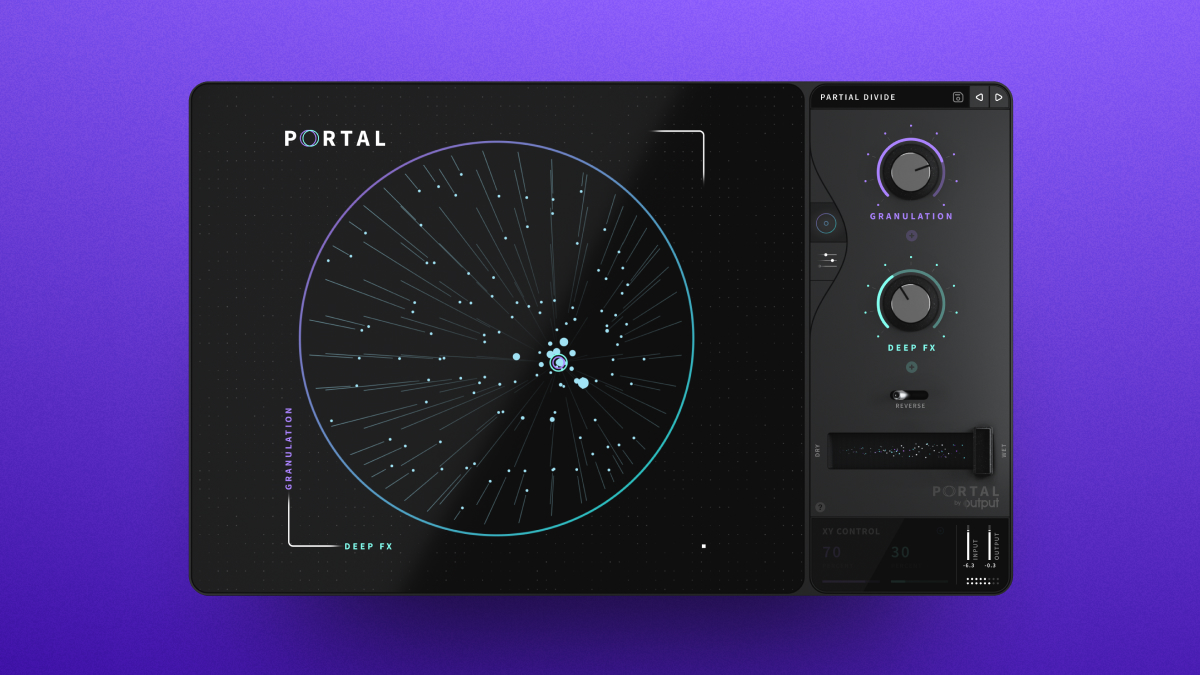
Portal takes a different approach. Rather than being a standalone synth, it is a granular effects processor. You insert it on any audio channel — a synth pad, a guitar, a vocal recording — and it deconstructs the incoming signal through its granular engine. The XY pad makes real-time manipulation intuitive, and the macro controls let you morph between presets smoothly. At around $149, Portal is particularly valuable because it can transform sounds you already have into granular textures without requiring you to load samples into a new instrument. Output’s own granular synthesis guide demonstrates how to use Portal for evolving pad design and atmospheric processing.
Audio Damage Quanta 2
Quanta 2 is a dedicated granular synthesizer at $129 that combines a granular engine with dual VA oscillators and a comprehensive effects section. The granular engine offers fine-grained control over spray (random position offset), density, and grain shape. The built-in effects — reverb, delay, chorus, and distortion — are optimized for granular sound design and sound excellent without additional processing. For producers who want a focused, purpose-built granular instrument without the complexity of a multi-engine synth, Quanta 2 delivers.
Arturia Efx Fragments
Efx Fragments is Arturia’s granular effects processor with three specialized modes: Classic, Texture, and Rhythmic. For ambient production, Texture mode is extraordinary — it freezes incoming audio and creates grain clouds that hover and shimmer in stereo space. As Sound On Sound noted in their review, the Texture mode excels at creating atmospheric backdrops from virtually any source material. Insert it on a bus, send your reverb tails through it, and watch them transform into otherworldly ambient layers.
Step-by-Step Workflow: Building an Ambient Granular Texture from Scratch
Let me walk you through the exact process I use to create an evolving granular ambient piece. This workflow applies regardless of which plugin you choose, though I will reference specific parameter names from Granulator III and Pigments.
Step 1: Source Material Selection
Your source material determines the harmonic DNA of the final texture. The best sources for ambient granular work are:
- Sustained chords — Record a simple Cmaj7 chord on a piano or pad synth, 10-15 seconds long. The harmonic complexity gives grains rich tonal content.
- Field recordings — Rain, ocean waves, wind through trees, urban ambience. Natural sounds contain micro-variations that translate beautifully into granular textures.
- Vocal recordings — Sustained vowel sounds or choir samples. Granular processing turns recognizable vocals into haunting, ethereal pads.
- Bowed instruments — Cello, violin, or viola recordings. The bow noise and natural vibrato create organic movement when granulated.
Record or select your source at 24-bit/48kHz minimum. Longer samples (10+ seconds) give the granular engine more material to work with, producing more variation as you modulate position.
Step 2: Initial Grain Parameters
Load your source into the granular engine and start with these baseline settings for smooth ambient textures:
- Grain Size: 60-80ms (smooth, pad-like)
- Grain Density: 60-80% (continuous sound without gaps)
- Position: Center of the sample, stationary for now
- Pitch: 0 semitones (original pitch)
- Jitter/Randomization: 5-10% (subtle variation)
- Stereo Spread: 70-100% (wide image)
Play a sustained note and listen. You should hear a continuous, slightly shimmering tone derived from your source material. If it sounds choppy, increase grain density or grain size. If it sounds static, add more jitter.
Step 3: Modulation for Movement
Static granular textures become boring quickly. The secret to compelling ambient sound design is slow, layered modulation:
- LFO 1 → Position: Rate 0.05-0.2 Hz, depth 30-50%. This slowly sweeps through different regions of the source material, creating timbral evolution.
- LFO 2 → Grain Size: Rate 0.1-0.3 Hz, depth 20-30%. Varying grain size changes the texture’s character from smooth to slightly grainy and back.
- LFO 3 → Pitch (fine): Rate 0.02-0.08 Hz, depth ±5-15 cents. Micro-pitch movement creates a natural, organic shimmer — similar to a chorus effect but more complex.
- Random/S&H → Density: Rate slow, depth 10-20%. Subtle density variations create breathing patterns in the texture.
In Granulator III, use the built-in LFOs and map them via the modulation matrix. In Pigments, drag modulation sources directly to parameters on the interface — start with the Macro knobs for performance control.
Step 4: Effects Chain for Depth and Space
Granular textures come alive with the right effects processing. Here is my standard ambient effects chain:
- EQ (subtractive): High-pass at 80-120Hz to remove low rumble. Gentle cut at 2-4kHz if the grains sound harsh.
- Chorus/Ensemble: Subtle, rate below 0.5Hz. Adds width and gentle movement without obvious modulation artifacts.
- Delay: Ping-pong or diffused stereo delay. 500-800ms, 30-40% feedback, 40% wet. Creates rhythmic echoes that add spatial depth.
- Reverb: Large hall or plate, decay 4-8 seconds, 50-70% wet. This is ambient music — do not be afraid of generous reverb. Pre-delay of 20-40ms keeps the dry signal defined.
- Saturation (optional): Gentle tape saturation at the end of the chain adds warmth and harmonic content. Keep the drive subtle — 10-20%.
If your plugin has built-in effects (Granulator III, Pigments, and Quanta 2 all do), start there before adding external processing. The internal effects are often optimized for granular output.
Advanced Techniques: Layering, Resampling, and Live Performance
Once you are comfortable with single-layer granular textures, these advanced techniques will take your ambient productions to the next level.
Multi-Layer Granular Stacking
Create three to four granular layers using different source materials but related harmonic content. For example:
- Layer 1 (Foundation): Sustained piano chord through Granulator III Cloud Mode — large grain size (100ms), low density, pitched down one octave.
- Layer 2 (Texture): Rain field recording through Pigments granular engine — small grain size (20-30ms), high density, lots of jitter for shimmer.
- Layer 3 (Movement): Bowed cello through Portal — moderate settings with heavy position modulation for evolving character.
- Layer 4 (Detail): Vocal sample through Efx Fragments Texture mode — frozen grains creating an ethereal high-frequency layer.
Pan each layer differently and give them distinct frequency ranges using EQ. The foundation sits in the low-mids, the texture fills the mid-range, movement occupies the upper-mids, and detail adds high-frequency air. Together, they create a massive, immersive ambient soundscape that feels three-dimensional.
Granular Resampling
One of my favorite techniques is recursive granular processing — taking the output of a granular synth, recording it, and feeding that recording back into a granular engine with different settings. Each pass pushes the sound further from the original source, creating textures that are impossible to achieve in a single pass. After two or three rounds of resampling, even a simple guitar note becomes an unrecognizable, otherworldly atmosphere. Record each pass at full quality and keep the source files organized — you will want to revisit them.
Live Granular Performance with MIDI Controllers
Map your granular parameters to a MIDI controller with faders or knobs for real-time manipulation. My typical mapping includes grain position on a fader, grain size on a knob, density on another knob, and reverb wet/dry on a fourth. Playing ambient granular textures live — slowly morphing parameters while recording — produces results that feel more organic than programmed automation. If you are using Granulator III with MPE support, a controller like the Sensel Morph or Roli Seaboard adds pressure and slide dimensions that map beautifully to grain parameters.
Choosing the Right Source Material: Tips from 28 Years of Sound Design
After nearly three decades of working with audio, I have learned that source material selection is arguably more important than the granular engine itself. Here are the principles I follow:
- Harmonic richness matters. Samples with complex harmonic content — orchestral recordings, choir pads, rich analog synth patches — produce more interesting granular textures than simple waveforms.
- Silence is the enemy. Avoid source material with significant silent sections unless you want rhythmic gaps in your texture. Sustained, continuous sounds work best.
- Record your own sources. Field recordings you capture yourself have a unique character that no sample library can replicate. A recording of wind through a specific canyon or rain on a particular rooftop becomes your sonic signature when granulated.
- Experiment with unlikely sources. Some of my best ambient textures came from granulating industrial machinery recordings, kitchen appliances, and even traffic noise. The granular engine strips away the recognizable identity and reveals the hidden musicality.
- Sample rate and bit depth matter. Always use 24-bit minimum. The granular engine is magnifying tiny fragments of your audio — low-quality sources produce low-quality grains with audible artifacts.
As MusicRadar demonstrated in their Granulator III tutorial, the combination of thoughtful source selection and careful parameter adjustment is what separates compelling ambient textures from generic pad sounds.
Practical Project: Complete Ambient Track Using Granular Synthesis
Let me outline a complete project structure for a five-minute ambient piece built entirely with granular synthesis. Open your DAW, set the tempo to 60 BPM (or turn off the grid entirely), and create these tracks:
- Track 1 — Drone Foundation: Granulator III in Cloud Mode with a sustained organ chord. Grain size 100ms, density 90%, position modulated by slow LFO. Pitch down -12 semitones. Reverb at 60% wet, 6-second decay. This provides the harmonic bed.
- Track 2 — Evolving Texture: Pigments granular engine loaded with a forest field recording. Grain size 40ms, heavy position modulation, pitch jitter ±20 cents. Stereo spread 100%. This adds organic movement across the stereo field.
- Track 3 — Melodic Fragment: Quanta 2 with a vocal sample. Set to a pentatonic scale using the pitch quantization. Sparse note triggers every 8-16 bars. Long attack (2s), long release (4s). Delay with high feedback for cascading echoes.
- Track 4 — Effects Layer: Portal inserted on a return channel. Send subtle amounts from Tracks 1-3. Automate the XY pad slowly over the duration of the track for continuous transformation.
- Track 5 — High Detail: Efx Fragments in Texture mode processing a bowed violin recording. Frozen grains providing a shimmering, high-frequency halo. Filter the low end aggressively — this layer should float above everything else.
Arrange the piece with gradual entrances — start with just Track 1, bring in Track 2 at 0:30, Track 5 at 1:00, Track 3 at 1:30, and Track 4 at 2:00. Let everything breathe together for two minutes, then slowly remove layers in reverse order. Automate master reverb size to grow throughout the piece, creating a sense of expanding space. Export at 24-bit/48kHz or higher for the best fidelity.
Granular synthesis ambient music production is ultimately about patience and experimentation. The techniques covered here — from basic grain parameter control through multi-layer stacking and resampling — give you a complete toolkit for creating immersive, evolving soundscapes. Load a sample, start tweaking, and let the grains guide you somewhere unexpected. That moment of discovery, when the engine reveals a texture you never imagined from a source you recorded years ago, is what keeps me coming back to granular synthesis after all these years.
Ready to take your ambient sound design to the next level? From granular synthesis sessions to full mix engineering, our studio team can help you craft the perfect sonic atmosphere.
Get weekly AI, music, and tech trends delivered to your inbox.






