
Plugin Alliance Brainworx Update: 64 Plugins Get Scalable UI + Free Upgrade in 2026
March 25, 2026
Next.js 16.2 Deep Dive: 87% Faster Dev Startup, Agent DevTools, and 200+ Turbopack Fixes
March 25, 2026
Ten images. That’s all it takes to teach Adobe’s AI your exact creative style. On March 19, Adobe officially launched the public beta of Firefly Custom Models, expanding what was previously a private beta to all paid individual subscribers. This isn’t just another AI update — it’s the moment creators can finally train a commercial-grade AI model on their own intellectual property, with full privacy guarantees.
What Are Adobe Firefly Custom Models?
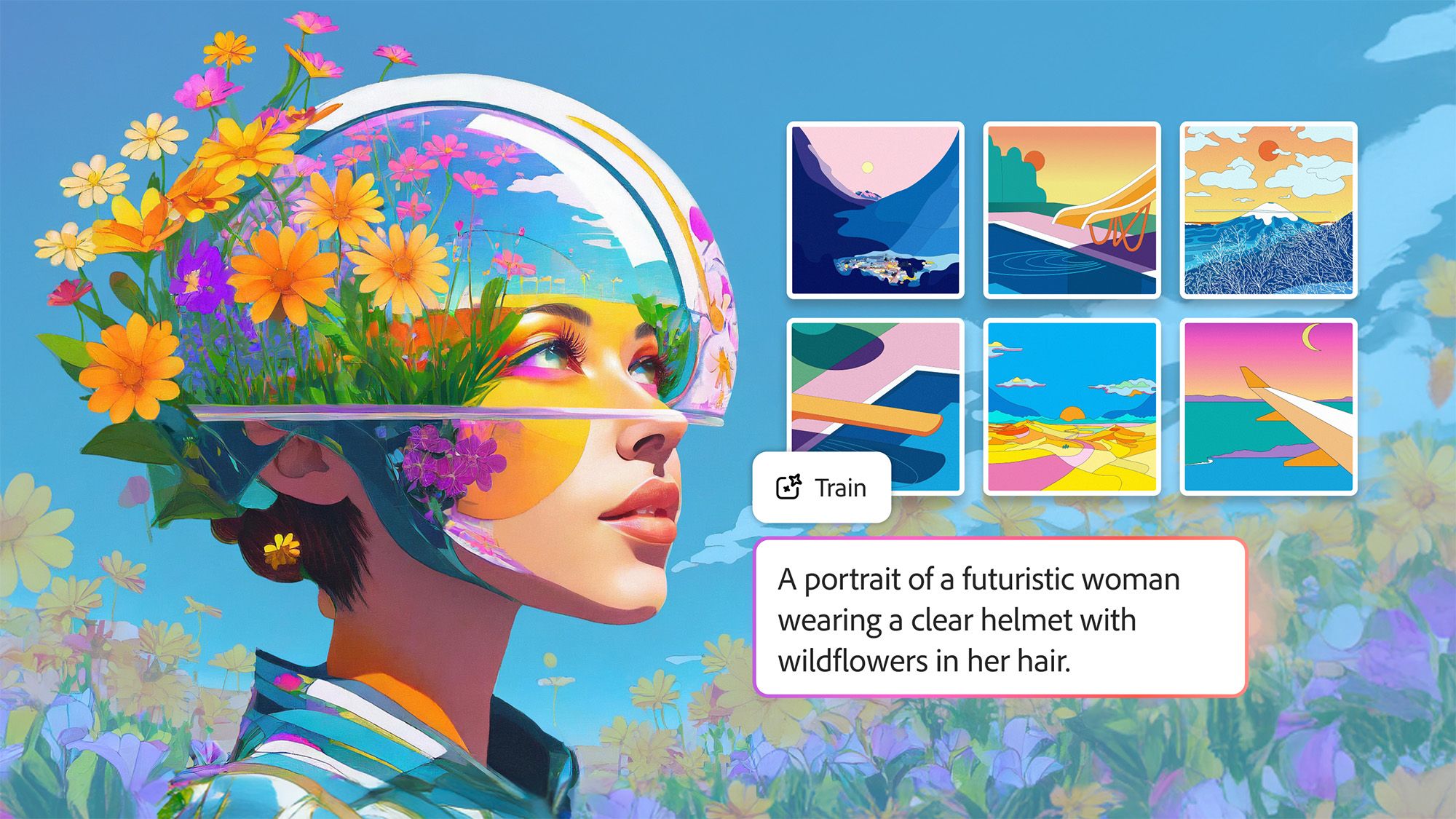
Adobe Firefly custom models let you upload 10 to 30 of your own images — illustrations, photographs, character designs, brand assets — and train a personalized AI model that learns your unique visual fingerprint. Once trained, the model generates new images that consistently preserve your stroke weight, color palette, lighting style, and character features across every generation.
The feature is currently optimized for three core use cases: illustration styles where line consistency matters, character designs that need to look the same across different scenes, and photographic looks that need to be replicated at scale.
How Training Works: Simpler Than You’d Expect
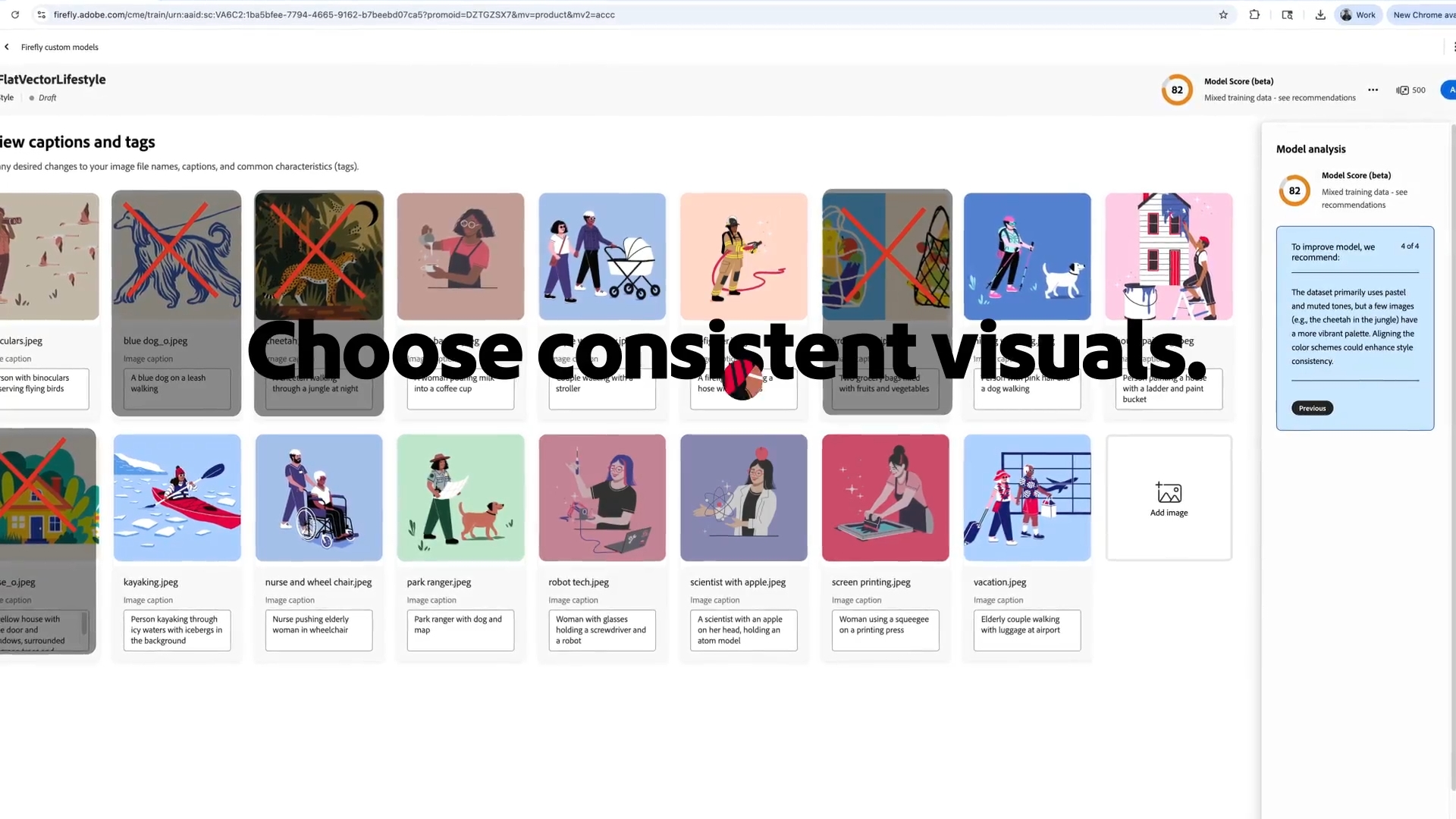
The training workflow is refreshingly straightforward. Head to the Firefly website, select “Custom models” from the top menu, click “Train a model,” and drag and drop 10 to 30 JPG or PNG images. Requirements are minimal: at least 1000 pixels resolution with up to a 16:9 aspect ratio.
Here’s where it gets interesting. Firefly automatically analyzes every uploaded image and generates detailed captions — fully editable, so you can fine-tune how the AI interprets each reference. A training set score appears before you start, with Adobe recommending a score of 85 or higher for optimal results. If your score is low, the system provides specific suggestions for which images to swap out.
You’ll choose between two model types: Style training captures colors, shapes, and background aesthetics, while Subject training focuses on reproducing a specific object or character consistently. Training costs 500 credits from your monthly generative balance and takes anywhere from 30 minutes to 2 hours, depending on complexity.
Firefly Image Model 5 — Native 4MP Generation
Alongside the custom models launch, Firefly Image Model 5 is now generally available. The headline feature is native 4-megapixel output — approximately 2240 by 1792 pixels — generated from the start without any upscaling. Previous Firefly models generated at lower resolutions and relied on post-processing to reach usable sizes, a process that often introduced softness, edge artifacts, and inconsistent details. With Image Model 5, what you generate is what you get: sharp, high-resolution images ready for commercial use.
Human rendering has improved substantially. The notorious “AI hands” problem — deformed fingers, extra joints, anatomical impossibilities — is significantly reduced in Image Model 5. Adobe reports that portraits and full-body figures now align much more closely with professional photography standards, making the model viable for fashion, editorial, and marketing work where human subjects are central.
Layered Image Editing — A Game Changer for Designers
Perhaps the most underrated addition is layered image editing. Firefly Image Model 5 can intelligently deconstruct a generated or uploaded image, automatically identifying distinct elements — a person, a background, foreground objects — and organizing them into independent layers. This means you can select a specific element, resize it, rotate it, or modify it through additional prompts while keeping the rest of the composition intact. For designers who have been frustrated by the “all-or-nothing” nature of AI image generation, this is a significant step toward practical creative workflows.
30+ AI Models in One Platform — Adobe’s Marketplace Strategy
This is arguably the most significant strategic shift in the entire announcement. Adobe Firefly is no longer just Adobe’s proprietary AI tool — it has evolved into a unified creative AI studio housing over 30 industry-leading models from competing companies. The current roster includes:
- Adobe Firefly Image Model 5 — native 4MP output with layered editing capabilities
- Google Veo 3.1 and Nano Banana 2 — video generation and image synthesis from Google
- Runway Gen-4.5 — one of the most advanced video AI models available
- Kling 2.5 Turbo — the newest addition to the platform, known for fast generation
- OpenAI GPT Image — text-to-image generation powered by OpenAI’s architecture
- Black Forest Labs Flux 1.1 — popular open-source foundation model
- Ideogram 3.0 — particularly strong at text rendering within images
- Luma AI Ray3, Moonvalley Marey, Pika — additional specialized models for various creative tasks
- Google Imagen 4 and Gemini 2.5 Flash Image — Google’s latest multimodal offerings
The real power here is not just access to these models — it is the integrated workflow. You can generate an image with one model, refine it with another, compare outputs side by side, and then finish with Adobe’s professional editing tools like Photoshop or Lightroom. No switching between platforms, no exporting and reimporting, no juggling multiple subscriptions. Adobe is positioning Firefly as the one place where all of generative AI comes together.
Pricing is also notable. Adobe is currently running a promotional period offering unlimited image and video generations across all available models. This is a significant departure from the credit-based system that has been the industry standard, and it signals Adobe’s intent to compete aggressively for creator mindshare during this critical adoption window.
Project Moonlight — Your AI Creative Director
Adobe also expanded access to the private beta of Project Moonlight, a conversational AI assistant designed to work across the entire Adobe application ecosystem. Think of it as an orchestrator: while each Adobe app has its own AI assistant that is an expert in its domain — Photoshop for image editing, Premiere Pro for video, Lightroom for photography — Moonlight operates like a conductor coordinating the entire creative ensemble.
The concept is compelling. Describe what you want to accomplish in natural language — “create a social media campaign for my coffee brand using warm earth tones” — and Moonlight figures out which tools, which models, and which workflows to deploy. It connects to your Creative Cloud libraries and social accounts, understanding your existing style preferences and asset library. Rather than a blank prompt box, it functions as a creative collaborator that already knows your brand.
While still in private beta, Moonlight represents Adobe’s broader vision for agentic AI in creative work — AI that does not just generate content but actively manages multi-step creative processes across applications. If executed well, this could dramatically reduce the time from concept to finished campaign assets.
Privacy and IP Protection: The Real Differentiator
For commercial creators and enterprise teams, the privacy architecture may be the single most important feature in this entire release. All custom models are private by default. When you upload images to train a custom model, that data stays in your account. Your training images are never fed into Adobe’s general Firefly model training pipeline. Period. You also retain full ownership of all content generated by your custom models.
This is a decisive competitive advantage over platforms like open-source alternatives where intellectual property protection is ambiguous at best. With Midjourney, for example, images generated on default plans are publicly visible. With Stable Diffusion fine-tuning, there is no centralized guarantee about how your training data is handled. Adobe’s approach gives enterprise brands and independent creators the confidence to train models on unreleased artwork, proprietary brand assets, and confidential design concepts without worrying about data leakage.
For agencies managing multiple client brands, this is particularly valuable. You can create separate custom models for each client, each trained on that client’s specific visual identity, with full data isolation between them. This kind of compartmentalized, privacy-first architecture has been a dealbreaker for many professional organizations considering AI adoption — and Adobe appears to have addressed it comprehensively.
Practical Considerations and Limitations
Before diving in, there are some practical details to keep in mind. The 500-credit cost per model training is non-refundable, even if you cancel mid-training. Adobe recommends having a clear vision of what style or subject you want to capture before starting, since each iteration consumes credits. For context, standard Creative Cloud plans include a monthly credit allocation that varies by subscription tier.
Training time ranges from 30 minutes to 2 hours, and during peak usage periods, it may take longer as models queue. The current beta is optimized for ideation rather than production-ready output, meaning results are excellent for exploring creative directions but may still require refinement in Photoshop or Illustrator for final deliverables. Adobe has also noted that the feature works best with stylistically consistent training sets — feeding it a mix of watercolor paintings and 3D renders will produce confused results.
Who Should Pay Attention
Adobe Firefly custom models are most valuable for creators and teams who need visual consistency at scale:
- Illustrators — maintain your signature style while rapidly exploring new compositions and scenes without starting from scratch each time
- Character designers — achieve automatic consistency across different scenes, poses, and environments for animation pre-production or game development
- Photographers — replicate specific lighting setups and color grading styles across large batches for e-commerce or editorial work
- Brand managers — quickly prototype on-brand visuals for campaigns, presentations, and social media without waiting for design team availability
- Content creators — build and maintain a consistent visual identity across dozens of social media posts per week
- Design agencies — create client-specific custom models that ensure every deliverable matches the client’s established visual language
The public beta is now open to all paid Adobe individual subscribers. At 500 credits per custom model, with 30-plus external models integrated into a single platform, native 4MP output from Image Model 5, layered editing capabilities, and the conversational Project Moonlight assistant on the horizon — Adobe is making its clearest strategic move yet to become the central hub for creative AI. The company is betting that creators want a unified, privacy-first platform over a fragmented landscape of standalone tools. Whether you are a solo illustrator protecting your unique style or a brand creative director managing assets across a global team, this update is worth testing before your competitors figure it out first.
Interested in building AI-powered creative workflows or automation systems? Let’s talk.
Get weekly AI, music, and tech trends delivered to your inbox.