


Microsoft Build 2025 Copilot Studio: 5 Autonomous Agent Features That Will Reshape Enterprise AI
May 7, 2025
Samsung Galaxy Z Fold7 Rumors: 5 Leaked Upgrades That Could Redefine Foldables
May 7, 2025
Three seconds. That is how long it takes for an Ableton crash to turn 500 expectant faces into confused murmurs. I have been on that stage, staring at a frozen waveform while my heart rate did what my kick drum was supposed to do. That experience in 2023 completely rewired how I approach Ableton Live 12 Performance Mode for live shows. And with Superbooth 2025 happening this very week, where hardware-software hybrid performance setups are dominating every booth, the timing could not be better to share what actually works on stage.
Here are seven battle-tested tips for optimizing Ableton Live 12 for live performance, from Session View architecture to the CPU strategies and Performance Pack workflows that keep your set running bulletproof under pressure.
1. Redesign Your Session View as a Stage Cue Sheet
The Session View in Ableton Live 12 is purpose-built for live triggering, but most producers treat it the same way they do in the studio. That is a mistake. According to Ableton’s official Session View documentation, scenes can be named, color-coded, and MIDI-mapped to function as a complete performance command center.
The key shift is thinking of scene names as stage cues, not arrangement markers. Instead of “Verse 1” and “Chorus,” use naming like “01-INTRO-120BPM” or “02-BUILD-120>128.” Under dim stage lighting, this makes the difference between a smooth transition and a panicked scroll through identical-looking clips.
Sound On Sound’s guide to preparing performances reinforces this approach, recommending narrow channel strips, batch clip editing, and visual organization as foundational steps before any sonic preparation.
- Narrow channel strips: Hide unused return tracks and sends. Fit every active track on one screen without scrolling
- Color coding system: Drums in red, bass in blue, vocals in green. Make it instinctive, not decorative
- Follow Actions: Set clips to auto-advance so you can focus on performance rather than manual triggering
- Empty scene dividers: Insert blank scenes between set sections to create visual breathing room
2. CPU Optimization: Freeze, Flatten, and Bounce Track in Place
CPU overload is the single most catastrophic thing that can happen during a live set. Ableton Live 12.2 introduced Bounce Track in Place, evolving the traditional Freeze/Flatten workflow into something far more stage-friendly. Ableton’s Computer Audio Resources guide provides the technical foundation for understanding how your DAW interacts with system resources.
Here is how the three approaches compare:
- Freeze: Temporarily renders the track to reduce CPU load. Original plugins remain editable. Perfect as the first step in pre-show preparation
- Flatten: Permanently converts frozen tracks to audio. No going back, so keep a backup project file
- Bounce Track in Place (new in 12.2): Creates a new audio track while preserving the original. The safest option when you want both flexibility and CPU savings
My recommended workflow: Freeze all soft synths two days before the show. After your final rehearsal, Flatten only the tracks you are 100% done tweaking. Always maintain at least 30% CPU headroom. Use the per-track CPU meters in Session View to identify hungry tracks before they become problems on stage.
Additional quick wins: disable unused I/O channels in Preferences > Audio, close plugin GUIs you are not actively using, and switch your sample rate to 44.1kHz for live situations. There is no audible benefit to running 96kHz through a club PA system, and the CPU cost is significant.
3. Mastering the Performance Pack: Iftah’s 4 Max for Live Devices
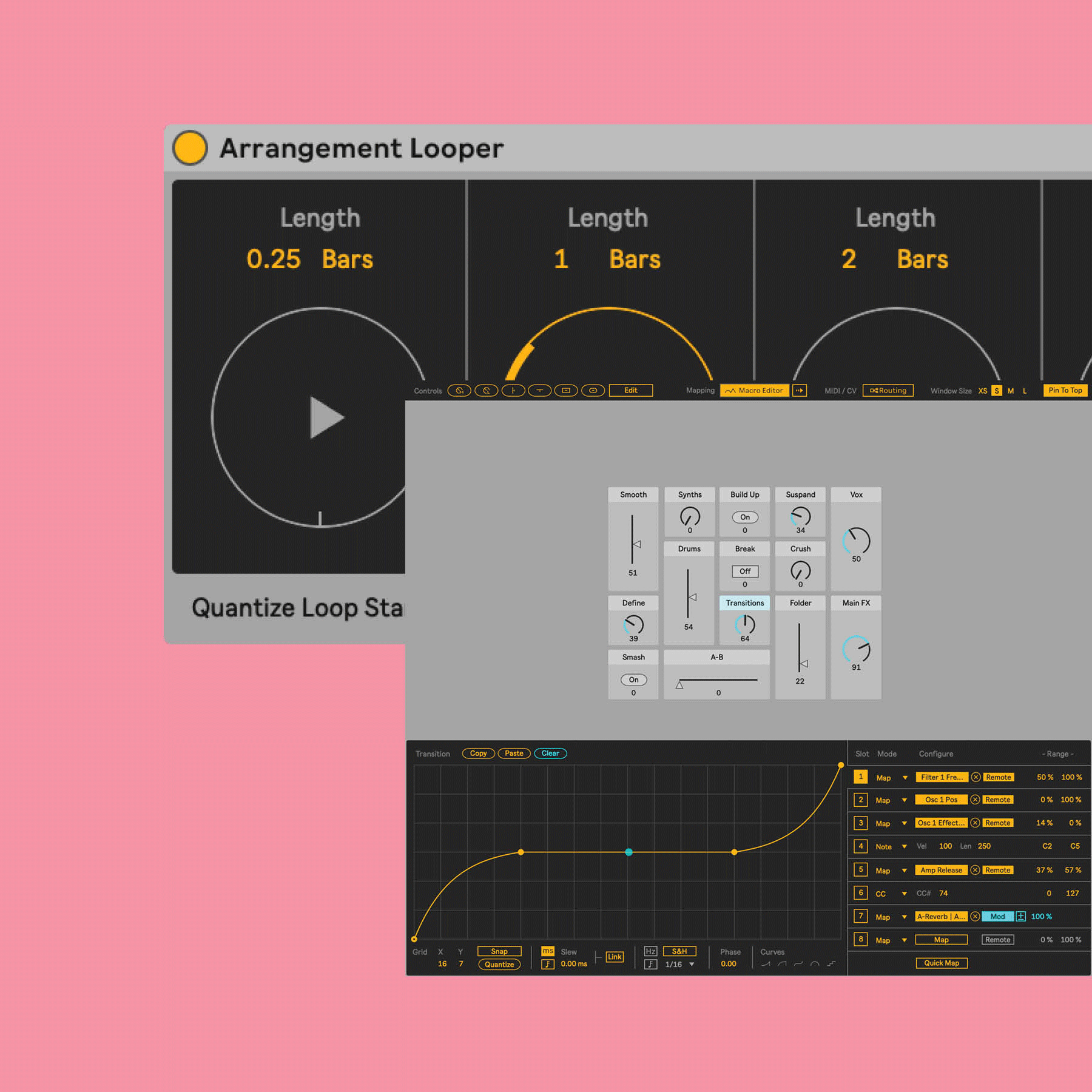
The Performance Pack is arguably the most significant addition to Ableton Live 12 Performance Mode. Designed by Iftah, these four Max for Live devices cover every major live performance scenario. As Ableton’s official blog details, the pack enables everything from DJ-style filter sweeps to sophisticated live looping.
Performer centralizes macro controls from across your entire set into one interface. Instead of hunting through tracks to find the right knob, you map everything critical to Performer and control your sound design from a single point. This is where DJ-style filter sweeps and pitch bends become effortless.
Variations lets you save and instantly recall snapshots of your current settings. Program different effect configurations for each song section, then switch between them with a single click. The margin for error drops dramatically when you are not adjusting eight parameters simultaneously.
Arrangement Looper brings real-time looping to the Arrangement View, synchronized perfectly with your timeline. This means you can layer live loops on top of pre-produced arrangements without timing drift, something that was notoriously difficult before.
Prearranger lets you pre-program scene orders and transitions. Automate the big structural moves of your set while keeping granular control live. This “semi-automated” approach is gaining serious traction among electronic performers who want consistency without sacrificing spontaneity.
4. Push 3 Integration: Freedom from the Screen
Push 3 is more than a controller for Ableton Live 12 Performance Mode. In standalone mode, it runs a complete live set without a laptop, which radically simplifies your stage setup and eliminates an entire category of potential failure points.
Critical Push 3 optimizations for live performance:
- Custom note layouts: Lock scale and key per song so wrong notes become physically impossible
- Reduced pad sensitivity: Lower sensitivity slightly to prevent accidental triggers from stage vibrations or nervous energy
- Maximum display brightness: Stage lighting will wash out anything less than full brightness
- Per-song MIDI mapping presets: Save different control configurations for each song in your set for seamless transitions
The most robust setup uses Push 3 standalone as your primary system with a laptop connection as backup. If the laptop crashes, Push 3 keeps playing independently. This dual-safety architecture has saved more than a few performances from disaster.
5. Buffer Size and Latency: Finding the Sweet Spot for Every Venue
Audio buffer size is the tightrope between stability and responsiveness. Set it too low and you get glitches; too high and your performance feels disconnected from your input.
Recommended buffer sizes by venue type:
- Small club (direct PA): 128 samples — minimum latency when your CPU headroom allows it
- Mid-size venue: 256 samples — the sweet spot for most situations, balancing stability with responsiveness
- Large festival: 512 samples — the venue’s own sound system introduces latency, so prioritize stability
- Live stream: 256-512 samples — network latency already exists, so lean toward stability
Always test your buffer settings during soundcheck at the actual venue. Settings that worked perfectly in your rehearsal studio can behave differently with a venue’s audio interface and driver combination. And stay at 44.1kHz for live work. The CPU overhead of higher sample rates buys you nothing when the signal is going through a club’s processing chain.
6. Clip Management and Re-Pitch Mode: Tempo Flexibility Without CPU Cost
Real-time tempo changes are common in live sets, whether you are reading the crowd’s energy or transitioning between tracks with different BPMs. How you configure your clip warp modes determines whether those transitions sound smooth or introduce artifacts.
As Sound On Sound emphasizes, pre-tempo-matched loops combined with Re-Pitch mode give you tempo flexibility at zero CPU cost. Re-Pitch simply changes playback speed like tape, bypassing the warp algorithm entirely, which means no quality degradation and no processor overhead.
- Drum loops: Re-Pitch or Beats mode — transient integrity matters most
- Synth pads and ambience: Complex Pro — tonal quality preservation is the priority
- Vocal samples: Complex Pro — formant preservation is non-negotiable
- One-shot effects: Re-Pitch — zero CPU cost, and the pitch shift often sounds better anyway
For frequently triggered clips, enable RAM mode to eliminate disk read latency entirely. This makes trigger response instantaneous, which is especially important if you are running samples from an external drive or a system without an SSD.
7. MIDI Mapping and Emergency Planning: Building Your Safety Net
The best live sets are not just technically polished. They are comprehensively prepared for failure. Systematic MIDI mapping and thorough contingency planning separate professionals from hobbyists on stage.
Essential MIDI mappings:
- Master volume kill switch: A single button that instantly mutes all output. Place it where your hand naturally rests
- Scene launch triggers: Map every scene to a dedicated pad or key for one-touch launching
- Global filter control: Use Performance Pack’s Performer for whole-mix filter sweeps that feel musical
- Transition macros: Map one knob to control multiple parameters simultaneously for dramatic builds and drops
Emergency checklist:
- Full project backup (project file + all samples) on a USB drive, updated the morning of the show
- Pre-rendered stereo mixdown of your entire set as a last-resort playback option
- Spare audio interface driver installers saved locally
- “Collect All and Save” on every project file to eliminate missing dependency issues
- Secondary audio output path configured (built-in sound card as emergency backup)
My Take on Ableton Live 12 Performance Mode: What 28 Years in Audio Taught Me
After nearly three decades working in music and audio production, I have seen countless live performances from both sides of the mixing console. The pattern is always the same: the sets that go flawlessly are not the ones with the most impressive technical setups. They are the ones where the performer spent 80% of their preparation time on “what if” scenarios rather than adding one more synth layer.
What makes the Performance Pack genuinely significant is not the technology itself, but the philosophy behind it. Iftah designed these four devices from the perspective of someone who actually performs. Performer’s centralized macro control is essentially what hardware mixers gave us 20 years ago, recreated in software with modern flexibility. Variations solves the preset management problem that has plagued live electronic music since its inception. These are not flashy features designed to sell upgrades. They are practical tools designed to reduce cognitive load on stage.
With Superbooth 2025 showcasing modular and hybrid performance setups this week, Ableton’s timing with the Performance Pack feels deliberate. The line between hardware and software performance is blurring fast, and the combination of Push 3 standalone mode with these Performance Pack devices gives modular performers a compelling hybrid option. But here is the thing I keep coming back to after all these years: the tool matters far less than your mastery of it. Pick your setup, then practice it until you could run your entire set blindfolded. That is where real performance confidence comes from.
Final Thoughts: Your Live Set Is Only as Good as Your Rehearsal
These seven Ableton Live 12 Performance Mode tips all converge on one principle: minimize what you need to think about on stage. Structure your Session View like a cue sheet, maintain 30% CPU headroom, simplify complex operations with Performance Pack, free your eyes from the screen with Push 3, and build a safety net that catches every conceivable failure. When the technical foundation is solid, you can finally focus on what actually matters: the music and the audience in front of you.
The best rehearsal advice I can give: practice under show conditions. Use headphones instead of studio monitors. Use Push instead of a mouse. Stand up instead of sitting down. These small environmental shifts build the muscle memory and confidence that separate a smooth performance from a stressful one.
Whether you need help setting up a live performance audio rig or professional mixing and mastering, let’s talk.
Get weekly AI, music, and tech trends delivered to your inbox.






