


Midjourney Web App Goes Public: No More Discord Required for AI Image Generation
August 26, 2025
Samsung 990 EVO Plus 4TB Review: 7,250 MB/s Reads Meet 73% Better Efficiency
August 26, 2025
Thirteen dedicated percussion synthesizers, hundreds of real-world impulse responses, and a pitch shifter personally designed by Robert Henke — all of this is already included in Ableton Live 12 Max for Live. If you own a Suite license and haven’t explored these devices yet, you’re sitting on the most powerful toolkit in your DAW without even knowing it.
Ableton Live 12 Max for Live isn’t just a plugin platform. It’s a fully integrated modular ecosystem where the Max programming environment lives inside your DAW, giving you access to over 1,000 community devices alongside Ableton’s own official offerings. Live 12 brought significant modulation UX improvements — mapped destinations can now be freely adjusted even after mapping, eliminating one of the biggest workflow friction points from previous versions. In this guide, I’ve curated the 10 essential devices that every producer should know inside and out.
1. Drum Synths — 13 Velocity-Sensitive Percussion Synthesizers
Forget sample libraries for a moment. Max for Live ships with 13 dedicated percussion synthesizers — DS Kick, DS Clap, DS HH, and more — each built with a synthesis engine optimized for its specific instrument type. Every parameter responds to velocity, and because these are fully synthesized (not sample-based), you can shape pitch, decay, and tonal color in real time from scratch.
For electronic music producers, Drum Synths dramatically reduce dependency on sample packs. From 808-style kicks to experimental glitch percussion, a few knob turns are all it takes to craft something entirely original. Load individual Drum Synths into a Drum Rack, and you’ve got a fully custom drum kit that sounds like nobody else’s. The CPU footprint is minimal too, so stacking multiple instances across a session is perfectly viable.
The real power here is iteration speed. Instead of scrolling through hundreds of one-shot samples looking for the right kick, you dial in the exact attack, body, and tail you need. That workflow difference compounds across an entire production session.
2. Convolution Reverb Pro — Real Spaces in Your DAW
Included in the Max for Live Essentials pack, Convolution Reverb Pro comes loaded with hundreds of impulse responses captured from real acoustic spaces. Concert halls, cathedrals, studio live rooms, even vintage hardware reverb units — they’re all here, and they’re all free with your Suite license.
Unlike algorithmic reverbs that approximate space, convolution reverb uses actual acoustic measurements. The result is a level of realism that’s particularly noticeable on vocals, acoustic instruments, and orchestral elements. You can also import your own IR files, which opens up possibilities like capturing the reverb character of any physical space with a starter pistol and a recorder.
The built-in EQ, pre-delay, and dry/wet controls give you enough sculpting power to integrate the reverb naturally into any mix. For producers who’ve been eyeing expensive third-party convolution plugins, this device alone justifies the Essentials pack download.
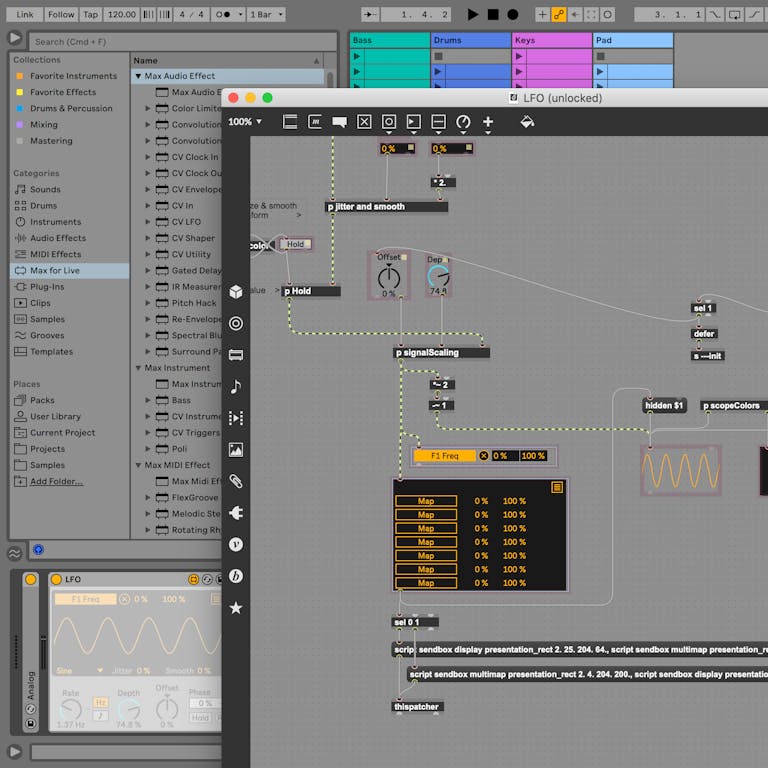
3. LFO — The Swiss Army Knife of Ableton Live 12 Max for Live Modulation
If there’s one Max for Live device that belongs in every single project, it’s the LFO. Map it to any parameter in Ableton Live, and you get automatic, periodic variation — filter cutoff, pan, volume, effect sends, you name it. Sine, square, sawtooth, triangle, and random waveforms are all available, with rate settable in Hz or synced to your project tempo.
Live 12’s modulation UX overhaul made LFO significantly more usable. Previously, mapping a parameter to the LFO locked you out of manual adjustments. Now you can freely tweak mapped destinations without breaking the modulation connection. This single change transformed how producers interact with modulation during both sound design and live performance.
Stack multiple LFOs on a single track to build complex modulation chains. Use one LFO at a slow rate to create evolving pad textures, and another at audio rate for pseudo-FM synthesis effects. The simplicity of the interface belies the depth of what’s possible.
4. Envelope Follower — Audio-Reactive Modulation
While LFO operates on time, Envelope Follower operates on audio. It analyzes the dynamics of incoming audio and converts that amplitude information into modulation data for any mapped parameter. The louder the input signal, the more the mapped parameter responds.
The creative applications are endless. Route a vocal track’s envelope to a synth filter for talk-box-style effects. Use a kick drum’s transients to duck a bass synth for organic sidechain pumping without a compressor. Drive visual elements in a live performance by mapping audio energy to effect parameters. Rise and Fall controls let you shape the response speed, while Gain adjusts input sensitivity for precise calibration.
Envelope Follower opens a dimension of modulation that’s fundamentally different from any time-based tool. Your audio becomes the controller, creating relationships between tracks that feel alive rather than mechanical.
5. Shaper — Custom Modulation Curve Designer
Think of Shaper as LFO’s more sophisticated sibling. Instead of choosing from preset waveforms, you draw your own modulation curves using breakpoint envelopes. Up to 64 points, each segment with individually adjustable curve shapes — this is modulation with surgical precision.
When sound design demands parameter changes that no standard waveform can achieve, Shaper is the answer. Design a filter sweep that opens gradually for three beats, snaps shut on the fourth, and wobbles through the transition. Create acceleration-style tremolo that speeds up toward the end of each cycle. The Ableton Max for Live device reference manual highlights Shaper as the most flexible modulation tool in the suite — and for good reason.
Combined with LFO and Envelope Follower, Shaper completes a modulation trinity that rivals dedicated modular synthesis environments, all without leaving Ableton Live.
6. Buffer Shuffler 2.0 — Step-Sequenced Glitch Machine
Buffer Shuffler 2.0 captures incoming audio into a buffer and lets you rearrange it through a step sequencer. Each step controls gate, pitch, filter frequency, and playback direction independently, giving you granular control over stutter, glitch, and beat-slicing effects.
For EDM and IDM producers, this device is a secret weapon for buildups and drops. A simple drum loop fed through Buffer Shuffler 2.0 transforms into something completely unrecognizable — in the best way possible. The Randomize function generates unpredictable patterns that you can audition and fine-tune, turning happy accidents into intentional design choices.
It also works brilliantly on vocals and melodic elements. Imagine a vocal chop that pitches up on certain steps, reverses on others, and gates rhythmically throughout — all from a single device. That’s Buffer Shuffler 2.0 in action.
7. Color Limiter — Hardware-Inspired Saturation Limiting
Part of the Creative Extensions pack, Color Limiter takes a deliberately different approach from transparent, clinical limiters. Inspired by hardware limiting circuits, it introduces harmonic saturation through its signature Color control, adding character and warmth to whatever passes through it.
Crank the Color knob on a drum bus, and you’ll hear transients gain a crunchy, analog-like presence. Apply it subtly to a synth group for warmth that cuts through a mix. Sound On Sound’s coverage of Ableton’s creative tools has noted the Color Limiter as a standout addition for producers seeking character in their dynamics processing.
This isn’t a mastering limiter — and that’s exactly the point. Color Limiter thrives on individual tracks and buses where you want dynamics control with personality. It fills a gap that Ableton’s stock Limiter doesn’t address, and it does so with refreshing simplicity.
8. Gated Delay — Rhythmic Echo Sequencer
Gated Delay combines a delay effect with a 16-step gate sequencer, creating rhythmic echo patterns that standard delays simply can’t produce. Each step toggles the delay signal on or off, synced to your project tempo, turning sustained echoes into precisely timed rhythmic textures.
Apply it to vocals for call-and-response effects that lock to the groove. Use it on synth leads for trance-gate-style delays that pulse with the track. The feedback and filter controls let you shape the delay tone from clean digital repeats to dark, degraded echoes that disappear into the background.
What makes Gated Delay special is how it bridges the gap between effects processing and rhythmic composition. The gate pattern itself becomes a musical element, adding movement and interest without requiring any additional arrangement work.
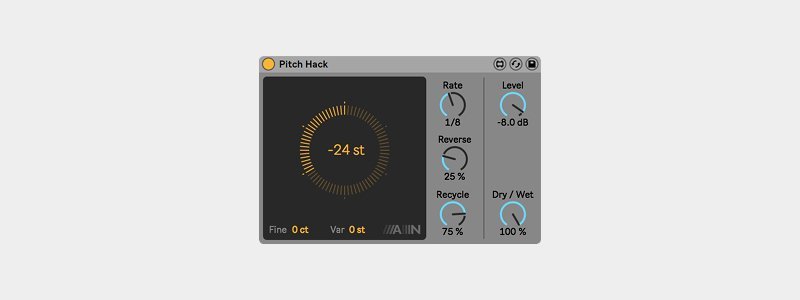
9. PitchLoop89 — Robert Henke’s Vintage Pitch Shifter
PitchLoop89 might be the most characterful device in the entire Max for Live collection. Designed by Robert Henke — co-creator of Max/MSP itself — it’s modeled after the Publison DHM 89, a legendary French hardware pitch shifter from 1989 that originally cost thousands of dollars.
This isn’t clean, transparent pitch shifting. PitchLoop89 deliberately preserves the grain, artifacts, and character of the original hardware. The result is pitch-shifted audio with rich texture and an unmistakable vintage quality — perfect for ambient music, experimental production, and creative sound design where sterile precision would actually be a drawback.
For many producers, PitchLoop89 alone justifies installing the Creative Extensions pack. Feed a simple piano chord through it, and you’ll understand immediately why this device has developed a devoted following. It transforms the ordinary into something hauntingly beautiful.
10. BASS & MULTI — Essential Max for Live Synthesizers
Rounding out the list are two synthesizers from the Max for Live Essentials pack that deserve far more attention than they typically receive. BASS is a monophonic virtual analog synth purpose-built for basslines. Its thick oscillators, resonant filter, and snappy envelopes deliver punchy, authoritative bass sounds with minimal dialing. If you’ve been reaching for third-party bass synths, give BASS a serious audition first.
MULTI takes a broader approach with six synthesis engines packed into a single interface. FM, subtractive, wavetable, and more — switch between engines to cover leads, pads, textures, and effects without loading a different instrument. The UI keeps things approachable despite the depth underneath, making it equally useful for quick sketching and detailed sound design sessions.
Together, BASS and MULTI cover a surprising range of synthesis territory. Before reaching for that next plugin purchase, explore what these two can do — you might find they’re already enough.
Making the Most of Your Max for Live Toolkit
The real magic happens when you combine these devices. Chain LFO into Envelope Follower for modulation that responds to both time and audio dynamics simultaneously. Use Shaper to create complex automation curves that would take forever to draw manually. Stack Drum Synths with Buffer Shuffler 2.0 for percussion that evolves constantly throughout a track.
Beyond these 10 essentials, the MaxforLive.com community hosts thousands of additional free and paid devices. Once you’ve mastered the official toolkit, diving into the community ecosystem will push your Ableton Live 12 setup even further. And keep checking Ableton’s official Max for Live page — the platform continues to evolve with each update.
Ableton Live 12 with Max for Live isn’t just a DAW — it’s a modular music production environment. These 10 devices form the essential building blocks of that environment, and each one has the potential to fundamentally change how you produce. If you own Suite, start exploring them today. Your next favorite sound might be hiding in a device you’ve never opened.
Looking to take your Max for Live productions to the next level? Whether you need professional mixing, mastering, or sound design consultation, Greit Studios can help.
Get weekly AI, music, and tech trends delivered to your inbox.






