


Google I/O 2025: What Android 16 and Gemini Reveal About the Pixel 10 Tensor G5
May 30, 2025
WWDC 2025 Hardware Lineup: MacBook Air M4, Mac Studio M4 Max, and Why Apple’s Keynote Goes All-Software
June 2, 2025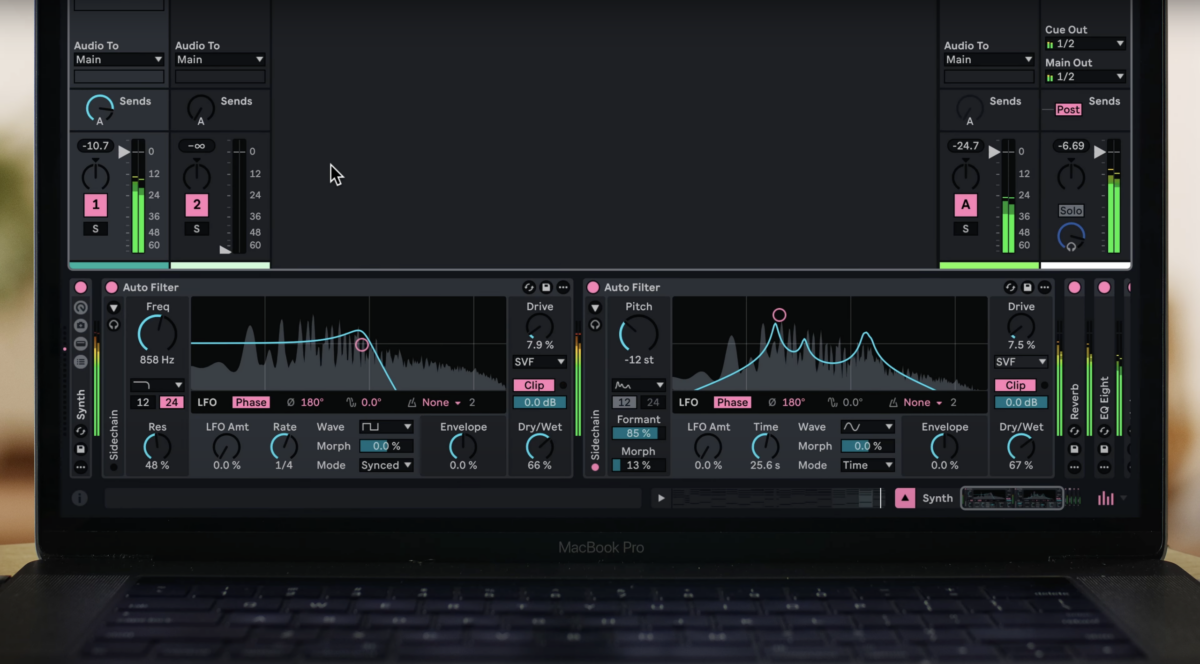
After months of quiet development, Ableton just dropped the full feature list for Ableton Live 12.2 — and it is substantial. Arriving on June 11 as a free update for all Live 12 users, this release tackles long-standing workflow frustrations and introduces creative tools that could genuinely change how you produce music. Having spent 28 years working with nearly every major DAW on the market, I can tell you: some of these features are worth getting excited about.
Ableton Live 12.2 Feature Overview — What’s Actually Coming
This isn’t a minor maintenance update. Ableton Live 12.2 brings a total workflow overhaul in several key areas: a brand-new Bounce to Track function, a completely redesigned Auto Filter with four new filter types, an MPE-enabled Expressive Chords device, significant Roar and Meld upgrades, major Push 3 improvements, and Move 1.5. Let’s break down every feature in detail.
Bounce to Track — The Feature We’ve Been Waiting For
If you’ve ever found yourself routing signals to a new track, hitting record, and waiting in real time just to render a clip to audio — those days are almost over. Bounce to Track in Ableton Live 12.2 lets you bounce clips or time selections spanning multiple clips on any MIDI or audio track, including all processing, directly to a new audio track. It’s pre-mixer, post-FX rendering, which means you get exactly what you hear through your insert chain without any bus or send effects bleeding in.
The keyboard shortcut alone tells you how overdue this is: Cmd+Option+Shift+J on Mac (Ctrl+Alt+Shift+J on Windows). There’s also Bounce Track in Place, which converts an entire track to audio — essentially freezing and flattening in a single operation. Source clips are auto-muted after bouncing, so you can always go back if needed.
For producers working with heavy virtual instruments or complex effect chains, this is a game-changer. No more real-time bounce workarounds, no more auxiliary track routing hacks. Select, bounce, done. It’s the kind of feature that saves you five minutes every session — and those minutes compound fast over a full production.
The All-New Auto Filter — A Complete Redesign
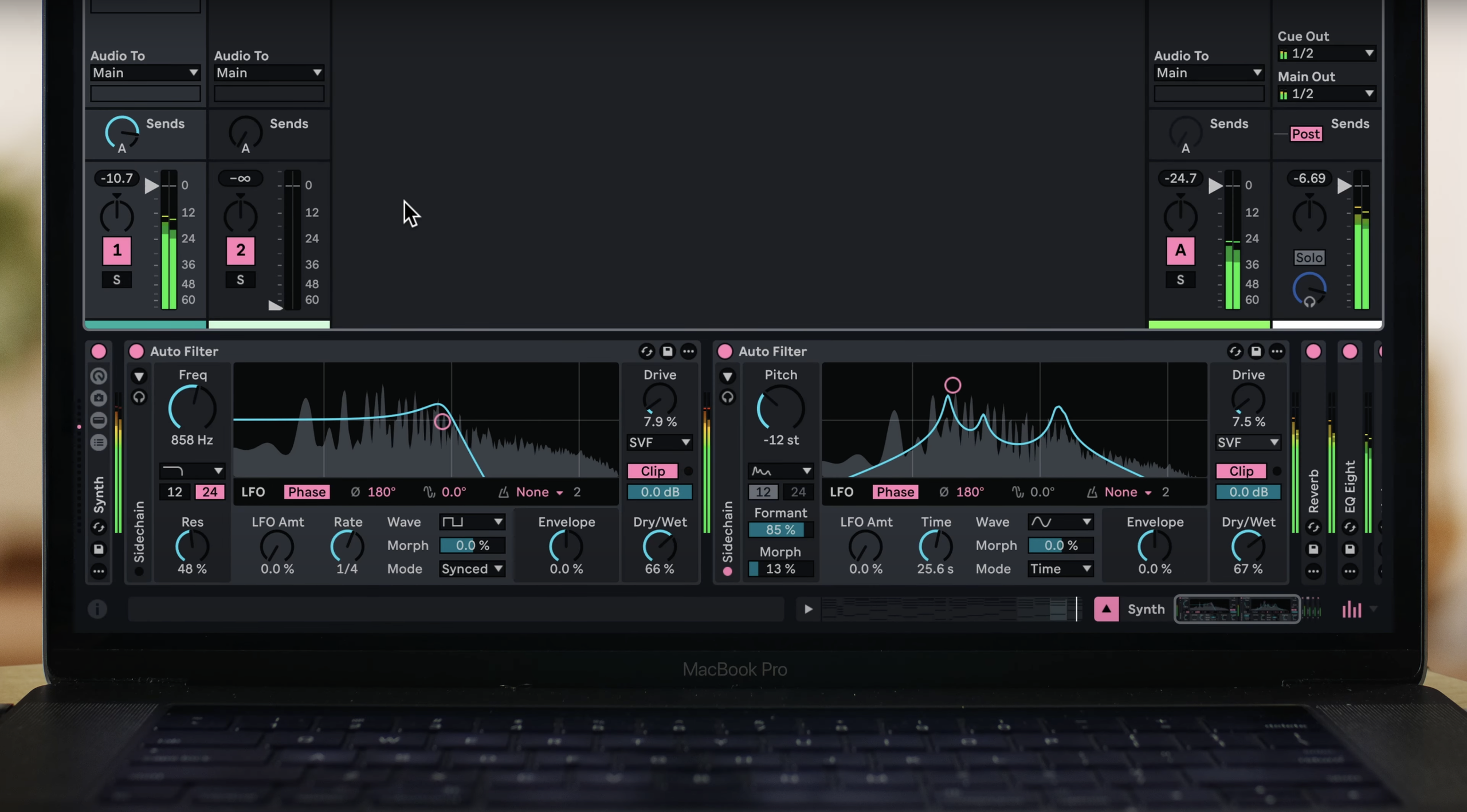
Auto Filter has been one of Ableton’s most-used effects for over two decades. MusicRadar noted that even 20-year Live veterans consider it the effect they reach for most regularly. In 12.2, Ableton has completely rebuilt it with real-time visualization, new modulation architecture, and four entirely new creative filter types.
New Filter Types
- DJ Filter — A single-knob high-pass/low-pass sweep. Turn left for low-pass, turn right for high-pass. Dead simple, incredibly effective for live performance and arrangement transitions.
- Vowel Filter — Formant-based filtering that mimics vowel sounds. Think of those classic “wah” and “ooh” tones that analog synths and talk boxes produce.
- Comb Filter — Creates metallic, resonant tones by feeding the signal back with a short delay. Excellent for adding harmonic texture to percussion and pads.
- Resampling Filter — Adds lo-fi character through sample rate reduction effects integrated directly into the filter path.
Enhanced Modulation
The LFO section gets a serious upgrade with new shapes including Wander, Ramp Up, Ramp Down, and Morph. There’s now Sample & Hold smoothing, LFO quantization for rhythmic filter patterns, and a dedicated mono sidechain option. The sidechain section also includes a built-in EQ, which means you can isolate specific frequency ranges from your sidechain source — no additional plug-ins required. Add soft-clipping and dedicated output controls, and you’ve got a filter effect that can legitimately replace several third-party plug-ins.
The redesigned Auto Filter will also be coming to Ableton Note and Move, bringing consistent sound design tools across Ableton’s entire ecosystem.
Expressive Chords — MPE Harmony from Single Notes
Expressive Chords is a new Max for Live device that turns single MIDI notes into full harmonies — with MPE expression preserved. It ships with 52 curated chord sets and, crucially, works outside traditional Western keys and scales. This opens up microtonal and non-standard harmonic territory that’s typically difficult to access without deep music theory knowledge or specialized plug-ins.
What makes this particularly interesting is the MPE integration. If you’re playing on a Push 3, Sensel Morph, Linnstrument, or any MPE controller, your per-note pressure, slide, and glide data passes through the chord voicings. The result is expressive, human-feeling chords — not static block harmonies. Expressive Chords is available for Live 12 Intro, Standard, and Suite users via the Packs page.
Roar Gets Delay Routing and Dispersion
Roar, Ableton’s distortion/saturation workstation introduced in Live 12, receives two notable additions. First, a new Delay routing mode that feeds signal through the delay path in creative ways — not just a simple post-effect delay, but an integrated routing option that changes how Roar’s distortion stages interact. Second, a Dispersion filter type that adds phase-based smearing to the signal, producing the kind of stretched, ambient textures you’d normally need a dedicated granular processor to achieve.
There’s also external audio and MIDI sidechain support with a Note mode pitch control, letting you use incoming MIDI to modulate Roar’s parameters musically. This turns Roar from a straightforward distortion box into something closer to a synthesizer in its own right.
Meld’s New Chord Oscillator and Scrambler
Meld, Ableton’s dual-engine synthesizer, gains a four-voice Chord oscillator using sawtooth waves with scale awareness. Think of it as an instant pad/chord generator built right into the synth engine. Combined with the new Scrambler LFO effect — which randomizes parameters in controlled, musical ways — Meld becomes significantly more capable as a sound design tool. The scale awareness means the Chord oscillator stays harmonically coherent without manual intervention, which is a thoughtful touch for producers who work fast.
Push 3 Finally Gets Follow Actions — And More
If you own a Push 3, this update addresses what MusicRadar called its “most notable missing feature” — Follow Actions. You can now set up clip and scene follow actions directly from the hardware, enabling complex arrangement structures without touching the computer. For standalone Push 3 users, this is massive.
Additional Push 3 features in Ableton Live 12.2 include:
- 16 Pitches layout — A new pad layout optimized for melodic one-shot sequencing. Instead of the traditional chromatic or scale layout, you get 16 pitches mapped across the pads for quick melodic programming.
- Groove Pool access — Apply and tweak groove templates directly from Push, no screen required.
- Tuning Systems — Access alternative tuning systems from the hardware for microtonal and non-Western scale exploration.
- External Audio Effect device — Route audio to external hardware processors and back, all controlled from Push.
Ableton Move 1.5 — Sample Slicing and MIDI I/O
Ableton’s portable hardware instrument, Move, gets its 1.5 update alongside Live 12.2. The headline features are sample slicing in Drum Racks — finally bringing one of the most requested Move features — and simultaneous MIDI In/Out across all four tracks. Move can now receive MIDI clock for synchronization with external gear, and the redesigned Auto Filter from Live 12.2 is integrated as well.
The MIDI In/Out capability is particularly significant. With four tracks of simultaneous MIDI, Move can function as a central controller for a small hardware setup — sequencing external synths while generating its own sounds. That transforms it from a standalone sketch pad into a genuine performance hub.
Browser Improvements — Quick Tags and Custom Icons
The browser gets a Quick Tags panel for faster sample and preset organization, customizable label icons so you can visually identify your custom categories at a glance, a simplified Filter View, and multi-column metadata viewing. These are the kind of quality-of-life improvements that don’t make headlines but save real time in daily sessions.
Who Should Care — And What This Means for Production Workflows
Ableton Live 12.2 is a free update for all Live 12 users — Intro, Standard, and Suite. The Spectral Resonator scale awareness feature is Suite-only, but everything else is available across all tiers. If you’re on Live 11 or earlier, this is yet another reason the upgrade to 12 is becoming difficult to ignore.
From a production workflow perspective, the combination of Bounce to Track, the redesigned Auto Filter, and the Push 3 Follow Actions collectively address the three most common complaints I’ve heard from Ableton users over the past few years. Ableton has clearly been listening, and this update feels like a direct response to community feedback rather than a marketing-driven feature dump.
Mark your calendar: June 11 is the day Ableton Live 12.2 goes live. If you’re already on Live 12, the update will be free. If you’re still weighing whether to upgrade from an older version, this release makes the value proposition considerably stronger. Either way, this is shaping up to be one of the most meaningful mid-cycle updates Ableton has delivered in years.
Looking to optimize your Ableton workflow, set up a professional mixing chain, or explore Dolby Atmos for your next release?
Get weekly AI, music, and tech trends delivered to your inbox.






