


7 Best Portable Monitors 2025: USB-C Displays That Actually Boost Remote Work Productivity
April 23, 2025
AI Mastering LANDR vs eMastered vs CloudBounce 2025: One Just Died — Here’s What It Means
April 24, 2025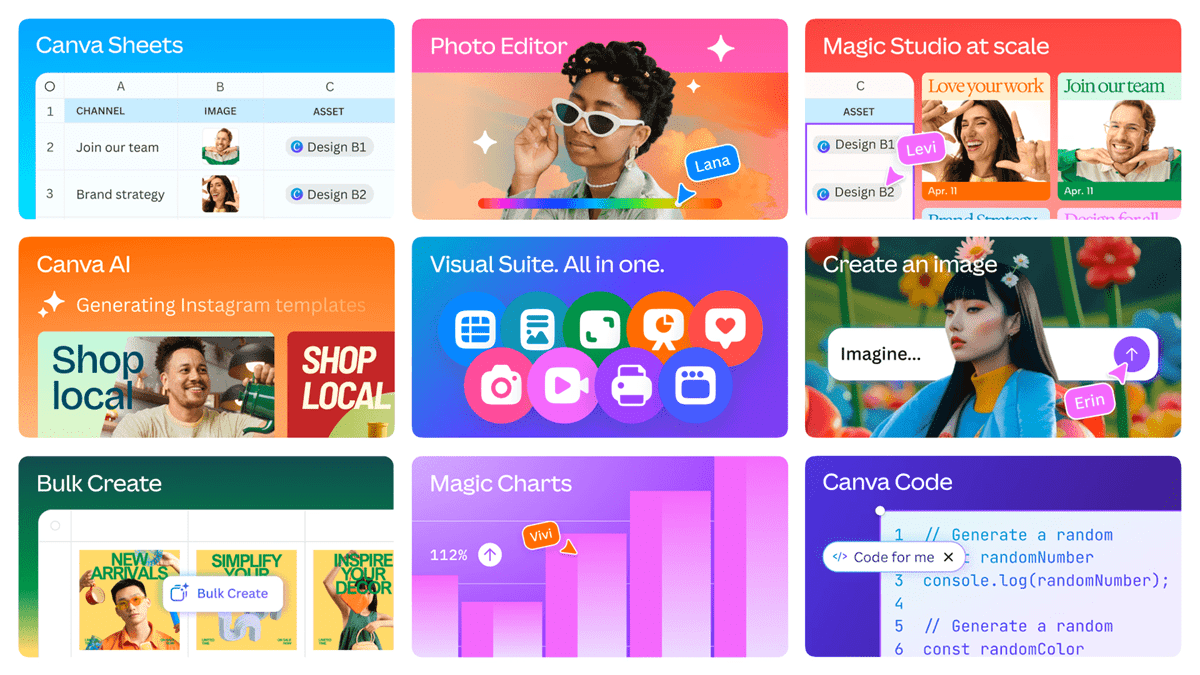
Canva just made its biggest power play yet. At Canva Create 2025 on April 10th inside LA’s SoFi Stadium, the company unveiled Canva Visual Suite 2.0 Magic Studio — and this is not your typical feature update. We are talking about presentations, videos, websites, and whiteboards merging into a single canvas, with AI generating video clips, synthesizing voiceovers, and writing code on command. For 230 million monthly active users, the creative workflow just fundamentally shifted.
Canva Visual Suite 2.0 Magic Studio: The Unified Canvas Era
The old Canva workflow was fragmented by design type. Presentation editor for slides, video editor for clips, website builder for landing pages — each lived in its own silo. Visual Suite 2.0 collapses all of these into a single unified format. One project can now contain slide decks, video clips, interactive web pages, and whiteboard notes, all coexisting seamlessly.
Why does this matter? In practice, most creative projects follow a predictable arc: brainstorm (whiteboard) to presentation to promotional video to landing page. Each transition used to mean switching tools, re-importing assets, and converting formats — friction that burns hours every week. Canva’s official announcement positions Visual Suite 2.0 as the elimination of that friction entirely, bringing all content types under one roof for their 230 million-plus user base.
\n\n\n\nThink about what this means for a typical marketing team. A campaign manager sketches ideas on a whiteboard, converts the best ones into a client-facing presentation, extracts key visuals for social media videos, and publishes a companion landing page — all without ever exporting, uploading, or reformatting. The design assets, brand colors, fonts, and layouts carry over automatically between content types. This is not just convenience; it is a fundamental rethinking of how creative output flows from ideation to delivery.
AI Video Generation: Text-to-Video Powered by Google Veo-3
The headline feature of Magic Studio’s update is AI video generation. The Magic Media text-to-video capability runs on Google’s Veo-3 model, producing 8-second video clips with synchronized audio from a single text prompt. Magic Video takes this further by combining existing photos and clips into auto-edited videos up to 60 seconds long.
Then there is AI Voice. This feature converts text to natural-sounding voiceovers in over 40 languages with multiple accent and tone options. No recording equipment, no voice talent booking — just type your script and pick a voice. The Highlights tool uses AI to automatically identify the most engaging moments in your footage, while new visual effects for captions and automatic audio optimization round out the video toolkit.
The practical limitations are worth noting. AI video generation requires a Pro or Teams subscription, and you get 5 clips per month. If you were expecting unlimited AI-generated video content, that is not where things stand today. But as a starting point for rapid prototyping and social media content, those 5 clips per month can go a long way.
\n\n\n\nThe strategic significance here extends beyond the feature itself. By integrating Google’s Veo-3 model directly into the Canva editor, the company is making AI video generation accessible to users who would never install a standalone AI video tool. A small business owner creating a product announcement does not need to learn Runway or Pika — they just type a description inside the same tool they already use for flyers and social posts. That zero-friction access to AI video, even with current limitations, will drive adoption far faster than any specialized competitor.
Canva Code and Sheets: When Designers Start Shipping Interactive Experiences
Canva Code is arguably the most unexpected addition. Feed it a natural language prompt — something like “create an interactive product catalog with filtering” — and it generates a working interactive web experience right inside the canvas. No HTML, no CSS, no JavaScript knowledge required. The implications for marketing teams and product designers who need quick prototypes are significant.
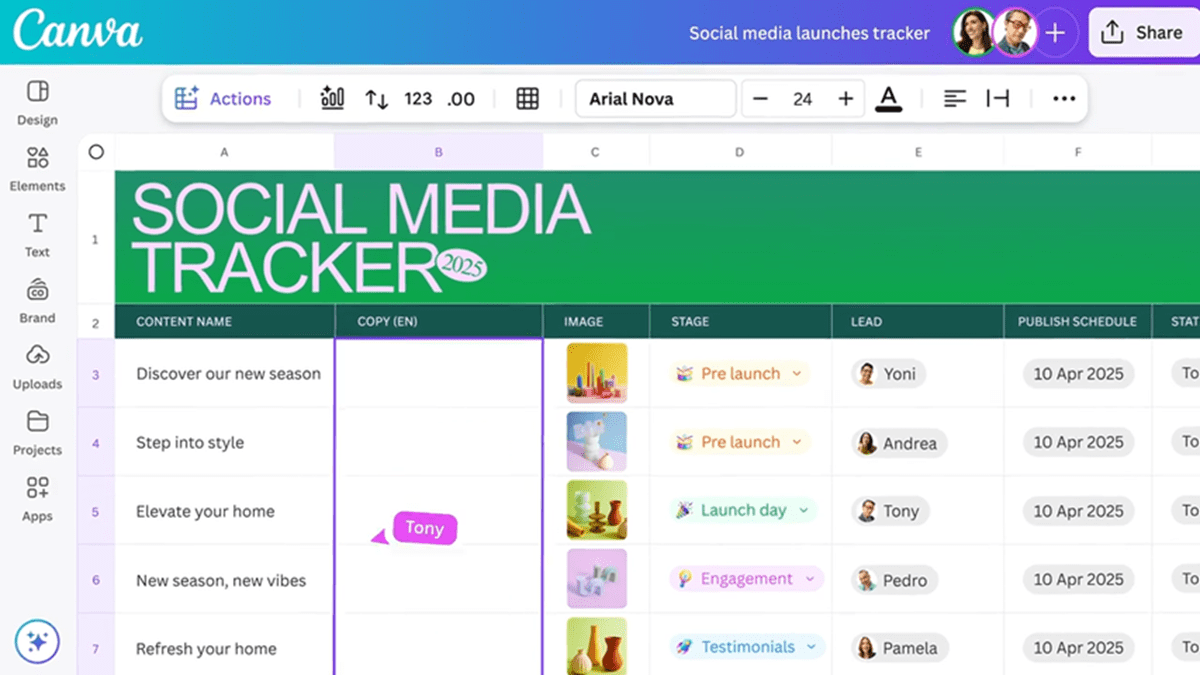
Canva Sheets enters the spreadsheet arena, but not as a Google Sheets clone. It integrates Magic Insights (automatic pattern detection), Magic Formulas (natural language formula generation), and Magic Charts (AI-recommended data visualizations). The differentiator is the seamless connection between data and design — you can go from raw numbers to a polished presentation chart without ever leaving the Canva environment. For teams that currently juggle between Excel, Google Sheets, and a design tool for reports, this could eliminate an entire step.
\n\n\n\nConsider the typical quarterly report workflow: export data from a dashboard, clean it in a spreadsheet, build charts, screenshot or export the charts, import them into a presentation tool, and style everything to match brand guidelines. With Canva Sheets feeding directly into the unified canvas, that entire pipeline collapses into a single environment. Magic Formulas means non-technical team members can ask for calculations in plain English rather than wrestling with spreadsheet syntax, and Magic Charts automatically recommends the most effective visualization type for your dataset.
Dream Lab and Magic Studio at Scale: Image Generation Levels Up
On the image generation front, Dream Lab now runs on Leonardo.Ai’s Phoenix model with support for over 15 styles — from sketches to photorealistic renders to 3D output. Magic Design generates personalized templates aligned with your brand guidelines, while Magic Edit lets you modify specific photo elements through text descriptions and Magic Eraser cleanly removes unwanted objects.
The enhanced photo editor also introduces a Background Generator for AI-powered background replacement — particularly useful for e-commerce product photography where shooting each product in multiple settings would traditionally require a photo studio and hours of post-production. Now a single product shot can be placed in dozens of contextual backgrounds in minutes.
For enterprise users, Magic Studio at Scale is the standout. It enables bulk content creation — hundreds or thousands of design variations — while maintaining brand consistency. Marketing teams running multi-platform campaigns can generate dozens of ad variations, social posts, and banner sizes simultaneously, with AI handling the repetitive adaptation work. According to The Verge, this positions Canva as a direct competitor not just to Adobe, but to the productivity suites from Microsoft and Google.
The AI Assistant: Voice and Text-Driven Design
Canva’s conversational AI assistant accepts both text and voice input. Tell it “make this slide’s color palette warmer” or “add a call-to-action button to the bottom right,” and it executes in real time. This is not a generic chatbot — it understands design context and operates as a true copilot for the creative process.
Multi-page website creation has also arrived. Previously limited to single-page landing sites, Canva now supports building and publishing full multi-page websites directly from the editor. For freelancers and small businesses, this could eliminate the need for a separate website builder like Squarespace or Wix. Combined with the AI assistant’s ability to handle layout adjustments through conversation, building a functional business website becomes a task that takes hours instead of days.
My Take: What 28 Years in Production Taught Me About Platform Shifts Like This
After 28 years working across music, audio, and technology, I have seen this pattern play out before. When DAWs consolidated recording, mixing, and mastering into a single application, the barrier to entry for music production collapsed almost overnight. Canva Visual Suite 2.0 is executing the exact same playbook for creative content.
Let me be honest — Canva’s AI video generation is not replacing professional video production tomorrow. The 5-clips-per-month limit and 8-second ceiling tell you that much. But here is what those numbers miss: the ability for anyone to produce a “first draft” of video content in minutes changes the entire creative briefing process. At Montadecs, we have been building AI-powered content pipelines, and Canva’s direction validates exactly where the industry is heading.
Canva Code is the feature I am watching most closely. The idea that a marketer can generate an interactive web prototype from a text prompt — without waiting three days for a developer to build a mockup — fundamentally changes the speed of creative iteration. It will not produce production-ready code, but reducing communication overhead between design and engineering teams is worth the trade-off alone.
What Canva is really building is clear: an all-in-one creative platform that encroaches on Adobe Creative Cloud’s professional market, Figma’s collaboration market, and Microsoft/Google’s productivity market simultaneously. With 230 million users already past critical mass, the AI features serve a dual purpose — preventing churn while deepening dependency.
\n\n\n\nThe question every creative professional should be asking is not whether Canva can match specialized tools feature-for-feature — it cannot, not yet. The question is whether the convenience of having everything in one platform outweighs the capability gap. For 80 percent of creative tasks that do not require pixel-perfect precision or professional-grade audio mixing, the answer is increasingly yes. The gap between specialized tools and Canva’s unified approach is closing faster than most professionals realize, and that is a shift worth paying attention to regardless of where you sit in the creative industry.
Interested in building AI-powered creative pipelines or automation systems? Let’s talk — 28 years of production experience meets cutting-edge tech.
Get weekly AI, music, and tech trends delivered to your inbox.






