


Summer Production Challenge: How to Make a Full Track in One Hour — Templates, Workflow Hacks, and the 60-Minute Rule
June 26, 2025
MIDI 2.0 Adoption Update June 2025: Which DAWs and Devices Actually Support It Now
June 27, 2025
In May 2025, Google rewrote the AI design tools comparison playbook overnight. They acquired Galileo AI — the startup that turned text prompts into polished UI screens — and relaunched it as Google Stitch at Google I/O 2025. A tool that cost $19-39 per month suddenly became free. Uizard and Visily woke up to a very different competitive landscape.
So I put all three tools through the same gauntlet. Same prompts, same scenarios, same evaluation criteria. Here is what actually matters when choosing between them.
Why These 3 AI Design Tools Matter Right Now
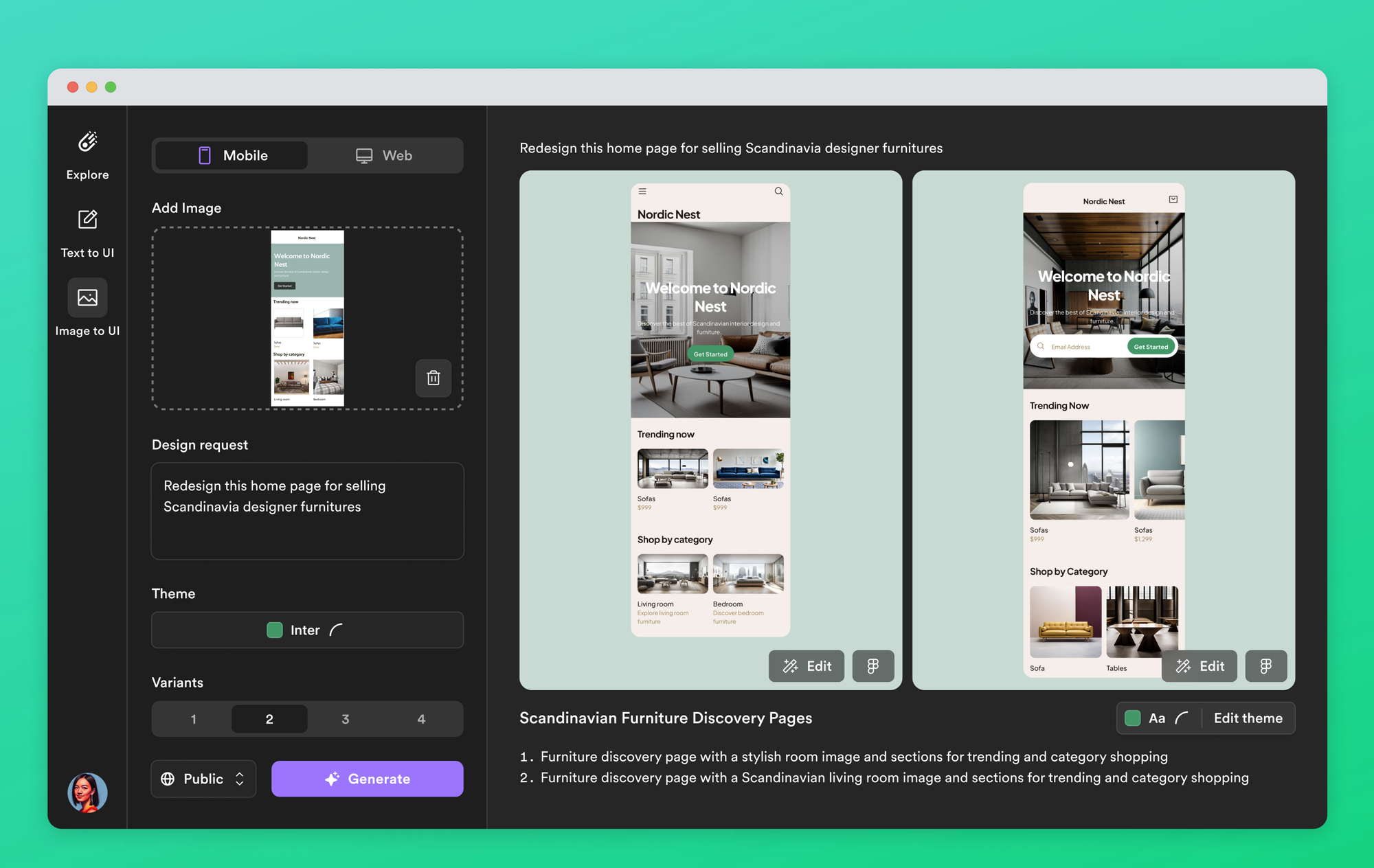
The text-to-UI space has been crowded with contenders, but as of mid-2025, three tools have emerged as the real players in the AI design tools comparison: Google Stitch (formerly Galileo AI), Uizard, and Visily. Each takes a fundamentally different approach to the same problem. Google Stitch leverages Gemini 2.5 models to produce high-fidelity, production-ready UI. Uizard excels at converting sketches and screenshots into editable designs. Visily focuses on making wireframing accessible to anyone, regardless of design experience.
All three qualify as no-code prototyping tools, but in practice, they serve very different users and workflows. Let’s break down each one.
Google Stitch (formerly Galileo AI) — Google’s Free Power Play
Galileo AI had already built a reputation for producing the most polished text-to-UI outputs in the market. After Google’s acquisition, the rebrand to Google Stitch brought one seismic change: the price dropped to zero. What was previously a $19-39/month subscription now offers 350 free generations per month in Standard mode (Gemini 2.5 Flash) and 50 in Experimental mode (Gemini 2.5 Pro).
In testing, Google Stitch’s prompt interpretation stood out immediately. Feed it something like “dark theme dashboard with sidebar navigation and three analytics charts,” and it doesn’t just place elements randomly — it builds a coherent visual hierarchy with proper spacing and layout logic. LogRocket’s hands-on review praised the intelligent prompt interpretation, Figma export capability, and HTML/Tailwind code export as standout features.
The weaknesses are equally clear, though. Accessibility is a problem — outputs frequently fail WCAG compliance checks. There’s a design homogeneity issue where generations start looking similar to each other. And responsive design support remains limited. You’ll still need a designer to clean things up before shipping to production.
Google Stitch Key Specs
- Pricing: Free (350 generations/month Standard, 50 Experimental)
- Engine: Gemini 2.5 Pro / Gemini 2.5 Flash
- Export: Figma, HTML/Tailwind CSS code
- Strengths: Highest-fidelity text-to-UI, free pricing, code export
- Weaknesses: WCAG accessibility gaps, design homogeneity, limited responsiveness
Uizard — The Sketch-First AI Design Tool
Uizard takes the most “traditional” approach of the three. While it supports text-prompt generation, its real strength lies in sketch-to-UI conversion and screenshot-to-design transformation. Snap a photo of a hand-drawn wireframe, upload it, and Uizard converts it into a digital prototype. Upload a screenshot of an existing app, and it becomes an editable design file.
Autodesigner 2.0, Uizard’s conversational AI feature, deserves attention. Tell it “add a login form to this screen” in plain language, and it modifies your existing design accordingly. This makes it particularly useful during client meetings and workshops where you need to visualize ideas in real time. TribalScale’s analysis highlights Uizard’s strength in visual brainstorming and collaborative workshop settings.
The trade-off is output sophistication. AI-generated designs require significantly more manual refinement compared to Google Stitch. Where Stitch produces near-pixel-perfect layouts from a text prompt, Uizard’s AI outputs often need substantial manual tweaking to reach a presentable state. The conversational AI is powerful for iteration, but the initial generation quality lags behind the competition.
Pricing is another consideration. The most useful features sit behind the paywall — Pro at $19/user/month and Business at $39/user/month. The free tier limits you to just 3 AI generations per month, barely enough for a test drive. For teams already paying for Figma, adding Uizard’s subscription on top can strain budgets, especially when Google Stitch now offers comparable text-to-UI for free. Uizard’s value proposition increasingly hinges on its unique sketch-based and screenshot-based capabilities that no competitor matches.
Uizard Key Specs
- Pricing: Free (3 gen/month), Pro $19/user/month, Business $39/user/month
- Core Features: Sketch-to-UI, screenshot-to-design, Autodesigner 2.0 conversational AI
- Export: React/CSS code
- Strengths: Sketch-based workflows, brand kit themes, real-time conversational design
- Weaknesses: Lower AI output quality, heavy manual refinement needed, best features behind paywall
Visily — Best Value AI Design Tool for Non-Designers
Visily has been quietly winning independent comparison reviews. It scored a perfect 5 out of 5 in a professional tool comparison evaluation, particularly excelling for non-designers and small teams. The text-to-UI quality is genuinely competitive, and it offers a unique text-to-diagram feature that neither competitor matches.
The pricing tells a compelling story. Pro comes in at $14/editor/month ($11 on annual billing) — cheaper than Uizard’s $19 — while offering Figma export and access to over 1,500 templates. Screenshot-to-wireframe conversion hits 85-90% accuracy, which is impressive for automated conversion.
The gaps are real but manageable. No auto-layout means manual positioning for complex designs. Minor edits can occasionally trigger unintended regeneration of surrounding elements. And if you need Figma-level precision for final production assets, you’ll eventually outgrow it. But for early-stage prototyping and wireframing — the phase where speed matters more than pixel perfection — Visily punches well above its price point.
One underrated advantage: Visily’s template library. With over 1,500 pre-built templates across categories like SaaS dashboards, e-commerce flows, and mobile apps, you can often start with something close to your vision and modify from there, rather than generating from scratch. For budget-conscious startups that need to move fast without hiring a full-time designer, this library alone can justify the subscription.
Visily Key Specs
- Pricing: Free starter, Pro $14/editor/month ($11 annual), Business $29/month
- Core Features: Text-to-UI, text-to-diagram, screenshot conversion (85-90% accuracy)
- Export: Figma
- Strengths: Highest review scores, best value, 1,500+ templates
- Weaknesses: No auto-layout, regeneration bugs, less precise than Figma
Head-to-Head AI Design Tools Comparison
Here’s how the three tools stack up across the metrics that actually matter.
Pricing: Google Stitch Free | Uizard Free-$39/mo | Visily Free-$29/mo
AI Engine: Google Stitch — Gemini 2.5 Pro/Flash | Uizard — Autodesigner 2.0 | Visily — Proprietary AI
Text-to-UI Quality: Google Stitch ★★★★★ | Uizard ★★★☆☆ | Visily ★★★★☆
Sketch/Screenshot Conversion: Google Stitch N/A | Uizard ★★★★★ | Visily ★★★★☆
Figma Export: Google Stitch Yes | Uizard No | Visily Yes
Code Export: Google Stitch HTML/Tailwind | Uizard React/CSS | Visily None
Accessibility (WCAG): Google Stitch Poor | Uizard Average | Visily Average
Best For: Google Stitch — Designers/Developers | Uizard — PMs/Non-designers | Visily — Startups/Small teams
How Google’s Acquisition Changed the Game
Google acquiring Galileo AI wasn’t just corporate news — it disrupted the business model of every AI UI design generator in the market. With 350 free monthly generations, Google Stitch covers not just individual projects but entire small-team prototyping workflows without charging a cent. For Uizard and Visily, a free high-quality alternative appeared overnight.
But Google Stitch doesn’t replace everything. If your workflow starts with hand-drawn sketches, Uizard remains the only real option. If you need Figma export at an affordable price point, Visily makes the most financial sense. And teams wary of Google ecosystem lock-in may prefer the independence that standalone tools provide. There’s also the question of data privacy — feeding your product designs into Google’s infrastructure may not sit well with every organization, especially those working on proprietary or pre-launch products.
Fora Soft’s 2025 AI wireframe tool comparison gave Visily a perfect 5/5 score for supporting both screen-by-screen and full-flow generation, while Uizard earned 4.5/5 — strong on full-flow capability but lacking Figma export. Google Stitch hadn’t been included in that evaluation post-acquisition, but it’s likely to rank at the top once added.
Which AI Design Tool Should You Choose?
The answer depends entirely on your use case.
Choose Google Stitch if you have zero budget and need the highest-quality text-to-UI generation. It’s ideal for designer-developer collaboration environments where both Figma and code export matter. Just be prepared to fix accessibility issues and responsive layouts yourself.
Choose Uizard if your workflow starts with hand-drawn sketches or existing app screenshots. It’s built for PMs and planners who need to create prototypes in real time during client-facing meetings.
Choose Visily if your team has many non-designers, a limited budget, and needs smooth Figma integration. The 1,500+ templates and text-to-diagram feature are bonuses that add genuine value.
The most practical approach for 2025 might be combining all three in a staged workflow. Start with Visily’s fast wireframing for initial ideation — its templates and text-to-diagram features make it perfect for the “napkin sketch” phase. Move to Google Stitch for high-fidelity mockups when you need to show stakeholders something polished. Then use Uizard’s collaborative Autodesigner for real-time iteration during team reviews and client presentations.
These AI design tools are not here to replace designers — they’re here to compress the timeline between idea and prototype from days to minutes. The teams that figure out how to layer these tools effectively will have a significant speed advantage over those still debating which single tool to adopt. In a market that’s evolving this fast, flexibility beats loyalty.
Need help implementing AI design tools into your team’s workflow or building automation pipelines?
Get weekly AI, music, and tech trends delivered to your inbox.






