OpenAI Codex Subagents GA: How Multi-Agent Parallel Coding Works, Real-World Results, and Claude Code Comparison
March 26, 2026
NVIDIA N1X ARM Laptop Chip: 20 CPU Cores, RTX 5070-Class GPU, and 8 Dell/Lenovo Models Launching Spring 2026
March 26, 2026
After a decade of predictable monthly updates, Microsoft just ripped up the playbook. Starting with version 1.111 on March 10, 2026, Visual Studio Code now ships stable releases every single week — and the ripple effects are already reshaping how 15 million+ developers think about extensions, AI agents, and workflow stability. This is not a minor tweak to the release calendar. It represents a fundamental shift in how the world’s most popular code editor evolves, and every developer who depends on VS Code needs to understand what it means.
Why Microsoft Killed the Monthly Cadence for VS Code Weekly Release
For ten years, VS Code’s monthly rhythm was sacred. Extension authors planned compatibility windows around it. Teams scheduled testing cycles. The “Endgame” week — a dedicated pre-release quality sprint — became a ritual that the entire ecosystem relied on for stability guarantees.
Then AI happened. Rapid model updates from OpenAI, Anthropic, and Google demanded equally rapid tooling adjustments. When a new model version drops and requires IDE changes, waiting three weeks for the next monthly release simply isn’t viable. Distinguished engineer Kai Maetzel confirmed that the traditional Endgame testing week has been folded into ongoing weekly activities. The official release notes put it plainly: “Welcome to the 1.111 release of Visual Studio Code, the first of our weekly Stable releases.”
The logic is straightforward: when AI models ship updates every few days, a monthly IDE release cycle creates a 2-3 week gap where developers are stuck with outdated tooling. Weekly releases close that gap — each update is smaller, more focused, and lands when features are actually ready rather than waiting for an arbitrary monthly window. Microsoft doesn’t change release cadences lightly. This move signals deep confidence in their CI/CD pipeline and a strategic bet that faster iteration beats stability predictability in the current AI-driven development landscape.
VS Code 1.111 to 1.112: What the First Weekly Releases Actually Deliver
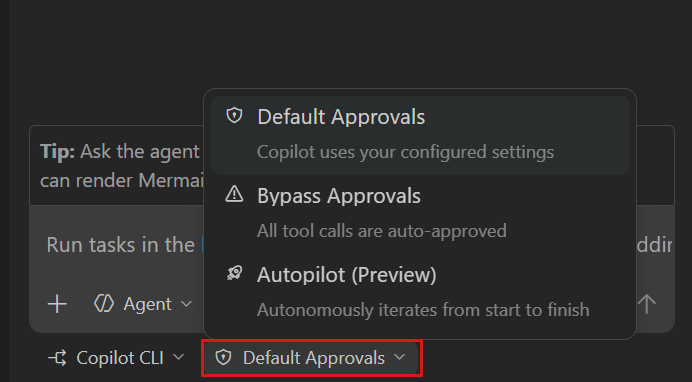
Version 1.111, the inaugural VS Code weekly release, focused almost entirely on AI agent improvements. Every single new feature in this release is AI-related — a telling indicator of where Microsoft sees VS Code’s future. The headline feature is a three-tier permission system for Copilot CLI that gives developers granular control over how much autonomy their AI assistant has:
- Default Permissions — Standard approval workflow; every tool call needs your explicit sign-off before execution
- Bypass Approvals — Auto-approves tool calls but still waits for your input on important decisions and direction changes
- Autopilot — Full autonomy. Auto-approves all actions, auto-responds to prompts, and continues iterating without any human intervention whatsoever
That last tier is where things get interesting — and controversial. The Register noted that Autopilot mode essentially removes the human safeguard layer, making it vulnerable to prompt injection and tool poisoning attacks. The official documentation acknowledges these risks but offers only partial mitigations, primarily recommending terminal sandboxing — which is only available on macOS and Linux.
Version 1.112, released just one week later on March 18, brought even more substantial changes that demonstrate the weekly cadence’s advantage — features that would have previously waited another three weeks to reach users:
- MCP Server Sandboxing (macOS/Linux) — Locally configured stdio MCP servers can now run in a sandboxed environment with restricted filesystem and network access. Enable it by setting
"sandboxEnabled": truein yourmcp.jsonconfiguration file - Integrated Browser Debugging — A new
editor-browserdebug type lets you debug web applications directly inside VS Code tabs, with most options from existing Edge and Chrome debug configurations supported - Agent Image & Binary Support — Agents can now read image files natively and display generated images in a selectable carousel view, with binary files shown in hexdump format
- Plugin Enable/Disable Per-Workspace — Both plugins and MCP servers can be toggled globally or per-workspace without uninstalling them, giving developers precise control over their environment
- Message Steering & Queueing — Send follow-up messages while Copilot CLI is still processing a previous request, allowing dynamic steering toward different responses
- Troubleshoot Skill — A new
/troubleshootcommand analyzes debug logs in conversations, providing insights into tool usage, response delays, and connectivity issues
MCP Sandboxing: The Security Feature That Matters Most
If you’re running AI agents that interact with your filesystem — and in 2026, who isn’t — MCP sandboxing is the single most important feature in these VS Code weekly releases. Understanding why requires some context about how AI tool integrations actually work under the hood.
The Model Context Protocol (MCP) has become the standard way AI tools communicate with development environments. It defines how language models request file reads, execute commands, and interact with external services. But MCP servers running locally have historically had unrestricted access to your filesystem and network. That’s a recipe for disaster when you’re installing third-party MCP servers from unknown sources — any one of them could silently read your SSH keys, environment variables, or proprietary source code.
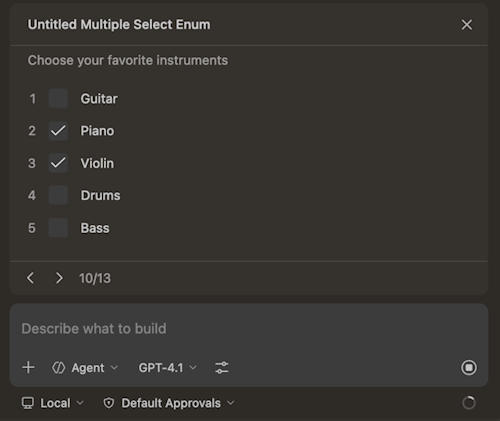
VS Code 1.112’s sandboxing changes this equation fundamentally. When you set "sandboxEnabled": true in your mcp.json, the server starts with minimal permissions. Need access to a specific folder? VS Code prompts you explicitly and records the permission grant. Need network access to a particular domain? Same explicit approval workflow. It’s a least-privilege model that should have existed from day one — and the fact that it arrives in the same release cycle as Autopilot mode suggests Microsoft recognizes the security tension inherent in AI-powered development.
The catch: this only works on macOS and Linux. Windows users are left without sandboxing for local MCP servers, though remote scenarios via WSL and SSH continue to work. Given that a significant portion of VS Code’s user base runs Windows, this is a notable gap that Microsoft will need to address in upcoming weekly releases.
Extension Developers Are Not All Happy About the VS Code Weekly Release Shift
While Microsoft frames the weekly cadence as a win for speed, extension developers see a markedly different picture. The monthly cycle gave them predictable testing windows — a known schedule to validate compatibility, fix breaking changes, and ship updates in an orderly fashion. That predictability is now gone, replaced by a relentless weekly drumbeat that demands constant attention.
Community feedback on Reddit and GitHub has been pointed. One developer called the change “confusing and concerning,” noting that some releases require settings changes and “having to review and amend settings every week is a burden.” Others questioned whether they could stay several versions behind to ensure stability — essentially asking if the old monthly pace is still achievable through manual version management.
There’s also the unresolved question of what happens to the Insider builds. Previously, Insiders served as a preview channel with a clear purpose — test upcoming monthly features before they hit stable. With weekly stable releases, the distinction between Insiders and Stable blurs considerably. An Insider build tested on Monday might see its features land in Stable by Friday. Microsoft hasn’t fully addressed this overlap, leaving extension developers uncertain about which channel to target for testing.
For extension authors maintaining popular packages, the math is brutal. Where they previously validated against 12 stable releases per year, they now potentially face 52. Even with smaller deltas per release, the cumulative testing burden increases significantly. Automated testing helps, but not every extension has the CI infrastructure to handle weekly validation cycles. Smaller, independent extension developers with limited resources may find themselves falling behind or forced to choose between thorough testing and timely compatibility updates.
The Autopilot Paradox: Speed vs. Safety in AI-Powered IDEs
Perhaps the most telling aspect of the VS Code weekly release shift is what it reveals about the AI tooling industry’s complicated relationship with safety. Microsoft introduces Autopilot mode that auto-approves everything an AI agent does — every file modification, every terminal command, every network request. Simultaneously, Google promotes a similar Auto Approve Mode in Gemini Code Assist — while its own documentation warns that the feature “is extremely dangerous and is never recommended” because it “disables critical security protections.”
This contradiction isn’t unique to Google. It reflects the entire industry’s struggle: developers want speed, AI agents need autonomy to be useful, but full autonomy without guardrails creates genuine security risks. Prompt injection attacks, where malicious instructions are hidden in code comments or documentation that the AI reads, can cause an autonomous agent to execute harmful commands. Tool poisoning, where a compromised MCP server returns manipulated data, becomes catastrophic when there’s no human reviewing the agent’s actions.
The three-tier permission model in VS Code is a reasonable compromise, but the very existence of an unrestricted Autopilot tier suggests Microsoft knows many developers will choose speed over safety. As someone who runs automated pipelines with AI CLI tools daily, I can confirm the temptation is real. When you’re iterating on code at 2 AM and the approval prompts feel like friction, Autopilot mode is exactly what you want. The question is whether the 99 times it works perfectly are worth the 1 time a malicious MCP server exfiltrates your codebase or injects backdoor code into your production deployment.
The weekly release model ultimately reflects a bet: that faster iteration beats stability predictability in the current AI-driven development landscape. For most developers, the smaller, more focused updates will be a net positive — bugs get fixed faster, new AI capabilities arrive sooner, and the editor stays in sync with rapidly evolving language models. For extension authors and teams that depend on version pinning, the transition period will be painful as they build new testing workflows around the weekly cadence. And for everyone using AI agents in their IDE, the combination of weekly releases, MCP sandboxing, and tiered permissions represents a new equilibrium — one where the tooling finally starts keeping pace with the AI models it’s designed to support.
Need help building automated development workflows or integrating AI tooling into your pipeline?
Get weekly AI, music, and tech trends delivered to your inbox.