Adobe Firefly Custom Models Public Beta — Train AI on Your Art Style with Just 10 Images (2026)
March 25, 2026
NVIDIA Vera Rubin: 50 PFLOPS Per GPU, 336B Transistors — The 6-Chip AI Supercomputer That Redefines Everything at GTC 2026
March 25, 2026
The dev server starts 87% faster — and that’s not even the most interesting part. Released on March 18, 2026, Next.js 16.2 doesn’t just ship performance wins. It introduces a fundamentally new development paradigm where AI coding agents can inspect and debug your running application directly from the terminal.
Next.js 16.2 Performance: The Numbers Tell the Story
Let’s start with what every developer feels first: startup time. next dev startup is approximately 87% faster compared to Next.js 16.1 on the default application. That means the time before localhost:3000 is ready has been cut to roughly a fifth of what it was.
But the rendering improvements might matter even more in production. The Vercel team contributed a change directly to React that makes Server Components payload deserialization up to 350% faster. The root cause was architectural: the previous implementation used a JSON.parse reviver callback, which crosses the C++/JavaScript boundary in V8 for every single key-value pair. Even a trivial no-op reviver makes JSON.parse roughly 4x slower.
The new approach is elegantly simple — plain JSON.parse() followed by a recursive walk in pure JavaScript. This eliminates the boundary-crossing overhead entirely. Here’s what that translates to in real-world benchmarks:
- Server Component Table with 1000 items: 19ms → 15ms (26% faster)
- Server Component with nested Suspense: 80ms → 60ms (33% faster)
- Payload CMS homepage: 43ms → 32ms (34% faster)
- Payload CMS with rich text: 52ms → 33ms (60% faster)
The heavier the RSC payload, the bigger the improvement. If your app renders complex data tables or rich text content, you’re looking at potentially 60% faster HTML rendering with zero code changes.
Server Fast Refresh: Hot Reloading Done Right
Turbopack’s Server Fast Refresh is a complete rethink of server-side code reloading. The previous system cleared require.cache for the changed module and everything in its import chain — often reloading unchanged node_modules in the process. The new system brings the same surgical Fast Refresh approach from the browser to your server code.
Because Turbopack understands the module graph, only the module that actually changed gets reloaded. The measured results are dramatic:
- Server refresh time: 59ms → 12.4ms (375% faster)
- Next.js internal processing: 40ms → 2.7ms
- Application code processing: 19ms → 9.7ms
- Real-world compile times: 400-900% faster
These improvements scale from “hello world” starters all the way to large production sites like vercel.com. The key architectural change is that Turbopack now leverages its knowledge of the module graph to perform surgical reloads. Instead of invalidating entire dependency chains, it identifies the exact module boundary where the change occurred and reloads only that unit. Unchanged dependencies — including heavy node_modules — stay warm in memory. If you’ve been frustrated with server-side HMR latency, this alone is worth the upgrade.
AGENTS.md: AI-Native Project Context
create-next-app now ships an AGENTS.md file by default. This gives AI coding agents — Claude Code, Cursor, GitHub Copilot, and others — access to version-matched Next.js documentation from the moment your project is scaffolded.
This isn’t just a nice-to-have. Vercel’s research found that giving agents bundled documentation achieved a 100% pass rate on Next.js evals — compared to 79% max with skill-based approaches. The key insight: always-available context beats on-demand retrieval because agents often fail to recognize when they should search for docs.
# AGENTS.md — included by default in create-next-app
<!-- BEGIN:nextjs-agent-rules -->

# Next.js: ALWAYS read docs before coding

Before any Next.js work, find and read the relevant doc
in node_modules/next/dist/docs/.
Your training data is outdated — the docs are the source of truth.

<!-- END:nextjs-agent-rules -->
The Next.js npm package now bundles the full documentation as plain Markdown files at node_modules/next/dist/docs/. No external fetching required — agents get accurate, version-matched references locally. For existing projects, you can add this with one command:
# Add AGENTS.md to existing projects
npx @next/codemod@latest agents-md
next-browser: Turning the Browser Into an Agent-Readable Interface
This is the feature that feels like it’s from the future. @vercel/next-browser is an experimental CLI that gives AI agents the ability to inspect a running Next.js application — screenshots, network requests, console logs, React component trees, props, hooks, PPR shells, and errors — all returned as structured text via shell commands.
An LLM can’t read a DevTools panel. But it can run next-browser tree, parse the output, and decide what to inspect next. Each command is a one-shot request against a persistent browser session, so agents query the app repeatedly without managing browser state.
Here’s what makes it particularly powerful for PPR optimization. Consider a blog post with a visitor counter — the getVisitorCount fetch runs on every request, making the entire page dynamic even though the post content could be static. An agent can use next-browser to diagnose this:
# Install next-browser
npx skills add vercel-labs/next-browser

# Diagnose PPR shell issues
next-browser ppr lock          # Enter PPR mode
next-browser goto /blog/hello  # Load page — see loading skeleton
next-browser ppr unlock        # Analyze what's blocking

# Output:
# PPR Shell Analysis
# 1 dynamic hole, 1 static
#
# blocked by:
#   - getVisitorCount (server-fetch)
#     owner: BlogPost at app/blog/[slug]/page.tsx:5
#     next step: Push the fetch into a smaller Suspense leaf
The agent gets a structured diagnosis telling it exactly which fetch is the blocker, which component owns it, and the recommended fix. It then wraps just the counter in its own Suspense boundary, and the static shell grows to include the actual post content. This is the kind of optimization that takes a developer several DevTools sessions to figure out — an agent can do it in seconds.
200+ Turbopack Improvements You Should Know About
Beyond the headline features, Turbopack ships a substantial list of improvements in this release:
Subresource Integrity (SRI): Turbopack now generates cryptographic hashes of JavaScript files at build time. This enables Content Security Policy implementation without forcing dynamic rendering — a significant security improvement for static sites.
// next.config.js — Enable SRI
const nextConfig = {
  experimental: {
    sri: {
      algorithm: 'sha256',
    },
  },
};
Tree shaking of dynamic imports: Destructured dynamic imports are now tree-shaken identically to static imports. const { cat } = await import('./lib') will have unused exports removed from the bundle — previously, dynamic imports brought in everything.
Inline loader configuration: You can now configure loaders on individual imports using import attributes, avoiding global side effects:
import rawText from './data.txt' with {
  turbopackLoader: 'raw-loader',
  turbopackAs: '*.js',
};
Other notable additions include Web Worker Origin support for WASM libraries, postcss.config.ts TypeScript support, experimental Lightning CSS configuration, and log filtering via turbopack.ignoreIssue.
Developer Experience: Debugging Gets a Major Upgrade
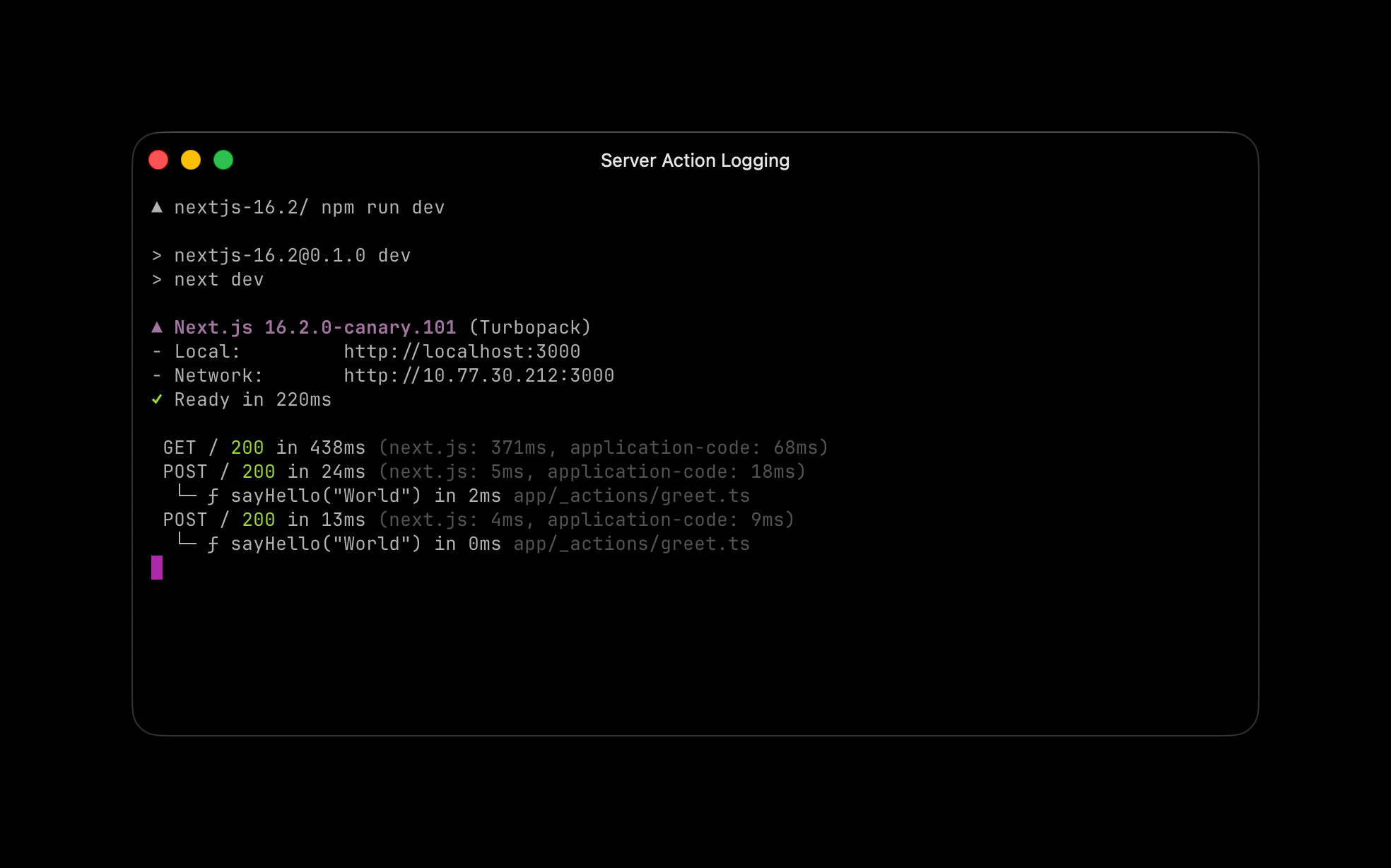
Server Function Logging: During development, the terminal now shows real-time Server Function execution — function name, arguments, execution time, and the file it’s defined in. No more guessing what’s happening on the server.
Hydration Diff Indicator: When hydration mismatches occur, the error overlay now shows a clear + Client / - Server diff. You instantly see what diverged between server and client rendering.
Browser Log Forwarding: Browser errors are now forwarded to the terminal by default during development. This is a game-changer for AI agents that operate through the terminal — they can now catch client-side errors without needing browser access.
// next.config.ts — Configure browser log forwarding
const nextConfig = {
  logging: {
    browserToTerminal: true,
    // 'error' — errors only (default)
    // 'warn'  — warnings and errors
    // true    — all console output
    // false   — disabled
  },
};
--inspect for next start: Following next dev --inspect in 16.1, you can now attach the Node.js debugger to your production server. Run next start --inspect for CPU and memory profiling in production.
Experimental Features Worth Watching
unstable_catchError(): A new API for component-level error boundaries. Unlike the error.js file convention, you can place these anywhere in your component tree, and they handle framework internals like redirect() and notFound() automatically.
experimental.prefetchInlining: Bundles all segment data for a route into a single response, reducing prefetch requests to one per link. The trade-off is duplicated shared layout data — this is a stepping stone toward automatic size-based heuristics.
ImageResponse — 2x to 20x faster: Basic images generate 2x faster, complex images up to 20x faster. The improvements come from optimized CSS and SVG coverage, including support for inline CSS variables, text-indent, text-decoration-skip-ink, box-sizing, display: contents, position: static, and percentage values for gap. The default font has also switched from Noto Sans to Geist Sans, aligning with the Vercel design system.
How to Upgrade and What I Recommend
There’s also a nice addition for View Transitions: the <Link> component now accepts a transitionTypes prop, letting you specify which View Transition types to apply during navigation. This enables different animations based on navigation direction or context — a welcome improvement for apps with polished UX.
Upgrading is straightforward:
# Automated upgrade
npx @next/codemod@canary upgrade latest

# Manual upgrade
npm install next@latest react@latest react-dom@latest

# Add AGENTS.md to existing projects
npx @next/codemod@latest agents-md
From a consulting perspective, the biggest value in Next.js 16.2 isn’t any single performance number — it’s the framework-level foundation for AI-agent collaboration. AGENTS.md and next-browser aren’t convenience features. They’re the first steps toward making the development process AI-native. Combined with Server Fast Refresh’s 375% improvement, the feedback loop for agent-driven development becomes dramatically shorter. If you’re building anything with Next.js in 2026, this update is non-negotiable.
Looking for help with Next.js migration, AI agent workflow integration, or development pipeline automation? Let’s talk.
Get weekly AI, music, and tech trends delivered to your inbox.