


Apple Watch Series 11 Blood Pressure Monitoring Changes Everything – Sleep Apnea, 5G, 24-Hour Battery
September 3, 2025
Neural DSP Quad Cortex CorOS 3.2: Cory Wong X, Live Tuner, and 5 Changes That Actually Matter
September 4, 2025
A year ago, the consensus was clear: Apple had fallen behind in AI. Then September 15 happened. With iOS 26, Apple Intelligence iOS 26 delivered over 20 new AI features that don’t just match the competition — they redefine how AI should integrate into a mobile operating system. ChatGPT now lives inside Image Playground. Your AirPods Pro 3 can translate conversations in real time. Point your camera at anything, and Visual Intelligence tells you what it is, where to buy it, and how much it costs. This isn’t an incremental update. This is Apple betting its entire ecosystem on AI — and the bet looks like it’s paying off.
What Changed with Apple Intelligence in iOS 26
At the September 9 ‘Awe Dropping’ event, Apple unveiled the iPhone 17 Pro with its A19 Pro chip purpose-built for AI workloads, the impossibly thin iPhone Air at 5.6mm, AirPods Pro 3 with Live Translation, and Apple Watch Series 11 with 5G and hypertension detection. But the real story wasn’t hardware — it was the software powering it all. According to Fortune, this was Apple’s most AI-centric event in the company’s history, and the resulting iOS 26 update made good on every promise.
As someone who has spent 28 years in the audio and technology industry, I’ve watched AI promises come and go. What makes Apple’s approach different is the commitment to on-device processing and privacy-first architecture. When I’m working with client recordings or sensitive pre-release material in the studio, knowing that Apple Intelligence processes most tasks locally — without sending data to external servers — is not just a feature, it’s a requirement.
” alt=”Apple Intelligence iOS 26 hero image showing AI features across iPhone iPad and Mac”/>
ChatGPT-Powered Image Playground: A Game Changer for Creators
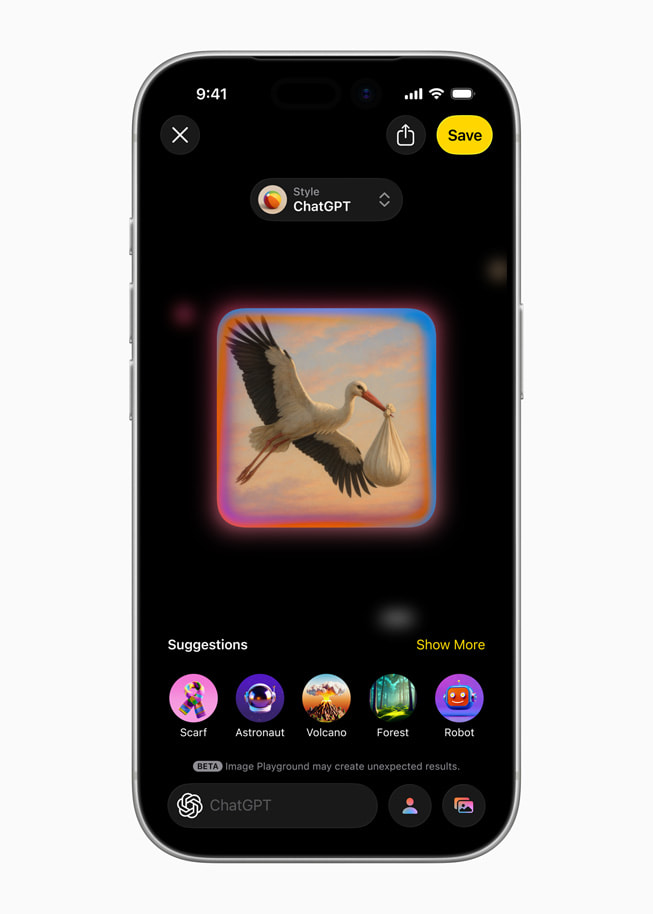
The single most impactful addition in iOS 26 is the ChatGPT integration within Image Playground. As AppleInsider reported, the update brings five new preset styles — Oil Painting, Vector, Anime, Print, and Watercolor — alongside an ‘Any Style’ option that accepts free-form text prompts. This means you can type “1970s jazz album cover in warm analog tones” and get something genuinely usable as a creative starting point.
For music producers and creative directors, this changes the prototyping game entirely. Need album artwork concepts for a client pitch? Generate five variations on your iPhone in under a minute. Working on social media promotion for a new release? Create on-brand visuals without opening Photoshop. The ChatGPT-powered styles do consume tokens, but Apple’s original on-device styles remain completely free and work offline — a thoughtful dual approach that gives you powerful creative tools without forcing you into a subscription for basic functionality.
What’s particularly smart is how Apple has positioned this. The on-device models handle privacy-sensitive requests — generating images of your family, personal photos, or anything you’d prefer to keep private — while ChatGPT handles the more compute-intensive artistic styles that require server-side processing. It’s a hybrid architecture that plays to each system’s strengths, and it solves the fundamental tension between AI capability and user privacy that other platforms have largely ignored.
For creative professionals specifically, the ‘Any Style’ option is the standout feature. Rather than being locked into presets, you can describe exactly what you want — “vintage Japanese woodblock print with modern typography” or “minimalist Bauhaus poster with bold geometry” — and get results that actually serve as usable creative briefs. This is not replacing professional designers, but it eliminates the friction of visualizing ideas during early brainstorming sessions. I can see myself using this to communicate visual concepts to album art designers far more efficiently than trying to describe a mood in words alone.
” alt=”Image Playground ChatGPT styles including watercolor oil painting and anime art options”/>
Live Translation: From Messages to AirPods Pro 3
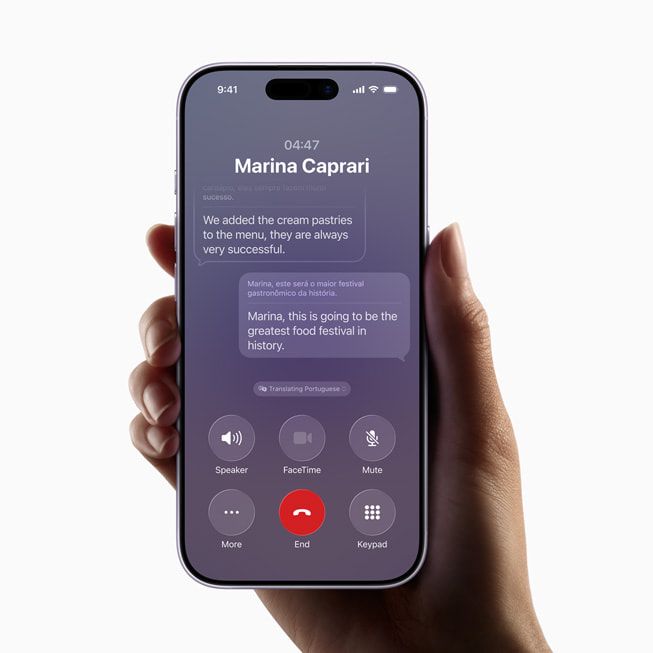
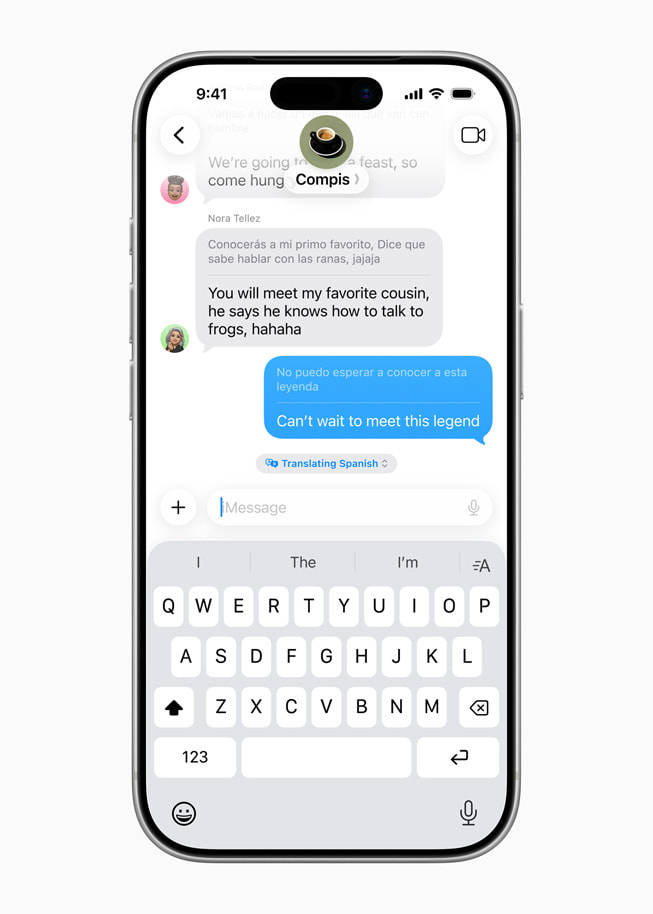
According to Apple’s official announcement, Live Translation is now integrated directly into Messages, FaceTime, Phone, and — most impressively — AirPods Pro 3. Previously, real-time translation required opening a separate app, copying text, and waiting. Now it happens contextually, within the apps you’re already using. During a FaceTime call with a Japanese client, translated text appears as subtitles. In Messages, incoming foreign-language texts are translated inline. With AirPods Pro 3, spoken words are translated and played back in near-real-time.
In my experience collaborating with international artists and engineers, even when English serves as the common language, technical nuances get lost. Explaining the difference between “parallel compression” and “New York compression” to a non-native speaker over a laggy video call is a familiar frustration. Having AI-powered translation baked into FaceTime could genuinely improve the precision of cross-language technical discussions. iOS 26 also adds eight new supported languages — Danish, Dutch, Norwegian, Swedish, Turkish, Vietnamese, Traditional Chinese, and Portuguese (Portugal) — dramatically expanding the feature’s global reach.
” alt=”Apple Intelligence iOS 26 Live Translation in Messages app showing real-time conversation translation”/>
Visual Intelligence, Genmoji Mixing, and the Smaller Wins That Add Up
Visual Intelligence received a significant upgrade. Point your iPhone camera at anything on-screen and it can now search across Google, eBay, Poshmark, and Etsy simultaneously. For studio professionals, this means you can photograph an unfamiliar piece of vintage gear and instantly get pricing, specifications, and purchase options. For everyday users, it turns your camera into a universal search engine that understands context, not just text.
Genmoji Mixing is a more playful addition — combine any two emoji to create an entirely new custom Genmoji. While it sounds trivial on the surface, it’s genuinely useful for social media marketing and artist branding. Creating a custom emoji that blends a musical note with a robot face, for instance, could become a signature visual for an AI music brand. Genmoji creation is now also available directly within the Image Playground app, consolidating Apple’s creative AI tools into a single hub rather than scattering them across the OS.
Additional AI Features Worth Noting
- Workout Buddy — The first AI-powered fitness coaching system on Apple Watch, providing real-time exercise guidance and form corrections during workouts.
- Intelligent Shortcuts — Shortcuts can now tap directly into Apple Intelligence models, opening up dramatically more powerful automation workflows for power users.
- Priority Notifications — AI identifies and surfaces your most time-sensitive notifications at the top of your stack. First introduced in iOS 18.4 (as TechCrunch reported), it becomes significantly smarter in iOS 26.
- Auto-categorizing Reminders — AI extracts to-dos from your emails and organizes them by category automatically.
- Apple Wallet Order Tracking — Automatically detects shipping confirmations in your email and tracks deliveries directly in Apple Wallet.
- Messages Poll Suggestions — AI suggests polls in group conversations and lets you customize conversation backgrounds using Image Playground.
- Foundation Models Framework — Unveiled at WWDC 2025, this framework allows third-party developers to build apps that leverage Apple’s on-device AI models directly.
What Apple Intelligence iOS 26 Means for Creative Professionals
Taking a step back from the individual features, the larger picture becomes clear: Apple is transforming AI from a standalone capability into a foundational layer of the operating system. The Foundation Models framework announced at WWDC 2025 is the key piece — once third-party apps can access Apple’s on-device AI, we could see AI-assisted composition suggestions in Logic Pro, intelligent mix referencing tools, or automated session organization directly within DAWs. The creative possibilities are enormous.
There are practical limitations to acknowledge. Apple Intelligence requires an iPhone 15 Pro/Pro Max or iPhone 16 and newer — meaning anyone with an iPhone 14 or earlier is completely locked out, regardless of the iOS version they install. As 9to5Mac’s comprehensive feature list confirms, ChatGPT-powered features require separate token allocation, and some advanced capabilities are optimized specifically for the A19 Pro chip in the iPhone 17 Pro. However, the core AI features — smart notifications, text summarization, Writing Tools — are available free on all supported devices. This tiered approach creates a clear upgrade incentive without making the base experience feel incomplete.
What excites me most as both a music producer and tech consultant is the combination of Intelligent Shortcuts and Foundation Models. When these two capabilities mature, the automation potential for creative workflows becomes staggering — from recording session management and client communication to project file organization and delivery pipeline management. Imagine a Shortcut that automatically backs up your Logic Pro session, generates a summary of the day’s recording notes using Apple Intelligence, emails a progress report to the client, and archives the project files — all triggered by a single voice command to Siri. That workflow is now technically possible with iOS 26’s toolset.
Apple achieving this level of AI integration while maintaining its privacy-first approach is a genuine differentiator from the cloud-dependent strategies pursued by Google and Samsung. Google’s Gemini integration in Android requires constant cloud connectivity for its most powerful features. Samsung’s Galaxy AI similarly leans heavily on server-side processing. Apple’s hybrid model — powerful on-device capabilities supplemented by optional cloud features — gives users meaningful AI functionality even in airplane mode, in the studio, or anywhere with limited connectivity.
iOS 26’s Apple Intelligence represents the smoothest implementation of “AI that disappears into daily life” that any company has achieved to date. You don’t need to install a separate AI app, craft perfect prompts, or navigate new interfaces. The AI is simply there — when you text, when you take a photo, when you check notifications. Whether you’re a creative professional trying to streamline your production workflow, or an everyday user who just wants smarter notifications and better photo editing, this update creates the most compelling reason yet to stay within the Apple ecosystem. The AI race isn’t over, but with iOS 26, Apple has made it clear they’re no longer playing catch-up — they’re defining what AI integration should actually look like.
Want to explore how AI is transforming creative workflows, or need help building tech automation systems? Let’s talk.
Get weekly AI, music, and tech trends delivered to your inbox.





