OpenAI Acquires Promptfoo: AI Red-Team Security Testing Gets Built Into Every Agent
March 20, 2026
DLSS 4.5 Dynamic Multi Frame Generation: 6X Mode Delivers 35% Boost, Launches March 31
March 20, 2026
6.5% compiler performance gains, custom AI agents you define in a single Markdown file, and over 5,000 bugs squashed — Visual Studio 2026 v18.4 just dropped on March 17, and this is not a minor patch. Microsoft’s “first truly intelligent IDE” keeps earning that tagline with every release, and the March update might be the most developer-relevant one yet.
If you’ve been tracking Visual Studio 2026 since its initial preview, you already know the foundation: solution loads roughly 2x faster than VS 2022, UI freezes cut by more than 50%, and backward compatibility with over 4,000 VS 2022 extensions. But v18.4 goes further. This release focuses on making the IDE not just faster, but genuinely autonomous — with AI agents that understand your codebase, your team’s conventions, and your performance bottlenecks.
Custom AI Agents: Your Team’s Knowledge in a Markdown File
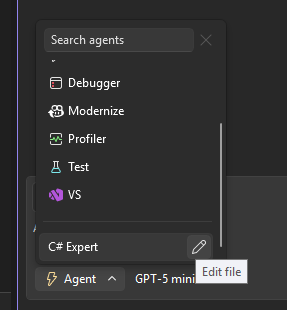
The headline feature of Visual Studio 2026 v18.4 is custom AI agents defined through .agent.md files. Think of it as giving GitHub Copilot a specialized brain for your specific project. You drop a Markdown file into your repository, describe what the agent should know — coding standards, architecture patterns, review checklists, deployment procedures — and Copilot transforms into a domain-aware assistant that follows your team’s rules.
This is a significant shift from the generic “autocomplete on steroids” model. Instead of Copilot guessing what you want based on general training data, your custom agent knows that your team uses a specific exception handling pattern, that your API endpoints follow a particular naming convention, or that database migrations require a specific approval workflow. The agent becomes a living, queryable version of your team’s institutional knowledge.
The implementation is deliberately simple. No plugin architecture, no configuration UI, no separate service to deploy. Just a .agent.md file committed alongside your code. When a new developer joins the team, they don’t just get the codebase — they get an AI assistant that already understands how the team works. That’s a meaningful reduction in onboarding friction.
Consider a practical scenario: your team maintains a microservices platform where every service must include health check endpoints, structured logging with correlation IDs, and circuit breaker patterns for external calls. Previously, these conventions lived in a Confluence page that nobody read after their first week. With .agent.md, you encode those rules once, and every Copilot suggestion automatically follows them. Pull request reviews catch fewer convention violations because the AI prevented them at authoring time.
Profiler Agent: AI-Driven Performance Analysis with .NET Counters
Performance profiling has always been one of those tasks that separates senior engineers from everyone else. You need to know which counters to watch, how to interpret the data, and where to look for bottlenecks. The new Profiler Agent in Visual Studio 2026 v18.4 attempts to democratize that expertise.
For ASP.NET applications, the Profiler Agent monitors .NET counters in real-time — request rates, memory allocation metrics, garbage collection pressure, thread pool saturation. But it doesn’t just show you numbers. It correlates the data, identifies anomalies, and suggests specific code changes. If your request rate drops while memory allocation spikes, the agent can point you to the exact allocation-heavy method causing the problem.
The debug-time performance tips are equally useful. While you’re stepping through code, the agent surfaces contextual performance insights: “This LINQ query materializes the entire collection — consider using IAsyncEnumerable” or “This lock contention pattern typically causes 15-30ms delays under load.” It’s like having a performance engineer looking over your shoulder, except it never gets tired and it’s read every .NET performance guide ever written.
The “Profile with Copilot” option in Test Explorer ties this all together. Run your test suite, get performance analysis, and receive AI-generated optimization suggestions — all without leaving the IDE.
C++ Compiler Gains: MSVC v14.51 Delivers Up to 6.5% with PGO
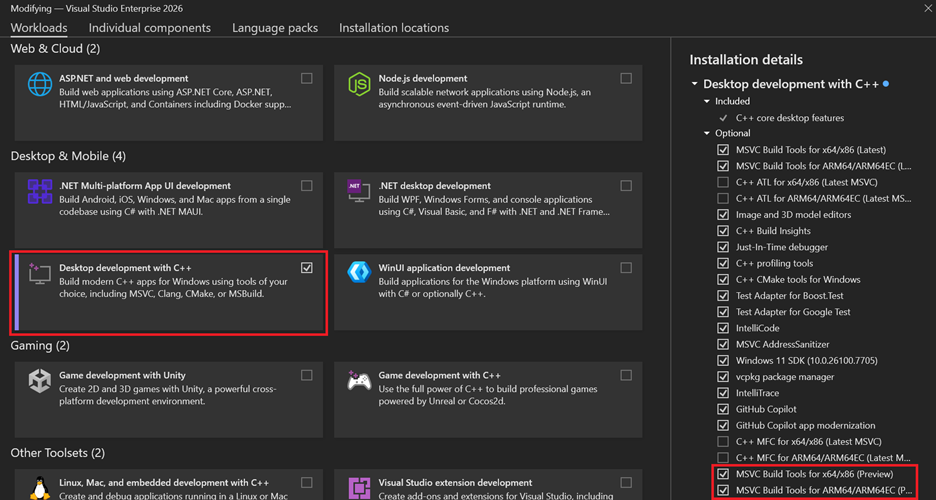
For C++ developers, compiler performance improvements are the gift that keeps giving. You don’t change a single line of code, recompile, and your application runs faster. The MSVC v14.51 compiler in this Visual Studio 2026 update delivers exactly that — up to 6.5% performance gains on Arm64 with Profile-Guided Optimization (PGO) and up to 5.0% on x64 PGO builds.
The improvements come from several optimizations working together. The SLP (Superword-Level Parallelism) vectorizer has been improved to find more opportunities for parallel execution. SROA (Scalar Replacement of Aggregates) now handles larger structs, breaking them into individual scalar operations that the CPU can process more efficiently. The loop vectorizer has gained hoisting capabilities, moving invariant computations out of hot loops. And new AVX intrinsics support means developers targeting modern hardware can squeeze out even more performance.
These aren’t theoretical benchmarks. A 6.5% improvement in a game engine’s physics simulation, a video encoding pipeline, or a real-time audio processing chain translates directly to better user experiences. For teams shipping performance-critical C++ code, this update alone justifies the upgrade.
What makes this particularly notable is the breadth of the optimization surface. The SLP vectorizer improvements mean that even code patterns that weren’t previously vectorized now benefit from SIMD execution. The SROA changes for larger structs address a long-standing limitation where aggregate types would bypass scalar optimizations. And the loop vectorizer hoisting eliminates redundant computations that developers often don’t notice in profiling because they’re spread across millions of iterations. Collectively, these changes represent months of compiler engineering work that benefits every C++ project compiled with MSVC.
Enterprise MCP Governance and the find_symbol Tool
Two features in this release target larger organizations. Enterprise MCP (Model Context Protocol) Governance introduces allowlist policies for MCP server access control. If your organization uses MCP servers to extend Copilot’s capabilities — connecting it to internal documentation, issue trackers, or deployment systems — you can now control which servers developers can access. This is table stakes for enterprise adoption, and it’s good to see Microsoft addressing it directly.
The find_symbol tool adds language-aware symbol navigation for C++, C#, Razor, and TypeScript. Unlike basic text search, find_symbol understands the semantic structure of your code. Searching for a class name won’t return string matches in comments or documentation — it finds the actual symbol definition and all its usages across the solution. For large codebases with thousands of files, this is a significant productivity improvement.
GitHub Copilot Enhancements: Agent Skills and Vulnerability Fixes
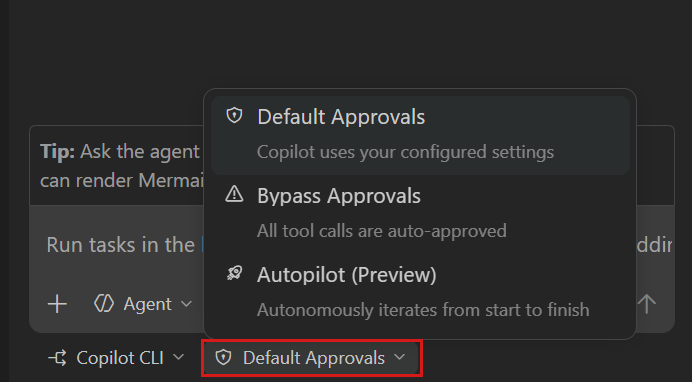
Beyond custom agents, GitHub Copilot in Visual Studio 2026 v18.4 gains several targeted improvements. Agent Skills support means Copilot can now execute multi-step workflows — not just suggest code, but actually perform sequences of actions like “create the interface, implement it in this class, add unit tests, and update the DI container registration.”
Smart Watch suggestions during debugging automatically recommend variables and expressions to add to your Watch window based on the current execution context. If you’re debugging a null reference exception, Copilot suggests watching the object’s initialization path. If you’re investigating a race condition, it suggests thread-related state variables. This eliminates the trial-and-error process of adding watches manually, which is especially valuable when debugging unfamiliar code or investigating issues in complex dependency chains.
The “Fix vulnerabilities with Copilot” feature integrates directly with NuGet package management. Right-click a vulnerable package in Solution Explorer, and Copilot analyzes the vulnerability, suggests an updated package version, evaluates breaking changes, and can even generate the code modifications needed to accommodate API changes in the newer version. Security remediation that used to take hours of research now happens in minutes.
This is particularly impactful for enterprise teams managing hundreds of NuGet dependencies across multiple solutions. The traditional workflow — scan for vulnerabilities, research each CVE, evaluate upgrade paths, test for regressions — could consume an entire sprint. With Copilot handling the analysis and code generation, the security team can focus on policy decisions rather than mechanical updates.
Quality of Life: JSON Editor, HTML Copy, and 5,000 Bug Fixes
The smaller features in this update are worth noting. The new JSON editor in the Core Editor brings first-class JSON editing with schema validation, formatting, and IntelliSense directly into VS — no more switching to VS Code for quick JSON edits. Rich HTML copy/cut support means you can copy code from Visual Studio and paste it into Office documents or Azure DevOps work items with syntax highlighting preserved.
And then there’s the sheer volume of fixes: over 5,000 bugs resolved and more than 300 feature requests addressed since the initial release. That kind of investment in stability and polish matters. An IDE can have all the AI features in the world, but if it crashes during a demo or freezes when you open a large solution, none of it matters. Microsoft clearly understands this, and the release notes reflect that priority.
What Visual Studio 2026 Means for Your Development Workflow
The Visual Studio 2026 March update represents a maturation of the “AI-native IDE” concept. The initial release proved that deep AI integration could work without destroying IDE performance. This update proves that AI integration can be customizable, governable, and genuinely useful beyond code completion.
Custom agents via .agent.md files are the standout. They transform Copilot from a general-purpose tool into a team-specific assistant, and the zero-infrastructure approach means adoption barriers are essentially zero. The Profiler Agent and C++ compiler gains address real performance needs. And the enterprise governance features signal that Microsoft is serious about making this viable for organizations with strict compliance requirements.
Whether you’re building ASP.NET services, shipping C++ applications, or managing a large enterprise codebase, this update has something concrete to offer. The era of the intelligent IDE isn’t coming — with Visual Studio 2026 v18.4, it’s already here, and it’s getting sharper with every release.
Building automation systems, CI/CD pipelines, or AI-powered developer tools? Let’s talk about how to make your workflow smarter.
Get weekly AI, music, and tech trends delivered to your inbox.