Logic Pro 12 AI Features: Synth Player, Chord ID & Session Players After 5 Weeks of Real Production
March 4, 2026
Spring 2026 Plugin Sales: 16 Best Deals on Synths and Effects (Up to 92% Off)
March 5, 2026
The era of the solo AI coding assistant just ended. On February 6, 2026, Anthropic shipped Claude Code agent teams alongside Opus 4.6 — and it fundamentally changed how developers interact with AI. One month later, the March stability updates are making it clear: multi-agent orchestration isn’t experimental anymore. It’s the new default.
From Hidden Feature to Official Release — The Story of Claude Code Agent Teams
It started on January 26, 2026. Developer kieranklaassen ran strings on the Claude Code binary (v2.1.29) and discovered something called “TeammateTool” — a fully implemented but feature-flagged multi-agent system hiding inside the CLI. Thirteen operations organized into four categories: team lifecycle, membership, coordination, and shutdown. Two gatekeeping functions — I9() and qFB() — both returned false, keeping it locked.
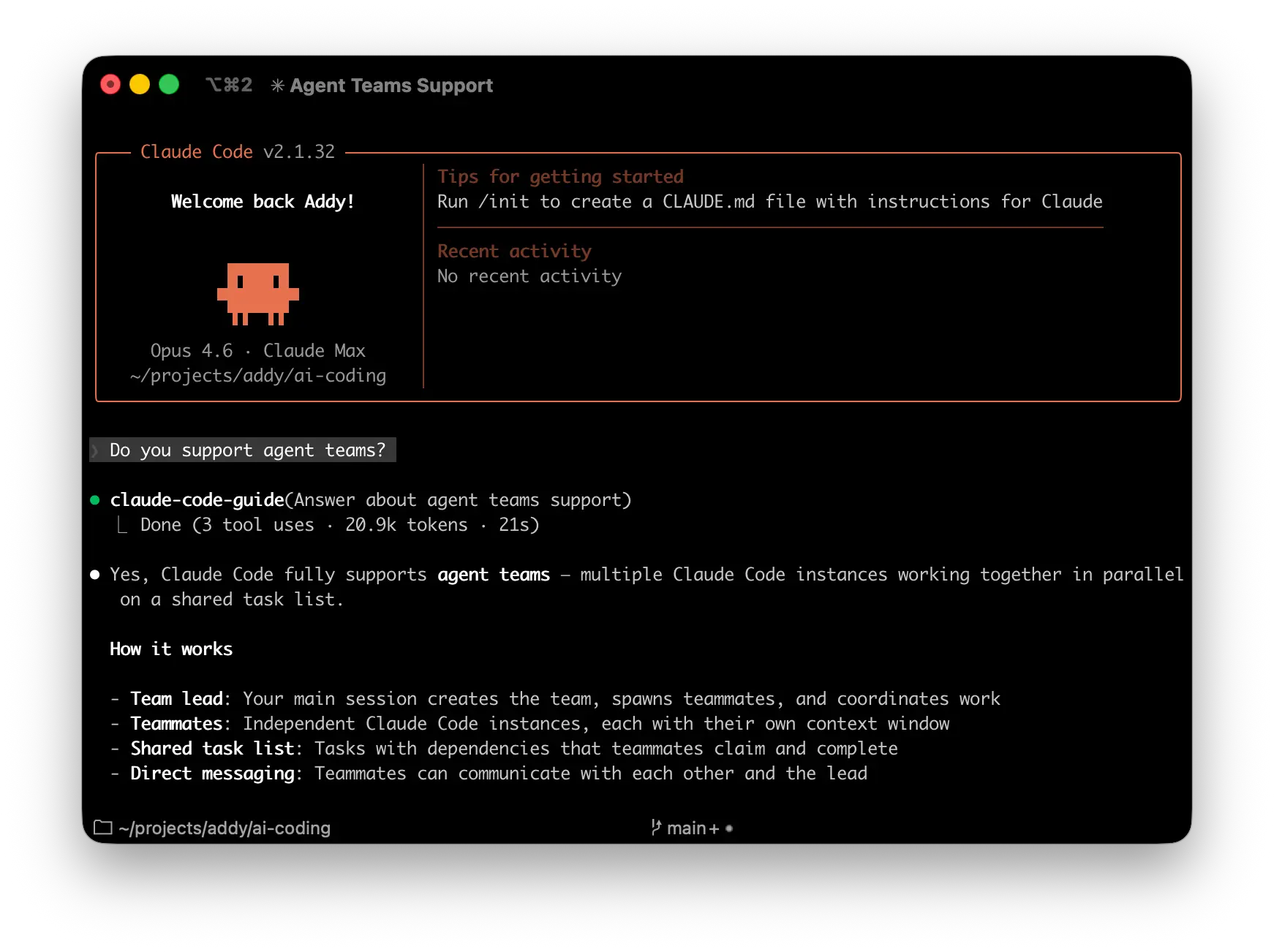
Two weeks later, Anthropic officially launched agent teams as a research preview with Opus 4.6. The feature requires Claude Code v2.1.32 or later and can be enabled with a single configuration flag.
How Claude Code Agent Teams Actually Work — Lead Agents, Teammates, and Independent Worktrees
The architecture is elegantly simple. One lead agent orchestrates the entire operation. Multiple teammate agents work independently, each in their own context window and Git worktree. The critical difference from subagents? Teammates can communicate directly with each other — not just report back to a parent.
TeammateTool’s 13 Operations
- Team lifecycle — spawn, discover, cleanup: Create and manage teammate instances
- Membership — request/approve/reject join: Control team composition dynamically
- Coordination — direct messaging, broadcasting, plan approval/rejection: Inter-agent communication and consensus
- Shutdown — graceful termination with approval workflows: Clean exits without losing work
Each teammate operates in an independent Git worktree, eliminating the risk of code overwrites. While a single agent typically consumes 80-90% of its context window before performance degrades, agent teams keep each teammate at roughly 40% utilization — enabling sharper reasoning within narrower domains.
Setup Guide — Enable Claude Code Agent Teams in 5 Minutes
Configuration is surprisingly straightforward. Add one line to your settings.json:
{
  "env": {
    "CLAUDE_CODE_EXPERIMENTAL_AGENT_TEAMS": "1"
  }
}
Once enabled, you define team composition in natural language. Tell Claude “Set up a team with frontend, backend, and testing specialists” and it handles spawning. No YAML configs, no manifest files — just describe what you need.
Display Modes
- In-process (default) — Works in any terminal. Use Shift+Up/Down to navigate between teammates
- Split-pane — tmux or iTerm2 shows all teammate output simultaneously (not supported in VS Code, Windows Terminal, or Ghostty)
March 2026 Updates — What Changed in v2.1.68 and v2.1.69
The first week of March brought critical stability improvements that address real-world pain points discovered during the initial month of adoption:
- Nested teammate spawning fix — Teammates could accidentally spawn additional teammates via the Agent tool’s
nameparameter. This runaway spawning issue is now resolved - Memory leak resolution — The parent’s full conversation history was being pinned for each teammate’s entire lifetime, causing significant memory consumption. Fixed in v2.1.69
- agent_id and agent_type hook fields — New fields in hook events enable proper subagent tracking, making team monitoring and logging much easier
- Opus 4.6 default medium effort — Max and Team subscribers now get Opus 4.6 at medium effort by default, with “ultrathink” keyword available for high effort
- –print hanging fix — The exit loop no longer waits indefinitely on long-running in-process teammate tasks
4 Scenarios Where Claude Code Agent Teams Shine
Not every task benefits from multi-agent orchestration. According to Addy Osmani’s comprehensive guide, these four scenarios deliver the strongest returns:
- Parallel code review — Deploy security, performance, and architecture reviewers simultaneously. Anthropic’s own multi-agent code review tool uses this exact pattern
- Competing debugging hypotheses — Multiple agents investigate different theories simultaneously, with adversarial validation to surface the correct root cause faster
- Cross-layer feature development — Frontend, backend, and test specialists work independently on different files, then merge their contributions
- Research-to-implementation pipelines — Parallel exploration of approaches before converging on the best implementation strategy
Pro tip: aim for 5-6 tasks per teammate. Fewer tasks reduce parallelism benefits; more tasks increase coordination overhead. Always establish clear file ownership boundaries to prevent merge conflicts.
The Realistic Limitations You Need to Know
Agent teams are still in research preview, and these constraints matter:
- One team per session — no nested teams allowed
- In-process teammates don’t survive session resumption
- Each teammate consumes a full context window — not economical for simple sequential work
- Teammate shutdown is slow, completing current operations before exiting
- Permissions propagate uniformly from the lead to all teammates
Token cost deserves careful consideration. For straightforward sequential tasks, a single agent remains more efficient. The key question before deploying teams: “Does parallel exploration add real value, and can teammates operate largely independently?”
Claude Code agent teams aren’t perfect yet, but the trajectory is unmistakable. The age of a single AI agent trying to handle everything alone is ending. Multi-agent specialization — where experts divide and conquer — is how agentic development scales. The March 2026 stability fixes prove this feature is moving from experiment to production tool faster than most expected.
Building AI automation systems or multi-agent pipelines? Get expert guidance from someone who’s been building with these tools since day one.